Saturday, December 21, 2013

Workaround for Infamous Bug 13626875

There is such issue logged on Metalink - inputListOfValues Field Not Updated When Selecting A Value Violating A Unique Key. (Doc ID 1402074.1). This is related to LOV functionality and validation. As per Oracle statement - LOV list must include only valid values, list should not return invalid values, this is by LOV design. However, this doesn't sound logical in most of the cases - often LOV may contain complete list of values and for specific attribute we need to enforce validation to accept only a subset of all values available in the list. Despite Oracle answer as such functionality is not possible b design, there is workaround to make it work.

Sample application contains required fix - LOVValidationApp.zip. This sample app is created with JDEV 12c, however same workaround can be applied for earlier JDEV versions. Firstly I'm going to describe, how it works without workaround - by default. Let's assume, we have Departments LOV defined for Department Id attribute:


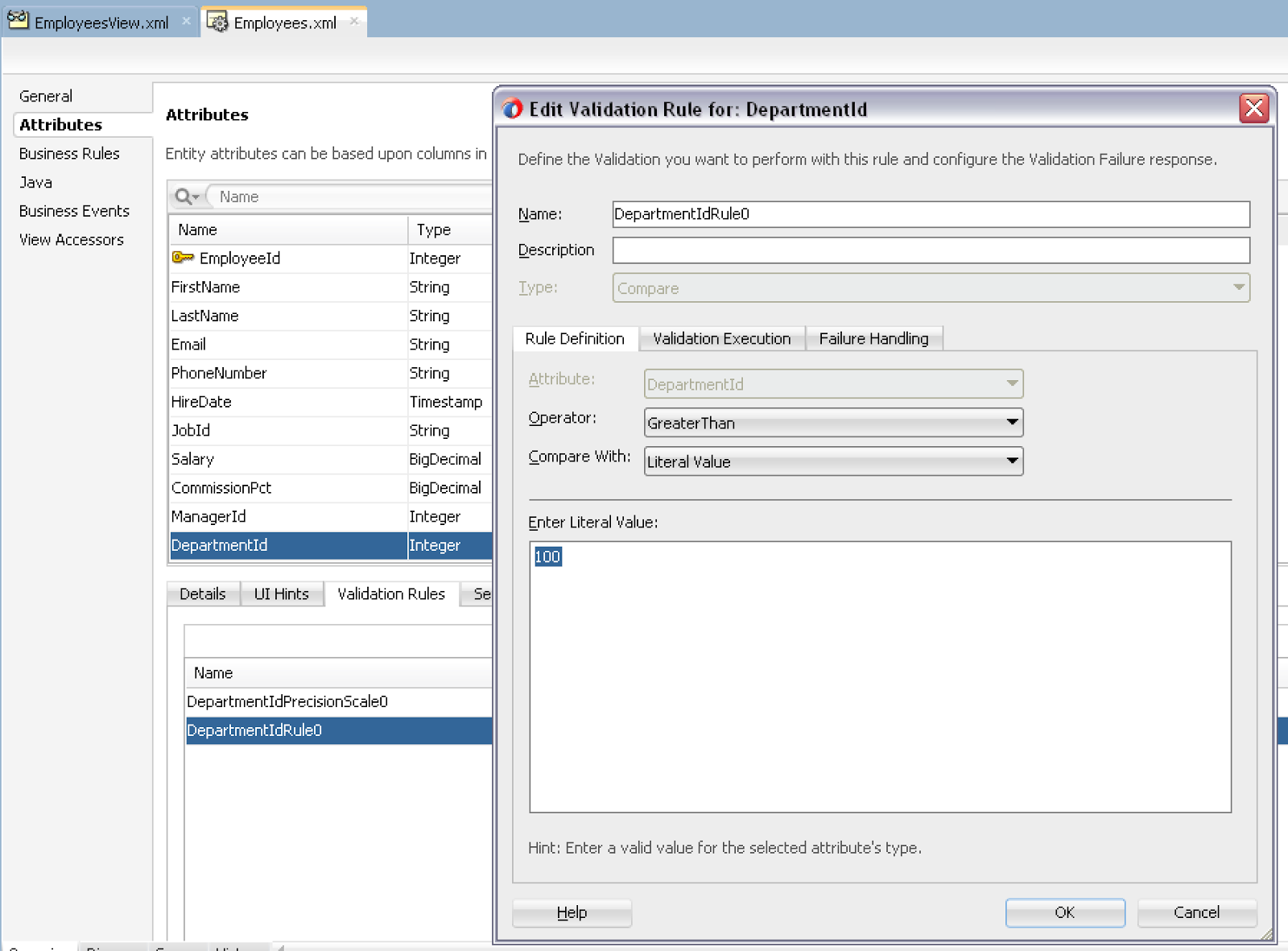
Department Id is assigned with validation rule - Department Id value must be greater than 100. This is to simulate issue related to LOV behaviour:


On runtime I'm going to pick Employee with currently set Department Id 140 and open LOV dialog. I'm going to select Department Id 30 from LOV dialog and try to set to the field:


What we would get, is not what we would expect. Selected value is not assigned, previous value still is displayed:


On the next click, moving focus or selecting other value - then suddenly change LOV value gets updated and validation error is displayed. This is fine, but this should happen one step earlier:


We need to speed up validation process by one step - immediately after value was selected. Workaround is to set ExceptionMode = Immediate for the Data Control Usage in DataBindings.cpx file:


With ExceptionMode = Immediate, somehow magically LOV value is changed instantly and validation error is displayed when it should. Repeating the same test as before - selecting value below 100 and returning it from LOV:


Value is changed and validation is displayed as expected:


So, if Oracle answer - 'not supported by design', didn't help, try to apply ExceptionMode = Immediate setting for Data Control Usage in DataBindings.cpx

Wednesday, December 18, 2013

Detail View Object Instance Programmatic Access

Usually it is quite obvious how to retrieve rowset from VO. It is still basic to retrieve rowset from detail VO, but there is something to keep in mind when accessing detail VO's - current row in master VO, current row must be set. Otherwise, there will be no detail rowset retrieved. I will demo and explain this case here.

Sample application is prepared as usual - MasterDetailAccessApp.zip. This application contains one Master VO and one Detail:


Here you can see example, where current row is not set for Master VO. In this case - there will be no rows returned for detail VO:


You would need to fix it, as for example by calling first() method. This will ensure first row is selected as current. As result - detail VO will be aware about current Master VO record and will be able to fetch proper value for bind variable to be included into SQL query:


Test from AM exposed interface:


Detail row is fetched and displayed:

Tuesday, December 17, 2013

How to Minimize Number of ADF BC Application Module Activations

As I have described in my previous post - you can track how long it takes to perform ADF BC activation in your system - Recording ADF BC View Object Instance Activation Time. Activation event can be potentially slow, as it involves re-quering and re-fetching of all active VO instances, initialized by current AM. In order to speed up ADF application runtime performance, we should tune it in a such way to avoid activation events as much as possible. Main goal of this post, is to prove with practical experiment, theory behind AM tuning for minimizing number activation events.

Firstly, you need to assign proper Referenced Pool Size value in AM properties configuration screen, to make sure it is equal to expected number of concurrent users. Don't forget to enable DB pooling - Stress Testing Oracle ADF BC Applications - Do Connection Pooling and TXN Disconnect Level, this will minimize open DB connections.

One of the key parts is to set longer time out value for inactive AM instance, you can set it to be equal to Web session timeout set in web.xml. This must be increased together with AM time to live setting to -1, as this will guarantee AM instance will be never removed forcefully. As AM time to live by default is 1 hour, ADF will remove AM instance, no matter for how long AM instance time out is set. This is based on recommendations posted by Duncan Mills - ADF Performance Presentation from UKOUG.

This is how sample application stresstest_v5.zip looks - there are two tabs, each using different AM. Navigation is involved, together with data update operation through ADF BC custom method - all this will tested by running JMeter stress load script:


JMeter script - ADFBC_Tuning.jmx, is created in a such way to simulate real user behaviour as much as possible. Script is starting 60 threads with 40 seconds delay, there are three breaks included - 3, 2 and 2 minutes. This allows to stretch stress test time and create more realistic load between requests:


AM from sample application is configured with 1 minute of Idle Instance Timeout and 1 minute of Pool Pooling Interval. By default these values are 10 minutes each, but I set both to be 1 minute, to fit it into JMeter script better - where breaks are by 3 and 2 minutes. There should be enough time for inactivity period, to mark AM instance as inactive and remove it. We are going to see how short inactivity time affects number of AM activations and runtime performance at the end. Updated settings for AM instance Idle Instance Timeout and Pool Pooling Interval. Of course, DB pooling is enabled as well, as per above recommendations:


Referenced Pool Size is set to 70, there should be enough available instances to handle 60 threads started from JMeter. Let's see how it works in practice.

Based on EM output - we can see that activations are happening for AM 1:


Similar picture for Activations is for AM 2:


This doesn't look logical at first, but really it is. Simply, when there is no activity - but user session is still active, inactive AM's are removed fast. When user is resuming his work - new AM instances are created again, this is when activation happens.

In order to avoid such effect, we need to increase Idle Instance Timeout, in this example I'm setting it to 3 hours (I would say this should be equal to web session timeout configured in web.xml):


Make sure to set AM time to live to be -1, otherwise AM instance will be forcefully removed after default 1 hour:


With these settings, we are getting much better results. For Referenced Pool Size = 70 and 60 concurrent JMeter threads, there are no activation events logged over longer time, there are no new AM instances, all active AM instances are reused:


The same is true for the second AM - no activation events are logged:


I can increase JMeter concurrent threads to 80, this will be higher than configured Referenced Pool Size = 70:


Naturally, this results in activation events - as Referenced Pool Size is too small to handle 80 concurrent threads in this situation - this is expected:


One final test - we need to verify if setting AM time to live to be -1 is really necessary. I'm going to set AM time to live to be 4 minutes, meaning after 4 minutes AM instance will be removed, no matter it is active or idle:


As it was presumed - we are starting to see AM activation events. This means it is not enough just to increase AM instance Idle Instance Timeout, but is really important to set AM instance Time to Live setting to be -1, or at least increase it to be longer than Idle Instance Timeout:


The same is for the second AM:


Summary - if you want to minimize number of AM activations in the system, make sure to set at least  these three settings described in this post:

1. Enable DB pooling
2. Increase AM instance Idle Instance Timeout
3. Increase or set to -1, AM instance Time to Live 

Thursday, December 12, 2013

Recording ADF BC View Object Instance Activation Time

Probably you already now - if there are too many Passivation/Activation events happening in the system, this may slow down your ADF application significantly. There are ways how to minimize number of Passivation/Activation occurrences by tuning Application Module settings. This post is about how to track actual time that takes to activate View Object instances - SQL execution and data fetch times during activation.

We need to use several overridden methods from ADF BC API, to track each View Object instance activation time. We are interested in View Object instance activation time, as this is where actual SQL execution and data fetch happens during activation - most of the time during activation is consumed here. Activation happens in following order:

1. Application Module instance is activated
2. View Object instance executes SQL statement
3. View Object instance fetches records from DB
4. Next View Object instance executes SQL statement
5. Next View Object instance fetches records from DB

As you can see, Application Module finishes activation before View Object instances are starting activation. This is the reason, we need to override several methods from ADF BC, to properly track activation time for each View Object.

Sample application - stresstest_v4.zip is using similar concepts as implemented in our ADF performance audit tool - Major Release for Red Samurai Performance Audit Tool v 2.0. Generic Application Module Implementation class overrides activateState method, we are using it to set activation event identifier, remember - Application Module is activated before View Objects. We are able to group later all View Objects activated during the same activation event by this identifier - stored temporary in ADF BC memory scope of user data:


Activation start time for each View Object instance is recorded in prepareForActivation method. End time is logged in activateCurrentRow method - this method is invoked after SQL query execution and data fetch, it makes it perfect place to log end time per individual View Object instance:


Application Module Pooling for sample application is disabled - this allows to test how activation time is logged:


This sample application UI - Jobs and Departments View Objects are exposed, both of them should participate in activation events:


Here we can see the log - activation events for Jobs and Departments are started right before Application Module activation ends. Jobs View Object activation ends after Jobs SQL query was executed and data was fetched, activation for this View Object is completed in 16 milliseconds:


Departments View Object is activated next - SQL query is executed, along with data fetching in 47 seconds. Keep in mind - last View Object activation time always will be the longest - as all View Objects instances are prepared for activation before the first View Object instance was activated. Activation process is sequential, each View Object instance one by one. Last View Object instance activation time will show total activation time for all View Objects:

Sunday, December 8, 2013

ADF Development Survival Kit - Essentials for ADF Developer

This post is about our second session on UKOUG Tech13 conference. We were presenting and describing essential tools for successful ADF development. These tools are not available from Oracle, but can be implemented by yourself. I'm going to give a walk through for our session in this post.


1. Red Samurai Performance Audit

We believe monitoring of ADF BC and interaction with DB is the key for ADF application performance tuning. This is why we focus primarily on ADF BC and offer statistical information not available through Oracle Enterprise Manager and DMS servlet out of the box.

We offer this ADF performance audit tool for our customers only, there is no direct download. However, you can send me email with your request - you should describe ADF performance problem you want to fix, I will evaluate it and send install files to you.

Here you can see main dashboard for performance audit, displaying overall system performance - all transactions, logged users, query distribution per AM, number of users vs. number of activations:


Every Application Module performance is displayed using ADF dial gauge component:


We log following statistic for slow ADF performance:


Even more:


Overall performance overview:


This is how our audit is implemented (you can see more details in slides). Our ADF BC generic classes are injected into ADF application, statistical information is written to DB through separate thread. There is separate ADF application implemented as dashboard to review logged statistics:


2. PL/SQL code reuse

We were presenting custom made JDeveloper extension to call PL/SQL logic through declarative way, avoiding writing Java logic over and over again:


If you are interested in demo application and see how it works, let me know by email:


3. Semi-Automated Business Logic Reuse for Forms modernisation

Semi-Automated process was presented based on generic DB Validator to simplify PL/SQL or Web Service logic reuse in ADF applications. Here you can see diagram, send me email if you are interested in more details:


4. OJAudit extension for JDeveloper

Finally, we were presenting our extension for JDeveloper, implementing a set of custom OJAudit rules. We are going to merge it with ADF EMG OJAudit extension available for public download.

Tuesday, December 3, 2013

ADF Anti-Patterns: Dangerous Tutorials - Real Experience in ADF

Florin and me were presenting two sessions on UKOUG - UKOUG Tech13 - Red Samurai Real ADF Experience Sessions. There was quite a lot of content described and demoed, this is why I decided to split it into two different posts. This post will be about ADF Anti-Patterns: Dangerous Tutorials. The main idea behind this session was to describe most common misunderstanding hidden by typical ADF tutorials available on the Web.


We have prepared special app for this session, separating each use case into different module. You can download complete sample application - DangerousApp.zip.

Here is the picture of us presenting:


You can check uploaded slides for more details, below I will describe in addition every point presented. All the code listed is part of sample application, you can download it and check directly.

1. Batches Of and Slow Query

I believe you had experienced such situation, when SQL query was executed fast in SQL Developer, but slow in ADF. You should remember - ADF is executed from the server and there is additional roundtrip to bring data from DB. Also it depends how many rows are fetched in result set from DB to the server. By default, Batches Of property is set to 1:


We recommend to increase it for better performance and communication between WebLogic server and DB - this would allow to bring more rows in less roundtrips. There is a way to do this task in generic way, programatically - check the source code of sample application:


If you want to track time taken to execute VO, you could do this from the same executeQueryForCollection method - simply get start, end times and log:


2. Large Fetch

You can monitor row fetches performed in ADF with standard ADF BC method - createInstanceFromResultSet:


We would recommend to disable full table scroll by setting RowCountThreshold property for iterator in Page Definition to -1. Read more about this here: How To Disable SELECT COUNT Execution for ADF Table Rendering:


Make sure -1 is not set for LOV ListRangeSize property, otherwise it will be fetching all rows from DB, when LOV popup will be opened. Read more about it here: Fix Rowset is Forward Only Error for ADF BC LOV Range Paging (11.1.2.1.0):


3. Groovy Misuse

Keep in mind - when using Groovy function, it calls basic SQL statement, fetches records into memory and performs intended function. This would mean, it could fetch lots of rows into memory and only later produce requested result. Instead, you should consider using optimised SQL query directly for better performance, without using Groovy function.

Here is Groovy sum function example:


From the log you could see basic SQL statement executed and all rows fetched (2 rows in this example, it will be much more in real life scenario):


Another possible slow performance case with Groovy - calling Java method from Groovy attribute value expression. Especially if this Java method in turn is calling VO to fetch data from DB. The problem is related to numerous invocation of the same method by Groovy expression defined for attribute value. Here is example of such Groovy expression calling Java method from attribute value:


Java method is basically calling VO and executing it:


From the log we can see - VO was invoked and SQL executed at least two times in this example:


4. Passivation/Activation

When rendering ADF table, by default two requests are made. Between these requests, passivation/activation may happen and this going to slow down application performance. We could minimise this up to one request by setting ContentDelivery=immediate for ADF table, to prevent unnecessary passivation/activation. You can read more about it in this post: Immediate Effect for ADF Table Content Delivery:


ORDER BY and large fetch related issue was described in addition, it is document in this post: Reproducing WebLogic Stuck Threads with ADF CreateInsert Operation and ORDER BY Clause

5. ADF Query Misuse

Make sure not mix-up Bind Variables in VO, while using them from View Criteria. In this case I demo wrong scenario - Bind Variable is defined as Required, Where type:


This Bind Variable is used later from View Criteria. For Required, Where type Bind Variables, JDeveloper allows to choose Ignore Null Values option. Eventually this will break DB index usage, as IS NULL will be applied for the column: