Tuesday, May 15, 2012

Missing New Feature in JDev (11.1.2.2.0) - ADF Methods Security

New features are always good to have in JDeveloper - but missing new features, this is something really new :-) It looks like documentation is released faster than actual functionality. If you read What's New in This Guide in Release 11.1.2.2.0 document, it provides new documentation section about how to setup security for ADF Methods (see Chapter 35). There are nice step by step instructions available in Chapter 35, how to enable security for ADF Methods. This guide says you need to have command component to execute ADF Method, also ADF Security must be enabled. Finally documentation says - "The Resource Grants page of the overview editor displays all methods that your application defines.". Well, may be I'm missing some magic check-box, but methods are not listed in the overview editor. I will be really happy, if its just me - and there is hidden check-box that enables this functionality.

Download test case application - ADFMethodSecurity.zip.

Documentation steps are pretty straightforward - see highlighted stament, it says methods will be shown automatically:


I have defined custom method inside AM implementation:


Custom ADF Method is exposed in Data Control:


Its all good for Web page - it is visible is security overview:


But not so good for ADF Method - its not visible (even Source Project selection is disabled), as supposed to be per documentation:


This is really powerful and required feature, sadly its missing - I hope it will be available with next release of JDev.

Sunday, May 13, 2012

View Link Accessor Usage Performance Side Effect

View Link Accessor is available when there is View Link defined and typically is used in ADF to retrieve detail collection from master row in VO row implementation class. Officially this is recommended approach to retrieve detail collections programmatically. However, not everything what is recommended is always good from performance point of view. Its always good to question recommended best practices and compare with other possible solutions to achieve better performance. However, when focusing on performance - don't forget to keep your solution still maintainable and don't over complicate things.

In this post I will show you there is one additional SQL select executed, when using View Link accessor - looks like data is not retrieved from the cache by default, even if detail rowset is loaded already. Alternative solution with better performance will be presented as well - directly using detail VO instance from AM data model. Download sample application - ViewLinkAccessorApp.zip.

This sample implements test case for both approaches - detail collection retrieval from View Link Accessor and from VO instance declared in AM. As you see in the screenshot, there is Master record loaded and related detail rows are available. This means no additional SQL should be executed, when accessing detail rowset:


First I test to get detail collection from VO instance declared in AM - there is no SQL executed as expected:


Now I use standard View Link Accessor approach - it executes new SQL statement to get detail rowset which already exists in the cache. It executes this additional SQL once, on the second View Link Accessor call it keeps data in the cache - but why it executes new SQL statement, it could retrieve same detail collection from VO cache in first place:


Here we have source code for both methods. First one is using View Link Accessor and executes SQL statement, regardless if there is detail collection already loaded. Second is using detail VO instance from AM data model and always gets data from existing cache:


Optimized method instead of using View Link Accessor, is calling detail VO instance from AM data model directly - means it gets same data collection as displayed on the UI:


Saturday, May 12, 2012

Refreshing Single Row Without Full Rollback

With ADF Rollback operation - ADF is reloading entire dataset from DB. It invokes ROLLBACK from database and then executes View Object to return latest data from DB for all rows. This works well when we want to undo multiple changes at once. It may happen to encounter such use case, where we need to undo changes per row, not per set of rows. This is possible in ADF as well - using refresh(...) method for ADF BC Row. But keep in mind, while this method refreshes selected row - it never cleans up ADF BC transaction, it will remain dirty. This is logical - ADF BC doesn't know, if there are other changed rows. This means - you should provide to the user both buttons:

1. Undo - will rollback changes for all rows and mark transaction clean (standard Rollback operation)
2. Undo Row - will refresh only selected row and keep transaction dirty (Described in this post)

In this post I will describe how to refresh selected row, download sample application - RowHighlight_v2.zip. This application is extended version of my previous sample from this post - Changed Row Highlighting in Oracle ADF Table.

We will see first, how ADF BC performs when executing standard Rollback operation. There are three rows changed, row selection is on last row:


Press Undo to invoke Rollback operation, when operation is completed - changes are cleared from all rows as expected, but there is side effect - row selection is lost and reset to point to the first row:


If we check in the log, there is plain SQL statement executed for entire data collection - without bind variable restriction, this re-executes View Object:


Will demo now, how single row refresh works. User needs to select row, where changes should be cleared:


Press Undo Row button - changes for the selected row will be cleared, without affecting existing changes for other rows. Its very important - row selection will stay on the same row as it was before invoking Undo Row operation:


Now we can see different picture in the log - ADF BC executes SQL restricted by bind variable and fetches only data for specific row we are refreshing. This will perform much better comparing to standard Rollback operation:


Single row refresh is implemented as custom method inside View Object implementation class. For current row we are calling refresh operation with REFRESH_UNDO_CHANGES and REFRESH_WITH_DB_FORGET_CHANGES arguments - this will force to reload current row cache:


This method is exposed through View Object client interface and is accesible from Data Control:


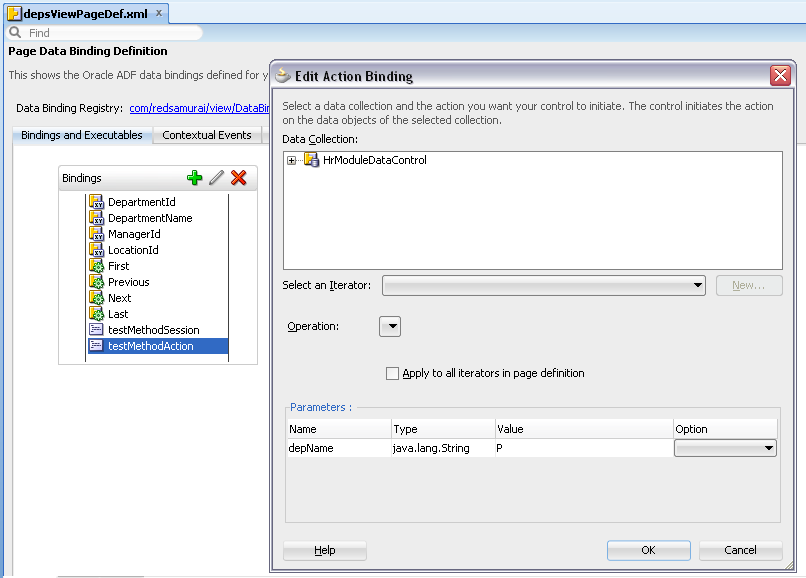
Method is declared in Page Definition:


Is invoked from Managed Bean action method:


Sunday, May 6, 2012

How to Update Data from DB View using ADF BC DoDML Method

When working with complex use cases, very often we need to bring aggregated data from DB View. ADF BC Entity Object can be based directly on DB View - it works for data read access. Update operation will fail, because we can't update data through DB View, we can only read. This means, there should be another Entity Object available with direct connection to the DB table. I will describe example where data is populated from DB View through ADF BC EO and updated through another EO connected directly to the table:


Download sample application - UpdateDBViewEO.zip. This sample is based on DB View available in HR schema - EMP_DETAILS_VIEW. Make sure this DB View is compiled:


We can easily generate ADF BC Entity Object on top of DB View:


Data is retrieved without issues. However, when we change data and try to submit changes - expected DB View error is generated:


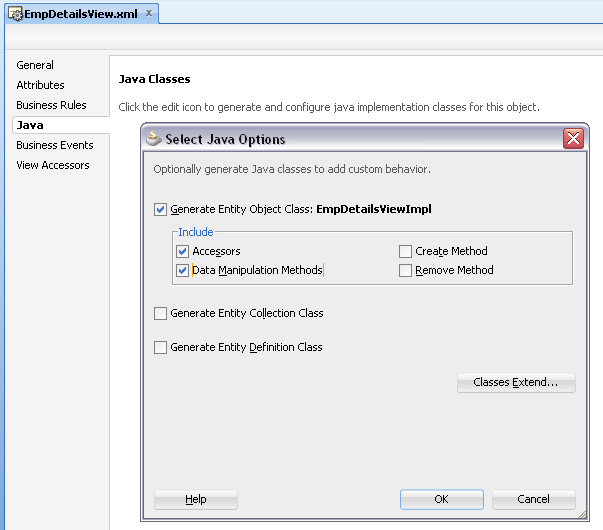
In order to prevent this error, we need to disable EO based on DB View from data update - it should not submit data to DB and try to update DB View. Generate Java Implementation class for EO based on DB View - include accessors and data manipulation methods:


Comment out call to super inside doDML(...) and lock() methods - this will prevent this EO from posting data to DB:


Why we use EO at all? This is because EO always represents single row - doDML(...) method is invoked for every row with changes. This means we can track all changed rows and update EO based on DB table accordingly:


There is only one attribute editable on UI - Salary. In doDML(...) I have implemented a check to verify if Salary was changed - through getPostedAttribute(...) method. However, getPostedAttribute(...) method is a bit useless in this context - it returns just previous value (not the one from DB). So, if user is changing same attribute two times - second time getPostedAttribute(...) will return value from the first change. Inside doDML(...), we are getting instance of VO based on editable EO - searching for specific record by key and finally setting changed attribute value. Changes for editable EO will be posted automatically, during transaction commit phase.

When transaction is completed, we must refresh data coming from DB View - execute VO to clear EO cache:


If we change one row on runtime, there will be following SQL executed during transaction commit phase:

1. Find By Key SQL to retrieve row to update from updatable VO:


2. Executing lock for record to be updated and executing update statement itself:


Data is retrieved from DB View and updated directly through editable VO/EO:


Thursday, May 3, 2012

Bad Practice for Session Scope Access in ADF BC

Few months back I had a blog post which started discussion in ADF community - if its good or bad practice to access Session Scope in ADF BC - How to Access Session Scope in ADF BC. In this blog post I was describing ADF public API method which gives access to the Session Scope object in ADF BC. Is it good or bad practice? Well - there always must be common sense, when thinking about architecture. I believe its Ok to access Session Scope object in ADF BC in exceptional cases, but this should not become a rule. If to be more precise - you can access Session Scope in ADF BC, if this will not violate MVC pattern (if you still will be able to run ADF BC separately, without ADF UI present). For example, you need to access current Web client IP info, etc.

In this post I would like to show one of many scenarios, when you should avoid accessing Session Scope in ADF BC - SecurityFormLogin_v4.zip.

Application Module Implementation class contains two methods:


First method gets parameter from Session Scope. Second method gets parameter from function argument. Both methods execute View Criteria and initialize Bind Variable value from input value.

Second method is not accessing Session Scope, but rather gets input value from function argument:


Both methods are exposed through Application Module interface:


In Login bean, Session Scope variable - "depName" is initialized with value "A". This value will be accessed from first AM method:


Second method gets parameter declaratively, through ADF bindings - because it accepts function argument:


From ADF UI both methods work great - results returned are correct:


Both methods initialize Bind Variable, search is executed:


If you try to test first method from ADF BC tester - you can't. MVC pattern is violated, you can't set input argument value - Bind Variable will not be initialized:


Be very careful, when you are accessing Session Scope directly in ADF BC. While it works, it always will be quick and dirty type solution - you may pay expensive price for it in the future.

Wednesday, April 25, 2012

Bug in ADF 11g R2 View Criteria Bind Variable Timestamp Type Configuration

I was blogging last year about new type configuration in ADF 11g R2 and issue with BigDecimal - ADF BC 11g R2 - Java Extended For Oracle Data Type Map. There is another bug related to Java Extended For Oracle Data Type Map - reproduced with Bind Variable defined from View Criteria for Timestamp type (JDeveloper 11g R2 generates different Timestamp in EO and for Bind Variable in VO).

Download fixed sample application - SearchDateApp.zip. This sample contains View Criteria with Date field (based on Timestamp type generated in EO). View Criteria renders out of the box ADF Query:


You can search by Date:


After the first search, click on calendar icon again. You will get error: java.lang.IllegalArgumentException: Cannot convert date of type java.sql.Timestamp to class oracle.jbo.domain.Timestamp:


Let's understand why this error happens - it can be very frustrating to developers and disappointing as well. Stay cool, try to debug it - compare generated Timestamp type in EO and VO Bind Variable.

Open EO and select HireDate attribute:


Open source XML and check generated type for HireDate. You will see that JDeveloper generates automatically oracle.jbo.domain.Timestamp:


Check what type was auto-generated for Bind Variable in VO (should be also Timestamp):


Open source XML - you will see java.sql.Timestamp was generated for Bind Variable:


There is no way to change this through the wizard, only possible through source XML view. This is what we call - JDeveloper magic, powered by artificial intelligence :) Obviously on runtime we get error, because generated types doesn't match.

Set Bind Variable to match type auto-generated in EO for date attribute - oracle.jbo.domain.Timestamp:


After this change, ADF Query will work without issues (at least related to described problem).

Saturday, April 21, 2012

How to Search in Range with Single ADF Query Field

ADF Query supports out of the box between search operator. This operator is applied for single VO attribute, ADF renders two field (from and to) on UI to enter search range. We may have different use case - to display on UI only one query field and in the background to search by two different attributes (minimum and maximum range value). I will describe how to implement such use case, sample application is available for download as usual.

Here is use case for sample application, you can download - SearchInRangeApp.zip:


Jobs table contains two attributes - Minimum and Maximum Salary. We would like to provide to the user only one field - Salary. User will type value, execute search and get results where entered Salary value is in between Minimum and Maximum Salary.

ADF UI looks like this - Salary field from ADF Query and results table with both Minimum and Maximum salary values:


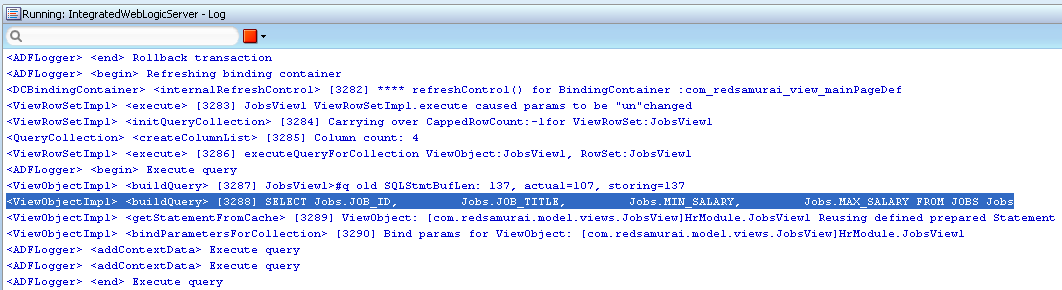
When ADF Query is executed, it generates query for both MIN_SALARY and MAX_SALARY:


How to achieve this? There is a trick you can apply for View Criteria definition. View Criteria contains both - MinSalary and MaxSalary attributes. Pay attention - both attributes point to the same Bind Variable, this is needed because we pass only one single value from ADF Query for both attributes:


Both attributes are included into View Criteria, but we need to display only one - set second attribute (MaxSalary for example) to be Never rendered:


MinSalary attribute label is renamed to Salary - to show it in ADF Query. We need to display MinSalary label in results table, for this purpose - duplicate attribute MinSalaryResults with label Minimum Salary is defined:


Of course you could use same attribute MinSalary in both ADF Query and for results table - however, then would need to define label for MinSalary appearing in results table inside ViewController. I prefer to keep ADF BC elements labels inside Model project.