ADF Faces provides long list of rich UI components. One of them shuttle component, it allows to create shuttle type multi-selection lists out of the box. We were looking how to access shuttled items programmatically, didn't found any proper info on the Web - decided to contribute to community with one more hint. If you will read ADF Faces developer guide, there is a suggestion to use ADFShuttleUtils Java Script object in order to access shuttle items. This means you would need to implement af:clientListener for Java Script invocation and so on, but I'm not a big fan of using Java Script for such scenarios. Let's find easier and better solution.
Download sample application - ShuttleAccessApp.zip. This simple application implements ADF Select Many Shuttle and provides managed bean methods to operate this component:

You only need to specify Base and Display attributes, then ADF Select Many Shuttle is defined:

List binding - DepartmentsView1, will be defined inside Page Definition file - we will use this binding to access shuttled elements from managed bean:

Here is the most interesting part, instead of using Java Script API, you can simply get the list binding inside managed bean and iterate through shuttled items:

It could be common requirement to clean shuttled items with external button, we can achieve this by clearing selected indices:

Shuttle some items and press Process Selection button:

We access shuttled items from managed bean:

Press Clear Selection button to remove shuttled element, this will clean shuttle programmatically:

Download sample application - ShuttleAccessApp.zip. This simple application implements ADF Select Many Shuttle and provides managed bean methods to operate this component:

You only need to specify Base and Display attributes, then ADF Select Many Shuttle is defined:

List binding - DepartmentsView1, will be defined inside Page Definition file - we will use this binding to access shuttled elements from managed bean:

Here is the most interesting part, instead of using Java Script API, you can simply get the list binding inside managed bean and iterate through shuttled items:
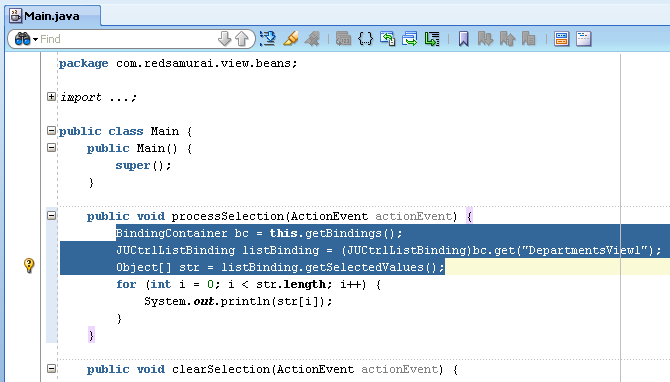
It could be common requirement to clean shuttled items with external button, we can achieve this by clearing selected indices:

Shuttle some items and press Process Selection button:

We access shuttled items from managed bean:

Press Clear Selection button to remove shuttled element, this will clean shuttle programmatically:


17 comments:
Hi,
I'm new in ADF.
I Created a new components programatically and now i want make these components selectable to delete a specific one.
any help plz
ps: sorry for my bad english.
Khayem
Hi
Thank u for a wonderful post. i am using the vo based on an EO and i want to save the selected one in database...i tried doing it from AMImpl but it is not working can u suggest me something to achieve this.
Hi, i'm new to ADF 11G, my problem is that i have a table with two columns for example: Acces (it has some data) and another is Denied with data too, i want to put a af:SelectedManyShuttle component, binding the table getting leading list with data Acces column and trailing list with data Denied column, how could i do that?, can you help me pls?, sorry for my english. regards
Dario
You can use sample app from this post, it should cover your use case.
Andrejus
Hi,
is it possible to initialize the component, with the previously added items selected ?
eg: these are the items (A,B,C,D,E,F)
first time user selects :(E,F)
when second time the form opens up it shows (E,F) as selected,again user adds (A,B)
the third time it shows (E,F,A,B) as selected ...and so on
Thank you
Yes, you will need to store selected values in database and then every time before rendering Shuttle, make sure to use setSelected(key) to prepare selected values.
Andrejus
Thanks for your post but I still need help.
I have a selectManyShuttle which is getting value programatically.
Steps:
1: Selected few values from available.
2: Created one more value and added into available list (It happens in a popup).
3: After I close the popup, newly created value is added into available items but selected items are getting disappeared.
4: Here I want to keep the selected values as selected even after adding a new item.
Any idea how can I do it?
If its more complex requirement, you may implement as two regular tables.
Andrejus
Hi Andrejus ,
Can we keep the selected values as selected after the refresh of selectManyShuttle. This refresh will add one more value in available values.
Hi,
Can we use a tree component in he shuttle component.
My requirement is to show the item from left pane to move to right pane under a certain value, something like a tree.
eg
Ship From Ship To
========= =======
Shpdvc pack1 shpdvc rac1
--item1 --item2
Shpdvcpack2 shpdvc rac2
--item3 --item5
--item4
now if I move item4 from shpdvc pack2 to shpdvc rac2, then it will look like :
Ship from Ship to
========= =======
Shpdvc pack1 shpdvc rac1
--item1 --item2
Shpdvcpack2 shpdvc rac2
--item3 --item5
--item4
Any Pointers?
Thanks
Sumit Yadav
Hi Andrejus,
I have a use case to ask and hopefully you can find time to lead me in the right direction.
In this particular blog you are retrieving the value of the component binded like the one below.
af:selectManyShuttle value="#{bindings.DepartmentsView1.inputValue}"
id="sms1" partialTriggers="ctb2">
f:selectItems value="#{bindings.DepartmentsView1.items}" id="si1"/>
Now, I am finding it hard to find a document on how to set the value of a particular LOV components(e.g Selectonechoice,shuttle..et. al)
from my backing bean.
Is there any utility class to do such as the code below that when executed would set the value of my LOV components?
JSFUtil.setExpressionValue("#{bindings.DepartmentsView1.inputValue}", ?);
A sample use case is that, what if you need to set a particular value to an LOV component from your backing bean. Your LOV component is binded
with listbinding. Then how do you accomplish this?
I am a big fan of your post and everyday at work I always see to it to check if you have a new post so keep on blogging please.
Thanks
Greetings,
first of all thanks a lot for this nice article, I use your way and it works fine, the difrrence between my case and your case I have a select one choise list that filter the shuttle through auto submit and value change listener , again every thing works will except when I deselect all selected Items I got the following NullPointerException with description :
ADF_FACES-60098:Faces lifecycle receives unhandled exceptions in phase PROCESS_VALIDATIONS 3
ADF_FACES-60096:Server Exception during PPR, #1
please advice if you can.
Thanks
Mohammad Alkhateeb
Hi Andrejus
I want to shuttle my columns in user interface. The shuttle look like attribute shuttle provided by jdev to shuttle columns
please guide me how to do it
Hi Andrejus,
I have an select order shuttle and delete button
If I select some rows in shuttle then click the delete button.
These rows will be deleted database and shuttle also
Please help me how to do it
Hi,
I have a task flow , and there are 3 pages .. i have 2 selectMany controls and i want to access the selections from the third page , i dont want the user to click any buttons apart from making the selections and clicking the next button to go to navigate to the next page.
Thanks
Tom
Hi Andrejus,
How do we get both the base and display attribute value in the bean.
I have a use case in which i have to display both base and display attributes.
Thanks,
Rohit
Hi Andrejus ,
We tried implementing the same but we are facing issue on page load where pre- populated selected values are not visible.
We tried printing the list in managed bean same list is printed properly der.
Regards,
Arpit
Post a Comment