This post is about reusable ADF region and its usage from ADF Dialog Framework. If we have ADF Task Flow with fragments and want to use Dialog Framework, we need to create intermediate ADF Task Flow with pages and include our reusable region there - this will allow to load ADF Dialog from the fragment (dialog is always running in ADF page). I will describe in this post how to pass data from/to ADF region included into ADF Dialog to the calling fragment.
There is main ADF Task Flow in the sample - empls-flow (download sample application ReusableDialogRegionApp.zip):

This task flow is configured to call intermediate ADF Task Flow with wrapper page. We are passing and getting parameters to/from the dialog:

Dialog is opened from the button in the main employees fragment:

Button is configured to open dialog:

There is dialog listener defined for this button, it receives return value. Alternatively we can get return value from the dialog return parameter directly:

Intermediate ADF task flow (which actually implements ADF dialog), contains a page and return activity. This page is only a wrapper, it includes reusable ADF region:

Intermediate ADF task flow with wrapper page defines input and output parameters:

Wrapper page contains Close button, this button sets return value, it retrieves return value from the bindings. Because Data Control is shared between reusable ADF region and intermediate ADF task flow with wrapper page, we can access bindings from ADF region and return it from the wrapper page. You can see that this page includes our reusable ADF region:

Here is binding definition for the attribute in the page definition for wrapper page:

And the last bit - ADF reusable region, JSF fragment view:
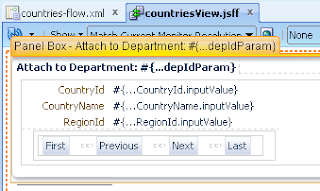
Bindings for ADF reusable region, you can see where CountryId attribute value is set. We are getting the same value in dialog wrapper page through shared Data Control:

I should mention one important thing - intermediate ADF dialog task flow is configured to run in isolated scope. This is important and allows to reset reusable ADF region in the dialog always to its initial state on opening:

Countries region is loaded and DepartmentId value is passed into:

Selected value is returned back:

The same reusable region is opened from another fragment - region state is reset, user can select value and return it:

There is main ADF Task Flow in the sample - empls-flow (download sample application ReusableDialogRegionApp.zip):

This task flow is configured to call intermediate ADF Task Flow with wrapper page. We are passing and getting parameters to/from the dialog:

Dialog is opened from the button in the main employees fragment:

Button is configured to open dialog:

There is dialog listener defined for this button, it receives return value. Alternatively we can get return value from the dialog return parameter directly:

Intermediate ADF task flow (which actually implements ADF dialog), contains a page and return activity. This page is only a wrapper, it includes reusable ADF region:

Intermediate ADF task flow with wrapper page defines input and output parameters:

Wrapper page contains Close button, this button sets return value, it retrieves return value from the bindings. Because Data Control is shared between reusable ADF region and intermediate ADF task flow with wrapper page, we can access bindings from ADF region and return it from the wrapper page. You can see that this page includes our reusable ADF region:

Here is binding definition for the attribute in the page definition for wrapper page:

And the last bit - ADF reusable region, JSF fragment view:

Bindings for ADF reusable region, you can see where CountryId attribute value is set. We are getting the same value in dialog wrapper page through shared Data Control:

I should mention one important thing - intermediate ADF dialog task flow is configured to run in isolated scope. This is important and allows to reset reusable ADF region in the dialog always to its initial state on opening:

Countries region is loaded and DepartmentId value is passed into:

Selected value is returned back:

The same reusable region is opened from another fragment - region state is reset, user can select value and return it:


35 comments:
Hi Andrejus,
I need to make something like this but I've a problem that I need this popup to open without firing the validation in the page.
For Example I need to use popup like this to insert value in a field and I want the validation is not fired.
if for example Employee ID is not entered the validation will fire.
There is a way - we have implemented it in one of the projects. I plan to blog sample app.
Andrejus
Andrejus,
I tried out your solution in a sample application. I am getting a "ADF_FACES-60101:HTTP Error Status Code: 404" error every time I am accessing the bounded taskflow from the button.
Please note that the jsf page I have used for the TF is under public_html folder and not under WEB-INF.
Am I missing some configuration in the TF call?
Best Regards,
Anirban Mukherjee
Thanks Andrejus,
I'm waiting :)
Hi,
Yes - you should compare one by one differences with my sample app. There can be different reasons for the error you are getting. You can enable ADF log diagnostics FINEST level for ADF Controller - it will show whats wrong.
Andrejus
I get the same error "HTTP Error Status Code: 404" only when I deploy the application in a production environment.
I tried the same technique with JSPX -not JSF-; It works!!! in the embedded weblogic and in the production environment.
This means you are missing something. How come my sample app works with JSF Facelets then? :)
Andrejus
Hi andrejus
Will the pop up share the data controls of the caller jsff?
It runs in isolated scope - this is whole point of this sample :)
Andrejus
Andrejus
We have the events getting published in a JDEV project and they have to be subscribed by a page in another JDEV project. The jdev project is not able to list out the events/handlers of the region for event mapping. The project which has the region has been added in the classpath of the referring project. Is there anything else?
I need help with the following scenario. I have task flow A calling task flow B. Task flow B is a separate project from task flow A (i.e. task flow b is access using a shared library). Task flow A calls task flow B via a region in a page of task flow A. Task flow B's default activity is a method. If that default method throws an error/exception we don't want the task flow to open and display the page fragment associated with it. Instead we want that error to return to task flow a and display there. Is this possible? I tried this example, and using the ViewPortContext currentViewPort = context.getCurrentViewPort(); as well as the getCurrentRootViewPort() and it knows there is an exception, but it's just a generic exception. It's not the exception thrown in task flow b. If the default method does not throw an exception then we want the page fragment to display and continue loading the task flow. The problem is that we can't have task flow b open and popup the error because the page would just be a blank page with a popup error which isn't the prettiest.
How did you get the popup to display without the close button at the top right of the popup? I'm trying to display a confirmation for the user when the attempt to press the "close" button. This can easily be done through the task flow handling, but I can't find a way to control what happens prior to closing the popup if the "X" is clicked. Therefore my solution is to simply remove it, just as it appears in your example. Any ideas? Thanks
Hi,
Here you will find the answer: https://blogs.oracle.com/jdevotnharvest/entry/how-to_remove_the_close_icon_from_task_flows_opened_in_dialogs_11114
Regards,
Andrejus
Thank you, that was very helpful. Although, I wish this wasn't an application-wide setting. This means I have to enable this setting application-wide, then apply the style class for all other popups in the application for which we *do* want to display the "X". Our application has 15+ ADF library jars, including a view project, which all contain many popups, so this may likely not be an option for me.
I see, this is never easy :) Try another approach - https://blogs.oracle.com/jdevotnharvest/entry/how-to_hide_the_close_icon_for_task_flows_opened_in_dialogs
Andrejus
Great Post it helped me a lot
Hello,
Thank you for this post!
I am using Jdeveloper 11.1.2.4.0.
I have tried to reproduce your example, only I have used jsff instead of jsf.
The only problem is that the value for the input parameter was not being displayed on the last taskflow's page.
I hade to change every pageflowscope with request scope for the input parameters, and now it works. But I would like to understand why it worked with request scope, and not pageflowscope.
Also, could you please tell me why you first set request scope, for the infput parameter, in the dialog TF, and for the other parts where input params where needed, you used pageflowscope?
Thank you!
@crossmymind, I think it's not working on .jsff.
As per my understanding you can not set the 'Run as dialog=true' property of a task flow call activity which contains fragments(.jsff).
I think the version of JDev of sample application is R2. If we want to implement the same functionality as exist in sample application on R1(PS5/PS6) we can't implement that.
I am not sure how you you implement the same functionality using .jsff
Andrejus, can advice if I am wrong here.
Thanks,
Tanmoy
Yes, you need to have a wrapper page and then use a region, as described in the sample app. This works across all ADF versions. Firstly I'm passing value from request scope on the initial page, later it is being used from page flow scope inside dialog region.
Regards,
Andrejus
Andrejus, Please accept my apologies if I am wrong here.
As per your sample you use Facelets in 'countriesDialog.jsf'. If i create 'countriesDialog.jspx' rather than 'countriesDialog.jsf' then I can't drop this as a view in 'countries-dialog-flow'. If we drop it after some times it will show an error.
We can use Facelets in JDev11g R1 (PS4/PS5).
So my conclusion is we can not open a bounded task flow as a popup which contains fragments(.jsff).
I am attaching your modified sample application. Please see the 'myCountriesDialogFlow' bounded tasf flow in 'MyViewController' project.
https://drive.google.com/file/d/0B-8Suq_hutEhcmJNSzc3WG8xNTQ/view?usp=sharing
Thanks in advance !
I will check it.
Andrejus
Thanks Andrejus.
There is a typo on my comment.
Here is it
"We can not use Facelets in JDev11g R1 (PS4/PS5)".
I have tested - it all works well. Your assumption is not right, there is one thing missing in your code. You must convert myCountriesDialogFlow to the Task Flow with Pages - the same is described in the blog post. Please double check.
Regards,
Andrejus
100Thank you so much Andrejus.
I am so sorry for my stupidity.
Yes it's working on PS5.
Thing is until we select the behavior "Run As Dialog=true"
the task flow will show an error.
Once "Run As Dialog=true" the error will gone.
Once again Thank You so much !
Hi Andrejus,
I have a scenario where dynamic taskflows are used as region in the wrapper page. How can we return values from these dynamic jsff to the main taskflow?
Best Regards,
Divya Philip
Hi Divya,
This should be possible with generic method to handle dynamic return parameters, by parameter definition. I will need to develop a sample app.
Regards,
Andrejus
Hi Andrejus,
Thank you for the prompt reply. :)
Best Regards,
Divya Philip
Great post this really helps. There is so much pain to change jsff's to jspx each time you have to open it in dialog.
This post resolves that issue.
Hi Andrejus
Your sample is very helpful for me,but I have a question for you please answer.
I want to return a countryname value, and I also see the return value of countryname,but it could not display on the page after the countryId. what's the problem? the following is the code.
public void handleCountriesDialogReturn(ReturnEvent returnEvent) {
String countryId = (String)returnEvent.getReturnParameters().get("countryIdReturn");
String CountryName = (String)returnEvent.getReturnParameters().get("CountryNameReturn");
System.out.println("DIALOG RETURN: " + countryId+"/"+CountryName);
}
<2016-3-22 上午08时34分19秒 CST>
DIALOG RETURN: AR/Argentina
DIALOG RETURN: AU/Australia
Hi Andrejus,
Do you know of a way to use the dialog framework without having to specify the width and height for the window but rather have the dialog stretch to adjust to the content?
Thanks.
Hi Andrejus,
I have used Taskflow as Dialog but the popup works only first time, when i click second time, I see a blank page.
Can you please provide me some inputs.
Thank you,
Raj
Which ADF version you are using?
Hi Andrejus,
Download sample application link is not working.
Can you please provide some way to access it.
Thank you
You can download all samples prior to 2014 from Google Archive: https://code.google.com/archive/p/jdevsamples/downloads
Andrejus
Hello Andrejus.
I too would like to know if there's any way to make the dialog size re-adjust itself based on content without specifying width and height for the window?
More specifically:
Is there any way to make to set the taskflow's dialog 'resize = off' and stretchChildren = 'none' ?
Kind regards.
Post a Comment