In regular case, when JboException is thrown from the Model, it is rendered in UI within popup component automatically. This works fine, when we are calling operation bindings directly. However, if operation is called through ADF task flow Method Call - JboException is being catched by Controller layer and is rendered differently. Exception handling for ADF task flows with pages can be done slightly differently, I will explain it in my next post.
Download sample application - MethodCallExceptionHandler.zip. This sample app contains one customer method in Application Module implementation class, where JboException is being thrown:

This method is exposed to the ViewController through Data Control:

ADF task flow Method Call activity is implemented to invoke processData() method, which throws JboException:

On runtime, when JboException is encountered from Method Call activity, we are getting browser error:

This can be avoided by defining single ADF task flow Template with only one activity - Method Call marked as error handler:

In the case, when we have ADF task flow with fragments, there is no need to implement error handler method - exception is handled and popup will be rendered automatically. Only what we need to do is to define error handler ADF task flow activity as shown in the screenshot above.
In order to define error handler method activity ones, we are using ADF task flow Template. All ADF task flows, where we want to handle JboExceptions for Method Calls should be based on that template:

In a case when JboException will happen, user friendly popup with error text will be rendered to the user:

Download sample application - MethodCallExceptionHandler.zip. This sample app contains one customer method in Application Module implementation class, where JboException is being thrown:

This method is exposed to the ViewController through Data Control:
ADF task flow Method Call activity is implemented to invoke processData() method, which throws JboException:

On runtime, when JboException is encountered from Method Call activity, we are getting browser error:

This can be avoided by defining single ADF task flow Template with only one activity - Method Call marked as error handler:
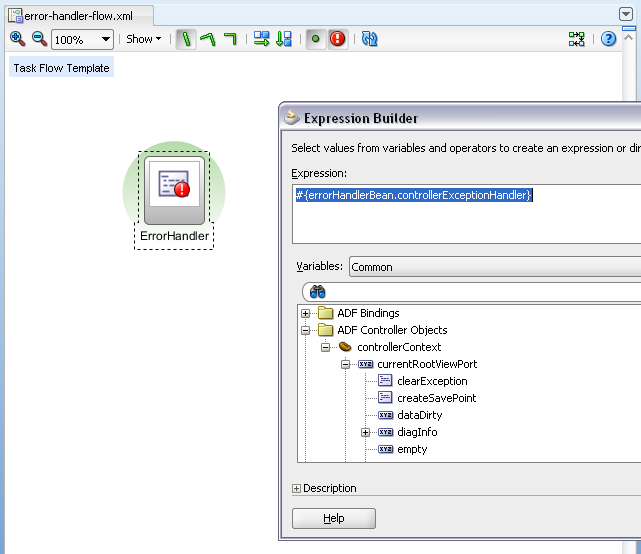
In the case, when we have ADF task flow with fragments, there is no need to implement error handler method - exception is handled and popup will be rendered automatically. Only what we need to do is to define error handler ADF task flow activity as shown in the screenshot above.
In order to define error handler method activity ones, we are using ADF task flow Template. All ADF task flows, where we want to handle JboExceptions for Method Calls should be based on that template:

In a case when JboException will happen, user friendly popup with error text will be rendered to the user:


30 comments:
Hi,
I just imported your application to 11gR2 and ran as is. But upon clicking the process data it does nothing, no popup error messages i dont see a stack trace also. I checked the AM method is definitely being called also.
What could be the case, is it R2?
Hi,
Yes, method is invoked - I tested. But it looks like JboExceptions are not raised in R2 - looks like R2 bug.
Andrejus
Hi,
Can I personalize the text of the exception?
Thanks
Yes, check first screenshot - you can set your text.
Andrejus
Hi,
Will the same error handling happen if there is a error in the page fragment's pageDefinition ControllerClass ?
Regards,
Vijai
Please specify, what you mean by Page Definition Controller class?
Andrejus
I mean to say that the page definition file of the page fragment includes a attribute ControllerClass.
To this a class is assigned which extends RegionController. These have a set of methods which are invoked on every activity performed say the refresh.
I have my validation in the refresh method where the Exception raises....
And exception is not handled in your test by TF exception handler?
Andrejus
Nope I modified your sample in this post. And it didnt.... :(
Vijai
Hi Andrejus,
Any idea off how to catch the above mentioned exception please ?
Vijai
I did not reproduced it.
Andrejus
Hi Andrejus,
We have a defalut method activity in a TF. which is a AM method, and we would like to thrwo JboException and that we want to handle it by ErrorHandler and show as a popup on the UI.
In our case before page renders itself, as part of default method activity of TF we are throwing the exception. So though i followed the steps you mentioned in this Blog, I am not able to see the popup in UI.
We have used the TF as a region onto a Jspx and it is failing with the below exception .
java.lang.IllegalStateException: The expression "#{bindings.NotificationWorklistFlow1.regionModel}" (that was specified for the RegionModel "value" attribute of the region component with id "r1") evaluated to null.
in Debug mode i have checked that controlis going to Default method activity and it is executing thorw new JboException statement. But we are not getting it to UI.
Any Help on how to show the JboException from default activity to UI?
Thanks for your help!!
Hi Andrejus,
Thanks for posting this code.
Your code somewhat mimics mine so I had somewhat modified your code.
If you may have the time to look
http://www.4shared.com/zip/yoc_GQdx/MethodCallExceptionHandler_2.html
My use case is that, what if I have a method call as the default activity of the jobs-form-flow and it has raised an exception.
I somehow need to display the message of the exception and I dont want the jobs-form page to load.
I tried it with your code but I cant seem to get the exception message.
Any idea please?
Thanks
Hi,
In ADF 11g R2, it works if you get Current View Port, instead of Current Root View Port. This should work:
ViewPortContext currentViewPort = context.getCurrentViewPort();
Just update controllerExceptionHandler() method.
Regards,
Andrejus
Can you post about exception handling mechnanism at model layer and how to do it at global level which takes care of both model and view controller layers
We have an application working in ADF 11.2.2, however, when we moved to 11.2.3 we encountered the issue you describe when we raise a custom JBO Exception. Are you aware of any changes with how JBO exceptions are handled between the two versions?
Hi Scott,
You would need to define exception handler on Task Flow level as described in this post - does it fix the problem then?
Andrejus
Hi Andrejus,
I have downloaded this sample and when i click on button Process Data . I am not getting any Exception with popup. Even in log window i cannot see the jboException.
using jdev 11.1.2.3.. plz rep
Thanks
Nitesh
Hi,
Yes, this have changed a bit in ADF 11g R2. You should change exception handler method to the following and its going to work okej:
public void controllerExceptionHandler() {
ControllerContext context = ControllerContext.getInstance();
ViewPortContext currentViewPort = context.getCurrentViewPort();
if (currentViewPort.isExceptionPresent()) {
Exception exceptionData = currentViewPort.getExceptionData();
exceptionData.printStackTrace();
FacesContext facesContext = FacesContext.getCurrentInstance();
facesContext.addMessage(null, new FacesMessage(FacesMessage.SEVERITY_FATAL, exceptionData.getMessage(), null));
}
}
Andrejus
Hi Anderjus,
Is this post works with R2 11.1.2.4.0, because I have try both getCurrentRootViewPort and getCurrentViewPort and it's not work.
It's work fine with last comment.
Thank's,
It works, check my recent comment above. I tested it and it works.
Andrejus
Thanks Andrejus :)
How about 12.1.3.0.0? I've tried this numerous times today and I just can't get it to popup anything pretty. I've tried all of the different getCurrentViewPort vs getCurrentRootViewPort etc.
12.1.3.0.0 is not a public download, I can't comment on it.
Andrejus
Hi Andrejus,
It doesnt work in 12.1.2.Please help me
Mridu
What exactly is the error on 12c?
Andrejus
Hi Andrejus,
i have created adf task flow template but still I'm getting the below error
ADFC-06002: unhandled exception when click on processData button
Mridu
It works perfectly fine in 12c, I tested with the updated code for 11g R2 (see above in comments).
How come you was testing before, without template? :)
Andrejus
Hi Andrejus,
Its working now.Thank you :)
Post a Comment