Sunday, February 20, 2011

BPM Portal 11g PS3 - How To Configure Oracle BPM 11g PS3 Process Portal on Oracle WebCenter Spaces 11g PS3

If you are working with Oracle BPM 11g and Oracle WebCenter 11g technologies, definitely you will be interested to join these two together and create enterprise portal. Such integration became available with Oracle Fusion Middleware 11g PS2 release during the last year, see technical steps to make this integration work - BPM Portal - How To Configure Oracle BPM 11g Process Portal on Oracle WebCenter Spaces 11g. With Oracle Fusion Middleware 11g PS3 being released few weeks ago, there are some changes in this area - mainly configuration part, overall features are still the same as in PS2. In PS3, they moved all Oracle BPM process portal related content into WebCenter domain, before it was in SOA domain. However, build script and properties file still remains in SOA domain. Its very important now, to setup UCM and WebCenter Discussions services properly - otherwise BPM and WebCenter mapping process will fail, it was not so critical in PS2.

Ok, let's start from the beginning. You need to complete two steps described below, before you will run BPM and WebCenter integration script as per documentation (5.5.2 Enabling Process Spaces in a WebCenter Domain). For Oracle BPM and WebCenter integration in PS3, you still can reference blog mentioned above for PS2. There are few extra steps specific for PS3, I will explain these now.

First Step - Oracle BPM Spaces:

First of all, follow instructions from documentation - 5.5.2 Enabling Process Spaces in a WebCenter Domain. Step one says to extend WebCenter domain with Oracle BPM Spaces product, however this product is not on the list there in the wizard (even documentation says it should be there). In order to extend WebCenter domain with Oracle BPM, do the following - run config.sh from WebCenter domain:


Choose to extend an existing WebLogic domain:


Extend WebCenter domain:


As you can see, there is no Oracle BPM Spaces product available on the list. But, we can extend domain using extension template - select Oracle BPM Spaces extension template:


You can find this template inside WebCenter domain, common folder:


Now WebCenter domain will be extended with Oracle BPM Spaces product.

Second Step - UCM:

Keep in mind, after you will install Oracle UCM, there is no folder support by default - need to enable it. Login into Oracle Content Server console and select Admin Server:


From Oracle Content Server Admin console, select Folders option - this will list all supported folder features:


Make sure Folders_g feature is selected, this will enable folders support in UCM:


Now select Integration group:


Make sure WebCenterConfigure feature is set - otherwise will get exceptions when extending and mapping WebCenter with BPM:


Restart UCM server, you should see Contribution Folders available now in UCM:


We need to define UCM RIDC port and IP address filtering, this can be done through Oracle Enterprise Manager:


I decided to set UCM RIDC port to 7777 and allow access to all IP's *.*.*.*. You are free to choose your setting here.

We are done with the second step now.

Make sure UCM and WebCenter Discussions properties are set correctly. For example, for my environment:

#content server details
wcContentServerName=127.0.0.1
wcContentServerPort=7777 (UCM RIDC port)
wcContentSpacesRoot=/ProcessSpaces (UCM folder for BPM Process Portal)
wcContentAdminUser=weblogic (UCM admin user)


#discussion server details
wcDiscussionServerUrl=http://127.0.0.1:8890/owc_discussions
wcDiscussionAdminUser=weblogic

Here we go - bazinga! :), Process Workspace appears inside WebCenter Spaces 11g PS3. I have customized default Process Workspace view to demonstrate all powerful features - created new pages, changed components order, etc.:


Process Tracking view:


Process Calendar view:


Mash-up Task Flow that brings Employees list:


We can browse UCM repository content and read PDF documents:


Collaborate on internal forums - WebCenter Discussions:


Integrate external sites and applications:


Friday, February 18, 2011

ADF Faces PopUp 11g PS3 Performance Improvements

I'm sure you already noticed better JDev/ADF 11g PS3 performance comparing to previous releases - ADF 11g PS3 Runtime Performance 2-3 Times Faster vs. ADF 11g PS2. Blog reader was asking, what works faster - to open ADF Faces popup using Java Script or through RichPopup API, using show(PopupHints) method. There is no better way, as just to try it.

Download sample application - ChoiceListLOVPerformance3.zip, this sample implements both methods for popup opening.

If we test with JDev/ADF 11g PS2, it takes around 1 second to open ADF Faces popup:


Now, will test the same on JDev/ADF 11g PS3, will open ADF Faces popup through Java Script from managed bean:


Now it opens much faster on PS3, around 400 milliseconds:

Let's try to open ADF Faces popup without using Java Script, but through RichPopup API (on PS3):


This method allows to open ADF Faces popup record fast, just around 250 milliseconds:


Sunday, February 13, 2011

ADF Region Communication - Region Refresh Through Contextual Event

I will extend previous sample application - ADF Region Communication - Data Exchange Through Shared Data Control Java Class and will describe how you can enrich it and apply contextual events. Even you would think about contextual events as about something cool, be careful - its not a panacea for all problems, and should be used carefully to avoid system architecture complexity explosion. While its not always true, I would prefer to use contextual events mostly for dependent region refresh, without passing payload directly. When system grows, its easier to track data references from Data Control Java class (see referenced blog post above), than contextual events payload variables. Its possible to refresh dependent region through ADF bounded task flow parameters - but contextual events provide better separation level between two regions.

Download sample application - ADFRegionCommunication2.zip. Two regions are implemented - Jobs and Employees:


Based on user selection, second region is refreshed - rows for selected job are highlighted:


If selection is changed, dependent region is refreshed as well:


As in previous blog article referenced above, user can insert new row - CreateWithParams operation will get JobId selected from the first region:


JobId data is passed as before, through Data Control Java class. Region is being refreshed through contextual event. This event (jobIdSelectionEvent) is generated on row selection and is triggered from table selection listener method:


Event (jobIdSelectionEvent) is declared in page definition file for Jobs region:


Main page provides contextual event mapping between two regions - producer (headerflow1) and consumer (detailflow1):


Finally consumer region assigns contextual event to be handled by refreshDetailTable method:


This method is coming from managed bean associated with consumer region:


In order to be able to map this method from consumer region page definition, you need to create Data Control for managed bean class:


It is good practice to generate Data Control for managed bean from early beginning, while there are ADF classes declared yet. Otherwise generated Data Control will include attributes from ADF classes and will be unnecessary big. There is no option to deselect class objects from being included into Data Control.

Row color is controller by expression language, we are referencing Data Control Java class to retrieve current selection from header region and compare it with each row value from detail region:

Friday, February 11, 2011

How to Retrieve ADF Select Many Shuttle Selection

ADF Faces provides long list of rich UI components. One of them shuttle component, it allows to create shuttle type multi-selection lists out of the box. We were looking how to access shuttled items programmatically, didn't found any proper info on the Web - decided to contribute to community with one more hint. If you will read ADF Faces developer guide, there is a suggestion to use ADFShuttleUtils Java Script object in order to access shuttle items. This means you would need to implement af:clientListener for Java Script invocation and so on, but I'm not a big fan of using Java Script for such scenarios. Let's find easier and better solution.

Download sample application - ShuttleAccessApp.zip. This simple application implements ADF Select Many Shuttle and provides managed bean methods to operate this component:


You only need to specify Base and Display attributes, then ADF Select Many Shuttle is defined:


List binding - DepartmentsView1, will be defined inside Page Definition file - we will use this binding to access shuttled elements from managed bean:


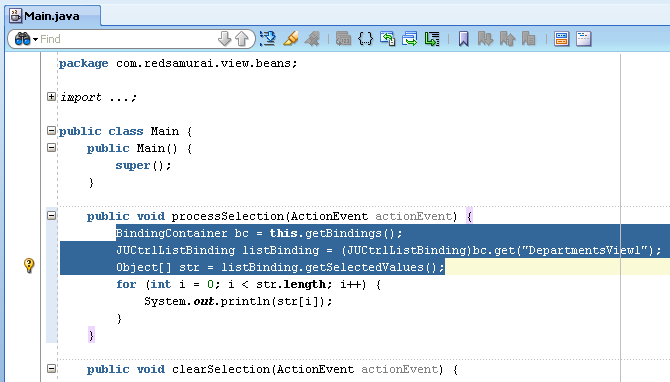
Here is the most interesting part, instead of using Java Script API, you can simply get the list binding inside managed bean and iterate through shuttled items:


It could be common requirement to clean shuttled items with external button, we can achieve this by clearing selected indices:


Shuttle some items and press Process Selection button:


We access shuttled items from managed bean:


Press Clear Selection button to remove shuttled element, this will clean shuttle programmatically:


Sunday, February 6, 2011

CreateWithParams Operation for Oracle ADF BC 11g

While coaching ADF developers, I have noticed people are not using standard ADF BC Data Control operation - CreateWithParams. Instead of simply using this standard operation to assign default values on create, sophisticated algorithms are created to provide default values for the new row initialization. This happens mainly, because standard operation CreateWithParams is a bit not intuitive to use, its why developers sometimes avoid using it. In this simple blog, I will describe how you can apply CreateWithParams operation in two easy steps.

Download sample application - ADFRegionCommunication.zip.

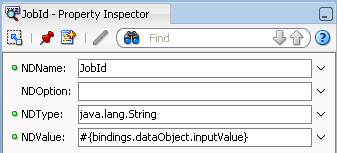
CreateWithParams operation allows us to define parameter to assign it to the new row for some specific attribute, for example here we have parameter for JobId declared along with CreateWithParams operation:


Its very important to mention, that when you will define CreateWithParams operation by yourself, wizard will not allow you to add parameters - parameters table will be empty (its what is confusing most of the developers). So, in order to add parameter, you should right click on already defined CreateWithParams operation and choose Insert Inside - NamedData:


When NamedData will be added, manually provide attribute name, which you want to be initialized (JobId in my example). Also provide attribute type and of course initialization value:


ADF Region Communication - Data Exchange Through Shared Data Control Java Class

There are several ways to exchange data between ADF regions. Here are the most common ones:

1. ADF Task Flow parameters - preferable option, is simple to use, however sometimes is not enough for complex scenarios

2. Contextual Events - flexible and powerful approach, but can be too complicated. When application grows, is hard to maintain and understand dependency between different Contextual Events. In certain situations, its mandatory to use Contextual Events, for example dependent region refresh

3. Page Definition Access through Data Control - we can access separate ADF region page definition through Data Control directly. While this works, is not advisable because it creates direct dependencies between regions

Every ADF region maintains its own Page Flow scope, this means even if you have two ADF regions on the same page - each ADF region will have its own Page Flow scope and it will not be allowed to enter another region Page Flow scope. If we would be allowed to share Page Flow scope between different regions, it would be easy to pass data from one ADF region to another, however this is not allowed by design. I will describe possible alternative - to use custom Data Control to exchange data.

What we can do in order to simplify data exchange between ADF regions is to define our own Java class and declare it as ADF Data Control. Download sample application - ADFRegionsCommunication.zip.

Java class contains dataObject variable and initializer method:


DataPackage Data Control is generated for our simple Java class:


DataPackage Data Control provides dataObject and initializer method:


Sample application implements two ADF regions - header and detail. Using our custom DataPackage Data Control will share data from header to the detail. Data Control needs to be populated with default value, this can be done using default Method Call activity inside header ADF task flow:


At that point of time, when header region will be initialized, our data control will be populated with JobId from the first record available in VO:


Row selection listener for the header table component is overridden as well to set update Data Control with newly selected value:


Consumer ADF region - detail, declares Attribute Value that points to dataObject from our custom Data Control. This means that DataPackage DataPackage Data Control generated based on our Java class will act as a bridge and will allow to exchange data from producer to consumer ADF regions without using Contextual Events. Its also good, because there are no direct dependencies between two ADF regions, data exchange is done through proxy DataPackage Data Control created based on our Java class:


Detail ADF region contains CreateWithParams operation, this operation is referencing Attribute Value from DataPackage:


When ADF regions are loaded and header region is initialized, immediately DataPackage Data Control is initialized as well (as you saw before through default Method Call):


Press Create button available inside detail region - JobId value selected from header region will be populated automatically:


Select another row from header region and press Create button again - JobId will display newly selected value from header region:


Thursday, February 3, 2011

How to Install Oracle ECM 11g PS3 - Domain Configuration Hint

When we want to install Oracle Fusion Middleware on WebLogic server or to create/extend WebLogic domain, in most of the cases we are running quickstart.sh script. This script is available in utils folder, under ORACLE_HOME:


But it seems not true, for Oracle ECM 11g PS3 installation. Lets create new WebLogic domain, by running quickstart.sh script and selecting Oracle UCM product:


Domain creation is failing, with the following error:


First I was thinking, may be Oracle ECM 11g PS3 installation package download was corrupted and downloaded it once again, but received the same error.

Configuration hint: run config.sh script inside common/bin directory from Oracle ECM 11g PS3 installation folder:


WebLogic domain configuration wizard opened:


This time domain configuration was successful: