Showing posts with label ACM. Show all posts

Friday, March 6, 2015

Invoking REST Service from Oracle ACM Java Activity

In this post I will show you, how to call REST service from ACM Java activity class method. This could be useful in the situations, when you would like to have programmatic ACM activity integrated with REST service data. We could access ACM payload data from within the method overriden in the class implementing Case Activity Callback.

ACM activity implemented on top of Java class, contains the same properties and configuration as the regular one. You could define input/output data, execution properties, etc.:


Here is the Java code to invoke REST service from the Java class implementing ACM activity. I'm giving an example to parse ACM payload and access Last Name attribute. REST service is invoked through a library packaged with FMW 12c:


One important hint - you must place ACM activity class under SOA/src path (by default it goes into SOA/SCA-INF/src). This will ensure class will be compiled and executable on runtime:


REST Client library is referenced from FMW 12c installation, no need to add any external libraries:


Sample application implements Cancel Hotel Booking activity, the one which is based on Java class. It executes and calls a method:


Here is the output - Last Name printed out from the payload and REST service call result:


Here you can download sample application, this contains both REST service and ACM examples - HotelBookingProcessing_v2.zip. REST service application implementation - ADF BC Range Paging and REST Pagination. ACM application implementation - Adaptive Case Management 12c and ADF Human Tasks.

Saturday, January 10, 2015

How To Start a Case in Oracle Adaptive Case Management 12c

Blog reader was asking to describe how to start a new case in Oracle ACM 12c. You can read my previous blog post on ACM 12c topic - Adaptive Case Management 12c and ADF Human Tasks. There are multiple ways to start a case, depends if you want just to test the case or really use it. I would recommend to use SoapUI to test the case. In the real scenario, case most likely will be started from third party web service or through ACM 12c Java API. Here I would like to describe, how you could use SoapUI to test ACM process during development.

Once ACM 12c application is deployed, you could open it in EM. There is the option to test deployed composite and invoke it through EM Web Service tester. In the example below you can see startCase operation selected and payload structure displayed. Unfortunately it doesn't work well to test ACM process through EM, payload structure is very confusing and it usually fails with mandatory attributes missing errors:


Instead I would recommend to use SoapUI to test the ACM 12c composite. You could download and use it free of charge. Start the tool and choose to create New SOAP Project:


We need WSDL URL to define a SOAP project in SoapUI. You can copy WSDL URL from EM test screen:


Paste it into SoapUI dialog (Initial WSDL field) and Project Name will be filled in automatically (keep Create sample requests for all operations? option selected):


SoapUI will fetch all operations from the service and new SoapUI project will be generated:


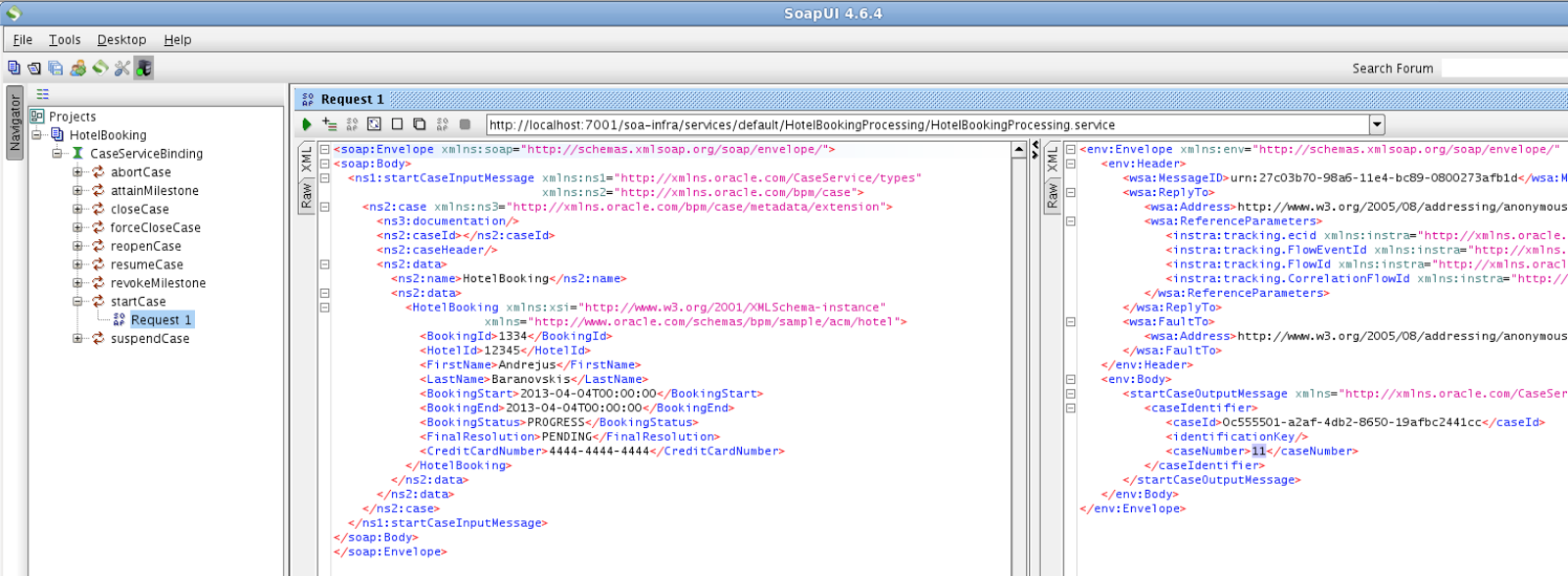
In order to start a new case, expand startCase operation and open Request 1. Request will be pre-filled with default payload structure (similar as we saw in EM):


Save SoapUI project, before doing any changes to the request structure. I would suggest to save it under ACM JDEV application structure - project is saved into single XML file:


Change the request to include custom data payload (you can find this XML code inside sample application available for download) and invoke the service. If request will be successful, you should see case number returned in the response:


Case with the same number should be available in BPM Workspace:


Here you can download sample application with SoapUI project (XML file) included - HotelBookingProcessing_v1.zip.

Thursday, December 4, 2014

Adaptive Case Management 12c and ADF Human Tasks

I'm diving into the new topic - Adaptive Case Management 12c and ADF integration. Today will be the first post in the category and there are more posts planned for the future. I strongly believe that ACM (Adaptive Case Management) makes a great extension for standard BPM. Mainly because it allows to define a loose process, without strict order steps. Process steps can be executed in different order, depending on the situation requirements, at given time. I will be explaining how to implement ADF Human Task for ACM activity and will share several tips, how to make it run in BPM Workspace application.

This is how sample application (HotelBookingProcessing_v1.zip) is constructed, there are two Human Tasks (AddHotelBooking and ValidateHoteBooking) and HotelBookingProcessing Case control:


HotelBookinfProcessing case is defined with Hotel Booking Details data type (this type is based on XSD schema and is defined as Business Component variable - don't mix up with ADF Business Components) - you can think about it as about main data structure type for the case, this can be transferred into every case activity:


There are two stakeholders defined, this could help to control who could have access to human task and case activity. Customer Service Representative is supposed to add new hotel booking, while Financial Accountant can approve or reject it:


I have created Human Task activity directly through composite, it is not necessary to have BPM process to define human tasks. Important to set Application Context property for Human Task to be OracleBPMProcessRolesApp, this will help later with security roles configuration in BPM workspace:


In order to register human task with Case management, we are given option to promote human task as a case activity. This will allow to initiate human task from the case management:


We can define input and output for the case activity, based on the same data type defined in the case. This will allow to transfer data from the case to the activity, and to the underlying human task in our situation:


You could generate ADF form case data, this form will be rendered in BPM workspace case UI. I'm going to look into customisation options of this kind of form in my future posts (checkbox is set to generate editable form):


This is how case data form is rendered, out of the box is given option to save and reset data for the case - Hotel Booking Details:


Human task form is generated in the same way as it was in 11g - no change here for 12c. You could auto generate this form, it generates a lot of code and I would prefer to build custom light form instead:


Important hint - auto generated human task form will not render in BPM workspace window. You need to change FRAME_BUSTING parameter generated in web.xml from differentOrigin to never. With differentOrigin option it doesn't render human task form, in 11g it was generating with option set to never, for some reason this was changed in 12c - not for good:


With FRAME_BUSTING set to never, human task form renders well:


Human task is started directly from the case activity - Add Hotel Booking from the available list of activities:


We can track in the case activity log - when activity was started, completed or modified. This is quite helpful info to track activity history:


One of the main advantages - user could decide the order of activities, on contrary to strict BPM process. Start Validate Hotel Booking activity, this will create new task for Financial Accountant:


Activity was started, we can see this from the audit log:


This is readonly human task, rendered in BPM workspace - Financial Accountant could approve or reject it:


Case can be closed and hotel booking approved: