Showing posts with label Service Bus. Show all posts

Friday, April 3, 2015

Indicator for Background REST Service Access with A-Team Mobile Persistence Accelerator

You should check my previous post about Background REST Service Access with A-Team Mobile Persistence Accelerator (AMPA). There I describe how to optimise MAF performance for REST service calls, allow user to continue working with the mobile application, without locking the screen until Web Service response arrives. Steven Davelaar have documented how it works, you can read it in his blog - Calling Web Services in Background Using MAF 2.1.

I have updated sample application from previous post, to include indicator for AMPA background service call status tracking. Updated sample application - MobileServiceBusApp_v8.zip.

AMPA provides application scope variable, which acts as a flag and indicates when background service call is executed. Based on this flag, we could conditionally display animated GIF image, this will help user to understand if background service call still runs:


When user is searching and request is being processed in background, he will see rotating status indicator in the top right corner:


Until data is being returned from background task, user could go to another screen and monitor when request is completed, to see the latest data:


Once background task completes, indicator disappears:

Sunday, March 22, 2015

Background REST Service Access with A-Team Mobile Persistence Accelerator

REST service transfers light data, but service execution time could bring significant delay to the enterprise mobile application. I have already introduced you to the A-Team Mobile Persistence Accelerator (AMPA) in previous post - REST Service Access with A-Team Mobile Persistence Accelerator. Based on AMPA author - Steven Davelaar suggestions, I will post today updated application, where REST service call will be handled in background. This will allow mobile user to continue working with the MAF application, while REST call is being processed in background thread.

Here you can download updated sample application - MobileServiceBusApp_v7.zip. Remote read in background is configurable through AMPA persistence mapping, I have changed it to be false - let's see how it works for slow REST service execution:


Data Control method is executing (sequential in this example) remote findAll operation through AMPA, to fetch employees data. Data collection is loaded to the UI, after service execution is completed:


Server side ADF BC VO is set to wait 30 seconds (waiting for 30 seconds after VO was executed), before completing SOAP response. This allows to simulate slow REST service execution and check how MAF mobile application behaves with sequential service call:


Executing search operation over slow REST operation blocks entire MAF mobile application. User can't navigate to other screens and is locked into current screen, until response comes. This is how it looks like, when I changed search criteria - mobile application waits for the response:


Obviously this is inappropriate, because it blocks application and user can't continue his work. Let's test with AMPA configured to execute REST calls in background - remoteReadInBackground = true:


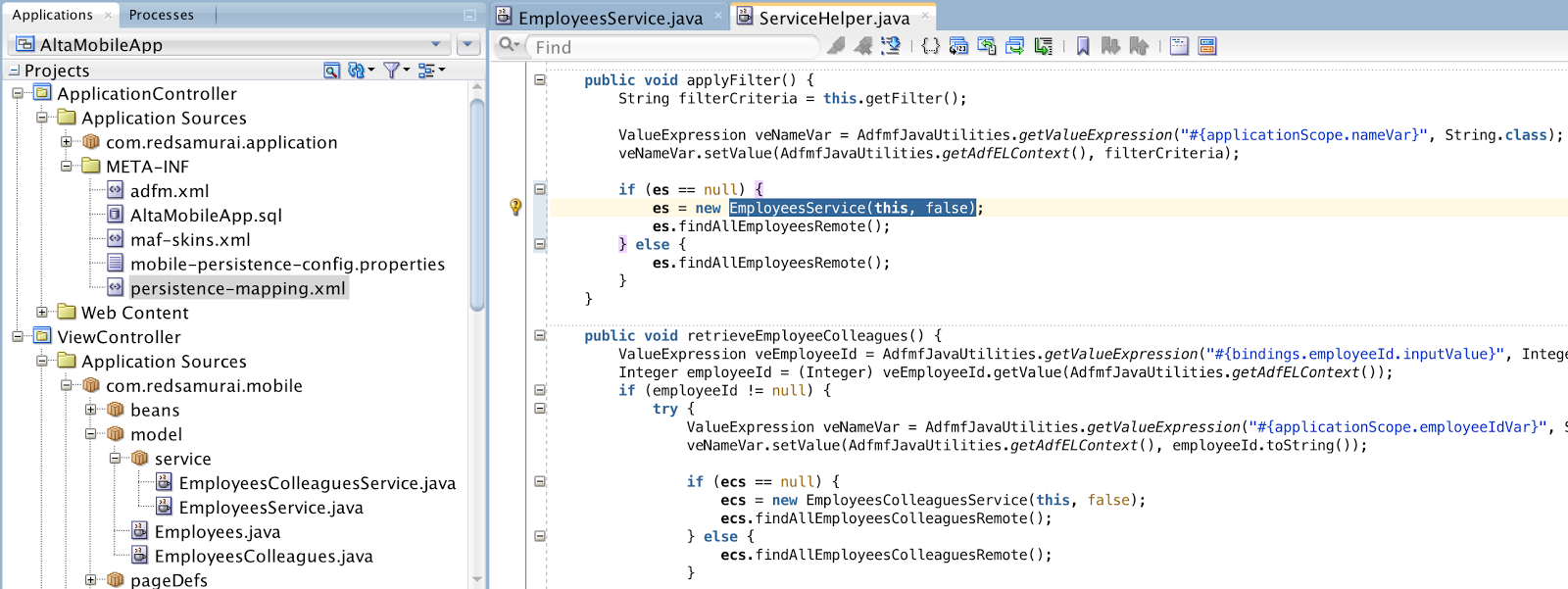
Data Control method responsible to execute REST action is refactored. I'm only starting remote findAll operation - not waiting it to complete. AMPA generated service class EmployeeService is changed to include additional constructor, where I'm passing instance of Data Control class and a flag to prevent auto query. Here is applyFilter method from Data Control class, it call REST service in background, through AMPA:


AMPA generated class is changed with overriden method refreshEntityList. This method is called automatically by AMPA, when background REST call is completed. Here I'm calling Data Control class method, responsible to refresh UI and display data fetched from the background service:


Data Control class method responsible for UI refresh - it updates Data Control collection and invokes synch with UI:


I will describe a test I have completed, with REST service execution in background. Perform search action with a parameter:


ADF BC on server side executes VO with SQL statement, there is a wait time of 30 seconds:


MAF mobile application is not blocked anymore, as it was with sequential REST service execution. User can navigate to other screen and do different actions:


Once ADF BC VO completes execution and SOAP service returns response, Service Bus is transforming SOAP response to REST. Mobile application receives data and UI refresh happens, to present latest changes. User can view the changes, once he is back to the screen:


In the same way, user could run another search:


While search is running, user could view details for present data:


After returning back to the search list, results for the new search query are displayed - data from REST service call executed in background:


User could load details screen and view the data:

Monday, March 16, 2015

REST Service Access with A-Team Mobile Persistence Accelerator

A-Team Mobile Persistence Accelerator (AMPA) works on top of Oracle Mobile Application Framework (MAF) and provides tools to simplify consumption of REST services. It enables transparent persistent layer usage on the device with the option of synchronising offline data with the server side. In this post, I will be testing AMPA in the context of the use case implemented previously - MAF 2.1 Alta Mobile UI and Oracle Mobile Suite. Working MAF application, where REST service calls are coded by hand, will be changed to fetch REST service data through AMPA - reusing existing Data Control. This is unusual approach, most of the tutorials related to AMPA describe end-to-end scenario, where Data Control is generated on top of AMPA service class and UI is generated with AMPA wizard. Mobile UI in most of the cases will be custom made and we rarely generating it. This is why it is important to explain, how to use AMPA with custom UI and Data Control.

You could read more about AMPA and find installation instructions in Steven Davelaar post - Getting Started with the A-Team Mobile Persistence Accelerator.

I will be using my sample application from the MAF 2.1 Alta UI post mentioned above. You can download application updated with AMPA support here (this includes ADF BC SOAP service, OSB transformation to REST and MAF application with AMPA) - MobileServiceBusApp_v6.zip.

As soon as REST connection is defined, AMPA wizard offers you to define REST resources. In my case I have to different resources, though working with the same Employees data schema. Both require to provide parameter:


Wizard is going to ask you to provide sample parameters to retrieve a response from REST resources. This is how AMPA retrieves metadata required to generate service representation in MAF:


Data Objects will be constructed automatically for each resource path. In my case, both resources are based on the same schema Employees. If this is the case for you, make sure to change the names in the wizard to be unique, otherwise AMPA fails to generate proper SQL scripts and service classes.

In this example I don't want to persist any data on the device. My use case requires to retrieve latest data from the server, therefore there is no need to keep a copy on the device - this is why Persistent checkbox is not set:


Next you will get similar wizard as in ADF BC, where all attributes for the service will be listed along with types, etc.:


I don't have any create/update/delete operations in the example, therefore only mapping present if for find operation:


Both REST resources were defined with attributes. We need to set the values later, for this purpose we could define ELExpression value provider for the attribute and type actual expression into Literal Value field. You could use any scope, I'm using applicationScope in this example. Variable defined by EL expression must be initialised before executing REST operation - this will be done later, in the code:


Six easy steps and AMPA persistence layer for MAF is generated. Let's take a quick look, what was actually generated. There is SQLite script with on device DB structure - two different tables will be created, each per REST service defined in the beginning:


In this example, I'm not really using on device DB, tables are not mandatory. Persistence mapping file is generated, this is where on device persistence structure and REST service mapping is defined. This mapping is used as a metadata resource to describe how data retrieved from REST service should be translated into on device persistence layer. I have set the option not to persist data, this will only retrieve it:


AMPA does a remote read in background by default - this means it reads data from REST, populates it into local SQLite DB and doesn't wait until operation is completed. This is good for performance optimisation reasons in some use cases, but is not suitable, when we want to see data immediately in the same request (especially when we are integrating AMPA into our own custom service class). Remote read in background can be turned off through persistence mapping:


Service class is generated, it extends from AMPA service. We could generate Data Control on top of this class and use it from MAF UI. However, I would like to integrate it into existing service class and consume from existing Data Control:


You could generate Data Control through JDEV menu, as displayed below.


In my case, I have Data Control already - generated on top of ServiceHelper class, I will reuse it. Here is the service class - ServiceHelper. In order to use AMPA generated service class and POJO types from existing service class, I have changed types for service class variables. Names and POJO structure remains the same, this means Data Control will continue to work:


Method responsible to search for employees by name is changed to invoke AMPA functionality. Instead of calling REST service and transforming response - I'm initialising EmployeeService generated by AMPA and calling findAllEmployeesRemote method. Remote method works with REST service, this is what we need - always fetch latest available data from the service:


You should notice how REST service variable is initialized - through EL Expression in application scope. This is the same expression as we have defined in resource mapper.

Here you can see how it look on UI. List of employees is filtered and displayed on the mobile device screen. Data from REST service is retrieved through AMPA, UI remains exactly the same as it was implemented in the previous version of the application:


Very important thing to mention - MAF Data Control is able to cache data by itself. Once you fetch data and if you don't require offline support, MAF Data Control is able to keep fetched rows in memory, without requiring them from the service.

For example, we fetch a set of rows with David Austin in the list:


There are two different MAF fragments (List and Edit), attached to the same Data Control. When we navigate to Edit and back to List, there is no REST call executed - MAF is using previously fetched data from Data Control (there is no need to use AMPA to handle such use cases):


Detail data for David Audit is retrieved from MAF Data Control:


You need to ensure - getter in service class implementing Data Control is not triggering a call to the REST service. REST service call must be invoked from Method Call, before MAF fragment is loaded - this will allow to prepare data in advance (see Task Flow diagram above):

Monday, February 9, 2015

MAF 2.1 Alta Mobile UI and Oracle Mobile Suite

This post is about Alta Mobile UI and MAF 2.1. I was using Oracle Work Better mobile application as a reference, along with Alta Mobile UI Design Guidelines. This is based on my previous posts about Oracle Mobile Suite and MAF 2.1 integration, read more here - Oracle Mobile Suite - Web Service Performance Optimisation with Result Caching. You could also use Alta UI 12c with regular ADF Web applications, check more here - Custom ADF Application with New ADF 12c Alta UI.

Sample application - MobileServiceBusApp_v5.zip (contains ADF BC SOAP Web Service, Oracle Mobile Suite SOAP to REST transformation and MAF 2.1 application with Alta Mobile UI) implements a dashboard. Component to visualise amounts and values comes out of the box with MAF (iPad view):


User could open a springboard and select Employees option in the sample application:


Here we can search for employees by first name/last name and bring results as a list:


Optionally user could switch to cards view, to display the same results in different way:


You could click on employee icon - this will load details screen and bring additional info:


Steven King is a manager, he manages Executive department and there are two team members reporting to him. Compensation graph can be displayed for team members:


A list of team members is displayed in the third tab:


There is MAF 2.1 Deck component in Employees search page, it allows to switch between a list and cards view:


Employee details page is rendered with a help of MAF 2.1 Deck component as well, along with Select Button component to display tab UI and navigate between Detail, Compensation and Team sections:


You could check how these pages are implemented in the sample app provided above.

Tuesday, February 3, 2015

Oracle Mobile Suite - Web Service Performance Optimisation with Result Caching

One of the main advantages of Oracle Mobile Suite - Service Bus and SOAP/REST web service transformation (more here - Oracle Mobile Suite Service Bus REST and ADF BC SOAP). In addition you will get very nice performance improvement, there is out of the box caching for Web Service resultset with Coherence. I'm going to demonstrate how it works, all out of the box - really simple.

You could define caching for external service (ADF BC SOAP web service in my case), just edit service definition. This is our business service running on WebLogic backend, where actual processing happens. Naturally we would like to eliminate duplicate calls and retrieve previous resultsets from cache stored in Service Bus layer:


Wizard allows to enable result caching by cache token expression. In my case, nameVar is a variable from ADF BC SOAP web service, findEmployees method. You could use a wizard to construct expression. On runtime it will cache resultsets for all the requests according to specified expression. Basically it will cache all invocations of findEmployees method and will track cached data by nameVar parameter value. You could specify cache expiration time, if data is updated more often, expiration time should be shorter. Expiration time even can be dynamic, taken from the request variable:


That't is - this was really simple. All Coherence complexity is hidden and you don't need to worry about it.

I will be running MAF application to perform a test. Here I'm searching by value - th:


If we would check WebLogic log, where ADF BC SOAP web service is deployed, we could see the SQL query was executed with nameVar=th (as per search request in MAF application screen):


Let's run a different query now, search for nameVar=ew:


Again repeat previous search with nameVar=th, there should be query executed on WebLogic server with ADF BC SOAP web service, result should be taken from cache stored in Service Bus (as directed per performance optimization tuning above):


Indeed there was no SQL query executed for nameVar=th this time, data was taken from cache - this is great performance optimisation:


Download sample application (it contains ADF BC SOAP web service, Service Bus and MAF implementations) - MobileServiceBusApp_v4.zip.