Showing posts with label WebSockets. Show all posts

Thursday, March 29, 2018

Socket.IO Integration with Oracle JET

Socket.IO is a JavaScript library for realtime web applications. It comes in two parts - a client-side library that runs in the browser and a server-side library for Node.js. In this post I will walk you through complete integration scenario with Oracle JET.

Here you can see it in action. Send Event button from JET - sends message through Socket.IO to Node.js server side. Message is handled on server side and response is sent back to client (displayed in browser console):


Server side part with Socket.io is implemented in Node.js application and it runs on Express. To create Node.js application (which is just one json file in the beginning), run command:

npm init

To add Express and Socket.io, run commands:

npm install express --save
npm install socket.io --save

To start Node.js application on Express, run command:

npm start

Double check package.json, it should contain references to Express and Socket.IO:


Here is server side code for Socket.IO (I created server.js file manually). When connection is established with the client, message is printed. Method socket.on listens for incoming messages. Method socket.emit transmits message to client. In both cases we can use JSON structure for payload variable. There is cheatsheet for socket.emit - Socket.IO - Emit cheatsheet. Socket.IO server side:


Socket.IO client side can be installed into JET application with NPM. There is separate section in Oracle JET documentation, where you can read step by step instructions about 3-rd party library installation into Oracle JET - Adding Third-Party Tools or Libraries to Your Oracle JET Application. I would recommend manually include Socket.IO dependency entry into package.json in JET:


Then run command to fetch Socket.IO library into JET application node modules. Next continue with instructions from Oracle JET guide and check my sample code:

npm update

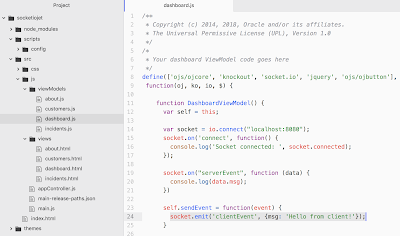
To establish socket connection - import Socket.IO into JET module and use io.connect to establish socket connection. Connect to the end point where Express is running with server side Socket.IO listener. Client side is using same socket.on and socket.emit API methods as server side:

Download sample code from my GitHub repository.

Wednesday, March 16, 2016

OFM Forum Session Slides - Oracle JET and WebSocket

I would like to post slides from my session on Oracle Fusion Middleware Forum - Oracle JET and WebSocket. This session was done today.

Slides are available on slideshare:


Sample application used for the demo, can be downloaded from here (it consists of three parts - WebSocker server implementation, ADF BC tester application to generate continuos DB updates and JET application) - Oracle JET Live List with WebSocket.

ADF application with live data DVT component rendered in JET can be downloaded from here - When JET Comes To Rescue - Live Data Charts in ADF.

Sunday, February 28, 2016

Oracle JET Live List with WebSocket

I have updated sample - Oracle JET and WebSocket Integration for Live Data, to include live data list. Along with live updates delivered to the chart component, list component displays changed data. I'm displaying five last changes, with new data appearing in the last row:


Watch recorded demo, each 4 seconds new data arrives and chart is updated, along with list records:


JET list component UI structure (data grid) is rendered with a template, to arrange separate column for each job:


When new data arrives, it is being pushed into JET observable array (this triggers automatic UI list reload/refresh). If there are more than five items in the list, first one is removed. List observable array is configured with 500 ms. delay, to make UI refresh smoother:


Download sample application (JET, WebSocket server side and ADF to simulate updates in the DB) - JETWebSocket_v2.zip.

I'm going to present JET and WebSocket integration on Oracle Fusion Middleware Partner Community Forum 2016.

Saturday, February 6, 2016

Oracle JET and WebSocket Integration for Live Data

I was researching how to plugin WebSocket into JET. I would like to share my findings and explain how it works. It is amazing, how scalable and quick it is to send JSON message through WebSocket channel and render it in JET. Luckily WebSocket client is implemented in JavaScript, this integrates perfectly with Oracle JET (also based on JavaScript).

Watch recorded demo, where I'm sending updated data with JSON message through WebSocket. UI chart is rendered with JET. See how nicely JET re-draws chart, based on received new data (watch at 6th second):


Download sample application - JETWebSocket.zip. This contains both WebSocket application (implemented with JDeveloper) and JET (implemented with NetBeans).

On WebSocket server side, I'm listening for DB changes (Database Change Notification Listener Implementation). Each time when DB change happens, all changes are collected into one collection and sent to the clients through WebSocket:


Changes are collected into array. WebSocket message must be encoded into JSON Array, this makes it easier to read it on client. Multiple JSON Objects are added into JSON Array:


Message is sent to all connected WebSocket clients:


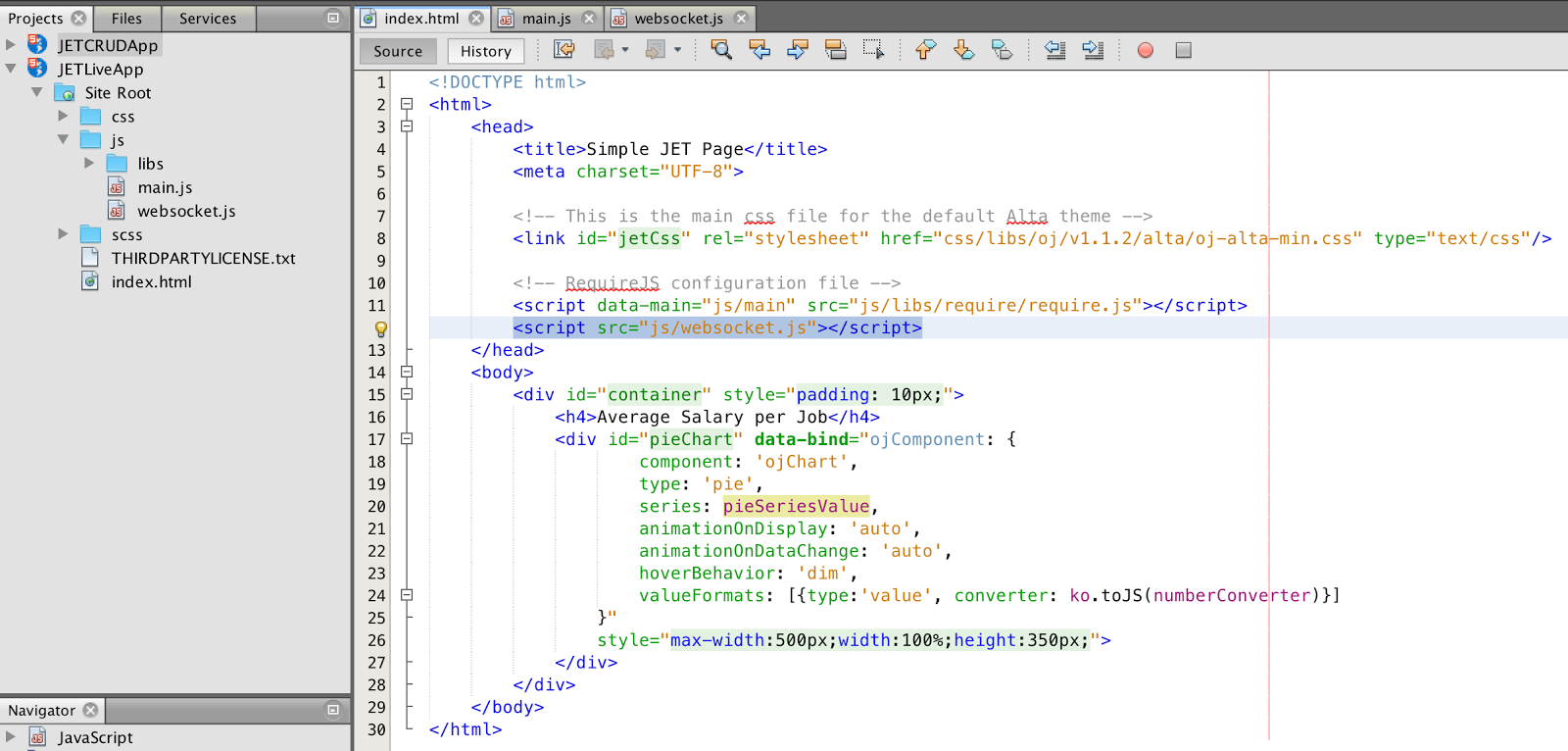
All this happens on server side. Now lets take a look into client side. We should open WebSocket connection when JET is loading. I have included WebSocket client JavaScript code from separate file websocket.js. JET renders chart component:


Each time when WebSocket message is received by the client, onMessage method is invoked. This method is responsible to parse JSON message and pass it to function from JET context, where chart data update happens:


WebSocket is opened, when document is rendered. In the next step, JET View Model is created along with bindings:


Variable viewModel is accessible from WebSocket onMessage method, because it is defined outside of JET function:


Method updateChart invoked from onMessage, applies received changes to chart data. JET re-draws chart automatically, because changes are applies for observable array. This is really cool:


See how it works. Page is loaded with JET chart component, WebSocket is opened:


Go to DB and update few records, commit changes:


JET receives changes through WebSocket and chart is updated instantly:

Saturday, January 16, 2016

Automatic ADF Logout on Browser Close with WebSocket

Every ADF project could have a requirement to handle browser close event effectively. Differently than desktop applications where we could handle such events, browser doesn't send any event to the server, when browser page is closed. This is especially important for transactional data, when user locks data row and lock must be released automatically, in case if user is closing browser without unlocking. Besides transactional data management, it is important for performance improvement - Web session will be closed instantly and WebLogic resources will be released. There was no reliable solution to handle this, now we can do it with WebLogic 12c and WebSockets. WebLogic 12c supports WebSockets natively, there is no need to configure anything or add libraries.

When WebSocket channel is closed, it delivers event to the server on browser close. We could use this event to release locked resources, we need to logout ADF session to force ROLLBACK. Sample application implements HTTP client invoked by WebSocket server endpoint. This HTTP client simulates browser activity and redirects to adfAuthentication with logout request, using original JSESSION ID from closed browser session. This works also during accidental client computer power off. Download sample application where I have described all important implementation steps - ADFSessionHandlingWebSocket.zip.

Sample application is protected with ADF Security, you can login with redsam/welcome1 user. It includes Oracle JET libraries, one of the dashboard tiles implements JET fragment. JET is not required for the sample to work, it is used only to implement dashboard UI.

You can observe from browser log when WebSocket connection is opened. Connection is established on initial page load, immediatelly after login. This opens WebSocket communication chanel, as soon as this chanel will be closed - WebSocket server endpoint will force logout for ADF session from closed browser:


As soon as WebSocket channel is established, ADF web session ID (JSESSIONID is retrieved from the cookie) is sent to WebSocket server endpoint. Sample logs ID of ADF web session:


I'm going to lock one of the records, I'm invoking ADF BC lock method (DB pool is disabled, this will keep DB connection assigned for AM):


Lock action for row data is visible in the log, SELECT FOR UPDATE is executed for ID 102:


Let's close a browser now without issuing ROLLBACK, invoke Quit action in the browser:


WebSocket channel will be closed and this will trigger ADF Authentication servlet request to logout from ADF web session. As logout happens, ADF resources are released, ADF BC is triggering ROLLBACK in DB:


Session is closed based on JSESSIONID. With HTTP Client we simulate user logout after browser was closed:


Now we should overview technical implementation. WebSocket channel is opened from JavaScript:


This happens on page load, with clientListener triggering connectSocket method:


Method connectSocket in JavaScript is using standard WebSocket API to open connection:


WebSocket server endpoint is defined with custom configurator. Through configurator we can reference HTTP session initiated in ADF. HTTP client in WebSocket endpoint will use it later, to simulate ADF logout:


ADF HTTP session is referenced through WebSocket configurator:


Helper session listener class is defined in web.xml, here I'm copying JSESSIONID from the cookie into session attribute (to be able to reference JSESSIONID in WebSocket endpoint):


OnClose method in WebSocket endpoint is invoked, when connection channel between client and server is closed (browser is closed). Here I'm invoking custom method handleLogout method:


I'm constructing HTTP client request with the same JSESSIONID value as it was copied from ADF session. HTTP Get is executed against ADF Authentication servlet with logout request using JSESSIONID value. This is forcing ADF session to logout from simulated HTTP session by HTTP client:


Saturday, May 16, 2015

ADF and Two-Way WebSocket Communication Architecture

This post is based on WebSockets and ADF, topic described in the previous post - WebSocket Integration with ADF for PPR Request Monitoring. I would like to look into it from technical architecture perspective and split WebSockets server logic into separate application deployed on WebLogic. WebSocket is two-way (bidirectional) communication channel, this allows to send and received data at the same time. I'm going to demonstrate how it works with my sample application.

It is best to explain how WebSocket works, with a live demo - you can watch recorded screencast. I'm using Twitter stream, you should see how many tweets are coming in for music category. Each tweet location is sent through WebSocket channel to ADF page, where it is rendered on the UI, through Java Script. ADF UI performance is measured in Java Script and logged back to the server through the same WebSocket channel. Tweet locations are coming from the server to ADF UI and ADF UI performance statistics traveling back to the server, at the same time:


I'm pretty amazed, how WebSocket transfers data - you should see how quick output text value is changing in ADF UI.

Download sample application - ADFAltaApp_v5.zip. Below diagram describes the main idea of this example:


There are two applications deployed on WebLogic 12c server. WebSocket server side application is listening for Twitter stream and sends data to the WebSocket client running in ADF UI. Logged performance data in ADF UI is sent back to WebSocket server side application.

Twitter stream handler is implemented as a servlet. It listens for every tweet received for the given topic and invokes WebSocket method to send data to the client:


Data is sent to the client using WebSocket API (library is available out of the box in WebLogic 12c and JDeveloper 12c). Incoming message is handled by another method - processMessage. This method accepts complex type, sent from ADF UI in JSON format:


Make sure to define WAR deployment profile for WebSocket project, this must be deployed as part of EAR. There should be deployment profile set, later referenced from WebSocket client:


WebSocket client runs in Java Script, there is onMessage function to handle incoming data. Here I'm simply setting newly received text as value for the ADF output text component:


ADF output text is empty initially, value is populated on runtime through WebSocket:


WebSocket communication from ADF UI to WebSocket server side is initiated in Java Script. PPR request timing data is written to JSON format and sent over WebSocket channel:

Monday, May 11, 2015

WebSocket Accelerated Live Data Synchronization for MAF

New generation Mobile and Web applications are going to use WebSockets. This is one of the fastest and convenient ways to transfer JSON formatted data from the server to the client and back. Huge advantage - server could initiate data synchronisation request and deliver JSON messages directly to the client. You should read my previous post about detail information how to configure MAF with WebSocket - Oracle MAF and WebSockets Integration - Live Twitter Stream.

In this post I would like to describe, how to integrate further information received through WebSocket with MAF components. I will use MAF Tree Map UI component to display live data for Tweets locations.

Below you could see screen recording - MAF Tree Map is getting refreshed automatically, each time when update through WebSocket channel is being received. This is amazing, how fast data through WebSocket channel is coming. In this test, MAF is handling around 1 update per second, received from WebSocket:


Let's look how it is implement behind the scenes. There is MAF Tree Map UI component, this is regular MAF component to render graph visualisation:


UI component is based on Data Bindings, collection is initialized from Data Control method:


Method handling data update from WebSocket is responsible to update data collection - it invokes helper method, where data collection is re-constructed. Standard Refresh Provider is helping to repaint data displayed on the UI:


Simple and effective. Download sample application - AltaMobileApp_v2.zip.

Thursday, May 7, 2015

Oracle MAF and WebSockets Integration - Live Twitter Stream

Oracle MAF and WebSockets - I will describe how it works together. WebSockets is a protocol providing full-duplex communication channel over a TCP connection. This channel is interactive (communication is both ways) and we can send messages from the server to the client (MAF application running on the device). There is no need to use push notifications, WebSockets provide JSON support and allow to send complex payload data. In a way it competes with REST, however REST is different with request is being initiated by the client. WebSockets data is received automatically - there is no need to trigger any event by the client.

I have implemented sample MAF application with WebSockets integration, you can download it here - AltaMobileApp_v1.zip. Finance screen in the application contains MAF output text component. This component displays latest data received through WebSockets channel. Server side is listening for live Twitter Stream updates and sends each tweet location over WebSockets to the MAF application. See how it works in this screen recording:


WebSockets communication is not blocking MAF application functionality, it runs in the separate thread. User can navigating between MAF screens, run different actions and WebSockets delivers data in parallel.

Sample applications is based on two parts - server side WebSockets implementation with Twitter Stream listener and client side MAF application with WebSockets client.

Twitter Stream is handled with Twitter4J API, JAR's are included with the sample. You would need to provide your own Twitter account details, access keys could be retrieved for your account from Twitter developer portal. Make sure to obtain these keys, before running sample application:


New message from Twitter Stream is received by listener method - onStatus. I'm listening for all the tweets around the world, related to corporate keyword. Once there will be new tweet related to this topic, onStatus listener will be notified. In the listener method, I'm retrieving tweet location and and initiating WebSockets communication:


Method in WebSockets implementation - notifyClient, sends text message to the client (JSON message is supported as well):


Listener for Twitter Stream is started automatically, when application is deployed. This is done through servlet initialisation:


On the client side - MAF application is configured to receive automatic notifications through WebSockets channel. Implementation for WebSockets listener is very similar with the regular ADF Faces - it is done through JavaScript. MAF feature is registered with JavaScript file:


JavaScript contains all required methods for WebSockets communication. Here we open WebSockets channel with connectSocket function and further listen for the new messages/notifications with onMessage method. My goal is to update MAF components with the new data received through WebSockets. For this reason, I'm invoking Java method from onMessage JavaScript function and passing payload data (recently received tweet location):


Invoked Java method - processWebSocketMessage is responsible to update MAF bindings with the new data. Data Bindings class contains standard MAF propertyListener implementation, which ensures data refresh on MAF UI:


MAF output text on the UI displays recent data received through WebSockets channel: