Oracle JET provides a large set of UI components for enterprise apps. I explain how you can display data from Django with Oracle JET table. Data is injected into Django HTML template on the server side and later consumed by JET UI component.
Showing posts with label JET. Show all posts
Showing posts with label JET. Show all posts
Monday, October 3, 2022

Sunday, July 24, 2022
Oracle JavaScript (JET) UI rendered in single HTML file
Oracle JavaScript Extension Toolkit (JET) comes with a strong set of UI components for enterprise. You can reuse these components in other UI toolkits/frameworks. In this video I show how you can run JET table components in a single HTML file, without any additional configuration in separate files.
Friday, December 11, 2020
Oracle JET or Oracle VBCS For Your Next Web App
I talk about my experience of working with Oracle JET and VBCS. I share a few hints - how to choose between Oracle JET and Oracle VBCS for your next Web app development.
Monday, March 9, 2020
Building Dynamic UI Form with Oracle JET
Dynamic form is a common requirement when building more advanced UIs. With Oracle JET you have all the tools available to build dynamic form. One of the examples of dynamic form requirements - report parameter capture screens. Building fixed forms to capture parameters for each report would be an overkill. A smarter approach is to build one dynamic form, which would handle a set of different UI components and render based on metadata received from the service.


Dynamic form example:

When values are changed, we can capture all changes while submitting the form - value printed in the log:

In the heart of dynamic form logic, we are using JET bind for each tag, it renders form elements from metadata:

Each element is checked and based on the type - UI field is rendered through JET if tag. Input field properties are fetched from metadata.
Example of metadata structure - array. It is important to use Knockout observable for value property. This will allow capturing user input. When we submit the form, we can iterate through the array and read value property:

Sample code available on GitHub.
Thursday, November 28, 2019
Multiple Node.js Applications on Oracle Always Free Cloud
What if you want to host multiple Oracle JET applications? You can do it easily on Oracle Always Free Cloud. The solution is described in the below diagram:

You should wrap Oracle JET application into Node.js and deploy it to Oracle Compute Instance through Docker container. This is described in my previous post - Running Oracle JET in Oracle Cloud Free Tier.
Make sure to create Docker container with a port different than 80. To host multiple Oracle JET apps, you will need to create multiple containers, each assigned with a unique port. For example, I'm using port 5000:
docker run -p 5000:3000 -d --name appname dockeruser/dockerimage
This will map standard Node port 3000 to port 5000, accessible internally within Oracle Compute Instance. We can direct external traffic from port 80 to port 5000 (or any other port, mapped with Docker container) through Nginx.
Install Nginx:
yum install nginx
Go to Nginx folder:
cd etc/nginx
Edit configuration file:
nano nginx.conf
Add context root configuration for Oracle JET application, to be directed to local port 5000:
location /invoicingdemoui/ {
proxy_pass http://127.0.0.1:5000/;
}
To allow HTTP call from Nginx to port 5000 (or other port), run this command (more about it on Stackoverflow):
setsebool -P httpd_can_network_connect 1
Reload Nginx:
systemctl reload nginx
Check Nginx status:
systemctl status nginx
That's all. Your Oracle JET app (demo URL) now accessible from the outside:


You should wrap Oracle JET application into Node.js and deploy it to Oracle Compute Instance through Docker container. This is described in my previous post - Running Oracle JET in Oracle Cloud Free Tier.
Make sure to create Docker container with a port different than 80. To host multiple Oracle JET apps, you will need to create multiple containers, each assigned with a unique port. For example, I'm using port 5000:
docker run -p 5000:3000 -d --name appname dockeruser/dockerimage
This will map standard Node port 3000 to port 5000, accessible internally within Oracle Compute Instance. We can direct external traffic from port 80 to port 5000 (or any other port, mapped with Docker container) through Nginx.
Install Nginx:
yum install nginx
Go to Nginx folder:
cd etc/nginx
Edit configuration file:
nano nginx.conf
Add context root configuration for Oracle JET application, to be directed to local port 5000:
location /invoicingdemoui/ {
proxy_pass http://127.0.0.1:5000/;
}
To allow HTTP call from Nginx to port 5000 (or other port), run this command (more about it on Stackoverflow):
setsebool -P httpd_can_network_connect 1
Reload Nginx:
systemctl reload nginx
Check Nginx status:
systemctl status nginx
That's all. Your Oracle JET app (demo URL) now accessible from the outside:

Thursday, October 24, 2019
SEO for Single Page Oracle (SPA) JET Application
This is a quick tip post related to Oracle JET.
SEO (search engine optimization) is a must for a public website or public-facing app. Search engines do indexing well for static HTML pages. Oracle JET on contrary follows SPA (single page application) approach with dynamic UI. This makes it harder for the search engines to build an index for such an app. The same applies to any other SPA implementations with Angular, React, Vue.js, etc.
If you want to build SEO support for Oracle JET, similar solutions as for Angular, React or Vue.js SPAs apps can be applied.
One of the simpler and reliable solutions - generate static HTML pages for Oracle JET SPA app. You can follow this article, it explains how the same can be done for Angular - SEO for Single Page Applications.
SEO (search engine optimization) is a must for a public website or public-facing app. Search engines do indexing well for static HTML pages. Oracle JET on contrary follows SPA (single page application) approach with dynamic UI. This makes it harder for the search engines to build an index for such an app. The same applies to any other SPA implementations with Angular, React, Vue.js, etc.
If you want to build SEO support for Oracle JET, similar solutions as for Angular, React or Vue.js SPAs apps can be applied.
One of the simpler and reliable solutions - generate static HTML pages for Oracle JET SPA app. You can follow this article, it explains how the same can be done for Angular - SEO for Single Page Applications.
Wednesday, September 25, 2019
Running Oracle JET in Oracle Cloud Free Tier
OOW'19 stands up from recent years OOW conferences with important announcement - Oracle Cloud Free Tier offering. This offering includes two free DB instances and two free compute VM instances. What else you could wish for the side and hobby projects? This is a strong move by Oracle and it should boost Oracle Cloud. Read more about it in Oracle Cloud Free Tier page.

It was interesting to test how to deploy Oracle JET app to Oracle Always Free instance of compute VM. I will not go through the initial steps, related how to create VM instance and enable internet access (for the port 80). You can read all that in a nice write up from Dimitri Gielis post.
Assuming you already have created Oracle JET app and want to deploy it. One way would be to set up Node.js and Nginx on the compute VM and pull app source code from Git. I prefer another way - to go through Docker container, Nginx would act as HTTP server to redirect requests to Docker container port. But in this post for simplicity reasons, we are not going to look into Nginx setup - will focus only on JET deployment through Docker container.
1. Create an empty Node application (follow these steps):
express --view=pug
2. Add dependencies, go into the Node app and run:
npm install
3. Copy Oracle JET content from web folder into Node app public folder (remove existing files)
4. Inside Node app, adjust app.js file, comment out these lines:
var usersRouter = require('./routes/users');
app.set('view engine', 'pug');
app.use('/users', usersRouter);
5. Keep only index.js file in router folder
6. Remove template files from views folder
7. Update index.js file to redirect to Oracle JET index.html
router.get('/', function(req, res, next) {
//res.render('index', { title: 'Express' });
res.sendFile('index.html', {root: './public/'});
});
8. Note down port 3000 info from bin/www, this is the port Node app will run in Docker container
9. Create Dockerfile inside Node app folder (follow these steps). Content:
FROM node:10
# Create app directory
WORKDIR /usr/src/app
# Install app dependencies
# A wildcard is used to ensure both package.json AND package-lock.json are copied
# where available (npm@5+)
COPY package*.json ./
RUN npm install
# If you are building your code for production
# RUN npm ci --only=production
# Bundle app source
COPY . .
EXPOSE 3000
CMD [ "node", "./bin/www" ]
10. Create .dockerignore file. Content:
node_modules
npm-debug.log
11. Build Docker image locally, by running below command inside Node app:
docker build -t username/imagename -f ./Dockerfile .
12. Push Docker container to Docker Hub. This way we will be able to pull container from Oracle compute VM in the cloud:
docker push username/ imagename
---
Next steps are executed inside Oracle compute VM. You should connect through SSH to run below commands.
13. Install Docker (run sudo su):
yum install docker-engine
14. Enable Docker:
systemctl enable docker
15. Start Docker:
systemctl start docker
16. Check Docker status:
systemctl status docker.service
17. Check Docker version:
docker version
18. Login into Docker Hub, to be able to pull the container with Node app. If login doesn't work (access permission issue), run this command: sudo usermod -a -G docker $USER
docker login
19. Run container:
docker run -p 80:3000 -d --name appname username/imagename
Node app with Oracle JET content can be accessed by port 80 using public IP of your Oracle container VM: http://130.61.241.30/index.html
Oracle JET app runs on Oracle container VM free tier:


It was interesting to test how to deploy Oracle JET app to Oracle Always Free instance of compute VM. I will not go through the initial steps, related how to create VM instance and enable internet access (for the port 80). You can read all that in a nice write up from Dimitri Gielis post.
Assuming you already have created Oracle JET app and want to deploy it. One way would be to set up Node.js and Nginx on the compute VM and pull app source code from Git. I prefer another way - to go through Docker container, Nginx would act as HTTP server to redirect requests to Docker container port. But in this post for simplicity reasons, we are not going to look into Nginx setup - will focus only on JET deployment through Docker container.
1. Create an empty Node application (follow these steps):
express --view=pug
2. Add dependencies, go into the Node app and run:
npm install
3. Copy Oracle JET content from web folder into Node app public folder (remove existing files)
4. Inside Node app, adjust app.js file, comment out these lines:
var usersRouter = require('./routes/users');
app.set('view engine', 'pug');
app.use('/users', usersRouter);
5. Keep only index.js file in router folder
6. Remove template files from views folder
7. Update index.js file to redirect to Oracle JET index.html
router.get('/', function(req, res, next) {
//res.render('index', { title: 'Express' });
res.sendFile('index.html', {root: './public/'});
});
8. Note down port 3000 info from bin/www, this is the port Node app will run in Docker container
9. Create Dockerfile inside Node app folder (follow these steps). Content:
FROM node:10
# Create app directory
WORKDIR /usr/src/app
# Install app dependencies
# A wildcard is used to ensure both package.json AND package-lock.json are copied
# where available (npm@5+)
COPY package*.json ./
RUN npm install
# If you are building your code for production
# RUN npm ci --only=production
# Bundle app source
COPY . .
EXPOSE 3000
CMD [ "node", "./bin/www" ]
10. Create .dockerignore file. Content:
node_modules
npm-debug.log
11. Build Docker image locally, by running below command inside Node app:
docker build -t username
12. Push Docker container to Docker Hub. This way we will be able to pull container from Oracle compute VM in the cloud:
docker push username
---
Next steps are executed inside Oracle compute VM. You should connect through SSH to run below commands.
13. Install Docker (run sudo su):
yum install docker-engine
14. Enable Docker:
systemctl enable docker
15. Start Docker:
systemctl start docker
16. Check Docker status:
systemctl status docker.service
17. Check Docker version:
docker version
18. Login into Docker Hub, to be able to pull the container with Node app. If login doesn't work (access permission issue), run this command: sudo usermod -a -G docker $USER
docker login
19. Run container:
docker run -p 80:3000 -d --name appname
Node app with Oracle JET content can be accessed by port 80 using public IP of your Oracle container VM: http://130.61.241.30/index.html
Oracle JET app runs on Oracle container VM free tier:
Tuesday, September 10, 2019
Using Web Worker for Long Tasks in Oracle JET
JavaScript app runs in a single thread. This means if there is a long-running resource-intensive operation - the thread will be blocked and the page will stay frozen until operation completes. Obviously, this is not user-friendly and such behavior should be avoided. We can use Web Workers, through Web Workers we could run long-running operations in separate threads, without blocking the main thread. Code running in Web Worker doesn't have access to UI DOM, this means logic coded in Web Worker should operate with logic which is not directly related to UI.
Sample app contains commented code in dashboard.js. This code blocks main thread for 10 seconds, if you uncomment it - you will see that app becomes frozen for 10 seconds:

Web Worker is defined in dashboard.js. Web Worker is a separate JS file, which is being used for Worker object. API allows to send and receive messages, this way we can communicate to and from Web Worker (start a new task and receive message when task is completed):

Web Worker code - onmessage invoked when the message arrives from the main thread. postMessage sends message back to the main thread:

The sample app is available on GitHub repo.
Sample app contains commented code in dashboard.js. This code blocks main thread for 10 seconds, if you uncomment it - you will see that app becomes frozen for 10 seconds:

Web Worker is defined in dashboard.js. Web Worker is a separate JS file, which is being used for Worker object. API allows to send and receive messages, this way we can communicate to and from Web Worker (start a new task and receive message when task is completed):

Web Worker code - onmessage invoked when the message arrives from the main thread. postMessage sends message back to the main thread:

The sample app is available on GitHub repo.
Sunday, August 11, 2019
Oracle JET - How To Reference JavaScript Module in HTML
I will explain how to reference JavaScript module function in Oracle JET HTML. In previous Oracle JET versions, we were using $root to access parent appController module. Syntax $root looks a bit like magic, it is better to reference module through a predefined variable. I will show you how.
Sample app comes with number converter, which helps to format numeric value. For convenience reasons and better reuse, number formatting function is moved to a separate module. Our goal is to call function self.convertNumericValue from converter module inside our module HTML:

Import the converter module into your target module. Make sure to define a variable for the import. Then define the local variable and assign it with the value pointing to the imported module. This will allow calling functions from the imported module, anywhere within our target module:

To demonstrate how it works, I will include a call to format number for the table column. I have defined a table column template for that reason:

Within the template, I'm calling converter (function is called by referencing local variable) to format number:

It works well, the column with salary values is formatted by function from the imported module:

A sample application is available on my GiHub repo.
Sample app comes with number converter, which helps to format numeric value. For convenience reasons and better reuse, number formatting function is moved to a separate module. Our goal is to call function self.convertNumericValue from converter module inside our module HTML:

Import the converter module into your target module. Make sure to define a variable for the import. Then define the local variable and assign it with the value pointing to the imported module. This will allow calling functions from the imported module, anywhere within our target module:

To demonstrate how it works, I will include a call to format number for the table column. I have defined a table column template for that reason:

Within the template, I'm calling converter (function is called by referencing local variable) to format number:

It works well, the column with salary values is formatted by function from the imported module:

A sample application is available on my GiHub repo.
Tuesday, August 6, 2019
Oracle JET Model ID Attribute
When building Oracle JET Model/Collection structure to render table, you should be careful defining ID attribute. This attribute must have unique values only, if there will be duplicates in ID, then table rows will be rendered incorrectly.


Take as example below structure for Employees REST endpoint. EmployeId attribute provides unique values and it should be defined as ID for JET model:

Let's try and see what happens when non-unique DepartmentId attribute is set for a key in JET model:

In this case, during data fetch and UI table rendering (specifically when navigating to the next page of the table) - JET runtime for the table will get confused and will fetch all of the records from the backend (definitely, not what we want):

Ok, change it to the proper one - use EmployeeId for the ID in JET model:

The table works as expected:

Lesson learned - make sure to use an attribute with unique values for JET model ID. If there is no single attribute with unique values, the concatenate multiple attributes on the backend to construct a single attribute with unique value.
Source code is available from my GitHub repo.
Wednesday, June 26, 2019
Oracle Developer Tools - Do They Still Exist?
People are frustrated about @OracleADF @JDeveloper on social media - "ADF boat has no captain", etc. I agree @Oracle is to blame big time for such lame handling of its own Developer Tools stack. @Oracle please wake up and spend some budget on @OracleADF. Read more:
Oracle VBCS - right now this tool gets the most of Oracle focus. Supposed to offer declarative #JavaScript development experience in the Cloud. Not well received by the community. Are there any VBCS customers, please respond if yes?
Oracle APEX - comes with a very strong community (mostly backed by DB folks). But is not strategic for Oracle. More likely will be used by PL/SQL guys then by Java or Web developers.
Oracle JET - highly promoted by Oracle. Set of opensource #JavaScript libs, glued by Oracle layer. Nice, but can't be used as a direct replacement for @OracleADF, JET is UI layer only. Oracle folks often confuse community by saying - Oracle JET is a great option to replace ADF
Oracle Forms - still alive, but obviously can't be strategic Oracle platform. A few years ago, Oracle was promoting Forms modernization to @OracleADF
Summary - Oracle Developer tools offering is weak. Lack of Oracle investment into development tools - makes Oracle developers community shrink.
Oracle VBCS - right now this tool gets the most of Oracle focus. Supposed to offer declarative #JavaScript development experience in the Cloud. Not well received by the community. Are there any VBCS customers, please respond if yes?
Oracle APEX - comes with a very strong community (mostly backed by DB folks). But is not strategic for Oracle. More likely will be used by PL/SQL guys then by Java or Web developers.
Oracle JET - highly promoted by Oracle. Set of opensource #JavaScript libs, glued by Oracle layer. Nice, but can't be used as a direct replacement for @OracleADF, JET is UI layer only. Oracle folks often confuse community by saying - Oracle JET is a great option to replace ADF
Oracle Forms - still alive, but obviously can't be strategic Oracle platform. A few years ago, Oracle was promoting Forms modernization to @OracleADF
Summary - Oracle Developer tools offering is weak. Lack of Oracle investment into development tools - makes Oracle developers community shrink.
Saturday, June 15, 2019
Running Oracle JET as Progressive Web App
Progressive Web Apps (PWA) topic is a hot thing in web development these days. Read more about it - Progressive Web Apps. The beauty and power behind PWA - user can install a web app to his mobile device, without going through the app store. This simplifies update process too, when a new version of the app is available, the user will get it straight away, because it is essentially a Web page, wrapped to look like an installed app.
Inspired by this post - A Simple Progressive Web App Tutorial, I decided to add PWA config into Oracle JET app and test how it works (on Android, didn't test on iOS, but there is nothing JET specific, if PWA is supported on iOS, it should work).
Oracle JET PWA sample app is deployed on Heroku (PWA will work only if the app is coming through HTTPS) and available under this URL. The sample app is available on GitHub repo. Node.js wrapper for this sample is available in another GitHub repo, you can use it to deploy on Heroku or another service.
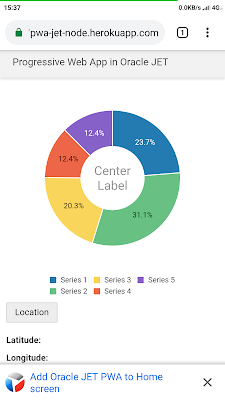
Access JET app URL, the app will be loaded and you should see Android notification in the bottom. Google Chrome mobile browser automatically is recognizing PWA app by manifest and offers to "install" it by adding to the home screen:
Select notification and you will get a confirmation message:

Select "Add" and Web app will be added to the home screen. It will look like a real mobile app for the user. For example, the user could get runtime stats for the app, check storage and data usage metrics:

The app is added to the home screen (look for Oracle JET icon):

Select the app icon and app will be opened. There is no URL address bar in the header and indeed it looks like a mobile app, not a Web page:

The app will be recognized as PWA, if certain config steps were implemented. One of them - you need to add manifest file (add it in Oracle JET in the same folder as index.html) and provide app icons, name, etc.:

The manifest file must be included through a reference in the app entry point - index page (Oracle JET index.html page for example):

In addition to manifest, the app must define a service worker (same as manifest file, you can create this file in the same directory as Oracle JET index.html). PWA doesn't only bring the visual experience of the real app to the Web application. You can define a cache store for the app files, this means next time when offline - app files will load from local cache storage, there will be no need to download them from the internet:

Service worker can be registered from main.js file where Oracle JET context is initialized on the application initial load. Add service worker registration at the bottom of main.js:

The idea of this post was to share a simple example of PWA for Oracle JET. This should help you to get started quickly with PWA support config for Oracle JET app.
Inspired by this post - A Simple Progressive Web App Tutorial, I decided to add PWA config into Oracle JET app and test how it works (on Android, didn't test on iOS, but there is nothing JET specific, if PWA is supported on iOS, it should work).
Oracle JET PWA sample app is deployed on Heroku (PWA will work only if the app is coming through HTTPS) and available under this URL. The sample app is available on GitHub repo. Node.js wrapper for this sample is available in another GitHub repo, you can use it to deploy on Heroku or another service.
Access JET app URL, the app will be loaded and you should see Android notification in the bottom. Google Chrome mobile browser automatically is recognizing PWA app by manifest and offers to "install" it by adding to the home screen:

Select notification and you will get a confirmation message:

Select "Add" and Web app will be added to the home screen. It will look like a real mobile app for the user. For example, the user could get runtime stats for the app, check storage and data usage metrics:

The app is added to the home screen (look for Oracle JET icon):

Select the app icon and app will be opened. There is no URL address bar in the header and indeed it looks like a mobile app, not a Web page:

The app will be recognized as PWA, if certain config steps were implemented. One of them - you need to add manifest file (add it in Oracle JET in the same folder as index.html) and provide app icons, name, etc.:

The manifest file must be included through a reference in the app entry point - index page (Oracle JET index.html page for example):

In addition to manifest, the app must define a service worker (same as manifest file, you can create this file in the same directory as Oracle JET index.html). PWA doesn't only bring the visual experience of the real app to the Web application. You can define a cache store for the app files, this means next time when offline - app files will load from local cache storage, there will be no need to download them from the internet:

Service worker can be registered from main.js file where Oracle JET context is initialized on the application initial load. Add service worker registration at the bottom of main.js:

The idea of this post was to share a simple example of PWA for Oracle JET. This should help you to get started quickly with PWA support config for Oracle JET app.
Friday, June 7, 2019
Running Oracle JET on Heroku with Node.js (JET Showcase)
I have implemented JET (more about Oracle JET) showcase app with data visualization components usage. This app shows historical weather data in Boston city, the dataset is taken from Kaggle. Switching years makes data visualization to change and show new data - I love how polar chat is updated. Calendar displays temperature for each day during the year using JET picto chart component:

App is deployed on Heroku and available by this URL. Heroku provides $7 per month account with analytics and better resources, but there is a free option too (it comes with sleep after 30 minutes of inactivity) - free option is good for experimentation, as for this case.
Heroku dashboard for the deployed JET app:

Free deployment comes without analytics option:

App comes with two options - Dashboard and Histogram. The dashboard allows switching between years and shows a polar chart along with daily temperature calendar:

The histogram displays the same data in a different view:

This app comes with Web Component implementation, yes Web Components are a standard feature in JET. Toolbar, where you can switch years, is implemented as Web Component:

Web Component is being used in both UIs - dashboard and histogram:

Visualization components are getting data through Knockout.JS observable variables:

Variables are initialized in JS functions:

Resources:
1. Heroku deployment guide for Node.js
2. Node.js app which is deployed on Heroku - GitHub. JET content is inside the public folder. JET content is copied from JET app web folder, after running ojet build --release
3. Oracle JET app - GitHub

App is deployed on Heroku and available by this URL. Heroku provides $7 per month account with analytics and better resources, but there is a free option too (it comes with sleep after 30 minutes of inactivity) - free option is good for experimentation, as for this case.
Heroku dashboard for the deployed JET app:

Free deployment comes without analytics option:

App comes with two options - Dashboard and Histogram. The dashboard allows switching between years and shows a polar chart along with daily temperature calendar:

The histogram displays the same data in a different view:

This app comes with Web Component implementation, yes Web Components are a standard feature in JET. Toolbar, where you can switch years, is implemented as Web Component:

Web Component is being used in both UIs - dashboard and histogram:

Visualization components are getting data through Knockout.JS observable variables:

Variables are initialized in JS functions:

Resources:
1. Heroku deployment guide for Node.js
2. Node.js app which is deployed on Heroku - GitHub. JET content is inside the public folder. JET content is copied from JET app web folder, after running ojet build --release
3. Oracle JET app - GitHub
Tuesday, April 30, 2019
Run Oracle VBCS Application on Your Own Server
Latest VBCS release brings an option to export VBCS application and run on your own server (or different cloud provider). This is a truly strong step forward for VCBS. Read more about it in Shay Shmeltzer blog post. If you decide to keep running VBCS app within VBCS itself, then you get additional functionality of VBCS Business Services, Oracle Cloud security, etc. out of the box. If you export VBCS application and run on your own environment, these features are not included, but then you don't need to pay for VBCS Cloud runtime when hosting the app. It is great to have alternatives and depending on the customer either one or another of the use cases would work.
One of the use cases - customer even don't need to have its own VBCS instance. We could develop Oracle JET app in our VBCS instance, export and deploy it in the customer environment. Later we could provide support for version upgrade.
I have exported sample VBCS app with the external REST service call (REST service). Deployed app on our own server. You can try it yourself - http://138.68.79.219:7001/vbcsapp/webApps/countries/:

I must say it is simple to export VBCS app, no hassle at all. Make sure VBCS app you are exporting is set with anonymous access (this will disable Oracle Cloud security model). You will need to implement security and backend secure calls yourself:

Next go to REST service control and specify Bypass Proxy option (this will enable direct REST service call from VBCS app, bypassing Oracle Cloud proxy service). Important: to work with Bypass Proxy option, REST service must be invoked through HTTPS:

Nothing else on VBCS side. Next need to push application code to Oracle Developer Cloud Service Git repository and build artifact which can be exported. I suggest reading Shay Shmeltzer blog post about how to proceed with VBCS and Oracle Developer Cloud Service setup.
In VBCS do push to Git for the selected app:

If it is the first time with Oracle Developer Cloud Service, you will need to set up (refer to Shay post mentioned above) a build job. Create build job configuration, point to Git repo:

Provide a set of parameters for the build job:

Add Unix Shell script to the build job. This script will execute Node.js NPM command to run vb-build job to construct artifact which can be exported and deployed in your own environment. It is important to make sure that property values used in the script match property values defined in the build job earlier. To execute npm command, make sure to use Oracle Developer Cloud Service machine with Node.js support:

Run the job, once it completes and if there are no errors, go to job artifacts and download optimized.zip - this is the archive with VBCS application you can deploy:

Important: when exported VCBS application is accessed, it loads a bunch of scripts and executes HTTPS requests. There is one request which slows down VBCS application initial loading - call to _currentuser. It is trying to execute the _currentuser request on VBCS instance, but if the instance is down - it will wait until a timeout and only then will proceed with application loading. To fix that, search for _currentuser URL in the exported code and change URL to some dummy value, so that this request will fail immediately and will not keep VBCS application from continue loading:

One of the use cases - customer even don't need to have its own VBCS instance. We could develop Oracle JET app in our VBCS instance, export and deploy it in the customer environment. Later we could provide support for version upgrade.
I have exported sample VBCS app with the external REST service call (REST service). Deployed app on our own server. You can try it yourself - http://138.68.79.219:7001/vbcsapp/webApps/countries/:

I must say it is simple to export VBCS app, no hassle at all. Make sure VBCS app you are exporting is set with anonymous access (this will disable Oracle Cloud security model). You will need to implement security and backend secure calls yourself:

Next go to REST service control and specify Bypass Proxy option (this will enable direct REST service call from VBCS app, bypassing Oracle Cloud proxy service). Important: to work with Bypass Proxy option, REST service must be invoked through HTTPS:

Nothing else on VBCS side. Next need to push application code to Oracle Developer Cloud Service Git repository and build artifact which can be exported. I suggest reading Shay Shmeltzer blog post about how to proceed with VBCS and Oracle Developer Cloud Service setup.
In VBCS do push to Git for the selected app:

If it is the first time with Oracle Developer Cloud Service, you will need to set up (refer to Shay post mentioned above) a build job. Create build job configuration, point to Git repo:

Provide a set of parameters for the build job:

Add Unix Shell script to the build job. This script will execute Node.js NPM command to run vb-build job to construct artifact which can be exported and deployed in your own environment. It is important to make sure that property values used in the script match property values defined in the build job earlier. To execute npm command, make sure to use Oracle Developer Cloud Service machine with Node.js support:

Run the job, once it completes and if there are no errors, go to job artifacts and download optimized.zip - this is the archive with VBCS application you can deploy:

Important: when exported VCBS application is accessed, it loads a bunch of scripts and executes HTTPS requests. There is one request which slows down VBCS application initial loading - call to _currentuser. It is trying to execute the _currentuser request on VBCS instance, but if the instance is down - it will wait until a timeout and only then will proceed with application loading. To fix that, search for _currentuser URL in the exported code and change URL to some dummy value, so that this request will fail immediately and will not keep VBCS application from continue loading:

Saturday, February 23, 2019
Oracle JET Table with Template Slots for Custom Cells
Oracle JET table comes with template slot option. This is helpful to build generic functionality to render custom cell within the table.
In this example, custom cells are used to render dates, amount and risk gauge:

While implementing Oracle JET table it is a best practice to read table column structure from a variable, not to define the entire structure in HTML itself. Property columns refer to the variable. Template called cellTemplate is a default template to render cell content:

Table column structure is defined in JS. To apply specific cell template, it is specified in column definition:

Table data is static in this example and coming through JSON array based on JET Array Data Provider:

Sample code is available on GitHub.
In this example, custom cells are used to render dates, amount and risk gauge:

While implementing Oracle JET table it is a best practice to read table column structure from a variable, not to define the entire structure in HTML itself. Property columns refer to the variable. Template called cellTemplate is a default template to render cell content:

Table column structure is defined in JS. To apply specific cell template, it is specified in column definition:

Table data is static in this example and coming through JSON array based on JET Array Data Provider:

Sample code is available on GitHub.
Subscribe to:
Comments (Atom)