Showing posts with label MDS. Show all posts

Thursday, June 4, 2015

How to Apply New Label Text in MDS Customisation

It may look simple, but really is not obvious how to apply new label text for the ADF BC attribute or UI component through MDS customisation. It is simple, if such label text already exists in the core bundle. If you need to create new label text in the customisation and use it - this becomes a bit tricky. Well, as usual - I'm going to explain how you could solve such task. You should read more about MDS customisation setup in ADF - MDS Seeded Customization Approach with Empty External Project.

Core application - mds_label_cust.zip, contains one label for First Name VO attribute:


The requirement is to customise core application and add label for the Last Name VO attribute, without changing anything in the core. For this purpose, we need to create different JDEV application - extension, configured with shared library deployment profile. Here you could simply create new properties file. We are going to use this application to deliver additional components for the core. Keep in mind - core application must be configured to use this library. Add label for Last Name VO attribute, in the properties file located in the extension:


Time for the main trick. We could use label directly from any resource bundle in the ADF application. This is accomplished through such expression - reference for the resource bundle and label key:


This code should be part of customisation project, on runtime it will find referenced resource bundle and label key in the resource bundle from extension (see above).

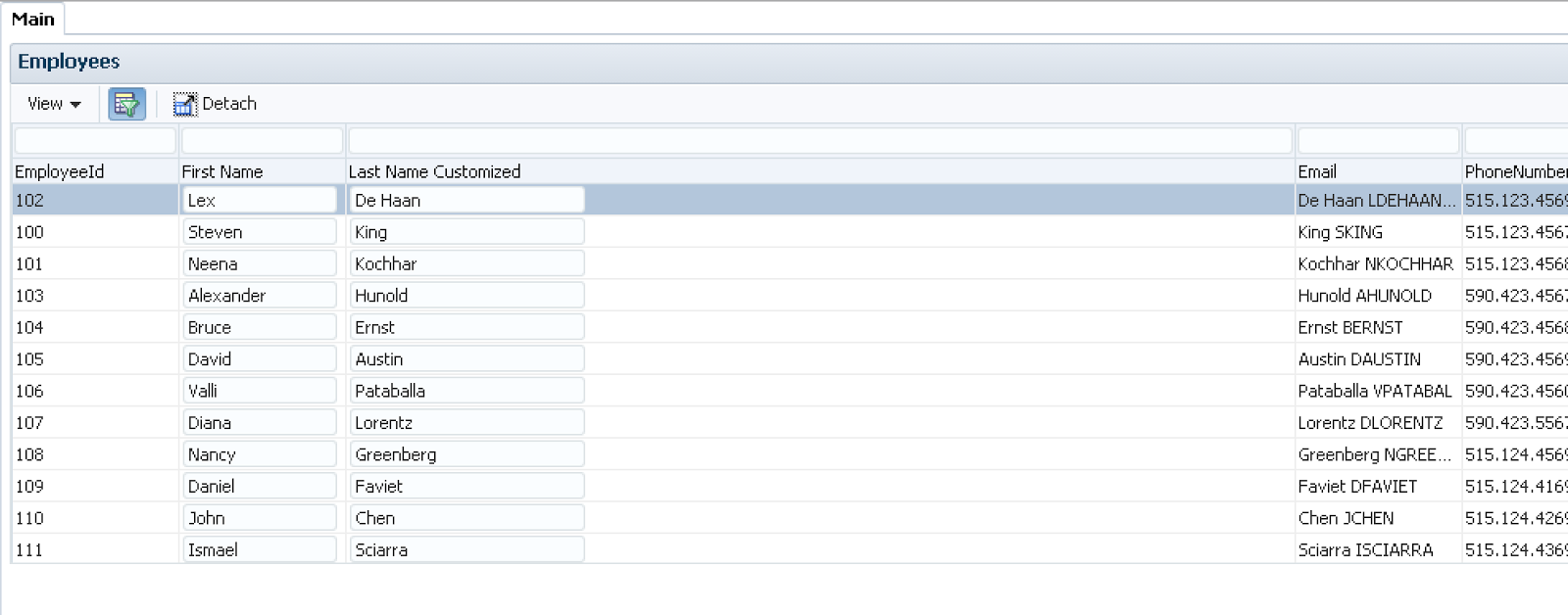
This is how it looks on runtime - label text is taken from resource bundle in extension and applied by customisation:


It sounds more tricky, than it is - just try it.

Wednesday, December 24, 2014

Configuring MDS Customisation Layer and Layer Value Combination in ADF

With this post I would like to dive a bit deeper into MDS customisation and layer combination handling. By default, there is defined customisation layer - site. Typically we set our own customisation values for this layer, as a result - all customisations usually are stored under site layer. There could be situations, when more advanced setup would be required - to be able to control layer and layer value combination in a custom way. In other words - to be able to define your own custom layer and then provide customisation values for this layer (MDS customisations will be stored under custom_layer/custom_layer_value, instead of default site/custom_layer_value). Oracle docs would not describe how to handle on runtime layer name to be dynamic and retrieve it from some sort of configuration file. I'm going to describe a technique for this, allowing to combine and group MDS customisations under custom layer and layer values folders.

Sample application - MDSCustomizationsApp_v3.zip is implemented with a separate JDEV project for MDS customisation files. There is no site layer, it starts with profile1/profile2 and then goes with MDS layer values group1/group2. Layer profile1/profile2 switch is dynamic and handled by custom MDS customisation class implemented in the project. This is how it looks like in JDEV (Customisation Context is set with profile2 name) - MDS layer name is retrieved from a custom JAR file stored under JDEV structure (I will describe it below):


In Oracle docs you would find an example of custom class with MDS layer, where layer name will be set as static. In my sample app, I have implemented it as dynamic - layer name is retrieved from configuration file. Layer name is retrieved and assigned during first application load, it is not reset until the next restart. Here is the example of layer name variable initialisation:


Method getValue is overriden as well, to return different MDS layer customisation values, based on ADF Security.

Method getName is overriden to return MDS layer name on application initialisation. Custom method retrieveDynamicLayerName is implemented to retrieve MDS layer name from configuration file. This method works on design and runtime, this means it can be used for MDS design time seeded customisations:


In order to use custom SiteProfileCC class on runtime, we need to package it into separate JAR file and include this JAR into EAR. In my example, configuration file is packaged together with the class (this would allow to use it for design time MDS seeded customizations):


You must copy JAR file with MDS seeded customisation class SiteProfileCC into JDEV directory - jdeveloper/jdev/lib/patches, this would make it visible for design time MDS seeded customisations:


I have defined multiple MDS layers with layer values. Two layers are used for the test - profile1 and profile2. Each of these layers is assigned with group1 and group2 MDS layer values:


Application must be configured to use custom class SiteProfileCC, this is done in add-config.xml file:


Customisations are implemented in the separate JDEV application, all customisations are deployed to MAR file (we can export them directly and apply to the running instance of ADF application):


MAR file is included into main application deployment profile, under EAR level. You should notice - MDS customisation class JAR file is included to be packaged under lib folder on EAR level (this is important, otherwise application will not be started, because it will fail to load custom SiteProfileCC class):


Let's see how it works. I have provided profile1 for MDS layer in configuration file and redeployed application:


Login with user redsam1, the one granted with Group One role:


Application screen is loaded with customisations based on MDS layer and layer value - read-only table is rendered on the right side:


Login with user redsam2, the one granted with Group Two role:


Customisations for profile1 and group two are applied. Instead of Submit button, Save button is implemented:


Let's change MDS layer to be profile2 and test again with the same users:


User redsam1 gets customisation applied with Jobs block rendered below Employees:


User redsam2 gets customisations with Save and Cancel buttons included:

Thursday, October 23, 2014

ADF BC View Object SQL Query Customization with MDS

This post is based on my previous article about MDS Seeded Customization - MDS Seeded Customization Approach with Empty External Project. Today I will focus on explaining how to customise SQL query for read-only VO. This is not so obvious as it sounds. However, it is doable - I will explain how.

Sample application - MDSCustomizationsApp_v2.zip contains both main and customisation projects. Main project implements read-only VO for Jobs data, it doesn't include Job Title attribute:


This is how SQL query looks for such VO in the wizard:


We should take a look into the source code, SQL query is defined by SQLQuery tag. Tag doesn't have ID, this would disable tag customisation using JDEV MDS wizards:


No matter there is no ID set, we still could customise it - I will show you how. Here is the example of SQL query customisation stored in MDS customisation file. Firstly you should remove SQL query completely from VO and then add it again (this will create two entries in MDS customisation file). Once SQL query is written to the MDS customisation file, we can change it as we would like to - Job Title attribute is added to the SQL statement:


We need to add separately VO attribute for Job Title, this can be done through JDEV MDS customisation wizard. Make sure to set IsSelected=true property, otherwise attribute will not be set from the query:


You should drag and drop Job Title attribute from Data Control into the fragment, this will generate binding entry in the page definition file:


UI component for Job Title will be generated as ADF Faces output text:


You should notice on runtime customised SQL statement executed, this statement would include Job Title added through MDS customisation:


Job Title value is fetched and displayed on UI:

Friday, July 25, 2014

MDS Support for Mobile Application Framework (MAF) in JDeveloper 12c (12.1.3)

MAF framework in JDeveloper 12c (12.1.3) comes with MDS support. This means, we can customise mobile applications in similar way as we customise regular ADF Web applications. I'm going to explain and demonstrate with the sample application, how it works in MAF 2.0. You can read about it more in MAF 2.0 developer guide, Customizing MAF AMX Application Feature Artifacts.

Sample application, tested with iOS platform - MAFMobileLocalApp_v2.zip. Original version of this application brings Locations screen, where both City Name and Street Address are displayed:


We are going to customise original application with MDS, without changing source code directly. Customized application is based on two MDS tip layers - gold and silver level partners. Gold level partners are able to see State Name in addition to the Street Address:


While silver level partners are allowed to see only City Name:


To achieve MDS functionality behaviour for MAF application, you must define first MDS customisation class, this class must extend from standard MDS CustomizationClass and implement several methods. Important method is getName(), you must define MDS customisation name, the same name will be used for customisation (JDeveloper automatically reads this name during MAF application design time):


Customization class must be set in add-config.xml MDS section, in order to be registered for customisation use:


Once customisation class is registered, we can switch JDeveloper to the Customization Developer mode and start customizing application:


Make sure MDS layers are properly configured in CustomizationLayerValues.xml file. Customization layer must be set to the same name as you set in Customization class above. Layer values should specify different layers supported for customization:


I have defined two layers - gold and silver partnership. MDS layer can be selected for customisation, we start from Gold:


Locations page is updated to include State Name:


However, actual change is stored not in Location page, but in generated MDS file for Location page - it keeps delta for the changes made in customization mode. This file is generated under Gold Partnership profile folder:


State Name addition required to update Page Definition file for Locations, there is extra MDS file created with delta information for Locations Page Definition:


Next we can customize for Silver layer - change layer value:


Here we should keep only City Name and remove Street Address:


This change is reflected in MDS delta for Locations page, stored under Silver Partnership level:

Tuesday, May 20, 2014

Personalising ADF Query with MDS User Persistence

I bet you are familiar with ADF Query UI having many criteria items. This may look irritating to the users, as there are so many options to use for the search. I will describe alternative approach in this post, with MDS user persistence and personalisation involved. It might be more user friendly, to offer only few criteria items by default and allow to add other items through ADF Query advanced option, together with MDS user persistence feature enabled for personalisation. Post is based on sample application from - ADF Query Saved Search in ADF 12c.

Here is updated sample application, for today post - SavedSearchApp_v2.zip. As you can see, there is minimal criteria set is available by default:


User could add additional criteria items he needs, like Email and save modified criteria for the future use:


Logout/login and personalised criteria for this user will remain available - quite cool. User could work only with criteria items he finds useful, this would make screen lighter also:


I hope such quick insight about ADF Query personalisation and criteria items optimisation will be useful for your project.

Saturday, April 5, 2014

MDS Seeded Customization Approach with Empty External Project

Great feature in ADF - MDS Seeded customisations support. This is particularly useful for independent software vendors, who are developing their own products on top of ADF framework. With MDS Seeded customisation, maintenance for multiple customers becomes easier. We could create customisation, instead of changing original source code - this makes it easier to maintain a product. I would like to share one important hint, related to technical architecture for MDS Seeded customisations - this will be related to the way how MDS Seeded customisations are organised and maintained. By default, you would create MDS Seeded customisation files in the original application, however this is not very clean approach. There is a way to create and keep all MDS Seeded customisation files in empty external application. I will describe in the post, how this can be achieved with a few easy steps.

If you are going to test sample application - MDSCustomizationsApp.zip, with integrated WLS instances in JDeveloper, make sure to read this post (it describes how to setup local MDS repository in file system) - How To Setup MDS Repository for Embedded WLS Instance.

Let's start - you can download initial version of sample ADF application from the blog post mention above. Employees form and empty Submit button:


I don't want to create any MDS Seeded customisation files inside, rather I would build and deploy ADF library out of main application:


Sample comes with special application - CustomizationApp (you can find it in the archive). This application was created to keep MDS Seeded customisation files, no other purpose. Initially, empty project was created - where ADF library was imported (the one we have just deployed):


Empty project is enabled with MDS Seeded customisation support:


Restart JDeveloper in customisation mode - so we could create some customisations for the content from imported ADF library:


If MDS Seeded customisation mode was successfully applied, you should see some special icon, next to the application name. Choose 'Show Libraries' to see a list of libraries - so, we could see contents from imported ADF library:


All attached libraries will be displayed, you should locate our ADF library. Expand it and you should see application packaging:


We could apply several customisations now. Let's open Employees VO and define View Criteria (filter employees by salary >= 1000). This customisation will be stored inside our empty project:


There will be a change in AM - View Criteria will be applied for VO instance:


We could go and review XML files for applied MDS Seeded customisations. There is one for VO and AM. XML for AM contains delta information about applied View Criteria for VO instance:


One more customisation on UI level now - drag and drop Commit operation for Submit button:


This change creates two additional XML files with MDS Seeded customisations - for JSF fragment and Page Definition:


You must define MDS Seeded customisations deployment profile (MAR) for application with empty project (containing XML's):


Development is completed, now will be a last bit - deployment. Make sure WLS is started (you should start it separately, if you want to test MAR profile deployment):


Go ahead and deploy main application first - you should get a list of MDS repositories (see a hint how to define local test repository in the blog post mentioned above):


Once main application was deployed, you can apply MDS Seeded customisations and export them through a MAR file from external application:


You should see main application name in the wizard, MDS Seeded customisations will be applied for this application:


All the changes applied through MDS Seeded customisations, will be visible in the log:


Good point - there is no need to restart main application, after MDS Seeded customisation changes were applied. Here you can see, original application with changes as per above:


If applied changes should be removed, this could be simply removed from MDS Seeded customisation XML file and re-applied. Main advantage of this approach - no need to store XML files with MDS Seeded customisations inside original project, we could keep them outside.