If data will not be commited to the database in the same request - not recommended to use postChanges() method in ADF BC. ADF developers tend to bypass this recommendation, especially when integrating ADF with PL/SQL code and trying to keep temporary data in the database. From my experience, is not safe to use postChanges() method even if database commit is done in the same custom method (read - one request). ADF BC passivation may happen anytime unexpected and then posted data is simply lost. Typically this error is not reproduced in development environment, but only in test or production when there are more concurrent users accessing the system. Good practice - always run your application with Application Module Pooling disabled before sending code to the testing team - this would allow to simulare stress test environment and force ADF BC to switch Application Module pool instances.
I would like to demo most common ADF post changes and PL/SQL invocation side effect with this simple application - PostControlApp.zip. Inside archive you will find SQL file with PL/SQL function for this application - EMPL_SAL_SUM. Function is pretty simple, it calculates total salary for all employees. The idea is to show that after Application Module passivation happens, posted data is lost and total salary is still returned without changes:

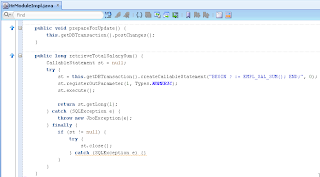
There are two custom methods implemented on top of Application Module Implementation class. One method is responsible to post changes and second calls PL/SQL function and returns total salary:

Here is the source code implementation for these two methods:
UI fragment contains two buttons, designed to invoke two custom methods. Total calculated salary value is displayed visually:

If you decide to run sample application, firstly invoke Show Total Salary button - it will display current sum (0.68M in my case):

Change salary value for one of the employees to be lower - 110 as for example and press Prepare For Update button (this calls postChanges() method):

Method - postChanges() is pushing data to DB, executing DML statement without commiting. Developer tend to think - this is great, we can push data to DB and invoke PL/SQL code over it. Not so fast - keep in mind ADF BC passivation behavior (DB connection from Application Module can be switched at any time and posted data will be lost for the next request):

Invoke Show Total Salary again - you will see a change in calculated total salary (0.67M). This time calculated value was retrieved from PL/SQL function correctly, simply because ADF BC passivation didn't happen:

Disable Application Module pooling - you will get different result:

Change salary value and press Prepare For Update button to invoke postChanges():

This time passivation happens, we can see that from the log:

Calculated total salary value stays the same after refresh - posted data was lost, because of change in database connection:

I would like to demo most common ADF post changes and PL/SQL invocation side effect with this simple application - PostControlApp.zip. Inside archive you will find SQL file with PL/SQL function for this application - EMPL_SAL_SUM. Function is pretty simple, it calculates total salary for all employees. The idea is to show that after Application Module passivation happens, posted data is lost and total salary is still returned without changes:

There are two custom methods implemented on top of Application Module Implementation class. One method is responsible to post changes and second calls PL/SQL function and returns total salary:

Here is the source code implementation for these two methods:

UI fragment contains two buttons, designed to invoke two custom methods. Total calculated salary value is displayed visually:

If you decide to run sample application, firstly invoke Show Total Salary button - it will display current sum (0.68M in my case):

Change salary value for one of the employees to be lower - 110 as for example and press Prepare For Update button (this calls postChanges() method):

Method - postChanges() is pushing data to DB, executing DML statement without commiting. Developer tend to think - this is great, we can push data to DB and invoke PL/SQL code over it. Not so fast - keep in mind ADF BC passivation behavior (DB connection from Application Module can be switched at any time and posted data will be lost for the next request):

Invoke Show Total Salary again - you will see a change in calculated total salary (0.67M). This time calculated value was retrieved from PL/SQL function correctly, simply because ADF BC passivation didn't happen:

Disable Application Module pooling - you will get different result:

Change salary value and press Prepare For Update button to invoke postChanges():

This time passivation happens, we can see that from the log:

Calculated total salary value stays the same after refresh - posted data was lost, because of change in database connection:


