Showing posts with label HTML. Show all posts
Showing posts with label HTML. Show all posts
Sunday, July 17, 2022
Tailwind UI in Django with Flowbite Accordion, Table, Form
I explain my experience working with Flowbite to build prototype UI for data mapping screen with accordion, table and form components.

Thursday, May 19, 2016
Oracle JET Master-Detail with ADF BC REST
One of the most typical use cases in enterprise applications - Master-Detail relationship implementation. I have decided to implement it in JET and to share this practical implementation with you. Hopefully it will be useful, when you will be learning and building JET applications.
Sample application - JETCRUDApp_v8.zip implements a table with row selection in JET (you must run ADF BC REST application in JDEV 12.2.1 and JET in NetBeans 8). On row selection, Job ID is retrieved from selected row and based on this - Job data is fetched. Minimum and Maximum salary values are fetched from Job data and displayed in the chart, along with selected employee salary. I'm executing separate REST call for each new selection in the master and detail data change, see how fast data is being changed in the chart:

Detail data displayed in the chart is fetched based on Job ID selected in the master table:

Each time when new row is selected in the table, chart is changed (REST call to ADF BC is executed in the background, using Job ID for selected employee as a key):

Great thing about JET - it is responsive out of the box. On narrow screen, UI components are re-arranged into single column layout. Editable form is displayed below table:

Chart is displayed below editable form:

Let's take a look, how detail data displayed in the chart is fetched. First of all chart UI component is defined in HTML, it points to series value observable variable:

This observable variable is defined as array in JavaScript. Observable variable allows to push value changes to UI automatically, without additional intervention:

I have defined data structure for Job response, this includes JobId key, Minimum/Maximum values. REST URL will be assigned later, in the table selection listener. This URL will change for each selected row, to retrieve different REST resource. We leave model definition without REST URL here:

Table selection listener creates new model and executes fetch operation for the job. REST URL with Job key is constructed to fetch required detail data. In the success callback returned data is accessed and pushed into observable collection, which is displayed in the chart:

Saturday, May 14, 2016
Oracle JET Input Search with ADF BC REST
LOV is popular component in ADF, it allows to seach for data entry in the list, select it and assign to the attribute. I was researching, how similar concept can be implemented in Oracle JET, based on data from ADF BC REST service. JET Input Search component seems to be useful for LOV like behavior implementation.
Job ID field is implemented with Input Search. It is based on value/label pair, user enters label and in the background selected value is returned and assigned to the attribute:

Watch this recording, to see how was it is. Search is performed on client side and value selection is instant:

List is being filter when user types value (you can configure it, to start filtering after user enters certain number of charachters):

Try to select a value from the list and update record:

In the background it is using key value SA_REP for update, we can track it in ADF BC log, where actual DB update takes place (through REST PATCH):

Let's take a look into implementation. In HTML I'm using ojInputSearch component with value and options properties. Property options provides list entries and property value holds selected value key:

Options are defined in JavaScript as observableArray, this allows to synch collection data to the UI. There is collection for options and REST service URL (pointing to Jobs ADF BC REST resource):

Data structure is defined by parseJob function, it contains JobId and JobTitle attributes - this will help to map REST response into JET collection:

JET collection is configured with REST URL for Jobs, unlimited fetch size (to fetch list of all jobs) and data structure mapping for REST resource:

Main part - we need to populate JET collection with data, this can be done by executing fetch method (see JET API documentation). In the success callback (executed asynchronously), we can access returned collection and push all entries into observableArray variable, attached to Input Search UI component:

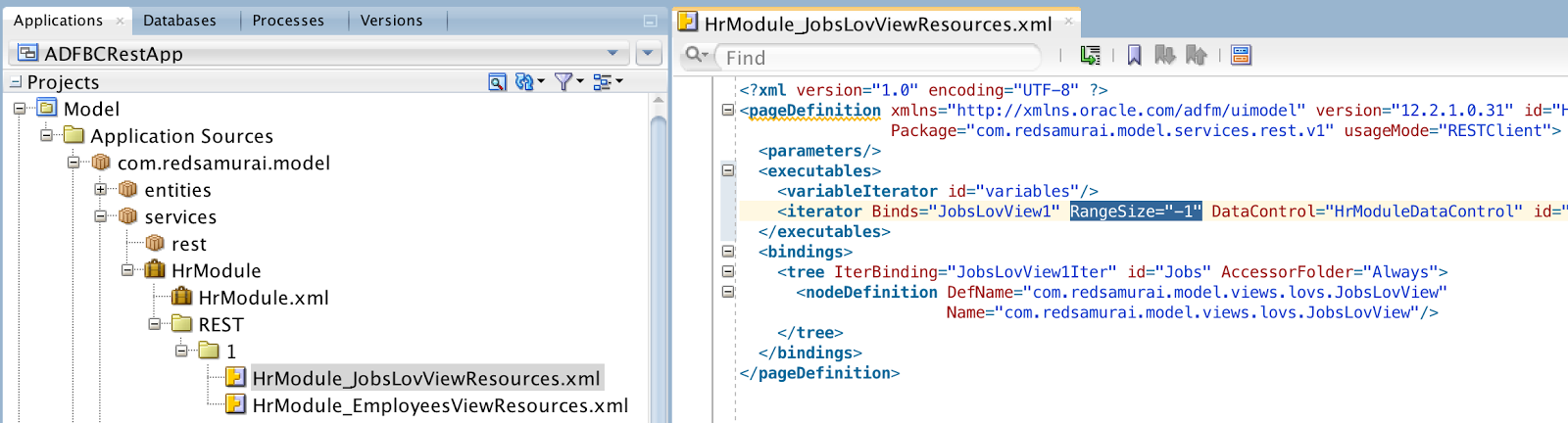
Make sure to set RangeSize = -1 in ADF BC REST service resource definition for Jobs. This will enforce ADF BC to return all rows:

Download sample application (archive contains ADF BC REST sample and JET implementation with NetBeans, you must add JET runtime distribution to run JET sample) - JETCRUDApp_v7.zip.
Job ID field is implemented with Input Search. It is based on value/label pair, user enters label and in the background selected value is returned and assigned to the attribute:

Watch this recording, to see how was it is. Search is performed on client side and value selection is instant:

List is being filter when user types value (you can configure it, to start filtering after user enters certain number of charachters):

Try to select a value from the list and update record:

In the background it is using key value SA_REP for update, we can track it in ADF BC log, where actual DB update takes place (through REST PATCH):

Let's take a look into implementation. In HTML I'm using ojInputSearch component with value and options properties. Property options provides list entries and property value holds selected value key:

Options are defined in JavaScript as observableArray, this allows to synch collection data to the UI. There is collection for options and REST service URL (pointing to Jobs ADF BC REST resource):

Data structure is defined by parseJob function, it contains JobId and JobTitle attributes - this will help to map REST response into JET collection:

JET collection is configured with REST URL for Jobs, unlimited fetch size (to fetch list of all jobs) and data structure mapping for REST resource:

Main part - we need to populate JET collection with data, this can be done by executing fetch method (see JET API documentation). In the success callback (executed asynchronously), we can access returned collection and push all entries into observableArray variable, attached to Input Search UI component:

Make sure to set RangeSize = -1 in ADF BC REST service resource definition for Jobs. This will enforce ADF BC to return all rows:
Download sample application (archive contains ADF BC REST sample and JET implementation with NetBeans, you must add JET runtime distribution to run JET sample) - JETCRUDApp_v7.zip.
Subscribe to:
Posts (Atom)