When working with complex use cases, very often we need to bring aggregated data from DB View. ADF BC Entity Object can be based directly on DB View - it works for data read access. Update operation will fail, because we can't update data through DB View, we can only read. This means, there should be another Entity Object available with direct connection to the DB table. I will describe example where data is populated from DB View through ADF BC EO and updated through another EO connected directly to the table:

Download sample application - UpdateDBViewEO.zip. This sample is based on DB View available in HR schema - EMP_DETAILS_VIEW. Make sure this DB View is compiled:

We can easily generate ADF BC Entity Object on top of DB View:

Data is retrieved without issues. However, when we change data and try to submit changes - expected DB View error is generated:

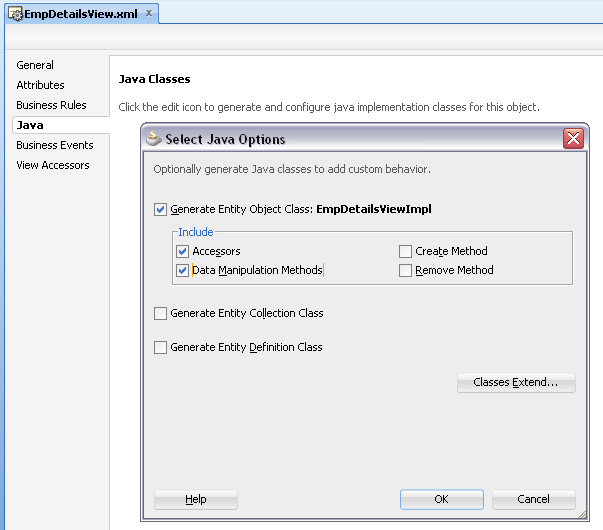
In order to prevent this error, we need to disable EO based on DB View from data update - it should not submit data to DB and try to update DB View. Generate Java Implementation class for EO based on DB View - include accessors and data manipulation methods:

Comment out call to super inside doDML(...) and lock() methods - this will prevent this EO from posting data to DB:

Why we use EO at all? This is because EO always represents single row - doDML(...) method is invoked for every row with changes. This means we can track all changed rows and update EO based on DB table accordingly:

There is only one attribute editable on UI - Salary. In doDML(...) I have implemented a check to verify if Salary was changed - through getPostedAttribute(...) method. However, getPostedAttribute(...) method is a bit useless in this context - it returns just previous value (not the one from DB). So, if user is changing same attribute two times - second time getPostedAttribute(...) will return value from the first change. Inside doDML(...), we are getting instance of VO based on editable EO - searching for specific record by key and finally setting changed attribute value. Changes for editable EO will be posted automatically, during transaction commit phase.
When transaction is completed, we must refresh data coming from DB View - execute VO to clear EO cache:

If we change one row on runtime, there will be following SQL executed during transaction commit phase:
1. Find By Key SQL to retrieve row to update from updatable VO:

2. Executing lock for record to be updated and executing update statement itself:

Data is retrieved from DB View and updated directly through editable VO/EO:


Download sample application - UpdateDBViewEO.zip. This sample is based on DB View available in HR schema - EMP_DETAILS_VIEW. Make sure this DB View is compiled:
We can easily generate ADF BC Entity Object on top of DB View:

Data is retrieved without issues. However, when we change data and try to submit changes - expected DB View error is generated:

In order to prevent this error, we need to disable EO based on DB View from data update - it should not submit data to DB and try to update DB View. Generate Java Implementation class for EO based on DB View - include accessors and data manipulation methods:
Comment out call to super inside doDML(...) and lock() methods - this will prevent this EO from posting data to DB:

Why we use EO at all? This is because EO always represents single row - doDML(...) method is invoked for every row with changes. This means we can track all changed rows and update EO based on DB table accordingly:

There is only one attribute editable on UI - Salary. In doDML(...) I have implemented a check to verify if Salary was changed - through getPostedAttribute(...) method. However, getPostedAttribute(...) method is a bit useless in this context - it returns just previous value (not the one from DB). So, if user is changing same attribute two times - second time getPostedAttribute(...) will return value from the first change. Inside doDML(...), we are getting instance of VO based on editable EO - searching for specific record by key and finally setting changed attribute value. Changes for editable EO will be posted automatically, during transaction commit phase.
When transaction is completed, we must refresh data coming from DB View - execute VO to clear EO cache:

If we change one row on runtime, there will be following SQL executed during transaction commit phase:
1. Find By Key SQL to retrieve row to update from updatable VO:

2. Executing lock for record to be updated and executing update statement itself:

Data is retrieved from DB View and updated directly through editable VO/EO:

