Showing posts with label Declarative. Show all posts

Saturday, January 26, 2019

Search Form in Oracle Visual Builder based on ADF BC REST

Oracle Visual Builder supports ADF BC REST out of the box. Build service connection using "Define by Specification" wizard:


Wizards support ADF as API type. Add describe at the end of the REST URL, this will bring metadata for exposed ADF BC REST service (information about attribute types, etc.):


List of endpoints will be populated automatically. You could select all endpoints to be supported for your connection or select only few:


The most typical thing you would do with endpoint - map it with the table to display collection data. You would drag and drop Oracle JET table into VBCS page and choose Add Data option to map it with the service connection:


In the wizard you would select previously defined service connection:


There is a way to switch wizard to detailed view and choose from multiple endpoints available for the connection:


In the next step, you would select service attributes to be displayed in table columns. All declarative, sweet:


In Visual Builder at any point you can quickly test application, it will load in separate browser tab (or you could switch app to Live mode and test page functionality directly in VBCS window):


Every action in Visual Builder is handled through events. For example, this event is mapped with Reset button (you can see it in structure tab on the left):


At any point, you can switch to source view and check (or edit) HTML/JET code which is generated for you by Visual Builder. So cool, imagine typing and copy-pasting all this text by hand, tough and time-consuming (you could do better things in your life than copy-pasting HTML code):


Let's explain how search form logic is done in this sample. I have defined page scope variable type, this type would hold search attribute name, type and operation:


Create as many variables based on this type, as many search criteria items you will expect to have. Make sure to provide attribute and operation names (leave value property empty, this will be assigned by user):


Map search form fields with variables:


Create an event for Search button, which calls search action chain:


In action chain we can define search logic. Before executing search criteria, we need to prepare search criteria array (normally this step could be skipped, but there is issue in current Visual Builder, it fails to execute criteria search, when at least one of the criteria items empty). Calling custom JavaScript function where search criteria array will be prepared:


Custom JavaScript function, it helps to prepare array to be based to criteria (if search item is not set, we are assigning empty value):


Result of the function is mapped with service connection criteria, search will be executed automatically:
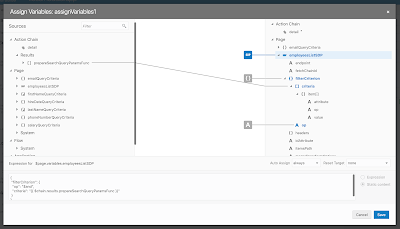

Table pagination is handled automatically too. Make sure to specify scroll policy = loadMoreOnScroll and define fetch size:


Resources:

1. Sample source code on my GitHub
2. Blog from Shay - Filtering Data Providers with Compound Conditions in Visual Builder
3. Blog from Shay - Oracle JET UI on Top of Oracle ADF With Visual Builder
4. My previous post about query logic in Visual Builder - Query Logic Implementation in VBCS for ADF BC REST

Tuesday, January 8, 2019

Oracle Visual Builder 18.4.5 and JET 6 Support

Oracle Visual Builder 18.4.5 comes with very neat and polished UI. Also it brings Oracle JET 6 support (latest JET version to date). Read more about it - New Features in Oracle Visual Builder December Release.

I have upgraded our VBCS instance to 18.4.5:


I was curious how automatic upgrade would work for VBCS app implemented in the previous version (download source code for the upgraded app from my GitHub repo). Especially that now VBCS is using newer JET too. I must say I was pleased with the results - application was upgraded to JET 6 automatically without manual interference:


I did a quick check in the source on runtime - indeed our upgraded VBCS app is using JET 6:


Awesome work by VBCS team.

Saturday, December 15, 2018

Off Canvas Menu in Oracle VBCS/JET Cloud

These days I'm actively working with VBCS/JET Cloud product from Oracle. The more I work with VBCS the more I like it. VBCS follows similar declarative development concepts as Oracle ADF, this makes it easy to get up to speed with VBCS development. VBCS with declarative JavaScript development approach brings unique solution for JavaScript systems implementation for enterprise.

I will share sample with off canvas menu implementation for VBCS app. Sample is based on step by step guide shared by Shay Shmeltzer. I don't describe steps how to build off canvas in VBCS from scratch, you should watch Shay's video for the instructions.

Off canvas menu rendered in VBCS app:


You should check how to build multiple flows in VBCS app in my previous post - Flow Navigation Menu Control in Oracle VBCS. I have defined three flows in my sample, this means there will be three menu items:


To render menu in off canvas block, I'm using JET navigation list component:


Sample app code which can be imported into your VBCS instance is available on GitHub.

Sunday, August 12, 2018

Flow Navigation Menu Control in Oracle VBCS

Oracle VBCS allows us to build multiple flows within the application. This is great - this helps to split application logic into different smaller modules. Although VBCS doesn't offer (in the current version) declarative support to build menu structure to navigate between the flows. Luckily this requirement can be achieved in few simple steps, please read John Ceccarelli post - Adding a Navigation Bar to a VBCS Application. I thought to go through instructions listed by John and test it out, today post is based on this. In my next posts I will take a look how to replace navigation bar menu structure with something more advanced, for example - menu slider on the left.

I think VBCS have great potential as JavaScript declarative development IDE. I see many concepts are similar to other Oracle declarative development tools, e.g. Forms, Oracle ADF. VBCS runs Oracle JET, all you build in VBCS is Oracle JET. Oracle takes care upgrading Oracle JET version in VBCS, I have applied recent patch (by click of the button) and latest JET version is available within our VBCS environment:


Coming back to flows in VBCS. We can create as many flows we want. Each flow could be based on one or multiple fragments (HTML/JS modules). Here I have created three flows, each with single fragment:


We can select flow and this will bring us flow diagram, where we could have navigation implementation between flow elements/fragments:


Fragment - this is where UI part is done:


So thats about flows and fragments. For someone with ADF background, this sounds very similar to task flows and fragments. Next we should see how to implement flow navigation, to be able to select flow from the top menu. VBCS application comes with so called shell page. This page is top UI wrapper, which contains application name, logged user info, etc. Here we can implement top level menu, which would navigate through application flows:


There must be default flow, which is displayed once application is loaded. Default flow is set in settings of the shell page. Go to settings and choose default flow, dashboard-flow in my case:


Next we need to add JET component - navigation list to the shell page, to render menu UI. You can do it by drag and drop, but easier is to switch shell page to source view and add navigation list HTML portion manually (you can copy paste it from source code uploaded to GitHub, see link at the end of this post) - highlighted HTML will render menu bar to navigate between flows:


Initially you will notice error related to JET navigation list not recognised, we need to import it. Another error - selection listener is not found, we will implement it.

To import JET navigation list component, go to source implementation of the shell page and add oj-navigation-list in component imports section - this will solve issue with unknown navigation list entry:


To execute action in VBCS, we must create Action Chain. Crete Action Chain within shell page - navigateToPage:


We need input parameter - flow name, which want navigate to. Create variable in Action Chain - currentFlow:


Add action of type Navigate to Action Chain, this will trigger navigation logic:


Go to Action Chain source and add "page": "{{$variables.currentFlow}}" under actions. This will force navigation to the flow, which will be passed through parameter:


Finally we create navigation list selection event (within shell page), this event will trigger action chain created above and pass current flow ID. We must create custom event and its name should match event name defined in JET navigation list in HTML (see above):


Choose to create custom event (it didn't work for me in Chrome, only in Safari browser. VBCS bug?) and provide same name as in navigation list component listener:


Choose our navigation Action Chain to be triggered from this event:


Just a reminder, event is called from navigation list selection:


Event is passing flow ID from currently selected tab item:


On runtime, dashboard flow is loaded by default:


We can switch to Jobs, etc.:


Download exported (runnable only in VBCS) VBCS app from GitHub repo.

Monday, June 18, 2018

Custom JavaScript Client Code in Oracle Visual Builder

Hey, this is my first post about VBCS, you should expect more posts in the future about this topic. Red Samurai decided to choose VBCS as our primary JavaScript development IDE in the cloud. We are going to use it for declarative JS development, similar as we use JDeveloper for ADF.

I was going through the custom JS client code functionality in VBCS and thought it would be good idea to describe how it works. There is good material available for the same topic from Oracle, I recommend to go through it - Variables, Modules, and Functions, OH MY! Custom Client Code in Visual Builder.

I have created simple UI with one input and one output field. Button calls custom JS method, where value from input field will be processed and returned to be displayed in disabled field:


Below I will describe how all parts are wired together. Across different parts of VBCS there is a lot of resemblance with the way how ADF development done - this helps to reuse ADF skills for VBCS.

VBCS allows to define variables on 3 levels:

1. Page - page scope
2. Flow - flow scope
3. Application - application scope

In my example I decided to go with page scope variables (defined in page called main-start) - first one is assigned with input field and second with output:


There is property inspector, it allows to assign expressions to UI fields. Below you can see first variable assigned to input field:


Second variable is assigned to output field:


Button is assigned with action chain call - in VBCS we can call action chains. In ADF we call action listener and code Java logic in the method, here action chain gives more flexibility, you will see this below in action chain implementation:


VBCS allows to switch to code view and check HTML structure built with JET components. This is useful when you want to adjust generated code by yourself or copy layout to external JET project:


There is JS tab, associated with each VBCS page. There we can find JS file, where custom code can be included. I have created basic custom function, just for a test purpose:


VBCS JS code editor offers extensive auto suggest functionality - great help during development:


In case of syntax issues - errors are reported in audit window:


There is separate tab for action chains, I have already one - called from button (see above):


Action chain editor view - along with diagram, we have various components available. This looks slightly similar to SOA/BPM extension in JDeveloper, isn't it? In this action chain, first of all we call custom action - custom JS method define above:


Input parameter for JS call is assigned from page variable (input component):


In the next step - assign variables logic is called, this helps to assign function return value to page variable, which is mapped with output UI field:


Function return value mapping with page variable:


Application can be tested with single click, our message is printed in the log:


I have exported VBCS application and uploaded to GitHub repository. Once you export from VBCS, can access and check generated code. Here is main page code:


In main-start-page.json we can see metadata definition. For example, there we can find button event mapping with action chain:


VBCS looks very promising to me and I think this might be declarative JS development future.