Showing posts with label Worklist. Show all posts

Wednesday, November 19, 2014

BPM Authentication On Behalf Business User from ADF

This is the next post in the series of ADF/BPM integration, check previous post available here - Dynamic ADF Buttons Solution for Oracle BPM Outcomes. Here I'm going to describe how you could authenticate with BPM from ADF through a proxy user, on top you could apply only business user name, password will not be required.

There is API method available - authenticateOnBehalf(context, userName), you must have a valid connection context created and with authenticateOnBehalf method you could set to use any valid user name, instead of proxy user. Here is the example for Workflow Context:


Similar example for BPM Context, same authenticateOnBehalf method:


As a proxy user I'm using weblogic. You could set to use any different user and consider it as a proxy user.

Tasks assigned for redsam1, connected through proxy user weblogic, are retrieved and displayed in the table:


This is how you could avoid using password for each business user and simply create initial connection through a proxy user. Download sample application - adfbpm11gr4.zip.

Thursday, November 13, 2014

Dynamic ADF Buttons Solution for Oracle BPM Outcomes

BPM Human Task activity is configured with outcomes. Based on these outcomes, buttons in ADF UI are constructed allowing user to perform different actions with the task. Auto generated ADF Human Task form contains a set of predefined buttons and this set is controller with rendered flag. My sample application is using different approach, it implements custom tasks table and dynamic ADF UI for the human task input form - Dynamic ADF Form Solution for Oracle BPM Process. Once user selects a task, action buttons are generated dynamically - using a set of outcomes configured for the particular task.

Here you can download complete sample application - adfbpm11gr4.zip. This application implements a method based on BPM API, where a list of outcomes by the currently selected Task ID is fetched from BPM engine:


Each outcome is represented by ActionType. I'm constructing a list of outcomes to be used on ADF UI. There is ADF UI iterator components on the fragment, this component is generating dynamic buttons, based on the constructed set of outcomes. Outcome name is used to set button name and outcome itself is used as attribute value for the generic action listener method:


Generic action listener method is responsible to parse outcome name, initialise a payload if needed, and execute BPM API to submit the outcome for further task processing:


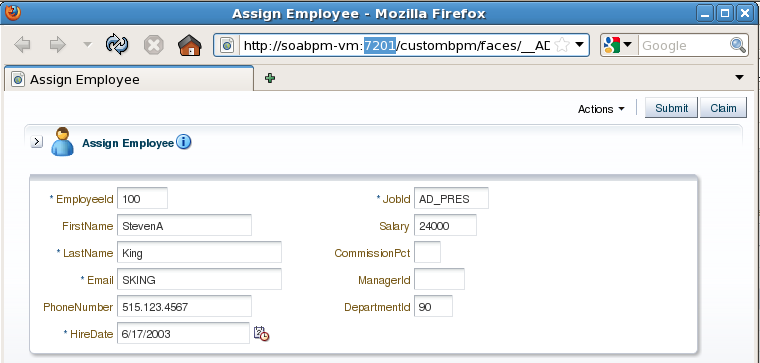
We can check how this works. There is a human task AssignEmployee with SUBMIT outcome, in the sample application:


Task action button is generated accordingly - there is only one Submit action button for the selected task:


The next human task ApproveEmployee is set with two outcomes - APPROVE and REJECT:


Based on the set of the outcomes, two buttons are present now - Approve and Reject:

Friday, November 7, 2014

Dynamic ADF Form Solution for Oracle BPM Process

I was working recently on integrating ADF 11.1.2.4 and BPM 11.1.1.7 environments. This worked pretty well, all configuration was done based on my previous blog post for similar topic, only previous ADF and BPM versions - BPM 11g R1 Worklist Integration (Hacking Experiment) Into Non-SOA ADF 11g R2 Domain. Goal of this post is to describe dynamic ADF form approach associated with BPM process human task.

BPM payload contains additional element called voInstanceName. This element is supposed to contain ADF VO instance name, this instance will be used later to render dynamic ADF UI for the currently selected task:


Sample application - adfbpm11gr4.zip, is based on two separate applications. One implements simple BPM process with payload including ADF VO instance name and another implements standalone dynamic ADF application with BPM API.

There are two human tasks in BPM process. Each of these human tasks accepts a payload element with ADF VO instance name. This allows to control ADF UI from BPM process, by providing ADF VO instance name to be used in ADF. The first human task is set to work with EmployeesView1 instance:


Second human task is set to work with different ADF VO instance - EmployeesROView1:


I'm reading voInstanceName payload variable value in ADF application, to construct dynamic ADF UI accordingly. Accessing currently selected task by ID and retrieving payload information for voInstanceName. Later this information will be used to construct dynamic ADF iterator:


Value from voInstanceName payload is used as a parameter for the ADF task flow rendering dynamic ADF UI. Task flow is configured to refresh each time, when parameter value is changed - new UI will be rendered for each new task selected:


ADF task flow checks if parameter for voInstanceName is not empty (it could be empty, if there are no tasks from BPM or payload value was not set). If there is no value, user will be redirected to the empty fragment:


Dynamic ADF UI is constructed in the bindings, instead of using static ADF iterator - we are initialising iterator from task flow parameter value passed through voInstanceName. This is how we can switch between different VO's from the ADF BC, depending on BPM task selected:


ADF UI is rendered with dynamic ADF form component. There are several ways to implement dynamic ADF UI, it can be all custom or using out of the box ADF UI components (depends on use case requirements). Here I'm using out of the box dynamic component, because UI is fairly simple:


This is how it looks like. Initially there are no tasks, no dynamic ADF UI - blank screen:


Start a new task in BPM, task is started through BPM API from standalone ADF application:


ADF UI form is rendered for the task. User can select a task and then select Employee, by navigating with Next/Previous buttons. As soon as Employee is selected (ID: 103), task can be submitted for further processing:


Login with different user - redsam2 and you are going to see new task in the inbox. Employee data is rendered from different VO instance and is readonly now. Employee ID was taking from the payload, this is how a row with ID: 103 is selected (the same as selected in the previous step):


Employee data in the second step is rendered from different read-only VO, including Job Title attribute:


There are two human task activities in the process, both are rendered with different dynamic ADF UI:

Saturday, April 20, 2013

Oracle BPM 11g Mobile Worklist with ADF Mobile

I have developed ADF Mobile application to bring BPM worklist tasks to the mobile device - I would like to share concepts of such ADF Mobile application with the community. The whole idea is based on BPM Java API to access BPM Context and get currently assigned tasks for the user, read more here - Lightweight ADF Task Flow for BPM Human Tasks Overview. Once tasks from BPM are queried, they are exposed through ADF BC secured Web Service method. Web Service is consumed from ADF Mobile application through Web Service Data Control - task data is rendered on the mobile device, later user can do callback and send approve/reject actions. Approve/Reject actions will be processed by BPM API on ADF BC secured Web Service side.

ADF Mobile login and secured Web Service call implementation is done based on previous blog - ADF Mobile - Secured Web Service Access.

Here you can see BPM mobile worklist solution high level architecture:


Sample application - BPMMobileWorkListApp.zip, is shipped with three separate JDeveloper applications:

1. ADFBasicAuthApp - server side application to allow login into ADF Mobile application running on the mobile device

2. ADFSecuredService - server side application with access to BPM context and exposed secured Web Service providing list of tasks for the current user

3. ADFMobileSecuredApp - ADF Mobile application with connection to secured ADF BC Web Service, displays BPM mobile worklist

User is provided with login screen for BPM mobile worklist application:


Here we can see standard ADF Worklist task flow running in the Web browser with BPM tasks listed. The same tasks are listed in BPM mobile worklist:


In BPM mobile worklist user can select particular task and view details:


1. ADF BC secured Web Service Implementation

ADF BC secured Web Service is implemented and deployed based on this post - Web Service Interface for ADF BC Application Module in Oracle Fusion 11g.

Web Service method returns List type, each task data is represented with one line in the list. Method is exposed through ADF BC Web Service, return type - List:


Connection to BPM context is established with the username retrieved from ADF Security context, password is static for the simplicity of the example:


Sample application contains logic to access BPM context and retrieve all pending tasks for current user. Tasks are collected and returned as List:


Such Web Service can be tested from Oracle Enterprise Manager, using OWSM policy for secured access. See list of task data returned:


2. ADF Mobile application for BPM mobile worklist

Secured Web Service is consumed in ADF Mobile and Data Control is created:


Data is loaded into mobile device screen through proxy Data Control bean - WorkList, in this bean we do parsing of Web Service data retrieved from MobileService Data Control:


Here is the source code for BPM mobile worklist screen - list of tasks:


Screen to display details of BPM task in ADF Mobile:

Sunday, April 14, 2013

BPM 11g R1 Worklist Integration (Hacking Experiment) Into Non-SOA ADF 11g R2 Domain

We all know there are no Oracle SOA/BPM available for ADF 11g R2 platform. In practice it happens to run both environments in parallel - Oracle SOA/BPM 11g R1 for process applications and ADF 11g R2 for ADF applications. Obvious question in such situations - how to access BPM 11g R1 Worklist application from ADF 11g R2 context? Well, this is possible - I will describe in this post how it can be done with some hacks. Keep in mind that officially it is not supported to access BPM 11g R1 Worklist from ADF 11g R2 environment, but if there is such requirement it can be achieved. Previously I was explaining how to run BPM 11g R1 Worklist and Human Task on Non-SOA 11g R1 domain - Running Oracle BPM 11g PS5 Worklist Task Flow and Human Task Form on Non-SOA Domain, today we go one step further and use newer ADF version for Non-SOA domain. But you should know that BPM Worklist is ADF application and really it can run well in ADF 11g R2 context. There are no SOA/BPM libraries for ADF 11g R2 installation, but this is not the issue - we can add and reference SOA/BPM libraries from different 11g R1 domain. There is no need to install complete SOA/BPM 11g R1 domain on that machine where ADF 11g R2 runs - you can copy SOA/BPM libraries package only.

Usually we don't want to deploy and run ADF related applications on the same domain where SOA/BPM is installed. Often ADF and SOA/BPM development is out of synch, this is when we need to make different BPM/SOA and ADF versions talk together.

Here you can download sample application for today post - adf11gr2_bpm.zip. This sample is based on two JDeveloper applications. IntegratedBPMWorklistApp - ADF 11g R2 application with integrated ADF 11g R1 BPM Worklist. EmployeeManagementLab - ADF 11g R1 Human Task ADF UI migrated to ADF 11g R2. BPM process - EmployeeManagement you can download from my previous post - Generic ADF 11g Human Task Handler Concept for Oracle BPM.


Visually this integration between SOA/BPM 11g R1 and ADF 11g R2 looks like this:


BPM process is deployed on SOA/BPM 11g R1 domain. Custom ADF application includes BPM Worklist ADF 11g R1 task flow and runs on ADF 11g R2 domain.

ADF 11g R2 application with integrated BPM Worklist ADF 11g R1 task flow:


Human Task ADF application generated with ADF 11g R1 and migrated to ADF 11g R2 runs on ADF 11g R2 domain:


The same ADF 11g R2 application renders custom ADF screens:


When Human Task is deployed on ADF 11g R2 domain, from the log we can see successful Human Task initialization and registration:


BPM process running on SOA/BPM 11g R1 domain points Human Task URL's to ADF 11g R2 domain:


BPM Worklist task flow is added into ADF 11g R2 custom application and is configured to run in worklist mode. At the end of the day BPM Worklist is ADF 11g R1 application with usage of some additional SOA/BPM libraries - it runs well in ADF 11g R2 context:


Make sure you don't forget to add ADF security permissions for BPM ADF task flows:


Worklist Components tag must be registered - pay attention, it points to the library from SOA/BPM 11g R1 domain.:


There are worklist and task list libraries added into ADF 11g R2 application from SOA/BPM 11g R1 domain:


Shared library - oracle.soa.workflow.wc is installed on ADF 11g R2 domain and must be referenced by custom ADF application with integrated BPM worklist:


You should install on ADF 11g R2 domain 2 worklist related libraries and make sure that WebService Policy Manager library is installed (is needed to communicated to BPM domain securely):


Add Foreign JNDI Provider pointing to the SOA/BPM 11g R1 domain (read more about this from my previous post):


Both applications - custom ADF 11g R2 with BPM Worklist and Human Task are deployed on the same ADF 11g R2 domain:


Ok, we are done with BPM Worklist part.

Let's take a look now into Human Task ADF implementation part ready to run on ADF 11g R2 domain. I simply migrated Human Task application to ADF 11g R2 by opening it in JDeveloper 11g R2:


JSF library is not migrated automatically. You need to remove JSF 1.2 and add JSF 2.0 library manually:


BPM Worklist libraries are added only for compilation, these two libraries are not not deployed:


Configuring ADF 11g R2 environment to run BPM Worklist from 11g R1 is not an easy task, but is doable based on my hacking experiment.