Recently I had a long meeting on customer side, to discuss and describe various ADF Security management strategies in production environment. Good news - at the end, everyone left this meeting happy and with correct understanding of benefits given by ADF Security. I will describe how you can manage Application and Enterprise security roles, as well as Permissions, after ADF application deployment on production WebLogic server.
Download sample application - ApplicationRoles.zip. This application contains one Application level role - accountants, for testing purposes it is mapped to Enterprise level role - Accountants:
There is test user defined - dev1, granted with Enterprise role:
Application contains one JSPX page and one ADF Task Flow with fragment. JSPX page is granted to be viewable for any authenticated user:
ADF Task Flow only to accountants Application role:
Sample application is configured not to migrate any users or groups defined inside local jazn-data.xml. This means we will consume users and groups defined in WebLogic server, without uploading those ones from development environment:
After deploying application, I can see there are no users uploaded from development environment, thats what I want:
Now, when deployment is done, we can open application control screen in Oracle Enterprise Manager 11g. There is Security group in the menu - it gives access to application policies and roles. This means we can manage ADF Security directly, even after application was deployed on the server, without redeployment:
I can see two Application Policies defined based on authenticated-role and accountants roles:
We can access Application Role - accountants:
And see details for this role:
Interesting thing, I can still see that Application Role accountants is mapped to Accountants group (Enterprise Role). It should not be visible, because with deployment profile I have declared not to upload any users or groups from development environment. I will try to delete this mapping:
However, delete operation fails with error - such role is not found:
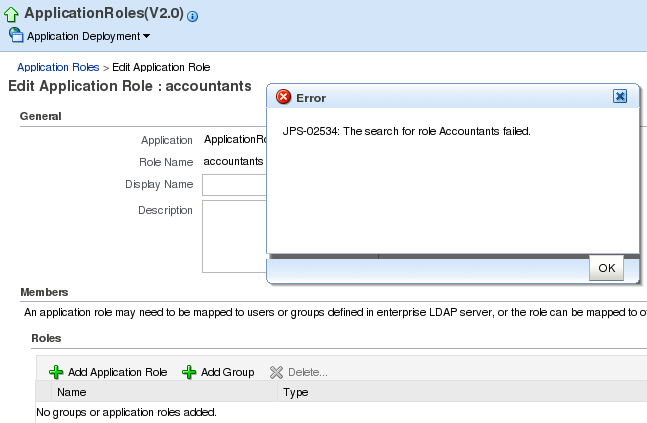
This means it is good practice to remove any mapping between Application and Enterprise Roles in development environment, before doing actual deployment:
After removing role mapping in jazn-data.xml and redeploying, I can see correct picture - no Groups assigned to Application Role:
Now I will switch to WebLogic console, and I will define new Group (Enterprise Role) - FinanceG. This role may come from Active Directory, etc:
I have defined new user on WebLogic server as well - john:
This user is granted with group - FinanceG:
Now its time to open Oracle Enterprise Manager 11g and map FinanceG group with Application Role - accountants:
Through Oracle Enterprise Manager 11g we can browse and assign groups from WebLogic server. All users from FinanceG group, will be able to access resources protected by accountants Application Role:
Login as user john, granted FinanceG group:
Both - page and ADF Task Flow are rendered:
If I would login as user scott, who is not granted with FinanceG group:
Region from ADF Task Flow will not be rendered, thats correct because user scott is not authorized to access this region without accountants Application Role:
Let's say organization security policy is changing and it is not allowed anymore to show Countries page without proper role assignment. You may think, application change and redeployment will be required. However, there is easy way - we can change Application Policies directly in Oracle Enterprise Manager 11g. Open Application Policies screen and select main page permission granted to authenticated role:
Grant this permission to accountants Application Role:
Remove authenticated role from the list:
Application becomes secured completely only by accountants Application Role:
All users from different groups, not mapped with accountants Application Role, will be unauthorized to access application (user scott in this case):
Monday, July 26, 2010
Managing ADF Security Using Oracle Enterprise Manager 11g
Labels:
ADF,
Enterprise Manager,
JDeveloper 11g,
Security,
WebLogic
Sunday, July 18, 2010
Redeploy and Version ADF Shared Libraries on WLS
Few days ago I have described how to extract ADF shared libraries from main EAR deployment package into separate WAR library deployment - Deploying ADF Applications as Shared Libraries on WLS. Now its time to tell you, how to redeploy and version ADF shared libraries on WLS. Next blog post will be focused on main site production redeployment. Today I'm describing ADF shared library versioning concepts and why it could be useful in your environment.
Download sample application with ADF shared libraries deployment and versioning scripts - ADFIntegrationUIShell5.zip. This application is based on developed sample from previous blog post mentioned above.
Let's assume we have our application running on the server, functionality is tested and works well:
There are already two versions of our ADF shared library deployed. Because main site doesn't specify, which version of shared library to use, the latest one will be always used automatically. In this case, it is redsamurai.shared.lib 1.0.1 version:
Now we deploy redsamurai.shared.lib update, version 1.0.2. Developer left one bug in this latest version, test team didn't performed test properly - Save button functionality is broken:
We check deployed shared library versions, you can see 1.0.2 version available - its where new bug was introduced:
However, we saw that Save button was working properly with previous redsamurai.shared.lib release - 1.0.1. This means, we simply can revert back to 1.0.1 shared library version - while development will fix Save button bug. In order to revert to the previous library version, first we need to stop main site deployment, shared library consuming application - UIShell:
When main application is stopped, delete redsamurai.shared.lib 1.0.2 library:
You can start now main application, it will automatically consume latest available shared library version - redsamurai.shared.lib 1.0.1:
Previously broken functionality is fixed - Save button is working well:
Now I will describe how you can increase shared library version and deploy it to WLS server. Developer have updated Departments fragment functionality, by adding new button - Undo:
Because we are using shared library deployment, there is no need to redeploy main site. First, we rebuild ADF library for Departments:
Then we need to increase redsamurai.shared.lib version:
Package all ADF libraries into redsamurai.shared.lib WAR deployment package - use create-shared-lib Ant target:
Shared library WAR archive should be generated now:
Verify generated library version, you can find it in MANIFEST file. This file is inside WAR archive package, it should be latest version - 1.0.2:
Deploy redsamurai.shared.lib to WLS using deploy-shared-lib Ant target. This Ant target is using two wldeploy commands - first it redeploys our shared library with new version and then it reloads main site. We need to reload main site in order to use latest available shared library. Otherwise we would need to restart WLS server in order to pick up latest redamurai.shared.lib library updates:
You can verify library deployments screen, latest shared library should be available:
UIShell application brings latest update in Departments fragment - Undo button:
If latest deployed shared library version is stable, you can remove previous versions from WLS. However, it is good practice to leave at least base version always available on WLS.
Download sample application with ADF shared libraries deployment and versioning scripts - ADFIntegrationUIShell5.zip. This application is based on developed sample from previous blog post mentioned above.
Let's assume we have our application running on the server, functionality is tested and works well:
There are already two versions of our ADF shared library deployed. Because main site doesn't specify, which version of shared library to use, the latest one will be always used automatically. In this case, it is redsamurai.shared.lib 1.0.1 version:
Now we deploy redsamurai.shared.lib update, version 1.0.2. Developer left one bug in this latest version, test team didn't performed test properly - Save button functionality is broken:
We check deployed shared library versions, you can see 1.0.2 version available - its where new bug was introduced:
However, we saw that Save button was working properly with previous redsamurai.shared.lib release - 1.0.1. This means, we simply can revert back to 1.0.1 shared library version - while development will fix Save button bug. In order to revert to the previous library version, first we need to stop main site deployment, shared library consuming application - UIShell:
When main application is stopped, delete redsamurai.shared.lib 1.0.2 library:
You can start now main application, it will automatically consume latest available shared library version - redsamurai.shared.lib 1.0.1:
Previously broken functionality is fixed - Save button is working well:
Now I will describe how you can increase shared library version and deploy it to WLS server. Developer have updated Departments fragment functionality, by adding new button - Undo:
Because we are using shared library deployment, there is no need to redeploy main site. First, we rebuild ADF library for Departments:
Then we need to increase redsamurai.shared.lib version:
Package all ADF libraries into redsamurai.shared.lib WAR deployment package - use create-shared-lib Ant target:
Shared library WAR archive should be generated now:
Verify generated library version, you can find it in MANIFEST file. This file is inside WAR archive package, it should be latest version - 1.0.2:
Deploy redsamurai.shared.lib to WLS using deploy-shared-lib Ant target. This Ant target is using two wldeploy commands - first it redeploys our shared library with new version and then it reloads main site. We need to reload main site in order to use latest available shared library. Otherwise we would need to restart WLS server in order to pick up latest redamurai.shared.lib library updates:
You can verify library deployments screen, latest shared library should be available:
UIShell application brings latest update in Departments fragment - Undo button:
If latest deployed shared library version is stable, you can remove previous versions from WLS. However, it is good practice to leave at least base version always available on WLS.
Labels:
ADF,
ADF Task Flow,
Integration,
JDeveloper 11g,
WebLogic
Wednesday, July 14, 2010
Deploying ADF Applications as Shared Libraries on WLS
Today I have new post from Integration series. Most of the ADF applications are developed using multiple ADF Task Flows packaged into different ADF libraries. When we consume ADF libraries, by default these libraries are included into resulting EAR deployment package. In most of the cases it works well, however on large production deployments, customers ask to externalize and exclude ADF libraries from main site deployment package. This allows to redeploy shared ADF libraries without main site redeployment. Multiple applications can consume shared libraries, without packaging them into each EAR package. There is George Maggessy blog post about ADF Task Flows and Shared libraries on WLS - post. I will dive more deeper into this topic and will provide sample application. With my next blog posts I will describe how to:
1. Redeploy and Version shared libraries
2. Perform Production redeployment for main site EAR package, without restarting the server
Download sample application - ADFIntegrationUIShell4.zip. This sample provides UIShell application to integrate four different ADF Task Flows coming from ADF libraries. These libraries will be deployed as single shared library on WLS:
You need to package all these four libraries into single WAR file, to deploy it as a single shared library containing ADF jars. For this purpose, it is enough to create new JDeveloper application with simple generic project:
Include all four libraries into SharedWeb project. You should see them under libraries entries:
Ensure you specify empty context root path in WAR deployment profile:
You need to create and set MANIFEST.MF file to describe shared library:
Sample MANIFEST.MF file, with shared library name set to redsamurai.shared.lib:
When deploying WAR package, select Deploy as a shared Library option. JDeveloper will generate WAR archive with META-INF (manifest file) and WEB-INF (ADF libraries) folders:
After successful deployment, shared library redsamurai.shared.lib will be listed under WLS deployments:
In order to compile main application in JDeveloper, you need to add ADF libraries references:
However, these libraries should not be packaged inside EAR archive during deployment. For this purpose, uncheck them from WAR contributors for main application:
One of the last required configurations for consuming application - create (if it doesn't exist already) weblogic.xml deployment descriptor file under WEB-INF:
Register shared library redsamurai.shared.lib reference in weblogic.xml, this will allow to access it on runtime:
Now deploy main application as EAR package on WLS:
We can unpack generated EAR file and can see that weblogic.xml was updated during EAR generation process with ADF shared libraries references. Our shared library reference is present as well:
On runtime, through Oracle UIShell template we can load dynamic regions from ADF Task Flows, packaged and deployed into WLS shared library:
Both - main application and shared library package are visible under WLS deployment list:
1. Redeploy and Version shared libraries
2. Perform Production redeployment for main site EAR package, without restarting the server
Download sample application - ADFIntegrationUIShell4.zip. This sample provides UIShell application to integrate four different ADF Task Flows coming from ADF libraries. These libraries will be deployed as single shared library on WLS:
You need to package all these four libraries into single WAR file, to deploy it as a single shared library containing ADF jars. For this purpose, it is enough to create new JDeveloper application with simple generic project:
Include all four libraries into SharedWeb project. You should see them under libraries entries:
Ensure you specify empty context root path in WAR deployment profile:
You need to create and set MANIFEST.MF file to describe shared library:
Sample MANIFEST.MF file, with shared library name set to redsamurai.shared.lib:
When deploying WAR package, select Deploy as a shared Library option. JDeveloper will generate WAR archive with META-INF (manifest file) and WEB-INF (ADF libraries) folders:
After successful deployment, shared library redsamurai.shared.lib will be listed under WLS deployments:
In order to compile main application in JDeveloper, you need to add ADF libraries references:
However, these libraries should not be packaged inside EAR archive during deployment. For this purpose, uncheck them from WAR contributors for main application:
One of the last required configurations for consuming application - create (if it doesn't exist already) weblogic.xml deployment descriptor file under WEB-INF:
Register shared library redsamurai.shared.lib reference in weblogic.xml, this will allow to access it on runtime:
Now deploy main application as EAR package on WLS:
We can unpack generated EAR file and can see that weblogic.xml was updated during EAR generation process with ADF shared libraries references. Our shared library reference is present as well:
On runtime, through Oracle UIShell template we can load dynamic regions from ADF Task Flows, packaged and deployed into WLS shared library:
Both - main application and shared library package are visible under WLS deployment list:
Labels:
ADF,
ADF Task Flow,
Integration,
JDeveloper 11g,
WebLogic
Friday, July 9, 2010
ADF Table AutoHeightRows Property
While going through Oracle WebCenter 11g documentation, I have noticed good advice for effective page geometry management - Guidelines for Creating Task Flows to Be Used in Oracle Composer-Enabled Pages. Quite often customers are asking how to control table height dynamic resizing effectively. We can use AutoHeightRows property for ADF Table component, this will allow to shrink rendered table height, if number of records will be less comparing to defined by AutoHeightRows.
Download sample application - ADFTableAutoHeight.zip. I have set AutoHeightRows property to 25, make sure ContentDelivery is set to immediate (otherwise dynamic height resizing will not work):
When number of result records is less then 25, table height shrinks and page geometry is better optimized:
When result contains more then 25 records, table is rendered with maximum possible height:
Download sample application - ADFTableAutoHeight.zip. I have set AutoHeightRows property to 25, make sure ContentDelivery is set to immediate (otherwise dynamic height resizing will not work):
When number of result records is less then 25, table height shrinks and page geometry is better optimized:
When result contains more then 25 records, table is rendered with maximum possible height:
Labels:
ADF,
JDeveloper 11g
Monday, July 5, 2010
ODTUG Kaleidoscope 2010 - Feedback
I was busy on ODTUG Kaleidoscope 2010 conference this week in Washington DC. It was pretty good technical level conference with lots of material for SOA/BPM/ADF field as well. I was delivering my session there - Developing Large ADF 11g Applications. I'm not uploading my slides, because there is simply nothing to upload, as my usual style - I was doing lots of technical live demos and explanations. If you are interested, I was talking based on following blog posts - Integration.
Let me tell you briefly what sessions I found interesting and what I have learned new.
1. Oracle ACE Director briefing. While I'm not allowed to tell any news from this briefing on public, I can tell you - many improvements and exciting new features are coming in next JDeveloper 11g and Oracle Enterprise Eclipse Pack releases. ADF EMG statistics were presented on this session as well.
2. SOA and BPM Symposium on Sunday. Was great day, with good technical content and workshops. Probably, the most useful for me was - What is SOA Full Lifecycle? presentation delivered by ACE Directors Hajo Normann and Torsten Winterberg. They gave excellent theoretical overview and did couple of practical demos with new Oracle BPM 11g studio using JDeveloper 11g.
3. Creating SOA Composite Applications with ADF and SOA Suite 11g by Juan Ruiz. Juan is Senior Product Manager from Oracle JDeveloper 11g team. His session was packed with practical examples and lots of people were attending as well. Once again I saw how Oracle ADF brings all Oracle Fusion products together, by implementing rich UI functionality.
4. BPM in 2010 - Myths and Reality by ACE Director Hajo Normann. Was very well explained the difference between complete SOA and BPM approaches.
5. BPM - The Business Face of SOA by ACE Director Mark Simpson. Mark have explained his experience implementing SOA projects. Especially well he have explained most typical business challenges when adopting SOA architecture.
6. How to Hack an ADF Application by ACE Director Anton Nielsen. Session title sounds scary, but good news from this session - ADF framework is un-hackable. As speaker said, only intentional developer implemented bad practice can cause problems, speaker didn't found hackable holes in ADF framework. Hmm..., may be session title should be changed then? :)
7. WebLogic Server for ADF and Oracle Forms 11g Developers by Mark Prichard from Oracle. Really cool presenter, I enjoyed this session and learned new things about shared libraries on WebLogic server.
8. Attention Oracle Developers: Find those Java Memory Leaks Fast ! by Mark Prichard from Oracle. Second part of session from point #7. I have learned useful stuff about JRockit Mission Control for WebLogic Server performance monitoring and about new tool called - Flight Recorder. It will allow to record WebLogic Server statistics and review them easily even after server crash.
9. Rapid Development for Mobile Devices with Oracle JDeveloper and Oracle ADF by Duncan Mills from Oracle. It was good demo about how to use ADF Mobile and develop apps for small screens.
10. What Makes a Service a Good Service? by ACE Director Torsten Winterberg. One more good session about SOA with indepth architect type information about how to implement and orchestrate your services.
11. Derisk Your SOA - Traps You Should be Aware Of by ACE Director Matjaz Juric. Very good presentation especially for those people, who are planning to adopt SOA, you can learn a lot from first hand experience. Matjaz was giving many examples of successful and failed SOA implementations along with explanations why it was success or failure.
12. Oracle JDeveloper 11g JAX-WS Web Services - As Easy As 1-2-3 - XSD, WSDL, Generate! by ACE Director Chris Muir. Yeah, even this session title sounds as very complex one, Chris was explaining JDev/WS related stuff in very clear way, with lots of technical demos - kudos for this.
This conference had much more interesting sessions, if I don't mention them - it is only because I wasn't able to attend some of them.
See you on Oracle Open World 2010 in San Francisco !
Let me tell you briefly what sessions I found interesting and what I have learned new.
1. Oracle ACE Director briefing. While I'm not allowed to tell any news from this briefing on public, I can tell you - many improvements and exciting new features are coming in next JDeveloper 11g and Oracle Enterprise Eclipse Pack releases. ADF EMG statistics were presented on this session as well.
2. SOA and BPM Symposium on Sunday. Was great day, with good technical content and workshops. Probably, the most useful for me was - What is SOA Full Lifecycle? presentation delivered by ACE Directors Hajo Normann and Torsten Winterberg. They gave excellent theoretical overview and did couple of practical demos with new Oracle BPM 11g studio using JDeveloper 11g.
3. Creating SOA Composite Applications with ADF and SOA Suite 11g by Juan Ruiz. Juan is Senior Product Manager from Oracle JDeveloper 11g team. His session was packed with practical examples and lots of people were attending as well. Once again I saw how Oracle ADF brings all Oracle Fusion products together, by implementing rich UI functionality.
4. BPM in 2010 - Myths and Reality by ACE Director Hajo Normann. Was very well explained the difference between complete SOA and BPM approaches.
5. BPM - The Business Face of SOA by ACE Director Mark Simpson. Mark have explained his experience implementing SOA projects. Especially well he have explained most typical business challenges when adopting SOA architecture.
6. How to Hack an ADF Application by ACE Director Anton Nielsen. Session title sounds scary, but good news from this session - ADF framework is un-hackable. As speaker said, only intentional developer implemented bad practice can cause problems, speaker didn't found hackable holes in ADF framework. Hmm..., may be session title should be changed then? :)
7. WebLogic Server for ADF and Oracle Forms 11g Developers by Mark Prichard from Oracle. Really cool presenter, I enjoyed this session and learned new things about shared libraries on WebLogic server.
8. Attention Oracle Developers: Find those Java Memory Leaks Fast ! by Mark Prichard from Oracle. Second part of session from point #7. I have learned useful stuff about JRockit Mission Control for WebLogic Server performance monitoring and about new tool called - Flight Recorder. It will allow to record WebLogic Server statistics and review them easily even after server crash.
9. Rapid Development for Mobile Devices with Oracle JDeveloper and Oracle ADF by Duncan Mills from Oracle. It was good demo about how to use ADF Mobile and develop apps for small screens.
10. What Makes a Service a Good Service? by ACE Director Torsten Winterberg. One more good session about SOA with indepth architect type information about how to implement and orchestrate your services.
11. Derisk Your SOA - Traps You Should be Aware Of by ACE Director Matjaz Juric. Very good presentation especially for those people, who are planning to adopt SOA, you can learn a lot from first hand experience. Matjaz was giving many examples of successful and failed SOA implementations along with explanations why it was success or failure.
12. Oracle JDeveloper 11g JAX-WS Web Services - As Easy As 1-2-3 - XSD, WSDL, Generate! by ACE Director Chris Muir. Yeah, even this session title sounds as very complex one, Chris was explaining JDev/WS related stuff in very clear way, with lots of technical demos - kudos for this.
This conference had much more interesting sessions, if I don't mention them - it is only because I wasn't able to attend some of them.
See you on Oracle Open World 2010 in San Francisco !
Labels:
ODTUG Kaleidoscope
Tuesday, June 22, 2010
On Insert Security Rule Implementation
As you know, ADF 11g allows to secure read, update, and delete operations on EO level. However there is no default support for insert operation. Typically, developers will go and set Expression Language statements directly on Web page to enable/disable one or another attribute. While this works, it is not good in terms of maintenance. Today I will describe another approach, where I will override isAttributeUpdateable() method on EO to evaluate security rule on insert. I believe, this approach works better comparing to Expression Language on front end, because it allows to secure Model directly. This is especially good, when you are using same EO's in different forms - no need to implement same security rule again.
Download sample application - ProgrammaticSecurity.zip. This sample is enabled with ADF Security and contains two application roles:
I have defined programmatic security rule inside EO implementation class:
Inside EO implementation class, I override isAttributeUpdateable() method. Security rule is applied only for SALARY attribute and only when current row is in insert mode. If current user is not granted with manager role, SALARY attribute will be rendered as disabled:
On runtime I login with user granted only accountant role. As expected, user can edit SALARY attribute values for current employees:
We click Create button - row is in insert mode. Current user don't have permission to enter new SALARY attribute value, while new employee is not yet in database - attribute is rendered as disabled:
When transaction is commited and new employee data is inserted into database, SALARY attribute becomes editable again:
Download sample application - ProgrammaticSecurity.zip. This sample is enabled with ADF Security and contains two application roles:
I have defined programmatic security rule inside EO implementation class:
Inside EO implementation class, I override isAttributeUpdateable() method. Security rule is applied only for SALARY attribute and only when current row is in insert mode. If current user is not granted with manager role, SALARY attribute will be rendered as disabled:
On runtime I login with user granted only accountant role. As expected, user can edit SALARY attribute values for current employees:
We click Create button - row is in insert mode. Current user don't have permission to enter new SALARY attribute value, while new employee is not yet in database - attribute is rendered as disabled:
When transaction is commited and new employee data is inserted into database, SALARY attribute becomes editable again:
Labels:
ADF,
JDeveloper 11g,
Security
Subscribe to:
Posts (Atom)


