Monday, October 22, 2012

Transaction Level ADF BC Entity Validation

Is not so well known, but we can defer validation execution to transaction level for ADF BC entity validators. This can be applied only to Key Exist and Method validators on Entity level and is available in both ADF 11g R1 and ADF 11g R2. It is useful, because it instructs framework to invoke such validation rule only if other validation rules were passed successfully. If validation rule invokes complex code, it may affect performance - each time to invoke it together with other validations. You could defer it for later execution, only if all other validations passed - sounds good.

Download sample application - EOValidationApp.zip. This sample implements two validation rules - one is marked to be deferred to transaction level and second is using default setting of entity level execution. You can configure validation rule execution option in Validation Execution section:


I have set both validators to return false, this will ensure both validators to fail. Let's test if validator with deferred execution will be invoked together with default one:


In order to distinguish executed validation visually, I have set different message for deferred validation - Employees validation on transaction level:


Only one validation rule is executed - it fails and framework prevents executing additionally second rule (one which is deferred):
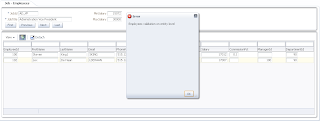

If we test both validation rules set with default execution setting:


Both rules are executed and reported at the same time:


Sunday, October 21, 2012

Why Oracle ADF Developers are Sensitive People

Here you can hear a story I told during my OOW session (OOW'12: Oracle ADF Implementations Around the Globe: Best Practices). This is a true (may be a bit funny, if not sad :) story about ADF developer life and his fight with the deadline for ADF form implementation:


Enjoy and stay calm, even if the deadline is coming to you :)

Wednesday, October 17, 2012

ADF Essentials Security Implementation for Glassfish Deployment

ADF Essentials includes all the key ADF technologies, only one is missing - ADF Security. This is related to ADF Security technical implementation dependency on WebLogic security. However, lack of ADF Security support is not a show stopper - we can enable JAAS security model. This would protect page resources from ADF application, but not ADF Task Flows with Fragments. One of the most common ADF architectures nowadays - use of ADF Task Flows with Fragments through dynamic regions based on single page. This means security implementation to protect ADF Task Flows with Fragments, when rendered through dynamic region is very important.

In this post I will provide solutions, implemented in the sample application - MultiTaskFlowApp_gfsec.zip for:

1. Configuring JAAS security for ADF application
2. Configuring ADF application for Glassfish security
3. Restricting access to ADF Task Flows with Fragments

Sample application contains SecurityController class - custom class, responsible to check if task flow can be accessed. Logic is pretty simple - we check current dynamic region task flow address, compare it along with a security check (globalaccess role). This is simplified example, in real life most likely you would retrieve mapping between task flow and security role from the database:


Now the key part - from where this logic is invoked. It is invoked from task flow activation property (conditional activation). This means, dynamic region will be activated only if task flow will be viewable (security access is granted) based on the custom security logic from our method above:


This is how we can control ADF Task Flow with Fragments access.

Now let's take a look how security infrastructure is configured for deployment. Firstly you need to define JAAS security constraint in web.xml:


As you can see here, all pages (/faces/*) are restricted to be accessed only for authorized roles. These roles are mapped with groups. Groups are defined on Glassfish server. This is the same concept as with WebLogic, only that we need to use glassfish-web.xml (create it manually) configuration file in WEB-INF where roles are mapped with groups:


We can test it now - login as redsam (GlobalUser):


Open task flow for Departments:


Login now as sking (RegionalUser):


This user doesn't have access to the Departments task flow, task flow will not be activated as per our security check implementation:


You can create local user in Glassfish, just in the same way as you do in WebLogic - go to file realm and press Manage Users:


You can manage users from here:

Sunday, October 14, 2012

PanelGridLayout (JDev 11.1.2.3.0 ) to Simplify Oracle Forms Modernization to ADF

I'm usually bored to death to work with UI layout or CSS. But not today, when we have new af:panelGridLayout ADF Faces component available with JDev 11.1.2.3.0 (it was already available with 11.1.2.2.0). Read more about it from Duncan Mills blog - PanelGridLayout - A Layout Revolution. This will change how we build layout in ADF, but also it will change how we build form blocks layout. I believe it will substitute af:panelFormLayout component, in more complex use cases. This is especially true for Oracle Forms modernization - usually Forms screens are pretty complex and stuffed with af:inputText boxes. Up till now it was hard to adapt af:panelFormLayout to create proper grid UI - this will change with af:panelGridLayout component.

Here is simplified example of such layout, typical to Oracle Forms systems (download sample application - PanelGridLayoutSampleApp.zip). This layout is stretchable:


Input text boxes are rendered using grid structure and spread across different areas of the page. We could achieve similar layout structure with af:panelFormLayout, but this would mean to add lots of af:spacer components into empty areas - not a real grid.

One more reason to move to JDev 11.1.2.3.0 - Panel Grid Layout available directly from Component Palette:


When you drag and drop it to the page - JDev offers configuration wizard, this is very helpful - is much easier to understand different layout properties and apply them correctly:


Here you can see how it looks from the source structure - rows and cells:

Saturday, October 13, 2012

ADF 11g R2 WebLogic 10.3.5 vs ADF Essentials Glassfish 3.1 Performance Test

With ADF Essentials certified on Glassfish server, we can run performance test and compare ADF runtime performance on both servers - Glassfish and WebLogic. You can read about ADF Essentials (free distribution of ADF framework) from my previous post - ADF Essentials - Quick Technical Review. Based on performance test results - ADF runs faster on Glassfish server. This can be explained logically, because Glassfish server is much lighter comparing to WebLogic - it allows to execute ADF runtime faster.

Performance test was completed on regular ADF developer environment, there was no special tuning applied for both servers - just all default settings. My goal was to test with default settings, without special tuning - because at the end we can tune both servers and get even better results in production.

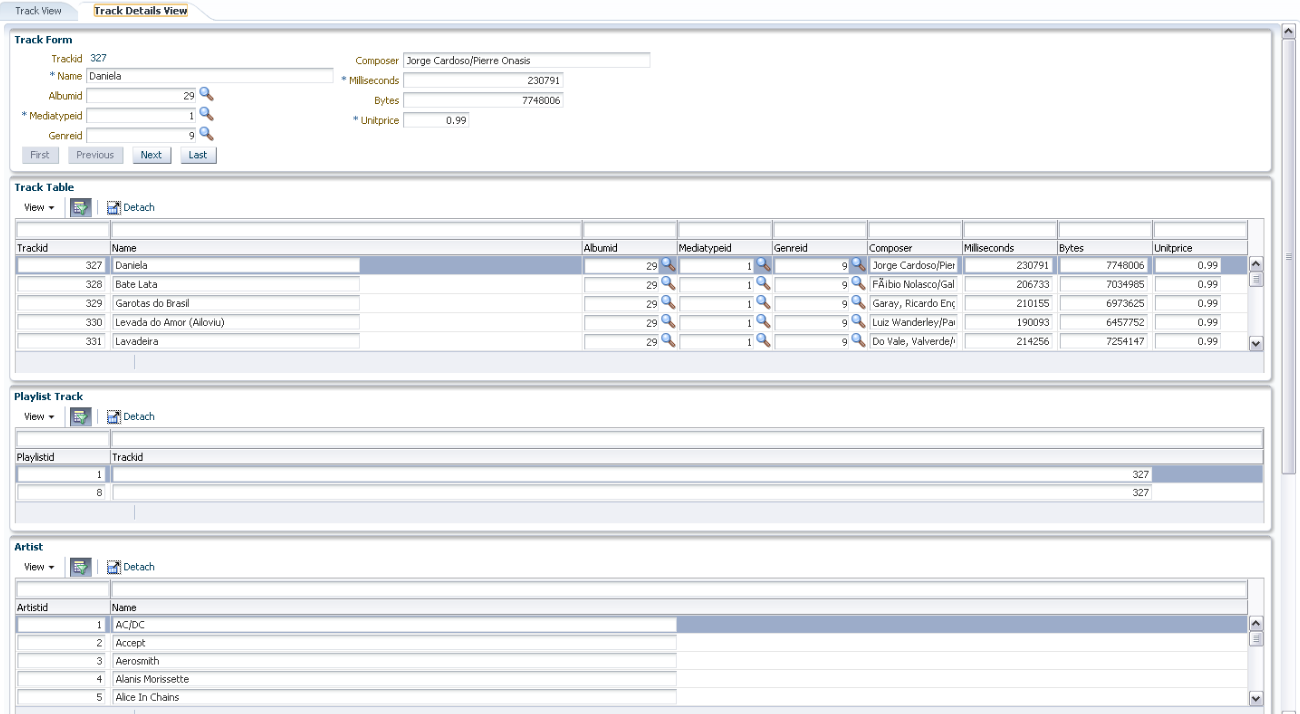
For the test case, in order to make it more realistic - I was using free sample Chinook Database data loaded into Oracle XE. I have generated ADF BC for this database, with Master-Detail relationships. Some of the tables contains around 10 K rows. I was using these tables for LOV and Master-Detail implementations.

The best thing - I was able to record single JMeter script and run it without changes (well, just server port change) for both deployments (Glassfish and WebLogic). Exactly same JMeter script execution against two servers allows to produce as much as possible accurate results for the same application deployed on both servers.

Here you can download sample ADF 11g (11.1.2.3.0) application I have developed for performance test - SamplePerformanceApp.zip. JMeter performance test script is included into archive.

Performance test was performed for two types of user load: 25 and 50. Each test was repeated 3 times to get average results.

1. 25 concurrent users. Response times (obviously lower is better):

a. Glassfish: 0.8 seconds in average
b. WebLogic: 1.4 seconds in average


2. 50 concurrent users. Response times:

a. Glassfish: 8.7 seconds in average
b. WebLogic: 17.2 seconds in average


These results show WebLogic to be 2 times slower (twice as slow) in average comparing to Glassfish when running the same ADF application.

Sample application contains two tabs. First tab brings region with single record block. Stress test is recorded for each user to navigate through records, to go to last/first record, open long list LOV for Album Id:


Second region renders 6 blocks, there are 3 Master-Detail relationships. Stress test is recorded for each user to navigate through Master-Detail records, open LOV's and return values:


Sample application implements ADF BC structure based on sample free Chinook DB (see above):


There are two regions, rendered in tabs from main page:


Master-Detail structure implemented in details region:


Below I provide JMeter stress test summaries:

1. Glassfish 25 users


2. WebLogic 25 users


3. Glassfish 50 users


4. WebLogic 50 users


Summary: ADF performance depends on the server type. ADF is not slow, but it might be just server is slow. It seems to run faster on Glassfish with free ADF Essentials distribution, at least today. I will not go into deeper conclusions at this point, because my goal was to compare ADF runtime performance on WebLogic and Glassfish from technical point of view.

Sunday, October 7, 2012

OOW'12: Oracle ADF Implementations Around the Globe: Best Practices

Publishing slides for my OOW'12 session - Oracle ADF Implementations Around the Globe: Best Practices. I really did enjoy presenting this session - was fun to talk about ADF and see so many happy ADF users in the room :)

You can download slides for this session from here:


This session was based on different projects around the globe (total 4 continents):


I presented similarities and differences in ADF projects based on geographical locations:


Red Samurai performance audit tool was presented along with the demo (read more here):


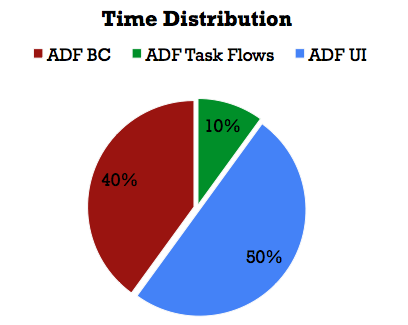
Typical time distribution in ADF projects across technology stack was shown:


From our experience - ADF BC development takes less time and usually is the most smooth development phase in ADF. UI implementation is the most complex one.

If we take a look into ADF Model - ADF BC implementation and check time distribution. Usually it takes longer to implement View Objects (SQL, custom Java), also Application Modules (custom Java). Entity Objects implementation takes less time - because often is implemented as part of common reusable library:


Often people forget about generic classes and common code, its why I included it into this graph with 0% (to indicate its presence, is 0% because is implemented only once).

Similar graph with time distribution was presented for ADF ViewController. As expected, ADF UI implementation is the most complex and it takes longer:


I have presented how to speed up ADF development with completely dynamic forms, generated on runtime (generated: ADF BC (EO, VO, LOV) and ADF UI). I will post sample application for this in my future posts. Now I'm posting architecture diagram:


OOW'12: Oracle Business Process Management/Oracle ADF Integration Best Practices

I'm posting slides from our OOW'12 session - Oracle Business Process Management/Oracle ADF Integration Best Practices. I was happy to present this session on OOW with my colleague - Danilo Schmiedel, from Opitz Consulting. We were speaking about different BPM and ADF integration best practices. Danilo covered a lot of BPM related content as well.

One of the central focus points was around Generic Task Handler concept (read more about it here).

You can download our slides from here: