When I work with more complex Use Cases, it happens to face requirement, when it would be very efficient to reuse ADF regions inside another ADF regions. Same as we are using ADF region inside JSF page, to use it from another ADF region. This is quite common requirement especially for such systems, where ADF region based UI Shell is implemented. In such systems, all main screens are represented by ADF regions, sometimes we need to use smaller ADF regions inside.
Of course, it was possible to include ADF region inside another ADF region in previous JDeveloper 11g PS1 release as well. But, this approach was not working, with enabled ADF Security. On runtime, security was not propagated to nested ADF regions, and as result these regions were not rendered. Situation is changed now - in JDeveloper 11g PS2, security is propagated for nested ADF regions correctly.
In order to demonstrate benefits of nested ADF regions, I have updated sample application from my previous post - Dynamic Iterator Binding to Reuse View Link Relationship for Master-Detail. Download updated sample - DynamicIterator2.zip. In my previous post I was describing how you can implement dynamic iterators in Oracle ADF. Today I will use the same concept, to show how you can benefit from dynamic iterator binding together with ADF regions reuse.
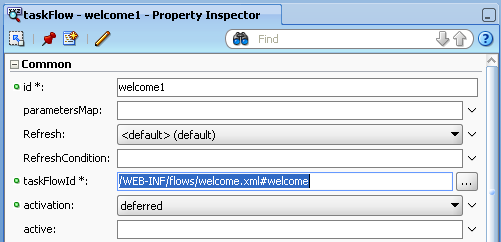
I have extracted Departments fragment into separate ADF task flow - dep-flow. I will use this task flow as individual region and additionally will include it into Locations fragment (as nested region):
Inside locdep-flow, task flow dep-flow is called with two parameters. First parameter is passing value for dynamic iterator binding and second indicates that dep-flow will be refreshed in case of nested region:
Departments fragment contains Query component, I will render this component conditionally. If fragment will be opened on its own, Query will be rendered. In case of nested region, it is not rendered:
For conditional Query rendering, I'm using task flow input parameter and evaluating it in Expression Language:
Just to remind you, as dynamic iterator binding was described in previous post, here as well I'm using dynamic iterator binding inside Departments fragment Page Definition. You can see, when input parameter is NULL, top level View Object will be mapped to iterator. Otherwise, when I will pass parameter - detail View Object instance will be used:
Now lets focus on Locations fragment. I have created nested region for Departments inside Locations, same as I would create it on JSF page:
Through Locations fragment Page Definition file, I set values for Departments task flow input parameters - View Object instance name and currently selected Location Id. I need to provide current Location Id, because I want to trigger nested region refresh:
Now is the main part, nested regions security was not working in JDeveloper 11g PS1, I need to test it now. I have enabled ADF Security for test application, you can user predefined user scott/welcome:
We login into application:
Router activity from locdep-flow navigates us directly to Departments dep-flow task flow region (because departments parameter was set, refer to previous post). Query component is present:
If we press Locations button, user is navigated to Locations region present in locdep-flow (see task flow diagram). We have in Locations region - nested Departments region. Nested region brings detail data for master records from Locations table. For nested region I'm using same Departments fragment, as in dep-flow:
If I click on any Location Id item, it will navigate to Departments region from dep-flow, where it will render detail View Object instance for Departments (because we pass parameter from Locations):
Thursday, May 13, 2010
JDeveloper 11g PS2: ADF Region Reuse Inside ADF Region
Labels:
ADF,
JDeveloper 11g
Sunday, May 9, 2010
CRUD Operations in Oracle ADF 11g Table Without Auto PPR
It seems, quite popular to implement CRUD operations for table component, using separate Popup window, as described in my previous blog post - CRUD Operations in Oracle ADF 11g Table Using PopUp Component. All my latest customers prefer to follow this approach. Its why today I will post improved sample for the same use case. There is an issue, when we want to reflect changes done in editable Popup window back to main read-only table. In order to keep main table in synch, we can set Iterator ChangeEventPolicy to ppr:
This means, each time when data change will happen in Popup window, main read-only table will be refreshed automatically. It works well, but there is one side effect with this approach, unfortunately. Table refresh will happen each time, when user simply selects another record. For simple tables thats Ok, but if we have complex screen with Master-Detail data - screen performance will be down immediately. It will refresh not only Master table, but all dependent Detail tables as well. So, we need to disable ppr for iterator binding:
The question now - how we trigger table refresh. Actually, it is quite straightforward - we need to set PartialTriggers dependency for Panel Collection from Popup and Popup Dialog components. We need to set it from both, because:
Let's set PartialTriggers property for Panel Collection:
PartialTriggers property must be based on two components:
Popup component and Popup Dialog:
Let's see how it works now. There is one record selected in the table:
We select another one, and no table refresh happens - thats what we want:
We can edit data:
Table is refreshed after we close dialog and shows latest changes:
When new row is being inserted, table is pre-populated with new empty row:
Download sample application - TableDialogEdit4.zip.
This means, each time when data change will happen in Popup window, main read-only table will be refreshed automatically. It works well, but there is one side effect with this approach, unfortunately. Table refresh will happen each time, when user simply selects another record. For simple tables thats Ok, but if we have complex screen with Master-Detail data - screen performance will be down immediately. It will refresh not only Master table, but all dependent Detail tables as well. So, we need to disable ppr for iterator binding:
The question now - how we trigger table refresh. Actually, it is quite straightforward - we need to set PartialTriggers dependency for Panel Collection from Popup and Popup Dialog components. We need to set it from both, because:
- Popup Dialog component triggers partial refresh on OK event (when we save data)
- Popup component triggers partial refresh on Popup Cancel event and on Popup fetch event (we can see newly inserted row)
Let's set PartialTriggers property for Panel Collection:
PartialTriggers property must be based on two components:
Popup component and Popup Dialog:
Let's see how it works now. There is one record selected in the table:
We select another one, and no table refresh happens - thats what we want:
We can edit data:
Table is refreshed after we close dialog and shows latest changes:
When new row is being inserted, table is pre-populated with new empty row:
Download sample application - TableDialogEdit4.zip.
Labels:
ADF,
JDeveloper 11g
JDeveloper 11g PS2 Update - Custom Declarative Components in ADF Faces Rich Client
Thanks to my blog reader, I received comment for blog post - Custom Declarative Components in ADF Faces Rich Client. This post describes how you can develop custom declarative LOV component, that comes together with description text. As reader says - provided sample application works with JDeveloper 11g PS1, but not with latest JDeveloper 11g PS2 release. LOV value wasn't refreshed and not stored to database. I fixed it to work in latest PS2 release, will tell you what update is required.
Download working updated sample application - AdvancedLOVComponent2.zip.
So, what's new now? We should take a closer look into declarative component parameters. Before, I was passing LOV model and value attributes as separate Object type parameters - it doesn't work anymore. Instead, now I need to pass one attribute for LOV, of type oracle.adf.view.rich.model.ListOfValuesModel. I will use this attribute value for declarative LOV component:
You can see, inside declarative LOV component, I'm referencing LOV model, value and label directly from declared LOV attribute:
Before, separate attributes of type Object and String were declared for this purpose. Description value comes as it was in previous version - as separate attribute:
We need to package updated declarative component into JAR library, and refresh consuming project:
Now our custom LOV contains only two custom attributes - one for LOV model and another for description text. LOV model is referenced directly from Page Definition attribute: #{binding.DepartmentId}:
Here we go - declarative LOV component works again - it brings LOV and description values:
User can select new value:
LOV and description text will be refreshed accordingly - updated data can be stored into database:
I should say, updated declarative component design is much better now - it is enough to pass LOV model value and it works.
Download working updated sample application - AdvancedLOVComponent2.zip.
So, what's new now? We should take a closer look into declarative component parameters. Before, I was passing LOV model and value attributes as separate Object type parameters - it doesn't work anymore. Instead, now I need to pass one attribute for LOV, of type oracle.adf.view.rich.model.ListOfValuesModel. I will use this attribute value for declarative LOV component:
You can see, inside declarative LOV component, I'm referencing LOV model, value and label directly from declared LOV attribute:
Before, separate attributes of type Object and String were declared for this purpose. Description value comes as it was in previous version - as separate attribute:
We need to package updated declarative component into JAR library, and refresh consuming project:
Now our custom LOV contains only two custom attributes - one for LOV model and another for description text. LOV model is referenced directly from Page Definition attribute: #{binding.DepartmentId}:
Here we go - declarative LOV component works again - it brings LOV and description values:
User can select new value:
LOV and description text will be refreshed accordingly - updated data can be stored into database:
I should say, updated declarative component design is much better now - it is enough to pass LOV model value and it works.
Labels:
ADF,
Forms,
JDeveloper 11g
Sunday, May 2, 2010
Handling Exceptions in Oracle UI Shell and ADF Dynamic Regions
Today is a next post in integration series, check my previous posts for the same topic. I will describe how you can handle exceptions with ADF Task Flow exception handler activity. Usually, we define separate Web page and render it, when exception occurs. However, its not user friendly - its better to inform user about exception and remain in the system. I will explain one undocumented technique for exception handling - combination between ADF Task Flow exception handler activity and dynamic regions. Described approach is applicable not only to Oracle UI Shell, but to the screens with dynamic regions as well.
Download sample application - ADFIntegrationUIShell2.zip. This sample is based on my previous post about Oracle UI Shell - Oracle UI Shell Update Available (1.02). I simulated Null Pointer Exception in one of the libraries and implemented exception handling approach.
In Departments library, I intentionally changed Commit operation reference in backing bean from Commit to CommitCorrupt:
Page Definition file defines Commit operation, this means on runtime OperationBinding object will be NULL and Null Pointer Exception will be thrown when trying to execute it:
At first, let's follow most common approach and declare separate JSF page for exception handler activity in ADF Task Flow - error page:
We open Departments application in UI Shell:
If Save button will be pressed, it will generate Null Pointer Exception, because OperationBinding will not be found (as described above). Since we have declared Exception Handler activity on error page, this page will rendered and user will be navigated away from the system:
It is not good, because it will look as whole system is down - nothing is shown, no menus and no navigation buttons. Most of the users will close and open their Web browser again.
In order to make it more user friendly, let's remove error page and mark the same main page as error activity by itself. This means, whenever exception will happen in the system, we will not navigate to any specific error page - but will stay on the same main page (where UI Shell is implemented):
You may ask, how we inform user about exception? Its quite simple - we define and render separate dynamic region with information about exception. I have defined new ADF Task Flow with one fragment - error.jsf:
This means in case of exception, we render only error fragment, and main page will remain the same - all menus and navigation buttons will remain present. How we can do this? Let me describe.
Oracle UI Shell contains facet for welcome region, instead having static region there, we can have dynamic. Let's add dynamic region ID calculation method into UI Shell launcher bean:
Now we need to change static welcome region ID:
To dynamic one from UI Shell launcher bean:
We have welcome region and can generate it dynamically. Now we need to define a reference to dynamic error region. In order to render error region only when its needed, we need to add some logic into dynamic region ID calculation method. First, we access ControllerContext object in order to check if there is any registered exception. And if there is exception, we clear this exception, close all currently open tabs and render error region. Because we declared ADF Task Flow exception handler on the same main page, after exception happens, framework again renders the same page and it triggers dynamic region ID calculation method - where we can render error region now, instead of default welcome region:
We need to clear exception, otherwise it will remain in ControllerContext object during next requests.
Now, we test the same Departments application and press Save button to generate Null Pointer Exception:
System is not navigating anymore to error page, but instead renders error region:
This is great, because user can use menu items and navigation buttons, to continue his work with the system:
Download sample application - ADFIntegrationUIShell2.zip. This sample is based on my previous post about Oracle UI Shell - Oracle UI Shell Update Available (1.02). I simulated Null Pointer Exception in one of the libraries and implemented exception handling approach.
In Departments library, I intentionally changed Commit operation reference in backing bean from Commit to CommitCorrupt:
Page Definition file defines Commit operation, this means on runtime OperationBinding object will be NULL and Null Pointer Exception will be thrown when trying to execute it:
At first, let's follow most common approach and declare separate JSF page for exception handler activity in ADF Task Flow - error page:
We open Departments application in UI Shell:
If Save button will be pressed, it will generate Null Pointer Exception, because OperationBinding will not be found (as described above). Since we have declared Exception Handler activity on error page, this page will rendered and user will be navigated away from the system:
It is not good, because it will look as whole system is down - nothing is shown, no menus and no navigation buttons. Most of the users will close and open their Web browser again.
In order to make it more user friendly, let's remove error page and mark the same main page as error activity by itself. This means, whenever exception will happen in the system, we will not navigate to any specific error page - but will stay on the same main page (where UI Shell is implemented):
You may ask, how we inform user about exception? Its quite simple - we define and render separate dynamic region with information about exception. I have defined new ADF Task Flow with one fragment - error.jsf:
This means in case of exception, we render only error fragment, and main page will remain the same - all menus and navigation buttons will remain present. How we can do this? Let me describe.
Oracle UI Shell contains facet for welcome region, instead having static region there, we can have dynamic. Let's add dynamic region ID calculation method into UI Shell launcher bean:
Now we need to change static welcome region ID:
To dynamic one from UI Shell launcher bean:
We have welcome region and can generate it dynamically. Now we need to define a reference to dynamic error region. In order to render error region only when its needed, we need to add some logic into dynamic region ID calculation method. First, we access ControllerContext object in order to check if there is any registered exception. And if there is exception, we clear this exception, close all currently open tabs and render error region. Because we declared ADF Task Flow exception handler on the same main page, after exception happens, framework again renders the same page and it triggers dynamic region ID calculation method - where we can render error region now, instead of default welcome region:
We need to clear exception, otherwise it will remain in ControllerContext object during next requests.
Now, we test the same Departments application and press Save button to generate Null Pointer Exception:
System is not navigating anymore to error page, but instead renders error region:
This is great, because user can use menu items and navigation buttons, to continue his work with the system:
Labels:
ADF,
Integration,
JDeveloper 11g
Saturday, May 1, 2010
SOA Partner Adoption Blogs About Oracle Fusion Middleware 11g Week of Product Releases!
Jürgen Kress, proficient in Oracle SOA Community, blogs today about amazing week of Oracle Fusion Middleware 11g releases.
Indeed its a great week, new releases for Oracle frontline products are available:
- SOA Suite 11gR1 Patch Set 2 (PS2)
- BPM Suite 11gR1 Released
- Oracle JDeveloper 11g (11.1.1.3.0) (Build 5660)
- Oracle WebLogic Server 11gR1 (10.3.3)
- Oracle JRockit (4.0)
- Oracle Tuxedo 11gR1 (11.1.1.1.0)
- Enterprise Manager 11g Grid Control Release 1 (11.1.0.1.0) for Linux x86/x86-64
In Jürgen blog, you can find highlights, downloading and installing instructions as well as early feedback.
Labels:
BPM 11g,
JDeveloper 11g,
SOA
JDeveloper 11g PS2 - getUserPrincipalName() Returns Anonymous in prepareSession() Method
I should say, migration from JDeveloper 11g PS1 to PS2 went very smoothly for us - we didn't noticed any significant problems. However, there is one issue with getUserPrincipalName() method, when you want to get current user name from ADF BC. Thanks to Steve Muench, there is already bug logged on Oracle Metalink - bug# 9672139. There are also good news about security, we don't have anymore these annoying security warnings in the log, for every protected resource. Today I will tell you, how you can get logged in user name in prepareSession() method, until mentioned bug will be fixed.
Download sample application - GetUserPrincipalADFModel.zip. This sample shows two approaches how to get logged in user name in ADF BC. One of them works and another no. Hopefully in next release, both of them will work. Because we were using getUserPrincipalName() method, and it stopped working, we moved to second approach - to get logged in user name through ADF Context.
We need to get logged in user name in Application Module Implementation class:
I override framework method - prepareSession(), will get user name in this method. Its especially useful, if you need to inform database, about current web user name. First approach to get logged in user name is based on this.getUserPrincipalName() (currently not working) and second accessing ADF Context:
There is one user declared in the jazn - scott/welcome1:
Let's test it a bit. If we run ADF BC tester - both approaches work well and print currently logged in user name:
Now we run Web part and log in into application - you can see user scott is logged in:
But if we check the log - only ADF Context returns correct user name in prepareSession() method. When we access this.getUserPrincipalName directly, anonymous is returned - it is incorrect:
So, for now get logged in user name on ADF BC level from ADF Context object.
Download sample application - GetUserPrincipalADFModel.zip. This sample shows two approaches how to get logged in user name in ADF BC. One of them works and another no. Hopefully in next release, both of them will work. Because we were using getUserPrincipalName() method, and it stopped working, we moved to second approach - to get logged in user name through ADF Context.
We need to get logged in user name in Application Module Implementation class:
I override framework method - prepareSession(), will get user name in this method. Its especially useful, if you need to inform database, about current web user name. First approach to get logged in user name is based on this.getUserPrincipalName() (currently not working) and second accessing ADF Context:
There is one user declared in the jazn - scott/welcome1:
Let's test it a bit. If we run ADF BC tester - both approaches work well and print currently logged in user name:
Now we run Web part and log in into application - you can see user scott is logged in:
But if we check the log - only ADF Context returns correct user name in prepareSession() method. When we access this.getUserPrincipalName directly, anonymous is returned - it is incorrect:
So, for now get logged in user name on ADF BC level from ADF Context object.
Labels:
ADF,
JDeveloper 11g
Subscribe to:
Posts (Atom)