Friday, December 14, 2012

ADF Post Changes and PL/SQL Invocation Side Effect

If data will not be commited to the database in the same request - not recommended to use postChanges() method in ADF BC. ADF developers tend to bypass this recommendation, especially when integrating ADF with PL/SQL code and trying to keep temporary data in the database. From my experience, is not safe to use postChanges() method even if database commit is done in the same custom method (read - one request). ADF BC passivation may happen anytime unexpected and then posted data is simply lost. Typically this error is not reproduced in development environment, but only in test or production when there are more concurrent users accessing the system. Good practice - always run your application with Application Module Pooling disabled before sending code to the testing team - this would allow to simulare stress test environment and force ADF BC to switch Application Module pool instances.

I would like to demo most common ADF post changes and PL/SQL invocation side effect with this simple application - PostControlApp.zip. Inside archive you will find SQL file with PL/SQL function for this application - EMPL_SAL_SUM. Function is pretty simple, it calculates total salary for all employees. The idea is to show that after Application Module passivation happens, posted data is lost and total salary is still returned without changes:


There are two custom methods implemented on top of Application Module Implementation class. One method is responsible to post changes and second calls PL/SQL function and returns total salary:


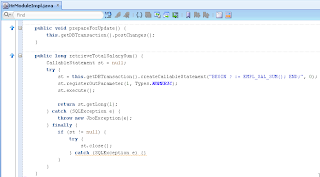
Here is the source code implementation for these two methods:

UI fragment contains two buttons, designed to invoke two custom methods. Total calculated salary value  is displayed visually:


If you decide to run sample application, firstly invoke Show Total Salary button - it will display current sum (0.68M in my case):


Change salary value for one of the employees to be lower - 110 as for example and press Prepare For Update button (this calls postChanges() method):


Method - postChanges() is pushing data to DB, executing DML statement without commiting. Developer tend to think - this is great, we can push data to DB and invoke PL/SQL code over it. Not so fast - keep in mind ADF BC passivation behavior (DB connection from Application Module can be switched at any time and posted data will be lost for the next request):


Invoke Show Total Salary again - you will see a change in calculated total salary (0.67M). This time calculated value was retrieved from PL/SQL function correctly, simply because ADF BC passivation didn't happen:


Disable Application Module pooling - you will get different result:


Change salary value and press Prepare For Update button to invoke postChanges():


This time passivation happens, we can see that from the log:


Calculated total salary value stays the same after refresh - posted data was lost, because of change in database connection:


Tuesday, December 11, 2012

ADF Mobile - Geo Location and Google Maps App

Let me describe ADF Mobile application with Google Maps and GPS support. I have implemented this application in few hours, installed on my iPhone and ready to travel - I will not be lost. So, I would like to share source code with you - you can compile and install it on iPhone, iPad or Android.

Main features currently available:

1. Google Maps embedded using ADF Mobile Geographical Map component (8.5.14 How to Create a Geographic Map Component)

2. GPS location update (9.5.8 How to Use the startLocationMonitor Method)

3. GPS location point display

If I will have time, I plan to implement dynamic GPS location point moving on the map as you go and synchronization with on device database. You can download source code for the current version from here - ADFMobileGoogleMaps.zip.

Here is the home screen - Google Maps. Screenshots are taken directly from my iPhone:


User have two options - Reset and Position. I have noticed that sometimes, especially when network connectivity is lost - ADF Mobile application with Maps component may get unresponsive. This is the reason for Reset button - it performs logout and resets application state. Position - it flips Maps display and open GPS control view:


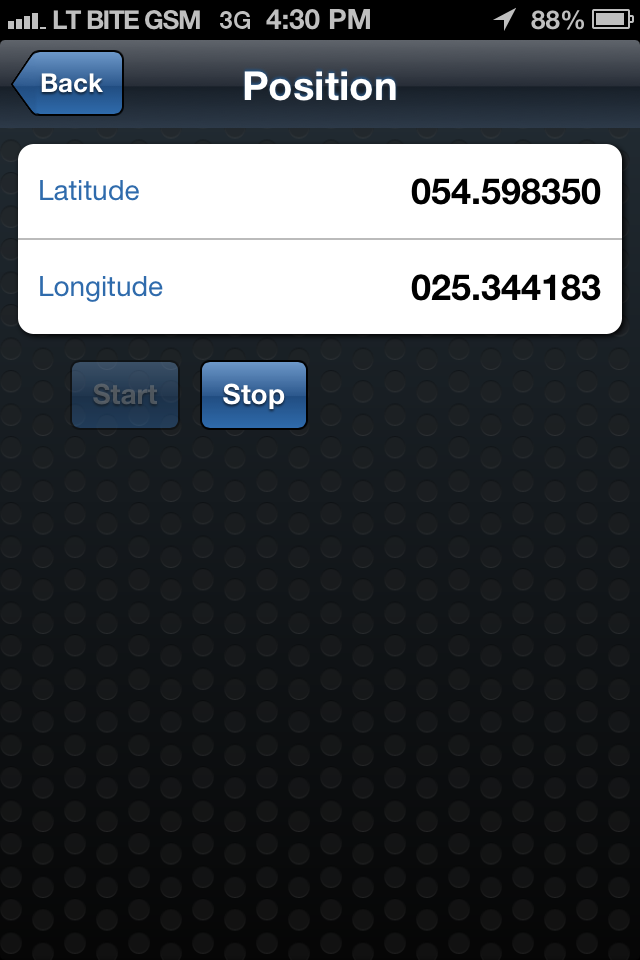
In this screen you can press Start and synchronize Latitude/Longitude for your current position from GPS satellite. Synchronization may take a bit of time, while it becomes accurate - this is the reason for Stop button (to stop synchronization period):


Once position is located, press Back and Google Maps will flip back with a zoom into your position displayed on the map (my real location is displayed here :):


I will walk you know through the technical things. This application contains ADF Task Flow and navigation between Google Maps page and GPS control:


The way how pages are opened on the device (slide, flip) is control by ADF Task Flow navigation case. I have set page transition behavior to be flipLeft:


Google Maps embedded using ADF Mobile Geographical Map component. It sets various properties, such as center, map type, zoom level. ADF Mobile Geographical Map is able to render data layers on top:


My application, renders single point - current position. Position is retrieved from custom bean Data Control (I have defined it myself):


Drag and drop this Data Control on top of ADF Mobile Geographic Map component, JDeveloper generates point data layer automatically from the wizard:


There is getPositions() method responsible to get data about retrieved position (initialized from custom GoogleMapsBean):


GPS action is triggered on the device and data is retrieved using built in ADF Mobile Data Control - Device Features. There is designated method available - startLocationMonitor(boolean, int, String):


GPS method is invoked from the Start button:


One of the parameters - locationListener, it points to the custom listener method. Listener is invoked each time, when GPS position synchronization happens (there is no need to use EL brackets) - method name is static text:


When position is retrieved from GPS and synchronization is stopped - custom Position bean is updated with X/Y:


There is one interesting specific thing related to ADF Mobile - value refresh on the UI. If value is changed in the background, we want to display new value on the UI (but there are no Auto Submit and Partial Triggers in ADF Mobile). Updated value is refreshed on UI using property change support listener invocation from the setter:


Property change support listener declaration:


Saturday, December 8, 2012

Good To Know - Conflicting View Objects and Shared Entity

While killing various issues and helping developers to get up to speed, during this week I encountered interesting ADF behavior - I would like to share it with you. Firstly it took some time to locate it and then I managed to reproduce it with sample application. Use case: 1 EO and 2 separate VO's, based on the same EO. You should admit, is quite common use case - often we share EO's across different forms and usually we implement dedicated VO's for each form (in most of the cases, hardly we can reuse the same VO with different View Criterias applied, because each form usually have different joins and different Master-Detail View Link relationships). Two separate VO's were conflicting during insert operation, more specifically - overridden create(AttributeList) method was invoked by the framework incorrectly. This method was overridden on VO (not on EO) level for a reason, because even VO's were based on the same EO - DB sequences for each of them were supposed to be different. I will describe it below - I hope it will be more clear at the end of this post, what I'm trying to explain (at this stage I believe is not) :)

Here you can download sample application, were described issue is reproduced (tested with the latest JDeveloper 11g 11.1.2.3.0) - EOSharedAccessApp.zip. It is always easier to present complex issue through diagram drawing, here is the one:


Based on this drawing, sample application contains one EO and two different VO's, each based on the same EO. Both VO's are enabled with VO Implementation class, where standard create(AttributeList) method is overridden to get DB sequence (different for each VO). Representation for the same diagram drawing with ADF BC objects in JDeveloper 11g R2:


Open EmployeesOneViewRowImpl class for the first VO, you can see overridden method there and very important - EmployeeId key attribute is initialized with static test value 888:


Open EmployeesTwoViewRowImpl class for the second VO - EmployeeId key attribute is initialized with different static test value 999:


Run ADF BC tester utility and see how it works. What would you expect - two new rows (one row per VO), new row from the first VO with EmployeeId = 888 and new row from the second VO with EmployeeId = 999. Well - I also would expect the same, but is not how it works - good to know.

1. Insert new row into EmployeesOneView1 - correct value 888 is set for EmployeeId (see from the log, overridden create method was invoked):


2. Call Rollback for EmployeesOneView1 to forget inserted, but not yet commited row:


3. Insert new row into EmployeesTwoView1 - incorrect value 888 is set for EmployeeId. Instead of 888, value 999 must be set. Even more funny things - log reports that two overridden methods were invoked from different VO's:


It looks like ADF may misbehave in some situations, when we share common EO's across different VO's. However, I think this is special case related to new row creation and custom code invocation in overridden method for create(AttributeList). You should not worry, just double check carefully functionality you are implementing - sometimes unexpected bug may appear and spoil your work.

As a workaround for this problem, you can rely on ADF Groovy support and get DB sequence value through Groovy expression as default value for EmployeeId key attribute. Differently than initialization from overridden create(AttributeList) method, initialization through Groovy expression happens correctly - I have tested this. I would recommend to check how to use ADF Groovy for DB sequence value retrieval in Grant Ronald's white paper - Introduction to Groovy Support in JDeveloper and Oracle ADF 11g.

Tuesday, December 4, 2012

ADF Mobile - Implementing Reusable Mobile Architecture

Reusability was always a strong part of ADF. The same high reusability level is supported now in ADF Mobile also. I have a blog, where ADF reusability architecture is described through ADF Libraries and ADF Task Flows - Integration in Oracle ADF Through ADF Libraries and ADF Task Flows. This blog was posted in 2009, now this architecture approach became de facto standard and is applied in every ADF project. We go mobile and apply similar architecture pattern for reusability through ADF Mobile libraries (Feature Archive Files) and ADF Mobile Feature sets. You can read more about ADF Mobile Feature Archive Files here - 5.12 Working with Feature Archive Files. Main goal of this post is to prove technically that reusable architecture concept works for ADF Mobile.

Here you can download a set of sample applications developed for this post - mobilereusable.zip. Sample use case is based on previous post - ADF Mobile - Secured Web Service Access, it contains one new application - ADFMobileEmplFar. This application implements reusable ADF Mobile artifact.

The main idea for ADF Mobile reusable architecture is to split one big block into smaller ones and allow to develop these smaller blocks separately:


To test ADF Mobile reusable functionality and Feature Archive File import into main ADF Mobile application, I decided to consume secured Web Service in my library application and import it into main ADF Mobile application. To make it more fancy, I have exposed VO through secured Web Service and implementing a list in my reusable mobile library:


VO is exposed through service interface:


Reusable mobile library contains mobile feature file, where mobile task flow is registered with employees list:


This feature is enabled with security, this will make sure it will be accessible only if user is authenticated into mobile application:


Reusable mobile library contains a list of employees, retrieved from secured Web Service:


This list is implemented using regular ADF approach - drag and drop Data Control element into ADF Mobile page:


Once we define secured Web Service connection and generated Data Control, reusable mobile library is updated with connection details for secured Web Service - connections.xml file:


You must copy connection details into main application connections.xml file manually, otherwise connection will fail.

Define ADF Mobile Feature Archive deployment profile and deploy your reusable mobile library:


Create file system connection in Resource Palette - you can browse through and see ADF Mobile features packaged into library:


Import library into main ADF Mobile application, same as you would import regular ADF library into regular ADF project and ADF Mobile feature becomes available in the main application context:


As I have said earlier - copy secured Web Service connection details into main application connections.xml file:


We are ready to test now - login into ADF Mobile application:


You can see two buttons - Home and Employees, these buttons represent ADF Mobile features we deliver with our application. Home is default feature and it loads first:


Click on Employees button - it will load feature included from reusable mobile library with Employees list: