Sunday, July 22, 2012

Lightweight ADF Task Flow for BPM Human Tasks Overview

We can customize and include available Oracle BPM Workspace task flows into our own ADF 11g application. Additionally to out-of-the-box task flows in Oracle BPM 11g, we can use Oracle BPM 11g Worklist API and build custom ADF task flows. While there can be different requirements and scenarios, in typical case I would suggest to use customized out of the box Oracle BPM 11g provided task flows for core requirements and additionally implement your own custom task flows based on available Worklist API. Most likely custom task flows based on Worklist API would cover less functional, but more lightweight requirements.

I have implemented such sample lightweight task flow - it shows a list with assigned tasks. Download sample application - IntegratedBPMWorklistApp_v4.zip. Here is how this task flow looks - simple table with assigned tasks:


Same application includes BPM Workspace task flow with complete functionality for Human tasks:


In order to implement your own ADF task flow with access to BPM context, you should follow instructions from Oracle documentation - 33 Building a Custom Worklist Client. I'm using sample application from previous post - Tips & Tricks How to Run Oracle BPM 11g PS5 Workspace from Custom ADF 11g Application. This application is extended with additional libraries required to access BPM API:


You can access BPM functionality through BPM context. It takes time to initialize BPM context, its why Oracle says to create it ones and keep in session scope. Ideal place to create BPM context is Login method. Check - initBPMContext(username, password) method, it authenticated to BPM environment and when context is created - stores it into session scope:


ADF task flow contains one fragment with read-only table to list assigned tasks:


Table is created from data control generated on top of Java class, where we are accessing BPM context and retrieving assigned tasks:


Data control class is responsible to construct a list of tasks, with task state - assigned. I'm reusing BPM context from session scope:


Tasks query is created, iterating over results and populating list of tasks:


Task list construction method is executed automatically, when table is rendered on the UI. For refresh functionality to work, we need to re-execute retrieveAssignedUserTasks() method and refresh iterator. Here is page definition for the fragment:


Refresh invokes task list construction and at the end calls iterator refresh:


Monday, July 16, 2012

Issue with Show Printable Page Behavior in ADF 11g R2 (11.1.2.2.0)

You may experience strange issue in ADF 11g R2 (11.1.2.2.0, 11.1.2.1.0), related to printable page behavior. After af:showPrintablePageBehavior operation is applied, ADF fails to register Active Data for command component on runtime. It doesn't seem to break application completely, but obviously is annoying for the users. Same issue related to Active Data registration is reproduced after applying export to Excel operation. This seems to be a bug and most likely will be fixed in the next ADF versions. There are workarounds how to overcome Active Data registration bug, I will describe them at the end of this post.

Download sample application, where printable page behavior error is reproduced - PrintPageBehaviorApp.zip. This application is very basic - contains only one page, no ADF regions.

There is Print link, it invokes af:showPrintablePageBehavior operation:


Run sample application, open tab with Employees table data:


Print employees data, press Print link - printable page will be loaded from another browser tab:


Go back to application and select another tab - Department data:


Active Data registration error happens, on the next invoked action after show printable page behavior was invoked.

There are several workarounds. One of them you should try first - set ChangeEventPolicy to none (by default - ppr) for related iterator from page definition:


This works, but not always. I noticed that for more complex pages with ADF regions, it doesn't help to set ChangeEventPolicy to none.

Another option is to implement printable page rendering programmatically (it will render in the same browser tab where application is launched). Read more about this solution here - ADF Code Corner 95. How-to Navigate to Printable Pages.

Saturday, July 14, 2012

Tips & Tricks How to Run Oracle BPM 11g PS5 Workspace from Custom ADF 11g Application

Oracle BPM 11g PS5 Task List task flow can be included into custom ADF 11g application. This task flow can be executed in 2 modes - worklist and workspace. I already blogged about worklist mode, see here - ADF 11g PS5 Application with Customized BPM Worklist Task Flow (MDS Seeded Customization). Today I'm going to cover different tips & tricks how to run Task List task flow in workspace mode. Workspace mode gives more functionality to the end user - it allows to render list of BPM processes, more dashboards, etc. User can start new BPM process through Task List task flow configured in workspace mode.

Download sample application configured with BPM 11g PS5 Task List task flow for workspace mode - IntegratedBPMWorklistApp_v3.zip. This application is based on the same sample from previous blog for worklist mentioned above.

Sample application is extended with additional custom ADF task flow, bringing data for employee record - this is to demonstrate, Oracle BPM 11g PS5 Task List task flow really can run together with other custom ADF task flows present in the same application. Employee data region is rendered from separate tab:


BPM Workspace tab brings BPM workspace region. User can access assigned tasks, initiate new BPM process from available applications, complete Human Task details, etc.:


Custom ADF application, includes Task List task flow in workspace mode, see task flow parameter value:


There is no very clear documentation about how to run Task List task flow in workspace mode and what libraries are required to be added to your custom ADF application. But we always can check how standard BPM application from Oracle is configured. Go to SOA home, navigate to soa/applications folder - open OracleBPMWorkspace.ear and check contents of this deployment archive. File - weblogic-application.xml includes references to the libraries deployed on the server, make sure to copy same library references into weblogic-application.xml from your custom application (if you deploy custom application on non-SOA domain, make sure to have these libraries deployed):


Library references found in weblogic-application.xml file:


Additionally to referenced libraries, some of the libraries must be packaged together with application. You can check this in the same OracleBPMWorkspace.ear file, WEB-INF/libs folder. Seven additional libraries are included directly into application:


You should notice that two last libraries are coming from JDEV home. These libraries provide us with BPM Task List task flow. Same libraries are available in SOA home as well - strange enough when using libraries from SOA home for BPM Task List task flow - my custom application was not working. Keep in mind this, if you face strange runtime exceptions, to check what libraries you are including.

Even with all libraries included, on runtime exception happens when accessing BPM Task List task flow in workspace mode. It fails to initialize ADF region for External Links task flow:


To workaround this problem, I decided to disable External Links task flow from Oracle BPM Task List library. In order to disable it, I restarted JDev in Customization Mode and opened main view for workspace - bpmHome.jsff:


I noticed that External Links task flow is registered in the left panel accordion. Panel accordion is implemented as declarative component by Oracle, is referenced directly from bpmViewList.jsff:


Open bpmViewList.jsff, now we can manipulate with panel accordion content and disable External Links section:


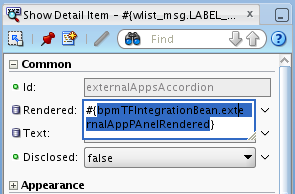
Select External Links af:showDetailItem element and go to Properties, select Rendered property:


Set Rendered property to be false - this means External Links section will remain hidden:


JDev creates MDS customization file and includes metadata info to hide External Links section from standard Oracle BPM library - this allows us to load Task List task flow in workspace mode successfully:


Monday, July 9, 2012

Running Oracle BPM 11g PS5 Worklist Task Flow and Human Task Form on Non-SOA Domain

With standard setup, both BPM worklist application and Human task form runs on the same SOA domain, where BPM process is running. While this work fine, this is not what we want in development, test and production environment. Mainly because BPM worklist and Human task form are ADF artificats, its easier to develop and run in production from different server. I will describe in this post how to run both BPM worklist application and Human task form on different non-SOA domain. There are two main advantages for such architecture:

1. BPM Worklist TF will be integrated into custom ADF application, no need to run standard BPM Worklist application from SOA domain (read more from previous post - ADF 11g PS5 Application with Customized BPM Worklist Task Flow (MDS Seeded Customization))

2. Human Task form will run on the same non-SOA server, where custom application is deployed (it integrates BPM Worklist TF)


All this makes ADF part less dependent on SOA specifics, as well allows to minimize workload on SOA domain.

Main goal of this post is to aggregate all available information from Oracle documentation into one single sample application. There are several things not working as described in the documentation, I will point below. In order to prepare sample applications for BPM worklist TF and Human task form to be deployed on non-SOA domain, I was using following chapters from Oracle SOA/BPM 11g PS5 developer guides:

1. A Creating Custom ADF Applications with Oracle Business Process Management Workspace Task Flows

2. 30.8.4 How To Deploy a Task Form to a non-SOA Oracle WebLogic Server

Download sample applications:

1. Sample BPM process and Human Task Form - Lab02_v2.zip

2. Custom ADF application with integrated BPM worklist TF - IntegratedBPMWorklistApp_v2.zip

Both applications are deployed on the same non-SOA domain (except for BPM process), I'm using JDev Integrated WLS server 7101 port for this - CreateOrderTaskForm (Human task form) and IntegratedBPMWorklistApp (BPM Worklist TF):


I was deploying CreateOrderTaskForm application first. Follow this section from Oracle SOA/BPM developer guide: 30.8.4 How To Deploy a Task Form to a non-SOA Oracle WebLogic Server. While provided documentation info is very useful, still you can't follow it completely.

Decide first, how you would like to run BPM Worklist TF. There are two options - federated and normal modes. Federated mode provides less functionality, is designed for remote servers. My sample app is configured (as by default) to run in normal mode, this means there is no need to create wf_client_config.xml file.

Create Foreign JNDI with links pointing to SOA server - this will allow to connect from non-SOA domain to SOA server:


Links:


Assign BPM security grants in system-jazn-data.xml from non-SOA domain. You still will see security error, when starting non-SOA domain, it will try to register Human task form with BPM process and will fail - you can ignore this.

One thing you should point your attention is oracle.soa.workflow library installation on non-SOA domain. If non-SOA domain already have WebCenter extensions installed, most likely there already exists another library - oracle.soa.workflow.wc. Developer guide says you can use either one or another. What I experienced - when I had both libraries installed, I was getting class path conflicts when starting BPM Worklist TF. If you will get similar error, double check may be both libraries are installed. I have only one:


Once configuration is completed - you can deploy Human task form. Deployment is done on JDev integrated server:


BPM process is deployed on SOA enabled domain:


Define Human task form URI for BPM process. Go to BPM process in Enterprise Manager and select Human Workflow component:


Specify address for Human task form associated with selected BPM process (server port should point to non-SOA domain in this case):


First part is completed - now we move to BPM Worklist TF (IntegratedBPMWorklistApp_v2 application). We are not using out of the box shell application - BPM Worklist. Instead we are using only Task List TF from that application, inside our own custom environment. Read more from Oracle BPM developer guide - A Creating Custom ADF Applications with Oracle Business Process Management Workspace Task Flows.

There is one thing that developer guide doesn't say. If you will configure BPM libraries for your project as developer guide says - you will get errors when running application directly from JDeveloper (libraries are not copied into deployment folder). It works well, if you will deploy on the server, but not when you run from JDeveloper. This happens, because standard BPM Worklist Components library available in JDeveloper is not marked to be deployed (and this option is disabled to change):


Same for BPM Services library, this library is mandatory on class path when deploying on non-SOA domain:


Libraries are not copied into deployment folder when running from JDeveloper, even there is a check:


Workaround it to create your own library group (for example - Custom BPM Worklist), add all 3 required libraries and set to be deployed by default (important if you want to run BPM Worklist TF application from JDeveloper directly):


Custom library is added to the project:


JAR files included through the custom library are targeted for deployment:


BPM Worklist TF - TaskList is included using Worklist mode (Workspace also possible, but will require additional libraries to be added):


Make sure security is granted to each resource:


Deploy custom ADF application with BPM Worklist TF to integrated WLS server:


BPM Worklist TF and Human task form is running from custom ADF application, deployed on JDeveloper integrated WLS server port 7101:


To summarize content of this post:

1. Enable JDev integrated WLS domain to run SOA

- Install Oracle SOA Workflow library, if required. Configure foreign JNDI. Set security grants for BPM

- Deploy

- Change Human task form URI

- Test from BPM Worklist application

2. Run BPM Worklist TF on non-SOA JDev integrated WLS domain

- Set domain trust password

- Define custom library for BPM components

- Make sure no conflicts between oracle.soa.workflow and oracle.soa.workflow.wc

Tuesday, July 3, 2012

Running ADF BC Browser inside Oracle BPM 11g Applications

Did you had a chance to developed Oracle BPM 11g application in combination with ADF BC? If yes - most likely you faced a problem with ADF BC Browser. ADF BC test utility simply doesn't start, if ADF BC project is implemented in the same application, where BPM process is defined. Most common error: MDS-01330: unable to load MDS configuration document. Don't worry - there is workaround for this bug.

Once again - ADF BC project is implemented within the same application, where we have BPM process project. Try to run AM:


Error is thrown about JBO-33001: Configuration file /tester.xcfg is not found in the classpath:


Workaround is to temporary (until you want to run ADF BC Browser) comment out MDS definition in adf-config.xml file:


ADF BC Browser is starting successfully now:


Looks like there is a conflict between ADF BC Browser runtime and MDS store configuration in adf-config.xml, specifically for BPM 11g applications. There is no such problem when running ADF BC Browser in WebCenter 11g applications. Make sure to uncomment MDS definition, when ADF BC Browser is not needed anymore.