Saturday, March 19, 2011

View Criteria and CRITERIA_AUTO_EXECUTE Property - ADF 11g PS3

Quick update for previous blog post - View Criteria and CRITERIA_AUTO_EXECUTE Property. Sample application for that post was implemented quite long time ago in 2009. We were checking recently, same functionality on ADF 11g PS3 - to control programmatically View Criteria execution mode. In order to make it work now, code should be changed slightly - add two lines of code:

1. Reset View Criteria, this will clean previously assigned parameter values
2. Save View Criteria state, this will store new value for CRITERIA_AUTO_EXECUTE parameter

Sample code to change CRITERIA_AUTO_EXECUTE parameter and save View Criteria state:


Thursday, March 17, 2011

SOA & E2.0 Partner Community Forum Slides - ADF/WebCenter 11g integration with BPM Suite 11g

I'm posting slides from my session at SOA & E2.0 Partner Community Forum in Netherlands. Soon, we will publish video recording on youtube for it. All demo applications can be reproduced by following these instructions - BPM Portal 11g PS3 - How To Configure Oracle BPM 11g PS3 Process Portal on Oracle WebCenter Spaces 11g PS3. Download:


Thanks to Juergen Kress and SOA Community for organizing such great event !

Sunday, March 13, 2011

Exception Handler for Method Calls inside ADF Task Flows with Fragments

In regular case, when JboException is thrown from the Model, it is rendered in UI within popup component automatically. This works fine, when we are calling operation bindings directly. However, if operation is called through ADF task flow Method Call - JboException is being catched by Controller layer and is rendered differently. Exception handling for ADF task flows with pages can be done slightly differently, I will explain it in my next post.

Download sample application - MethodCallExceptionHandler.zip. This sample app contains one customer method in Application Module implementation class, where JboException is being thrown:


This method is exposed to the ViewController through Data Control:


ADF task flow Method Call activity is implemented to invoke processData() method, which throws JboException:


On runtime, when JboException is encountered from Method Call activity, we are getting browser error:


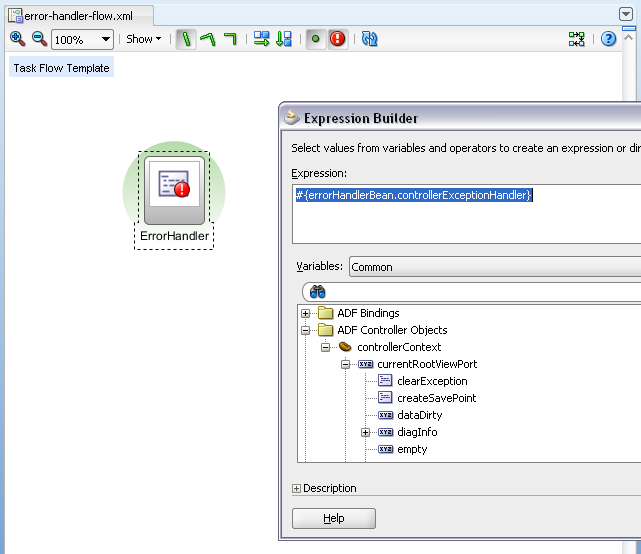
This can be avoided by defining single ADF task flow Template with only one activity - Method Call marked as error handler:


In the case, when we have ADF task flow with fragments, there is no need to implement error handler method - exception is handled and popup will be rendered automatically. Only what we need to do is to define error handler ADF task flow activity as shown in the screenshot above.

In order to define error handler method activity ones, we are using ADF task flow Template. All ADF task flows, where we want to handle JboExceptions for Method Calls should be based on that template:


In a case when JboException will happen, user friendly popup with error text will be rendered to the user:


Thursday, March 10, 2011

How to Enable Create Operation Security Check for ADF BC

Out of the box in ADF BC, we don't have control over create operation security. In order to prevent unauthorized create operations, we need to define update operation security permissions, this will disable input fields for newly created record - user will not be able to insert blank record into database (validation will fail). However, sometimes this is not enough, we had requirement recently to protect EO from unauthorized create operations in advance, before blank row will be inserted. While I was working on this blog post, I saw Frank Nimphius post on ADF Code Corner for the same topic this week (coincidence), check sample 76. While its same topic, I will post my sample application as well, I will be looking more from functional requirements side and project based use case. Thanks to Frank's post, I was able to improve my sample. Please refer to chapter 39.10 Declaratively Preventing Insert, Update, and Delete from ADF Developer Guide - I will prevent create operation, using on described methods.

Download sample application - CreateOperationSecurityADFBC.zip. JDeveloper 11g PS3 comes with updated ADF Security wizard, now we can define our custom ADF Security Resource. This works also with PS2, but no wizard support. I will define CustomADFBC ADF Security Resource and create operation - press green plus sign next to the Resource Type field:


Once new resource type is created, you should define resource itself - will name it AllowCreate:


In standard case we have pages and ADF task flows as resources, here we define our custom resource - AllowCreate. Now we can add Application Roles, same as we would do for pages or ADF task flows:


Next, select create action checkbox for added Application Roles:


Sample application contains three predefined users (password: welcome1). Two users (redsam1 and redsam2) are granted permission to create new rows, user scott is not granted with such permission:


There is EO extension class in Model project, it contains overriden method to prevent unauthorized new row creation:


Method - isInsertAllowed, scans ADF Security and checks custom permission to verify if user can insert rows into current EO or no. There is one very important practical thing here, you should pay attention. For sample application, it would be enough to check hardcoded security resource names and it would work. However its not enough in reality, especially when we have generic EO Implementation class. Different EO's may work with different security resources. This can be handled with EO custom properties. Every EO, where custom security permission needs to be applied, should define custom permission information:


Generic method will retrieve available properties, and if there are any - will do authorization check for create operation:


This will ensure proper authorization check for EO create method, if security check will fail - there will be no row inserted - see overriden methods. If unauthorized create operation happens, I'm throwing JboException.

Additionally, we can protect UI layer - but this is only visual, is not critical anymore. You can set disabled property for Create button and reference our custom security resource (make sure you are using logical negate sign for this expression):


Let's do some tests, another Create button will not set any expression for disabled property - will be always enabled:


Insert Row button will not call create operation directly, it will call navigation action and will trigger CreateInsert operation through ADF task flow Method Call activity. As we know, if JboException will happen while calling Method Call, this will end-up into Controller error and will break application view. In order to prevent such ugly behavior, I have defined separate Method Call activity and marked it as Exception Handler:


Exception Handler Method Call is invoking my custom method from managed bean:


You should see from ADF task flow navigation, once Exception Handler Method Call will be completed, navigation will be returned back original page. This means user should not notice any undesired behavior. Exception Handler method checks for currently available Controller exception and presents it to the user through JSF Faces Message:


Now its time to test our solution. We login as user scott, without permission to create new records:


As you can see, first Create button is disabled as expected, based on Expression Language statement. Another button is active, we can press it and try to insert new row:


We are informed - No permission to insert new record. Such user friendly behavior happens only because there is custom Exception Handler Method Call defined, otherwise it would be system error. User scott is not allowed to insert new records:


User redsam1 - is granted with permission to insert new records:


Authorization check is passed:


Monday, March 7, 2011

Grant Ronald ADF Workshop in London (March 22nd)

If you are in London on March 22nd (if you are not, you should come :), I would recommend to attend Grant Ronald ADF workshop event:

This workshop is designed to allow participants to gain practical experience of Oracle's Application Development Framework (ADF). It includes an introduction to the framework and a detailed insight into its technology stack. Hands-on labs enable the attendee to get practical experience of ADF and demonstrate the power of the framework.

Register here:


Sunday, March 6, 2011

ADF BC Dependent LOV 11g PS2/PS3 Bug and Fix

There is one interesting bug I want to share with you, this bug is reproduced on ADF 11g PS2 and PS3, but it works fine on ADF 11g PS1. Its either magic or someone is not running proper test automation process :) Its not that I'm enjoying to post such type of blogs, but you should double check your applications if you have similar use cases. If you do, there is a chance for dependent LOV not to work properly and for the user to get entire list of values without filtering. I will describe how to reproduce dependent LOV filtering bug and will explain possible fixes. This bug was discovered by testers from one of my projects.

Download sample application, where you can reproduce described bug - DependentLOVCriteriaBug.zip.

How to reproduce:

There is LOV VO, it defines View Criteria for filtering. View Criteria contains Bind Variable criteria item for First Name attribute:


Main Employees VO, declares view accessor to the LOV VO, it triggers View Criteria for dependent LOV filtering and sets bind variable value:


Based on that view accessor, main Employees VO contains LOV define for ManagerId attribute:


User don't want to see all searchable attributes inside LOV search region, so we are using predefined View Criteria to be rendered inside LOV search region:


So far all is simple - just regular LOV with View Criteria defined, for dependent value filtering. Let's test first, how it works in ADF BC tester - it works well:


Let's run UI and open same LOV - list of values is filtered correctly:


Close LOV by pressing Cancel button. Open same LOV again - now filtering suddenly is not applied anymore and all value are returned without applying View Criteria:


I have noticed, sometimes you need to open LOV and close with Cancel button couple of times, then this behavior is reproduced. Sometimes it works from the first time.

Do you know how to fix this? You would never believe, just set LOV search region to default one - include all queryable attributes:


Yes, thats a fix you need. Then all queryable attributes will be rendered inside LOV search region, but filtering will be triggered always:


If you still want to hide some of the attributes from LOV search region, you may set these attributes to be non queryable - EmployeeId for example:


EmployeeId is not available anymore in LOV search region:


If you still want to render View Criteria inside LOV search region, there is one fix. But this will limit one View Criteria per LOV and will make it not too much different from having static WHERE clause. Let's set back View Criteria as it was before for LOV search region:


Select View Accessor from main Employees VO:


Set false value for Row Level Binds property of View Accessor:


This will ensure executeQuery() method invocation for LOV VO. From this method we can apply View Criteria manually, every time when LOV is opened:


In this case, LOV will be filtered correctly as well:


However, this limits View Criteria usage by static reference from executeQuery() method. I would recommend, while this bug is not fixed, to avoid using View Criteria as LOV search region visual representation. Otherwise, users will get entire list by pressing LOV Cancel button.

Tuesday, March 1, 2011

WebCenter Document Management ADF Task Flows Without Oracle UCM

Primarily we are using WebCenter Document Management ADF Task Flows in connection with Oracle UCM product - Oracle Universal Content Management 11g and Oracle ADF/WebCenter 11g Integration. However, we are not constrained if there is no Oracle UCM available, it is possible to use as document repository regular file system storage. You will not be able to do indexing, document management performance will not be so good as in Oracle UCM, but still it will work. Let's look - how it works.

Download sample application - WCDocManagementFS.zip. This sample as document content repository is using file system connection:


WebCenter Document Management ADF Task Flow is implemented inside ADF Region. There is initialization method inside that region, method is called each time and it created file system folder for current user (if folder doesn't exist already):


Default Method Call is invoking our custom method and passing current user name:


Method is using standard Java IO package to create new folder on file system:


I have generated custom Data Control for this class, in order to call this method through Data Control bindings:


Method becomes available in Data Control and can be called through ADF bindings:


WebCenter Document Management ADF Task Flow configuration obtains resourceId value dynamically, from our custom bean based on current user name. This allows to restrict unique folder view per each user:


Now we login into application - user redsam1:


File system folder is created automatically:


We can upload document:


User can view uploaded documents, but is restricted to open other users folders:


Disclaimer: File System adapter is not supported for production use and supported only for use during development in JDeveloper, according to Oracle WebCenter Developer Guide section - 26.2.3 How to Create a Content Repository Connection Based on the File System Adapter. However, technically it works on production deployment as well. I don't recommend one approach over another, decide on your own, if you want to use File System adapter and possibly migrate to UCM in the future.

Production environment test for File System adapter:

1. File system connection is define on Oracle Enterprise Linux:


2. Application is deployed on production WebLogic server:


3. WebCenter Document Management ADF Task Flow works well and access to File System is done successfully:


4. We can upload file:


5. User folder is created on file system:


6. File is uploaded on file system as well: