Showing posts with label Web Services. Show all posts

Sunday, June 23, 2013

Calling ADF BC Web Service from BPM Process

This post is about calling ADF BC Web Service from BPM Process. In order to keep track of the steps executed in the process I will be calling ADF BC Web Service, passing task outcome and updating database table. This is quite handy, especially when identifying and recovering failed BPM process instances. You could implement process instance replay, when process instance execution data is stored in the DB. For this purpose I will pass process instance ID to the ADF BC Web Service in order to identify and assign current process task.

Run sample application - adfbpmapp_ps6_v3.zip and start new process:


We can see from BPM log - first task is completed and call to ADF BC Web Service is executed:


Same can be visualized in the process flow:


Database is updated through ADF BC Web Service with current process instance ID, payload ID and task outcome - started:


Push task further by submitting it for approval:


This will be visualized in the process flow - invoking status update through ADF BC Web Service and arriving to approve employee task:


Database is updated for the current process with the task executed set to be assigned:


Let's reject this task now:


Process flow comes back to original assigning task:


This is logged in the DB - status reject:


Start new task and you will see that record with new process instance ID will be created, assigned with different status:


Finally if first process instance gets approved:


We can see this updated in the DB - status approve:


This was quick description about how such functionality works, now I will describe important things from technical perspective.

First issue you will encounter when calling ADF BC Web Service from BPM process - Data Source driver compatibility. By default ADF BC is using non-XA data source driver, however this should be changed when calling ADF BC from BPM process. If you would use default non-XA driver, there will be error generated related to transaction failure and driver type:


Go and declare second driver for your ADF application, now XA type driver:


Make sure you select it for the application module configuration serving ADF BC Web Service:


ADF BC Web Service method itself executes View Criteria to search for process instance ID. If such ID was already logged, it updates the record, if not - creates new record:


Here we can see custom method from Application Module Implementation class exposed as ADF BC Web Service method:


Make sure to set additional listener class in weblogic.xml of ADF BC Web Service application, otherwise ADF BC Web Service method will not be located from BPM process. Add this listener - oracle.jbo.client.svc.ADFApplicationLifecycleListener:


You need to copy ADF BC Web Service WSDL URL and use it in BPM process to define service call:


Here you can see ADF BC Web Service invocation service call defined in BPM process:


Very important is to set correct Registry property for the service call defined on top of ADF BC Web Service. Registry property must start with ADF BC Web Service deployment application name and end with JBOServiceRegistry system keyword (there must be _ between these two).

ADF BC Web Service payload values are initialized through data association. Process instance ID is set from predefined BPM process variable - ecid:

Sunday, April 28, 2013

Master-Detail ADF BC Web Service for ADF Mobile

It seems like a bit unclear for the developers if ADF BC Master-Detail relationship can be reused out of the box through ADF BC Web Service in ADF Mobile. Short answer - yes, it can. In order to prove this I have developed sample application - second level Master-Detail relationship is exposed through ADF BC Web Service and consumed from ADF Mobile screens.

Mobile device in the first screen renders list of departments, second screen brings all employees from selected department and finally third screen brings subordinate employees (managed by). Here is ADF Mobile Task Flow implementation:


Here you can download adfmdmobilews.zip sample application, it contains both parts - server side and mobile client.

First screen brings all departments:


Second screen displays list of employees for selected department, first Master-Detail:


Third screen displays list of subordinates, employees managed by selected employee, second Master-Detail:


ADF BC server side is implemented to support classical ADF BC Master-Detail relationship defined with View Links and registered in Application Module:


ADF BC Web Service is exposed with Master VO instance - DepartmentsView1. This instance is enabled with View Criteria (just to bring entire list of departments), empty parameter values for the View Criteria are accepted:


Something very important now. Based on documentation - 11.2.6 How to Support Nested Processing in Service-Enabled Master-Detail View Objects, you must set SERVICE_PROCESS_CHILDREN property on View Link for the Master-Detail relationship be enabled for ADF BC Web Service. I did this for Department-Employees View Link:


As well as for Employee-Subordinates View Link:


This is about the server side, now we switch to ADF Mobile client. You should know that ADF Mobile client Web Service Data Control is stateless (different from regular ADF BC Data Control), this means current row selection is not preserved when moving from one ADF Mobile page to another. For the Master-Detail relationship to work on ADF Mobile client, we must transfer current Master record key between pages, in Page Flow Scope as for example:


We can drag and drop Master-Detail relationship from Data Control as usual in ADF. Here how we can set correct Master key for Detail relationship:


Data Control method - setCurrentRowWithKey is invoked in the second page (detail for Employees based on Department). We are using old good method from ADF 10g times - invokeAction, in order to call executable method on page load:


The same for the third page, where second level detail is implemented for subordinates. Here we call two methods for setCurrentRowWithKey, one for Departments and second for current manager Employee:


Keep in mind that by default setCurrentRowWithKey will not work, because ADF Mobile Web Service Data Control doesn't inherit key setup from ADF BC. You need to set key attribute for each of Data Control bindings manually, from DataControls.dcx go and edit required binding:


JDeveloper generates definition XML file for the binding, you can set proper key. Even it still displays old key and there is no way to remove it, on runtime only proper key is used:


Key is set manually for Employees binding as well:

Saturday, April 20, 2013

Oracle BPM 11g Mobile Worklist with ADF Mobile

I have developed ADF Mobile application to bring BPM worklist tasks to the mobile device - I would like to share concepts of such ADF Mobile application with the community. The whole idea is based on BPM Java API to access BPM Context and get currently assigned tasks for the user, read more here - Lightweight ADF Task Flow for BPM Human Tasks Overview. Once tasks from BPM are queried, they are exposed through ADF BC secured Web Service method. Web Service is consumed from ADF Mobile application through Web Service Data Control - task data is rendered on the mobile device, later user can do callback and send approve/reject actions. Approve/Reject actions will be processed by BPM API on ADF BC secured Web Service side.

ADF Mobile login and secured Web Service call implementation is done based on previous blog - ADF Mobile - Secured Web Service Access.

Here you can see BPM mobile worklist solution high level architecture:


Sample application - BPMMobileWorkListApp.zip, is shipped with three separate JDeveloper applications:

1. ADFBasicAuthApp - server side application to allow login into ADF Mobile application running on the mobile device

2. ADFSecuredService - server side application with access to BPM context and exposed secured Web Service providing list of tasks for the current user

3. ADFMobileSecuredApp - ADF Mobile application with connection to secured ADF BC Web Service, displays BPM mobile worklist

User is provided with login screen for BPM mobile worklist application:


Here we can see standard ADF Worklist task flow running in the Web browser with BPM tasks listed. The same tasks are listed in BPM mobile worklist:


In BPM mobile worklist user can select particular task and view details:


1. ADF BC secured Web Service Implementation

ADF BC secured Web Service is implemented and deployed based on this post - Web Service Interface for ADF BC Application Module in Oracle Fusion 11g.

Web Service method returns List type, each task data is represented with one line in the list. Method is exposed through ADF BC Web Service, return type - List:


Connection to BPM context is established with the username retrieved from ADF Security context, password is static for the simplicity of the example:


Sample application contains logic to access BPM context and retrieve all pending tasks for current user. Tasks are collected and returned as List:


Such Web Service can be tested from Oracle Enterprise Manager, using OWSM policy for secured access. See list of task data returned:


2. ADF Mobile application for BPM mobile worklist

Secured Web Service is consumed in ADF Mobile and Data Control is created:


Data is loaded into mobile device screen through proxy Data Control bean - WorkList, in this bean we do parsing of Web Service data retrieved from MobileService Data Control:


Here is the source code for BPM mobile worklist screen - list of tasks:


Screen to display details of BPM task in ADF Mobile:

Friday, November 23, 2012

ADF Mobile - Secured Web Service Access

I will dig today into secured Web Service access from ADF Mobile. There are good tutorials how to consume open Web Service in ADF Mobile, but in practice almost every Web Service exposed for the mobile must be secured - who wants to expose open Web Service on the public internet? ADF Mobile doesn't support Web Service Java Proxy, you have an option to use Data Control generated directly from the Web Service -  I will explain the steps how to configure such Data Control for secured Web Service access. Thanks to Joe Huang (ADF Mobile Product Manager) - he gave me very useful hints to finalize secured Web Service invocation from ADF Mobile.

In my next post - I will explain how to deploy and test the same application on real iPhone device.

I would recommend to read - 10.5 Accessing Secure Web Services, this is a good guide - but I will try to cover certain gaps. You can download sample application - mobilesecuredws.zip. This archive is based on previous blog sample application - ADF Mobile - Login Functionality and contains three applications:

1. ADFBasicAuthApp - typical ADF application with basic ADF security authentication enabled. This application is installed as authentication server.

2. ADFMobileSecuredApp - ADF Mobile application with deployment profile for iOS simulator. Implemented secured home page and configured with login page. Calls secured Web Service.

3. ADFSecuredService - ADF BC application enabled with Web Service from Application Module.

From this diagram you can understand all the relationships implemented in the sample application:


Access to ADF Mobile application is authenticated through WebLogic server security realm. Once initial authentication is completed - user is able to call secured Web Service. ADF Mobile injects user security information into Web Service header, security information is retrieved from security store constructed after login.

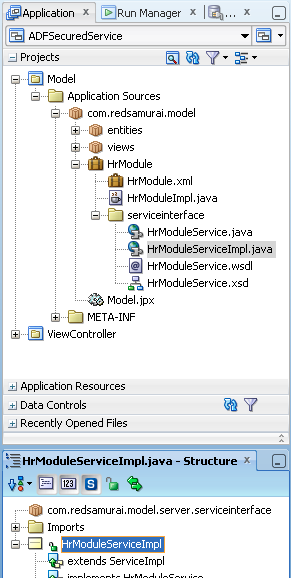
We should look now into the service part - where secured Web Service is implemented (ADFSecuredService application). Standard service interface is defined for Application Module and one custom method is exposed:


Custom method is not doing anything fancy, except that it prints success message:


How you can secure such Web Service? Just select implementation class in the structure window:


Locate OWSM Policies section in the Properties window and open property editor. There are different properties available, for this sample application I was using - oracle/wss_username_token_service_policy:


You can double check if security policy is assigned successfully for Web Service implementation class:


This is all with the service part, now we are going to switch to the ADF Mobile part (ADFMobileSecuredApp application). As I have said earlier, ADF Mobile doesn't support Java Web Service proxy, so we are going to use Web Service Data Control directly:


Once Data Control for Web Service is generated (I skip this part, because it is well documented anyway - just Google), you should select it in the Structure window, right click and choose - Define Web Service Security:


In the wizard, for your convenience - check option for Show only the compatible client policies for selection - this will filter only these security policies applied supported by the Web Service on server side:


Now we are approaching one of the most critical points in this post - connections.xml file configuration in ADF Mobile application:


This file defines two connections:

1. Authentication Server for Login
2. Secured Web Service

Both of these connections must point to the same adfCredentialStoreKey. There is a bug in current version, when you generated Web Service Data Control for ADF Mobile application - by default it is using different property name - credentialStoreKey. You should fix this property name manually to be adfCredentialStoreKey (check sample application). This is known issue - Enabling Credential Injection to Web Services (14726089).

Once again - adfCredentialStoreKey for authentication server:


Must be the same as for the secured Web Service:


Configuration is completed - now we can test it. Add button on ADF Mobile UI screen to invoke method from secured Web Service data control:


ADF Mobile is using the same bindings concept as regular ADF - action is defined in the page definition file, this action is responsible to call method from secured Web Service:


Run application on iPhone simulator directly from JDeveloper environment:


Few seconds and we are ready to login into ADF Mobile application:


Authentication is successful - press Test Web Service Secured Access button to invoke custom method from remote secured Web Service:


Check server log - method was invoked successfully: