Showing posts with label Tree. Show all posts

Tuesday, September 15, 2015

ADF BC Inline View Criteria for Hierarchical Search

ADF BC View Criteria allows to implement Inline View Criteria to execute hierarchal search. This is especially useful, when you have Master-Detail relationship and want to filter Master records, based on attribute value from Detail. Keep in mind, Inline View Criteria for hierarchical search would not work, if VO is based on custom SQL query. It works only with declarative VO's.

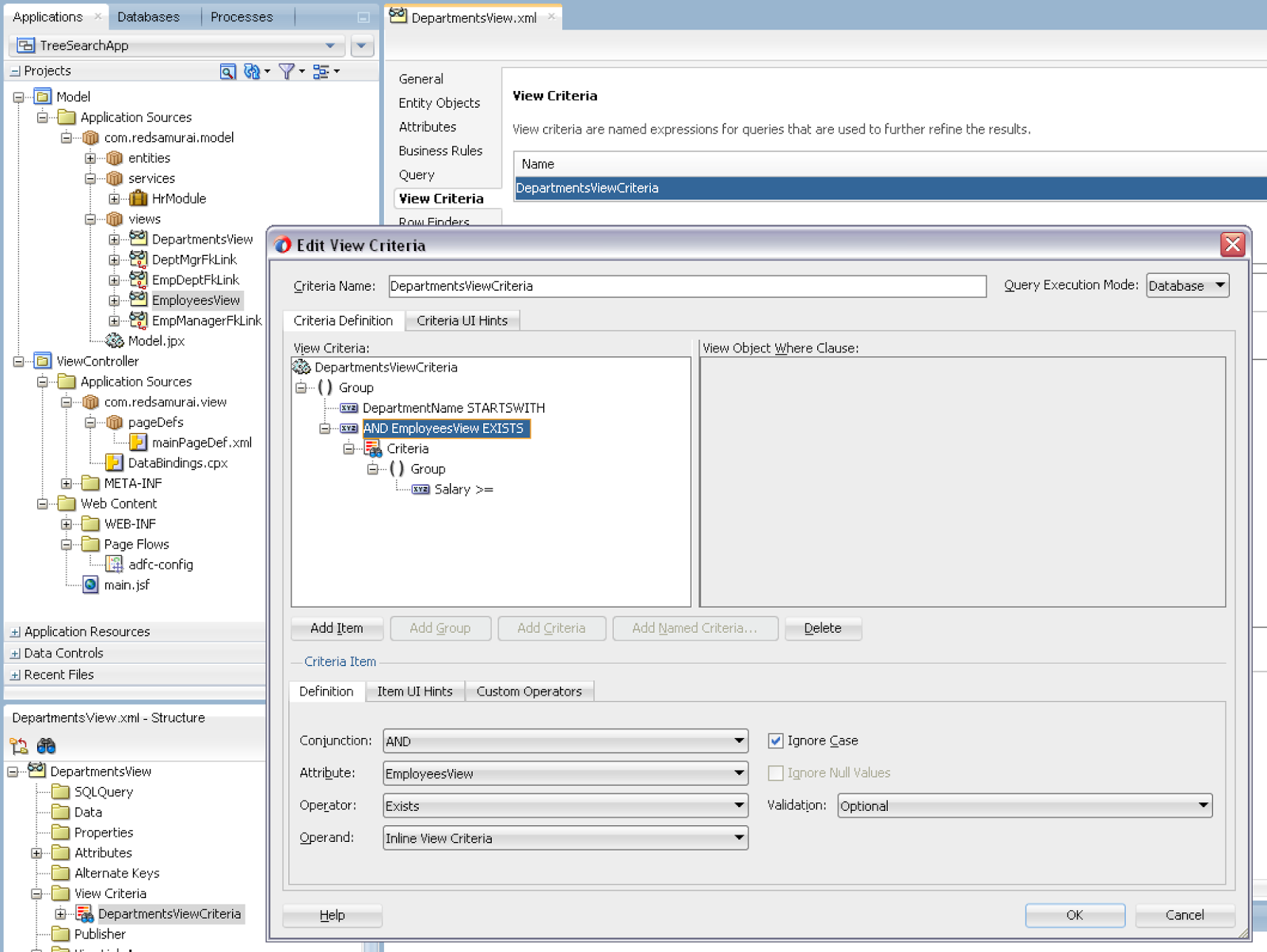
This is how View Criteria with detail search option looks like. If there is View Link available, you can select depend VO from the list of attributes. JDeveloper automatically sets Inline View Criteria option and you can select any attribute from detail VO. All criteria attributes will be rendered in the single search block on UI:


Inline View Criteria is created based on View Link:


Make sure not to use custom SQL based VO, Inline View Criteria would work only with declarative or not custom SQL based VO:


Search filters Master results (departments), based on Detail filtering (employees). I'm searching for employees with salary greater or equal to 12000. This query returns only those departments, where employees with such salary are available:


If I search with lower salary, more departments are present in the result:


Download sample application - TreeSearchApp.zip.

Sunday, November 18, 2012

Check Box Support in ADF Tree Table Different Levels

Year ago I had a blog post about workaround to render check box in ADF tree table - ADF Tree - How to Autoselect/Deselect Checkbox. This was implemented with previous JDeveloper 11g R1 PS4 version. However, there is no need to have described workaround anymore, check box and ADF tree table combination works much better in JDeveloper 11g R2 version - 11.1.2.3.0. Based on blog reader request, I will post today updated sample application - TreeCheckboxApp_v3.zip.

Both entities - Regions and Countries have special attribute of Boolean type, this attribute will be rendered as check box in ADF UI tree table component. There is no need to have helper attribute as we had before. Regions entity:


Countries entity:


Once Regions check box is checked - all Countries are checked (and vice versa). We can control this from managed bean - listening for value change event in Regions and resetting Countries:


On ADF UI side, in order to be able to render proper tree table structure with check boxes - don't forget to set rendered expression, we want to render check box only for such rows, where check box value is not Null:


Take a look how it is displayed on UI. China is selected, from Asia group:


Select Asia check box - all countries from Asia will get selected automatically (thanks to managed bean method we have implemented above):


Uncheck Asia check box - all dependent check boxes are unchecked:


While Region check box is checked, you can uncheck/check Countries check box as well. This is one of the most typical use cases for check box support in ADF tree table.

Thursday, December 15, 2011

ADF Tree - How to Autoselect/Deselect Checkbox

If you want to add selection checkbox to ADF tree, read this post - ADF Tree - How to Add Checkbox. Today I will describe how to implement auto-selection for the same checkbox. Checkbox selection will be calculated using Groovy, based on additional helper attribute.

Download updated sample application - TreeCheckboxApp_v2.zip. This sample is extended with additional helper attribute on EO level, for Regions and Countries EOs. This is transient String type attribute - RegionConfirmedStatus for Regions EO:


RegionConfirmed boolean attribute value is calculated trough Groovy, based on RegionConfirmedStatus character value - Y = true, else = false. This is required, otherwise boolean value is not changed directly. It works well, when value is calculated from Groovy:


Same for Countries EO - CountryConfirmed attribute:


On UI, ADF UI component - selectBooleanCheckbox, should be configured with value change listener and enabled with auto submit - this allows to catch checkbox change event:


Value change listener is not changing boolean value directly, but is changing only helper attribute value (Y/N). When change is performed, Groovy is fired on EO level and recalculates main boolean attribute value used for checkbox. If we would change boolean value directly, this value is not preserved and is reset back to original value during next refresh. Helper attribute value is changed for Regions level as well as for Countries level (iterating over detail collection):


Implemented functionality - user selects top level node - dependent child nodes are auto-selected (and opposite on deselect):


Monday, December 12, 2011

ADF Tree - How to Add Checkbox

This is common request - to add checkbox next to ADF tree nodes. Obviously we should use ADF selectBooleanCheckbox component - however selectBooleanCheckbox is not propagated across ADF tree levels by default (applies to all ADF 11g versions). This post provides sample application for selectBooleanCheckbox rendering on different ADF tree node levels.

Download sample - TreeCheckBoxApp.zip (tested with ADF 11g R1 PS3/PS4).

Implemented tree renders two levels (Regions -> Countries):


Both level nodes are rendered with checkboxes. Checkbox is rendered based on transient EO attribute, Boolean type for Regions:


Same type attribute for Countries:


ADF tree binding contains both - Regions node name and checkbox definitions:


Similar binding for Countries:


ADF UI implements tree table (with selectBooleanCheckbox), first tree level is rendered from nodeStamp. As you can see both levels are getting values from node variable:


Let's run such tree - disabled checkboxes are rendered for empty level nodes - this is wrong:


How we can fix this? Add rendered expression for both selectBooleanCheckbox components. First level checkbox should be rendered only when RegionName is not Null:


Second level accordingly, when CountryName is not Null:


Now checkboxes are rendered correctly with ADF tree:


Sunday, December 11, 2011

Tuning ADF Tree - Retain View Link Accessor Rowset

When expanding ADF Tree node, by default - each time ADF generates new SQL statement to retrieve expanded tree level nodes. New SQL statement is generated even after collapsing and expanding same node. In most of the cases, especially when tree structure is static, we would like to avoid multiple SQL invocation for the same nodes. This can be achieved by setting Retain View Link Accessor Rowset option for View Object tuning.

Download sample application - RetainViewLinkAccessorApp.zip. This sample implements 3 levels tree structure: Locations -> Departments -> Employees:


When user expands same node of Locations (top level) two or more times, we want to retrieve previously queried Departments rows from cache, instead of querying from database again. Go to Locations tuning section and set Retain View Link Accessor Rowset setting - this will enable Departments rowset caching:


Set the same setting for Departments (second level), this will cache Employees rowset:


Employees View Object represents tree leafs and can't be expanded - means no need to set tuning option (there will be no children):


When top level Locations node is expanded, SQL is generated to retrieve corresponding Departments rowset (if Locations node will be collapsed and later same node expanded again - no SQL will be generated, rowset will be retrieved from memory). SQL is generated only first time, because of our tuning - it will not be generated during subsequent collapsing/expanding of the same node:


Tree structure:


Saturday, February 27, 2010

How To Traverse ADF Tree

If you are thinking how to delete nodes from ADF tree, there is Frank Nimphius blog post - ADF Faces RC: Single row / Multi row delete from a tree component. However, Frank says that his blog entry is still a raw diamond and needs some polishing. In his example, if you remove root node, all child nodes still will remain in database. This means tree hierarchy will be broken. I decided to polish raw diamond, to describe how you can traverse ADF tree and remove all selected nodes together with children.

Download sample application - TreeTraversal.zip. This sample implements ADF tree traversal algorithm without recursion. ADF tree component provides Java API to get parent node for current node, this allows to avoid recursion.

I have defined tree binding and created action listener method, where tree traversal code is implemented:


Tree traversal algorithm scans selected nodes, and walks through all child nodes. When it reaches last child in tree branch, it returns back until it finds next child sibling. At the end it will return to the initial node, where tree traversal was started - root node.

I'm using two helper methods, one to get first child and second to get next sibling. Its ADF tree Java API, nothing special:


Let's see how it works. We can select multiple nodes, children of all those selected nodes will be traversed:


I intentionally commented node.getRow().remove; in my sample, just to prevent you from all nodes deletion by mistake :-) Traversed nodes are reported in the log:


It starts from first selection and walks from 100 to 102, reports parent node 90 and goes to second selection, walks through and reports parent node 110.

You can select such node, which contains multiple branches:


Tree traversal will work as well - it will enter first branch, traverse it and move to next sibling branch. Whole report for previous selection:


If you are planning to traverse large tree branches, you should increase ADF tree RangeSize property value. Default value is 25, means it will keep only 25 nodes in memory, so you will not be able to traverse whole hierarchy. With default RangeSize it will render large tree hierarchy structures pretty slow, I recommend to increase it to something at least 500:


It will keep 500 nodes in memory, and will allow such tree operations as Expand All Nodes and Expand All Nodes Below to perform faster.

Monday, November 23, 2009

Tree Table Component in Oracle ADF

I want to share today, how we are using Tree Table components in Oracle ADF. Sure, you can implement Tree or Tree Table just by reading Oracle JDeveloper 11g documentation. However, I will try aggregate different information and to put all pieces together, in order to help those developers who are just starting to use Tree components and are curious how things work. My today post is based on information from Frank Nimphius article available on ADF Code Corner - How-to access the selected row data in a TreeTable or Tree.

Download sample application developed in JDeveloper 11g R1 PS1 - TreeComponents.zip. In this sample I'm using two Tree Table components, second is dependent on first. Dependency could easily work through View Link Master-Detail relationship, but I decided to make use case a bit more complex and to filter second Tree Table from Selection Listener method. Also, I decided to include editable fields into both Tree Table components.

First Tree Table represents three level Master-Detail relationship between Regions, Countries and Locations. Second Tree Table is Master -Detail between Departments and Employees:


Its worth to mention, that Departments VO contains Bind Variable and Where clause, this allows me to filter second Tree Table from first Tree Table Selection Listener method:


On the layout side in ViewController, I have used Panel Dashboard (new component in JDeveloper 11g) - it allows to align your panels with Tree Table components in very easy and elegant way:


When you decide to create Tree or Tree Table, you should drag and drop from Data Control only Master VO. From a wizard you can add Tree Levels (VO details) and specify attributes to be shown on each level:


When Tree Table will be generated, if you want to have multiple columns, you should add Column components manually and define output/input components manually. Make sure you are assigning correct values from node binding (see my sample application):


Second Tree Table is refreshed based on selection changes in first Tree Table, this means we should declare Partial Trigger dependency:


We override default Selection Listener on first Tree Table in order to perform filtering on second Tree Table component:


In Selection Listener I'm using Java code from Frank Nimphius article mentioned above. I'm accessing currently selected row and if this row belongs to third level (Locations), I'm filtering second Tree Table:


On runtime you can see how nicely Panel Dashboard allocates two Tree Table components in Panel Boxes:


Expanded Tree Table view, with editable columns: