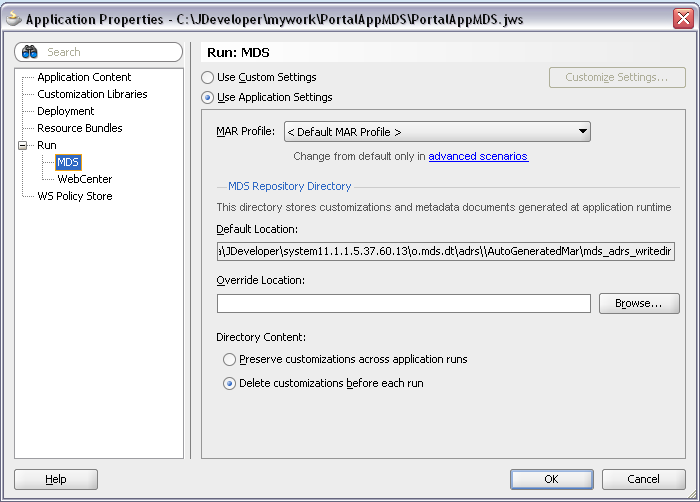
JDeveloper 11g MDS wizard for ADF application doesn't provide target MDS repository configuration options, you can specify only file based repository location:

Only when deploying ADF application enabled with MDS functionality directly from JDeveloper, wizard asks where we want to target MDS repository and specify partition name:

This works fine, when deploying directly from JDeveloper. However, very often deployments are done from deployment automation (Hudson with OJDeploy, etc.). In those cases, we don't have option to specify target MDS repository through the wizard.
By default, target MDS repository is configured in adf-config.xml as file system repository:

We can try to change this and point to database MDS repository, one that should be used after deployment:

However, OJDeploy fails to locate specified JNDI connection - target MDS location with database details is ignored and not included into deployment package:

If we try to deploy such EAR from Hudson automation, errors for target MDS repository are generated - naturally, because required information is missing. Its same as we would try to deploy EAR through Enterprise Manager, it asks to provide mandatory missing information for target MDS repository:

Possible solutions for automated deployment? Looks like only one - you need to write additional script, which will access packaged EAR and substitute target MDS repository values, right before EAR deployment. This would work, because EAR is already generated - we would simulate target MDS repository wizard action - substitute target MDS repository values in adf-config.xml with database details:

Now EAR contains information about target MDS repository, automated deployment will succeed:

Download sample application - PortalAppMDS.zip. You can find sample adf-config.xml file inside application_root/deploy folder, this file contains target MDS repository configuration with database details.
Only when deploying ADF application enabled with MDS functionality directly from JDeveloper, wizard asks where we want to target MDS repository and specify partition name:

This works fine, when deploying directly from JDeveloper. However, very often deployments are done from deployment automation (Hudson with OJDeploy, etc.). In those cases, we don't have option to specify target MDS repository through the wizard.
By default, target MDS repository is configured in adf-config.xml as file system repository:

We can try to change this and point to database MDS repository, one that should be used after deployment:

However, OJDeploy fails to locate specified JNDI connection - target MDS location with database details is ignored and not included into deployment package:

If we try to deploy such EAR from Hudson automation, errors for target MDS repository are generated - naturally, because required information is missing. Its same as we would try to deploy EAR through Enterprise Manager, it asks to provide mandatory missing information for target MDS repository:

Possible solutions for automated deployment? Looks like only one - you need to write additional script, which will access packaged EAR and substitute target MDS repository values, right before EAR deployment. This would work, because EAR is already generated - we would simulate target MDS repository wizard action - substitute target MDS repository values in adf-config.xml with database details:

Now EAR contains information about target MDS repository, automated deployment will succeed:

Download sample application - PortalAppMDS.zip. You can find sample adf-config.xml file inside application_root/deploy folder, this file contains target MDS repository configuration with database details.


