Showing posts with label Bugs. Show all posts

Tuesday, July 16, 2019

Fix for Oracle VBCS "Error 404--Not Found"

We are using Pay As You Go Oracle VBCS instance and had an issue with accessing VBCS home page after starting the service. The service was started successfully, without errors. But when accessing VBCS home page URL - "Error 404--Not Found" was returned.

I raised a support ticket and must say - received the response and help promptly. If you would encounter similar issue yourself, hopefully, this post will share some light.

Apparently "Error 404--Not Found" was returned, because VBCS instance wasn't initialized during instance start. It wasn't initialized, because of expired password for VBCS DB schemas. Yes, you read it right - internal system passwords expire in Cloud too.

Based on the instructions given by Oracle Support, I was able to extract logs from VBCS WebLogic instance (by connecting through SSH to VBCS cloud machine) and provide it to support team (yes, VBCS runs on WebLogic). They found password expire errors in the log, similar to this:

weblogic.application.ModuleException: java.sql.SQLException: ORA-28001: the password has expired

Based on provided instructions, I extracted VBCS DB schema name and connected through SQL developer. Then I executed SQL statement given by support team to reset all VBCS DB passwords in bulk. Next password expiry is set for 2019/January. Should it expire at all?

Summary: If you would encounter "Error 404--Not Found" after starting VBCS instance and trying to access VBCS home page, then most likely (but not always) it will be related to VBCS DB schema password expiry issue.

Monday, January 29, 2018

Avoid Blind SQL Call from ADF Task Flow Method

Keep an eye open on ADF Task Flow Method Call activities where methods from ADF Bindings are called. JDEV 12c sets deferred refresh for ADF binding iterators related to TF Method Call activities and this causing blind SQL to be executed. Blind SQL - query without bind variables.

Let me explain the use case, so that it will be more clear what I'm talking about.

Common example - TF initialization method call where data is prepared. Typically this involves VO execution with bind variables:


Such method call could invoke binding operation either directly (pay attention - bind variable value is set):


Or through Java bean method using API:


My example renders basic UI form in the fragment, after TF method call was invoked:


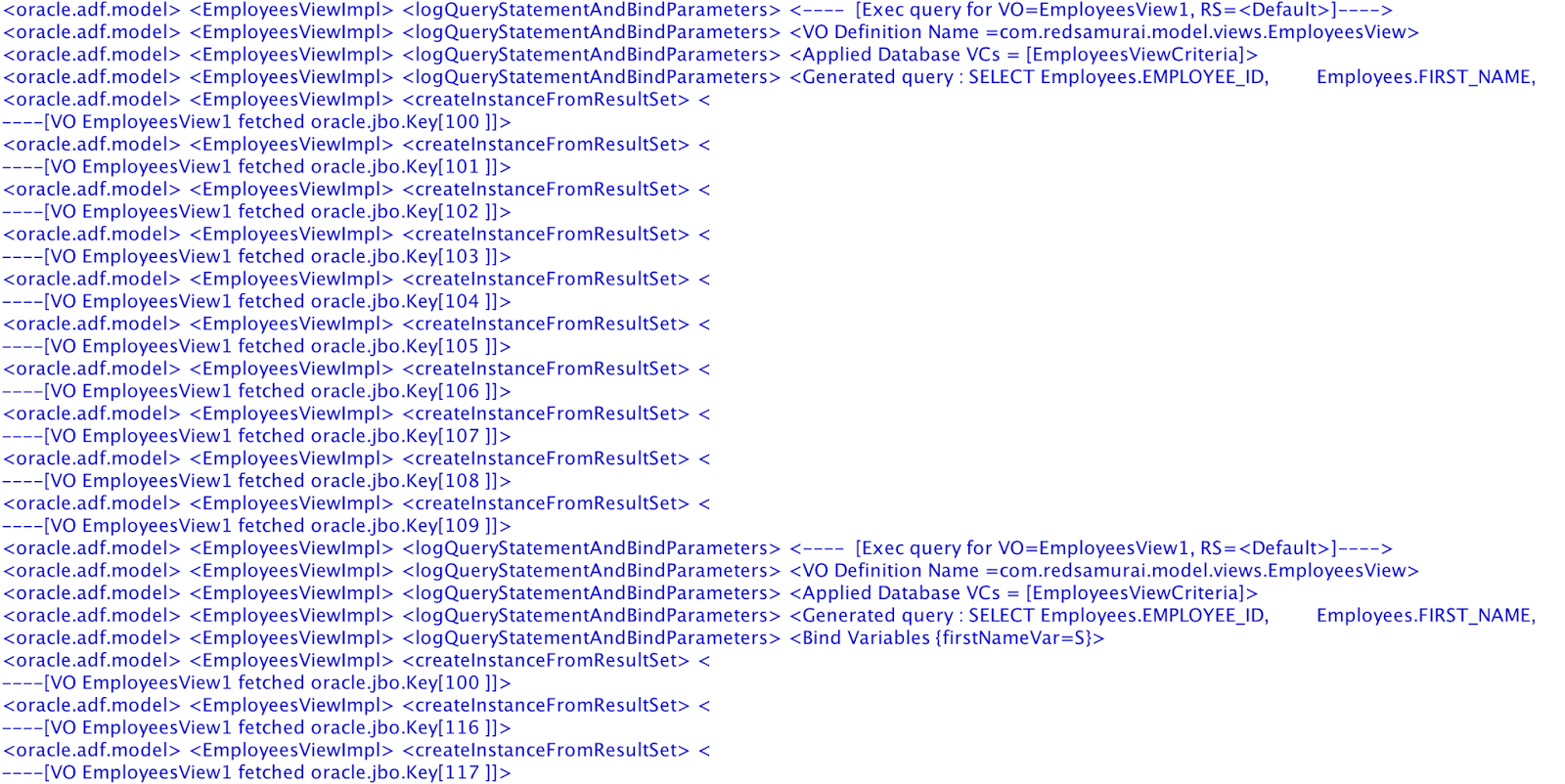
If you log SQL queries executed during form rendering, you will see two queries instead of expected one. First query is executed without bind variables, while second gets correct bind variable assigned:


What is the cause for first query without bind variables? It turns out - iterator (with setting Refresh = deferred) from page definition mapped with TF method call is causing this. Somehow iterator is initialized not at the right time, when bind variable is not assigned yet and this causing blind SQL call:


Workaround is to set Refresh = never:


With Refresh = never, only one query is executed as expected, with bind variable assigned:


This may look minor, but trust me - with complex queries such fix could be a great help for performance tuning. Avoid executing SQL queries without bind variables.

Download sample application - ADFTFCallBindingApp.zip.

Sunday, September 3, 2017

ADF 12c Table CRUD Fix for Auto Focus

I had a post about how to improve user data entry for ADF table with auto focus for new row - Improving ADF UI Table CRUD Functionality with Auto Focus. If you follow comments thread for that post - you will see described approach doesn't work exactly as it should in ADF 12c (focus is set for new row but later is lost after tab navigation - it should move focus to another column). Thanks to the community we have simple fix for this issue, read OTN Forum thread - Set Focus on CreateINsert row in ADF Table. I hope Oracle will fix this functionality in the next ADF versions (currently they say it is expected behaviour, and I don't agree with this). But for now - fix does the job.

 Sample app was updated to 12.2.1.3 and it contains fixes described on OTN Forum - ADFTableFocusApp_v2.zip. Focus is set for first column of new row to avoid extra mouse click:


After tab is pressed - focus moves to the next column:


Fix simulates row selection through ADF JS API. After focus was set for the first column in current row - we execute row selection based on active row key. This allows ADF Faces to move focus to the next column on tab, because it knows currently selected row on client side:


Make sure to set active row key in the bean method, same place where focus ID is calculated (otherwise there will be JS error):

Tuesday, July 4, 2017

JDeveloper 12.2.1.2 Patch for Transient Expression Compilation Infinite Loop

If you are using JDeveloper 12.2.1.1 or 12.2.1.2, probably you run into transient expression compilation infinite loop issue. Infinite loop happens when you open ADF BC project and navigate to VO, which contains Groovy expressions. JDeveloper starts to print repeating message in the log - compiling TransientExpression and soon at some point JDeveloper window closing down without any feedback:


For those of you, who are not aware - there is a patch for this issue. Patch can be downloaded from Oracle Support, search for Patch: 25218838 (there is one for JDEV 12.2.1.2 and another one for JDEV 12.2.1.1):


If its your first time applying Oracle patch - no worries, process is very simple and smooth. Extract download patch zip archive first. Next setup ORACLE_HOME environment variable, point to root folder of JDEV install:


Once environment variable is set, run OPatch by executing opatch apply from the directory where patch archive was extracted. You can reference OPatch by direct path:


Hopefully fix provided by this patch will be included into next JDEV version by default.

Friday, April 7, 2017

Workaround for ADF BC View Object Attribute Order Problem in JDeveloper 12c

I'm sure probably every ADF developer sooner or later faced this issue. When you create VO based on EO, JDEV gives you alphabetically ordered list of attributes. As a result - order of attributes in EO and VO becomes different. While this doesn't influence runtime functionality, it becomes quite annoying for application maintenance. Hard to match attributes between VO and EO, developer need to search through the list to locate attribute he is looking for. But there is a workaround, I will describe it here.

Let's see what the problem first. Assume we have Employees EO, attributes are generated in the same order as DB table columns:


Now if you are using VO creation wizard, list of attributes will be displayed in alphabetic order. This is frustrating:


Without any other choice, developer would select EO attributes and select them in such order as it is listed:


But wait, there is a workaround. Don't select all attributes, instead select only EO item itself. Then use Add button to add entire list of EO attributes:


This time attributes will be added in original order, as the order is set in EO.


Enjoy this small, but useful hint.

Saturday, October 15, 2016

JDeveloper 12.2.1.1 Bug and Workaround - Wrong Instance Name for Method Action Binding

After upgrade to JDeveloper 12.2.1.1 I have noticed issue related to Method Action binding instance name. This is not ADF 12.2.1.1 bug, but JDeveloper bug. JDeveloper sets incorrect name for Method Action binding instance name.

If you are going to create custom method in VO/AM and expose it through interface to be called in bindings layer - there will be similar error as below on runtime:


Source of this error is in the method binding definition:


Go to page definition source view and you will find instance name highlighted with warning. JDeveloper is able to recognize invalid expression, but still it generates it. ADF 12.2.1.1 runtime quality is improved, but can't say the same about JDeveloper IDE. Oracle focus is on Cloud, but still there is a lot to do to improve development tools quality:


Expression must be replaced manually to correct one (the one previous JDeveloper version used to generate) - data.DataControlName.VOInstanceName:


With correct expression for instance name, custom method is invoked correctly without error:


Download sample application - ADFOperationBindingApp.zip.

Thursday, September 8, 2016

Workaround for ADF 12.2.1.1 Match Media Behavior Tag

If you run ADF 12.2.1.1 application with adaptive UI implemented by af:matchMediaBehavior tag (ADF 12.2.1 Responsive UI Improvements), most likely you will face Null Pointer Exception in Match Media Behavior tag class. Apparently af:matchMediaBehavior tag expects default value to be set on UI component. If default value is not set explicitly, it fails to read it and generates exception (this was not the case in ADF 12.2.1).

This example contains three af:matchMediaBehavior tags, properties orientation and styleClass are not set on panel spitter by default:


This leads into Null Pointer exception on runtime:


To fix this, we can set default values for orientation and styleClass explicitly. Propety styleClass can be assigned with empty value, this helps:


UI is loaded this time:


UI is resized on narrow screen - panel splitter orientation is changed:


Download application with workaround for af:matchMediaBehavior - ADFResponsiveUIApp_v2.zip.

Sunday, October 12, 2014

Workaround for ADF 12c Choice List Blank Selection Issue

I would like to share a workaround for Choice List component in ADF 12c. There is specific issue, related to blank selection - as soon as user selects blank selection in the choice list, it starts to invoke value change listener for that list, each time when any other element is selected in the table. This is quite annoying and could lead to unexpected results, especially if you depend on logic implemented in value change listener.

Workaround is implemented in the sample application - ADFChoiceList12cApp.zip. We should take a look first, how it works without workaround applied. Imagine you have a table and one of the columns implements a choice list. Go and select a blank selection for a couple of rows:


Navigate between rows, do couple of clicks - you should notice in the log information about value change listener invoked. This is quite strange, it should not call value change listener each time, just only first time after selection was changed in the list:


Choice list UI component is set with AutoSubmit=true and assigned with value change listener method:


Choice list is configured with blank item selection in ADF BC:


To apply workaround, go and uncheck blank item selection in ADF BC, make sure checkbox for 'Include No Selection Item' is unchecked:


On UI side, provide any value for UnselectedLabel property of the choice list component, this will generate property in the source (alternatively you could just type it manually directly in the source):


Make sure UnselectedLabel property is set to be blank, this will generate blank item on the runtime (it works much better than the one enabled from ADF BC):


User could navigate through the table, there will be no value change listener triggered anymore (besides one time, when value was actually changed):


Exciting as usual - new features and new bugs :)

Tuesday, September 16, 2014

Handling Format for BigDecimal Numbers in ADF BC

This may not be as straightforward as it sounds - to define a format for a number attribute in ADF BC. Especially if you are going to have large number (more than 15 digits). Most likely you are going to experience precision/scale and rounding issues, for BigDecimal and Number type attributes with format mask applied. Sounds frustrating? Yes it is. I hope my blog post will help you to implement proper number formatting.

Firstly I'm going to demonstrate, how it works by default. I'm going to use format mask for 18 digits and 2 decimals. Format mask for a number attribute of BigDecimal type would fail with invalid precision/scale error - this is surprising, especially knowing that attribute is defined with (20, 2) precision and scale:


There is one more issue to handle - automatic rounding for large numbers (more than 15 digits). In this example I'm trying to enter a number with 18 digits:


Suddenly number is rounded, immediately after focus is moving out of the field - this is bad, user can't enter correct large number:


Let's see, how we can fix it. I will explain solution, based on Salary attribute with (20, 2) precision and scale. By default, this attribute is generated with BigDecimal type, I'm going to keep the same type, no need to change to oracle.jbo.domain.Number:


I have set format mask on the VO level, for the same Salary attribute. There is another issue - maximum length of the attribute value user can enter on UI. Maximum length property is reading precision and calculates maximum number of characters, however this is wrong when format mask is applied:


There will be extra comma and dot signs coming from the format, so I would advice to set Display Width to be equal to the attribute precision plus maximum number of commas and dots (26 in my case). Later we would need to change maximumLength property on the UI to use Display Width instead of precision:


Once you set a format mask, formatter class name is assigned for the attribute. Formatter class name is saved in resource bundle, for each formatted attribute separately:


You must change formatter class name to the custom one, don't use DefaultNumberFormatter class - out of the box formatter doesn't work with BigDecimals. Sample application comes with custom Number formatter class. Format method is overridden to support BigDecimal, standard formatter method breaks BigDecimal number by converting it to Double (this is the reason for rounding error) - this is fixed in the sample:


Method to parse is changed as well (this is fixing precision/scale number for the BigDecimal). Instead of calling parse method from super, I'm calling custom method:


I'm setting a property to enable BigDecimal parsing, this allows to work correctly with precision/scale:


In addition, precision and scale are checked by custom method - if there is invalid number of digits, user will be informed:


I was mentioning it earlier - maximumLength property on the UI is updated to point to Display Width set on the VO attribute UI Hints:


We can do a test now, type long number with 18 digits (remember (20, 2) precision/scale for Salary attribute):


Correct format will be applied:


Type decimal part and now there will be no error about precision/scale - it will be successfully accepted:


You can see from the log how format is being applied, it works well with custom formatter class provided in the sample application - ADFFormattingApp.zip: