Showing posts with label Oracle Fusion. Show all posts

Tuesday, June 11, 2013

Oracle Forms to ADF Modernization Reference - Convero (AMEC) Project

I'm excited to announce our new Oracle Forms to ADF modernization reference published on Oracle OTN site - Convero (AMEC) project:


You can read all the details and description from the reference document. I just can add from myself that Convero (AMEC) project is innovative in terms of technical approach to modernize such large scope Oracle Forms system to ADF.

Saturday, December 24, 2011

SOA & WebCenter & BPM & WebLogic Partner Communities Event Invitation

INVITATION TO

FUSION MIDDLEWARE PARTNER COMMUNITY FORUM 
SOA & WebCenter & BPM & WebLogic Partner Communities

Do you want to learn about how to sell the value of Fusion Middleware by combining SOA, BPM and WebCenter Solutions?

We would like to invite you to become updated and trained at our Fusion Middleware Partner Community Forum on February 7th and 8th 2011 at the NH Hotel in Malaga, Spain.


The event is a wonderful opportunity to:
  • learn how to sell the value of Fusion Middleware by combining SOA and WebCenter solutions
  • meet with Oracle SOA, BPM and WebCenter Product management
  • exchange knowledge and have access to competitive intelligence
  • learn from successful SOA, BPM, WebCenter and ADF implementations
  • learn about WebCenter Sites
  • network within the Oracle SOA Partner Community and the Oracle WebCenter Partner Community
During this highly informative event you can learn about partner success stories, participate in an array of break out sessions and exchange information with other partners.


Red Samurai will be doing ADF/WebCenter Master Class session together with colleagues from InfoMentum and VASSIT.

Wednesday, October 20, 2010

Oracle's Architect Community Newsletter - Profile

Oracle's Architect Community Newsletter for October 2010 contains my profile - Oracle ACE Profile:


I want to say thanks to Oracle Technology Network team !

Subscribe to this newsletter and check more about Oracle resources for Architects at Architect Home Page:

Wednesday, June 2, 2010

Oracle WebTier 11g Configuration for ADF 11g Applications

Oracle Web Tier description - Oracle Web Tier includes components that interact with end users at the outer most tier of application grid infrastructure typically through HTTP requests and responses. Oracle Web Tier hosts web pages (static and dynamic), provides security and high performance along with built-in clustering, load balancing and failover features. It sounds like this Oracle Fusion Middleware product can improve ADF applications performance, especially on public internet. Typically ADF applications are coming with significant amount of Java Script and skin images - Rich Client, so let's see how Oracle Web Tier components (HTTP Server and WebCache) can help us.

You should start with Oracle documentation - Oracle Web Tier Components Documentation. It is good, and gives lots of information about product installation and configuration, however there is no clear path described how to setup it for ADF applications. There is useful WebCenter Spaces document - Improving WebCenter Spaces Performance with Oracle Web Cache, it generally describes how Oracle Web Tier improves WebCenter and ADF performance with better compression and caching.

Today I will talk about how you can configure Oracle Web Tier to work together with ADF 11g applications.

There is sample application for today post - SAFootballApp.zip. Why football, you may ask? I'm now in South Africa, where football World Cup starts next week, so I decided to dedicate it for football :) Application comes with specific ADF 11g configuration to enable static resources compression and caching, I will describe it later in this post.

I will structure this post into different steps, it will be easier for you to understand. If you follow these steps, most probably you will be able to setup Web Tier components successfully.

1. WebLogic Server

Download and install latest WLS (at this moment 10.3.3)

2. Application Development Runtime 11.1.1.2

Download and install APP_DEV 11.1.1.2 libraries into WLS

3. Application Development Runtime 11.1.1.3

Download and install APP_DEV 11.1.1.3 patch

4. WebLogic domain

Create WebLogic domain. You may create Managed Servers as well, its not important in this blog post context. When create domain, make sure you select support for Oracle Enterprise Manager and Oracle JRF libraries:


5. Start WebLogic domain Admin Server

When WebLogic domain is created, make sure you have started Admin Server. It should be Up, for Web Tier configuration and association with WebLogic domain.

6. Web Tier 11.1.1.2

Install Web Tier 11.1.1.2 into Fusion Middleware home. Follow installation guide instructions, from Web Tier document link provided above. Make sure you select only installation - configuration will be done later:


Configuration will be done later, because we need to install 11.1.1.3 patch first.

7. Web Tier 11.1.1.3

Install Web Tier 11.1.1.3 as described in installation guide.

8. Web Tier configuration

Make sure WebLogic Admin Server is running and run Web Tier configuration script (read Web Tier installation instructions).

In Configure Components wizard screen, select both HTTP Server and Web Cache. Also select - Associate Selected Components with WebLogic Domain. This will configure Web Tier with WebLogic domain automatically, it will be accessible through Oracle Enterprise Manager:


Provide WebLogic domain details:


Specify HTTP Server and Web Cache components names:


Make sure all configuration steps are successful - HTTP Server and Web Cache are configured properly:


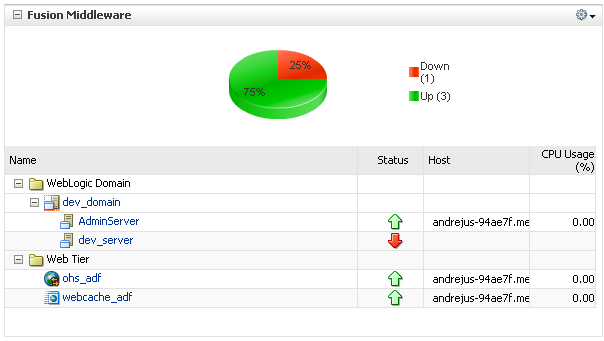
You can verify successful configuration from Oracle Enterprise Manager - HTTP Server (OHS) and Web Cache should be Up:


9. ADF 11g application compression and caching

In this step, we will configure couple of ADF parameters, in order to enable static content compression and caching.

First, let's check Oracle Application Development Framework Performance Tuning Guide. In View performance section, they talk about Disable resource debug mode:

When resource debug mode is enabled, the HTTP response headers do not tell the browser (or WebCache) that resources (JS libraries, CSS style sheets, or images) can be cached. Disable the org.apache.myfaces.trinidad.resource.DEBUG parameter in the web.xml file to ensure that caching is enabled.

Ok, so make sure you disable this parameter, it is disabled in my sample football application.

Next, we should enable ADF Faces Caching Filter, as it is described in ADF Faces Configuration guide. Provided sample application is enabled with ACF filter in web.xml, it defines compression and caching rules for Java Script and JPG files in adf-config.xml file.

Sample application WAR deployment properties specify Java EE context root as football, we need to remember it for future configurations:


10. ADF 11g application deployment

Deploy sample application to WebLogic Managed Server, or Admin Server - no big difference in this case.

11. HTTP Server configuration

Web Cache is configured to be used with HTTP Server automatically, we don't need to do anything for this, unless you need specific configurations. What we need to do is to point HTTP Server to WebLogic server, specifically to our ADF application deployed on WebLogic server.

We need to do this, because from now we will access application through HTTP Server, not directly. This will allow us to use HTTP Server and Web Cache functionality to improve application runtime performance.

Let's configure it using Oracle Enterprise Manager. Open HTTP Server home screen and go to Administration -> mod_wls_ohs Configuration menu:


There you will need to specify following parameters for successful WebLogic proxy:

WebLogic Host: localhost (in my case)
WebLogic Port: 7003 (Managed Server port in my case)
Expression: *.jsp
Location: /football (Java EE Context Root for deployed ADF 11g application)
WebLogic Host: localhost (in my case)
WebLogic Port: 7003 (Managed Server port in my case)


HTTP Server default port is 7777. This means when user will access 7777 port with location /football, HTTP Server will open proxy connection to WebLogic Server, where application is deployed.

Make sure you restart opmnctl instance, in order to apply changes:


12. Application testing

Application is deployed on WebLogic Managed Server port 7003. However we will access it through HTTP Server 7777 port, in order to go through Web Cache:


Now you can see, why I called this application - football. I'm loading my pictures of football World Cup Johannesburg stadium into ADF 11g Carousel component - to see what performance improvements will bring HTTP Server and Web Cache.

During first request (Internet Explorer), ADF Java Script is loaded together with World Cup stadium images, you can see this from the log:


During next requests, or even when opening another browser session, ADF Java Script and images are not loaded anymore from WebLogic server, but retrieved from cache - only ADF lifecycle related requests are invoked:


If I open the same application from another browser (Firefox for example), ADF Java Script and images are loaded again:


You can see there are more Java Script files loaded for Firefox browser, thats interesting. And then it is the same as in IE case, for all following requests, static content is not loaded anymore from WebLogic server:


This should help to improve ADF 11g applications performance, especially on public internet, where connection speed is slow - because static content compression. Content caching will improve ADF11g application performance by reducing the load on the backend systems, which in turn means you can serve more users or service the requests more quickly.

Update 2012/04/29:

If you will configure Web Cache in ADF 11g R2, in web.xml change filter class from oracle.adfinternal.view.faces.caching.filter.AdfFacesCachingFilter to oracle.adf.view.rich.webapp.AdfFacesCachingFilter.

Update 2010/06/09:

I got very good advice from Angelo Santagata, he suggested that we can compress jsp pages as well with WebCache. This will significantly reduce network traffic - Web pages will be compressed. In order to compress jsp, open Caching Rules menu in WebCache 11g:


Declare new caching rule with enabled compression for file extension .jsp:


New rule will be available in the list:

Friday, May 21, 2010

Oracle Podcast about Oracle WebCenter Suite 11g Implementation

Learn how Oracle WebCenter Suite provides an out-of-the-box centralized information system for King Khalid University. Hear from Oracle Specialized partner, Red Samurai, as they describe how King Khalid University is using Oracle WebCenter Spaces to create an integrated collaboration platform, where they use Enterprise 2.0 services such as blogs, wikis and discussion forums to share knowledge and communicate with others. You can download it from Oracle Fusion Middleware twitter, or directly.

Sunday, October 18, 2009

OOW'09 Video: An Architect's View of the New Features of Oracle SOA Suite 11g Release 1

Here is my video recordings of Clemens Utschig (Sr. Principal Product Manager, SOA Architect at Oracle Corporation) session on Oracle OpenWorld'09. I enjoyed his talk and demos, he gave great and clear overview for Oracle SOA 11g.

Part 1:


Part 2:


Part 3:

Saturday, September 26, 2009

Human Tasks in Oracle Fusion 11g

With today post I'm closing series of posts, where I was describing how you can orchestrate and connect various services with Oracle Fusion/SOA 11g. Before reading this post, I would recommend to look through my previous related writings:
  1. Web Service Interface for ADF BC Application Module in Oracle Fusion 11g
  2. Service-Enabled Entity Objects in Oracle Fusion 11g
  3. Business Events and ADF Business Components in Oracle Fusion 11g
  4. Business Rules in Oracle Fusion 11g
In those posts I was describing a set of sample applications and modeling SOA solution. This solution is based on three modules:
  1. ADF BC application (A) with custom methods exposed through Web Service
  2. ADF BC application (B) subscribed to application (A) services. Application (B) implements Business Events triggering and ADF Faces Rich Client UI
  3. SOA Composite application (C) to orchestrate business flow based on data from Business Event. Application (C) integrates Business Rule, Human Task and Web Services
Today I will describe Human Task functionality in Oracle Fusion/SOA 11g. Download sample application - SalaryManagement3.zip. This application extends SOA Composite sample developed in my previous posts - ApprovalHumanTaskFlow composite is added:


In BPEL flow, we can see there is a Switch activity added right after Business Rule from previous post:


Switch activity checks Business Rule output and if approval is required Switch scope is executed to trigger Human Task:


Before triggering Human Task, Switch scope invokes EmployeeWorkload method (through Web Service from application (A)), this method provides additional input to Human Task:


Invoke Activity for EmployeeWorkload method:


This method is invoked through Web Service implemented in SalaryControlService (A) application, it is declared in SOA Composite:


Human Task accepts three parameters - Employee Id, Salary Change value and Employee Workload value based on previous assignment history. Manager should approve or reject Salary Change based on provided information:


Human Task wizard in JDeveloper 11g - I have specified Title, Parameters and Approver in Assignment Policy:


There is one more Switch activity and it is designed to route process according output from Human Task. If manager will reject raised request, original salary value will be set back in database. If request will be approved, no action will be taken, because salary value already is updated in database by ADF BC:


Thats it, Human Task is defined and its output is processed. Now its time to check how it works on runtime. Let's use application (B) and for Employee Id = 101 update original Salary value 16000:


To 15000. Salary change is 1000 and this will not violate Business Rule, where it is declared maximum change without manager approval is 5000:


Human Task will not be initiated in this case - process instance will be successfully executed without Human Task intervention:


Let's update now to 23000, it will be 8000 change and Business Rule should trigger Human Task invocation:


You can see Human Task is in running state:


We need to approve or reject raised Human Task in order to complete BPEL process. We can do this through sample Oracle BPM Worklist application provided by Oracle together with Oracle SOA Suite 11g:


When I login into BPM Worklist, I can see there is a Salary Change task assigned to my user:


I can approve or reject it:


In this particular case I have rejected Salary Change and BPEL process became completed:


You can notice in the log, that right after Human Task there was SalaryControlService reference executed, this means Salary Change was rejected and Web Service method was invoked to store original salary value.

Thursday, September 17, 2009

Oracle Development SIG in UK - Modernisation of Oracle Development Skills

On the 27th of October, I'm going to Oracle UK London City office. Will present there on Oracle Development SIG, this event is organized by UKOUG and replaces old Development Engineering SIG.

You can find event agenda and register on UKOUG site - Development SIG.

Main focus of this event is to describe the path of Oracle Forms modernization, using different approaches offered by Oracle - JDeveloper, SOA, Apex.

I will talk based on my Oracle OpenWorld 2009 presentation - Oracle ADF 11g Production Project Experience on Oracle Open World 2009.

Will be happy to meet you in London.

Thursday, September 10, 2009

Business Rules in Oracle Fusion 11g

Today I'm writing my fourth post in Oracle SOA series and will cover Business Rules functionality. I recommend to check my previous post - Business Events and ADF Business Components in Oracle Fusion 11g, sample application I'm describing today is extended version of application from my previous post. What Business Rule means? Simply speaking, its a container that encapsulates specific functionality logic. In Oracle SOA Suite 11g, Business Rule accepts inputs and returns outputs. This means we can understand Business Rule as a black box in general process flow. This black box can be reused and updated at any point of time, without affecting other components in the flow.

You can download and deploy sample application with implemented Business Rule - SalaryManagement2.zip. As I already have mentioned, this sample is extended sample from my previous post. In my previous post I have declared Business Event on ADF BC Entity Object and developed SOA Composite in Oracle SOA Suite 11g with Mediator subscribed that Business Event.

I have updated my previous SalaryManagement application with addition of one more Scope component to BPEL flow - Scope_CheckSalaryChangeRange:


This scope contains Assign activity and Business Rule component:


Ok, let's start from the beginning - what type of Business Rule I want to implement. I want to implement a check to compare the difference between original and updated salary values. I'm getting those values through Business Event raised by ADF Business Components. My Business Rule will compare the difference between salaries with predefined constant value. If the difference will be too big, Business Rule will return true in order to invoke Human Task for approval. Human Task will be implemented in my next post.

First thing I did, I have declared local variable lSalaryChangeApprove in Scope_CheckSalaryChangeRange scope. This variable will be used as input and output parameter for Business Rule:


As a next step, I have created already mentioned Assign activity and initialized there lSalaryChangeApprove variable with false value:


Initializaton is done through a wizard, you can see on the right side there is a local variable:


When initialization and preparation part was done, I have declared Business Rule RequiresSalaryChangeRule in composite.xml by choosing Business Rule Service Component from Resource Palette:


Business Rule is based on XSD schema with two elements - salaryChange and approvalRequired. First is the difference between original and new salaries, second is Business Rule outcome:


I just defined Business Rule in SOA composite, will implement it a little bit later. Now I'm back to BPEL editor, where I will drag and drop Business Rule activity inside BPEL flow. Business Rule definition wizard is opened, where I can choose just few seconds ago defined Business Rule available in Dictionary:


I will define two inputs - first will be the difference in salary and second will get local variable lSalaryChangeApprove value:


First variable value is calculated by subtracting original salary value from new and applying mathematical abs function:


Second variable initialization from scope local value:


Input variables are declared, now let's move to output:


For output, I'm assigning back result of Business Rule to local scope variable:


When inputs/outputs are defined, just press Ok button and Business Rule will be included into BPEL flow:


The last step - actual Business Rule logic implementation. Open newly created Business Rule wizard and at first define global variable - MAX_SALARY_CHANGE. This global variable will contain constant value for salary difference comparison - limit for automatic salary change approval:


If changed salary will not satisfy predefined limit, manual approval process will be required - approvalRequired variable will be assigned with true:


Business Rule is defined, now you can deploy SOA Composite to Oracle SOA Suite 11g. In order to test this Business Rule, I'm using Oracle ADF front-end application from my previous post. Let's open some record, with current salary equal to 7000:


And update it to 15000, in order to violate our salary change Business Rule:


During salary change, ADF BC is raising Business Event. Through Event Delivery Network this event is delivered to subscribed Mediator, from where in BPEL flow Business Rule is triggered and received data is processed to generate output. Full trace log:


If you open to see detail trace for Business Rule, you will find it says that manual approval for this change will be required. And its correct, because difference between salary values is 8000:


Again, if I change salary value from 15000 to 12000:


Its logical that manual approval for salary change will not be required in this case:


In my next post I will describe how to implement Human Task for manual approval.

Spanish Summary:

Este post Andrejus nos explica lo que es un Business Rule (Regla de Negocio) y como lo podemos desarrollar con Jdeveloper. Este post es parte de la coleccion de temas SOA que andrejus ha escrito y que recomienda leerlos antes de revisar este post.