JET Composite Components - are useful not only to build UI widgets, but also to group and simplify JET code. In this post, I will show how to wrap JET table into composite component and use all essential features, such as properties, methods, events and slots.
Sample app code is available on GitHub. JET table is wrapped into composite component, it comes with slot for toolbar buttons:

What is the benefit to wrap such components as JET table into your own composite? To name a few:
1. Code encapsulation. Complex functionality, which requires multiple lines of HTML and JS code resides in the composite component
2. Maintenance and migration. It is easier to fix JET specific changes in single place
3. Faster development. There is less steps to repeat and less code to write for developer, when using shorter definition of the wrapper composite component
Sample application implements table-redsam component, for the table UI you can see above. Here is component usage example, very short and clean:

All the properties specific to given table are initialised in the module. Developer should provide REST endpoint, key values, pagination size and column structure. The rest is happening in the composite component and is hidden from the developer, who wants to implement a table:

Properties
We should take a look into array type property. Such property allows to pass array into component. This can be useful either to pass array of data to be displayed or array of metadata to help with component rendering. In our case we pass array of metadata, which helps to render table columns. Array type property is based on two attributes - Header Text and Field. Properties are defined in composite component JSON file:

Properties are retrieved from variable inside component and are assigned to local variables:

This is table implementation inside component, columns are initialised from component property:

Slots
Slot defines a placeholder, where developer who is using composite component can add additional elements. Slot is defined in component JSON definition file:

To define slot, JET slot component should be defined inside composite. You can control layout and location where slot will be rendered:

In our case, we use slot for table toolbar buttons. These buttons are added later, when developer is using composite. To place button into slot, put button inside composite component tag and assign defined slot name for the button. This will allow to render button in the slot:

Methods
Method defined in composite component, can be called from outside. In example below, I call JS function from toolbar slot button:

Function gets composite by ID and calls exposed method:
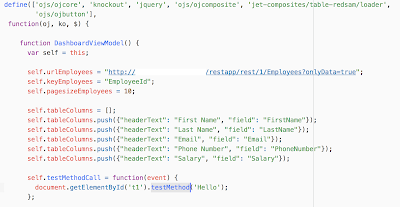
Method should be defined in composite JSON definition:

Method is implemented inside composite JS module:

Events
Events allows to implement external listeners. Basically this allows to override composite logic in external functions. Event is declared in composite JSON definition:

Composite tag contains event property mapped with external JS function, which will be called when event happens inside composite:

Function code in the module, it prints current row selection key:

Table is defined with listener property inside composite:

Listener inside composite initiates event, which will be distributed outside and handled by method defined in composite tag on-handle-selection property:

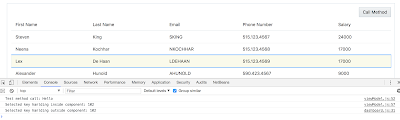
Let's see how it works. Call Method button invokes method inside composite:

Table row selection first triggers listener inside composite, then it initiates event and external listener is invoked too:
I think this lists pretty much all of the essential functionality given by JET composite components. I hope you will find it useful in your development.
Sample app code is available on GitHub. JET table is wrapped into composite component, it comes with slot for toolbar buttons:

What is the benefit to wrap such components as JET table into your own composite? To name a few:
1. Code encapsulation. Complex functionality, which requires multiple lines of HTML and JS code resides in the composite component
2. Maintenance and migration. It is easier to fix JET specific changes in single place
3. Faster development. There is less steps to repeat and less code to write for developer, when using shorter definition of the wrapper composite component
Sample application implements table-redsam component, for the table UI you can see above. Here is component usage example, very short and clean:

All the properties specific to given table are initialised in the module. Developer should provide REST endpoint, key values, pagination size and column structure. The rest is happening in the composite component and is hidden from the developer, who wants to implement a table:

Properties
We should take a look into array type property. Such property allows to pass array into component. This can be useful either to pass array of data to be displayed or array of metadata to help with component rendering. In our case we pass array of metadata, which helps to render table columns. Array type property is based on two attributes - Header Text and Field. Properties are defined in composite component JSON file:

Properties are retrieved from variable inside component and are assigned to local variables:

This is table implementation inside component, columns are initialised from component property:

Slots
Slot defines a placeholder, where developer who is using composite component can add additional elements. Slot is defined in component JSON definition file:

To define slot, JET slot component should be defined inside composite. You can control layout and location where slot will be rendered:

In our case, we use slot for table toolbar buttons. These buttons are added later, when developer is using composite. To place button into slot, put button inside composite component tag and assign defined slot name for the button. This will allow to render button in the slot:

Methods
Method defined in composite component, can be called from outside. In example below, I call JS function from toolbar slot button:

Function gets composite by ID and calls exposed method:

Method should be defined in composite JSON definition:

Method is implemented inside composite JS module:

Events
Events allows to implement external listeners. Basically this allows to override composite logic in external functions. Event is declared in composite JSON definition:

Composite tag contains event property mapped with external JS function, which will be called when event happens inside composite:

Function code in the module, it prints current row selection key:

Table is defined with listener property inside composite:

Listener inside composite initiates event, which will be distributed outside and handled by method defined in composite tag on-handle-selection property:

Let's see how it works. Call Method button invokes method inside composite:

Table row selection first triggers listener inside composite, then it initiates event and external listener is invoked too:

I think this lists pretty much all of the essential functionality given by JET composite components. I hope you will find it useful in your development.


