Showing posts with label JDeveloper 11g R2. Show all posts

Tuesday, May 3, 2016

Red Samurai ADF Performance Audit Tool Major Update v 5.0

Our ADF performance audit tool is growing and getting more advanced with each release. Current major update v 5.0 brings ADF Click History integration and allows to track ADF UI client request time. This allows to understand, how long it takes to execute action from user perspective. Combined with ADF BC performance monitoring, we could give precise answer about performance bottlenecks from top to bottom.

New features in v 5.0:

1. Redesigned UI with ADF 12.2.1 Responsive template. UI is aligned with Alta UI best practices

2. Group by ECID functionality. We can track request action from top to bottom. This includes client request time (time needed to complete action on UI, including network traffic time). Executed SQL queries and any issues in ADF BC performance for the given request

3. ADF Click history logging. Click history data about UI performance is being intercepted and logged into Red Samurai DB, for analysis. This gives a database of all user requests and time for each request

4. User request statistics visualization dashboard

Here you can see sample data from ADF demo application. User request statistics are presented to help in understanding system performance. Time for each user request is visualized, along with detail information about request (component ID, name, type, etc.). Average times are presented, along with user statistics and top actions. We display total requests count vs. recent requests, to visualize the load on the system:


Each of the logged requests can be tracked down by ECID. Here we can see a list of VO's invoked during UI request and any slow performance behavior happening in ADF BC:


In the next updated v 6.0, we are going to implement UI behavior analysis, to extract most common UI usage patterns in ADF application.

Tuesday, September 15, 2015

ADF BC Inline View Criteria for Hierarchical Search

ADF BC View Criteria allows to implement Inline View Criteria to execute hierarchal search. This is especially useful, when you have Master-Detail relationship and want to filter Master records, based on attribute value from Detail. Keep in mind, Inline View Criteria for hierarchical search would not work, if VO is based on custom SQL query. It works only with declarative VO's.

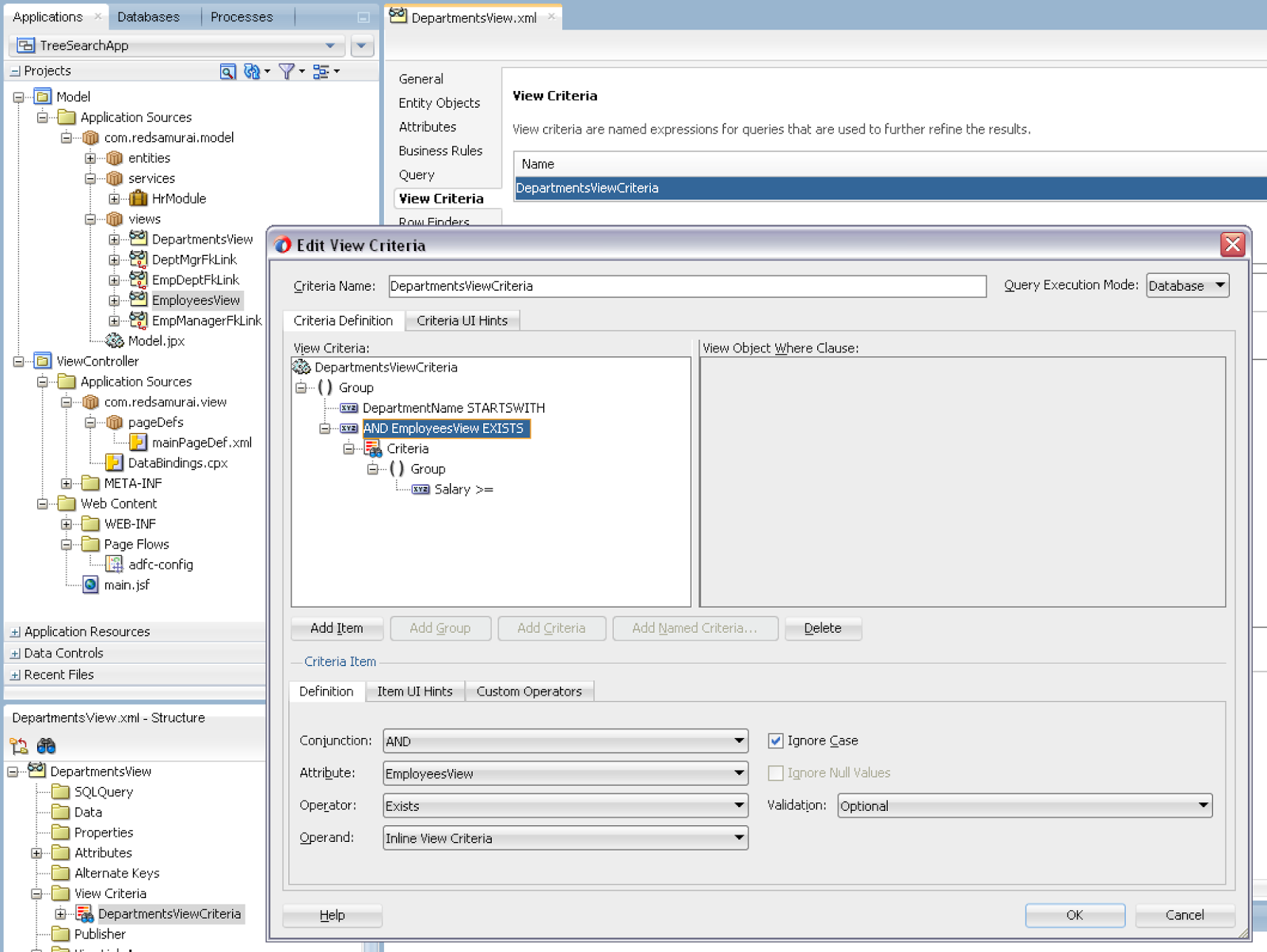
This is how View Criteria with detail search option looks like. If there is View Link available, you can select depend VO from the list of attributes. JDeveloper automatically sets Inline View Criteria option and you can select any attribute from detail VO. All criteria attributes will be rendered in the single search block on UI:


Inline View Criteria is created based on View Link:


Make sure not to use custom SQL based VO, Inline View Criteria would work only with declarative or not custom SQL based VO:


Search filters Master results (departments), based on Detail filtering (employees). I'm searching for employees with salary greater or equal to 12000. This query returns only those departments, where employees with such salary are available:


If I search with lower salary, more departments are present in the result:


Download sample application - TreeSearchApp.zip.

Thursday, August 27, 2015

Red Samurai ADF Performance Audit Tool v 4.0 - Web Client Request Monitoring and Complete Query Analysis

I'm excited to announce, we have released a new version of our RSA audit tool. This is a major update after previous version released in February 2015 - Red Samurai ADF Performance Audit Tool v 3.4 - ADF Task Flow Statistics with Oracle DMS Servlet Integration.

It is already 3 years, since initial version - Red Samurai Performance Audit Tool - Runtime Diagnosis for ADF Applications. We are using it for many of our customers to monitor ADF performance in both test and production environments. Many new features were added during these years, more features to come.

RSA Audit v4.0 New Features

1. RSA Audit v4.0 dashboard is supporting ADF 12c and Alta UI look


2. Web Client Request Time monitoring. Supported with ADF 11g and 12c. Generic method tracks request time for all ADF UI components. Logged data can be analysed through ADF UI dashboard or directly in the DB. Request time represents complete time from user action in the browser, until request is completed. This includes real user experience - browser processing time, network time, server side time and ADF BC/DB processing times. Runs in VERBOSE logging mode


3. Detail information about ADF fragment, button or other ADF UI component involved into request is being logged together with request processing time and is accessible from audit dashboard. This helps to identify slow actions spanning from Web Client to DB


4. Information about each request is grouped, this allows to compare differences between multiple requests and identify bottlenecks in the application performance


5. Duplicate Queries. Allows to track all executed VO’s, very helpful to identify redundant VO’s executions. Groups VO executions per ECID, this helps to identify VO’s re-executed multiple times during the same request. Runs in MEDIUM logging mode


6. VO’s executed from the same ECID are automatically highlighted - this simplifies redundant queries analysis


7. Number of duplicate executions of VO’s per ECID is calculated and presented in the table and sunburst chart


8. We calculate top VO’s per AM. This helps to set priorities for SQL tuning and understand heavy used VO’s


9. Sunburst chart displays visual representation of duplicate and top VO’s per AM

Wednesday, June 24, 2015

Intercepting Table Filter Query and Manipulating VO SQL Statement

I’m going to describe one non declarative use case. Imagine, if there is a table with filter functionality, you may want to intercept filter items and apply the same for another VO. This another VO should be based on the same DB table, so it could apply criteria items against the table.

Sample application - AdvancedViewCriteriaApp.zip, implements a fragment with table component and a chart. Table component can be filtered, criteria is intercepted and applied for the chart, this one is rendered from different VO with GROUP BY query. Chart stays in synch and displays data according to the criteria filtered in the table:


In the log, I’m printing out intercepted criteria from the table filter:


Chart is rendered from the SQL query below:


Table filter criteria is being intercepted by overridden method buildViewCriteriaClauses. Criteria clause is constructed here, we just need select FilterViewCriteria, the one originating from table filter. We could apply this criteria straight ahead to the VO responsible to bring chart data. However, this would not work - ADF BC would wrap original chart SQL query with SELECT * FROM (…) QRSLT WHERE (table filter criteria). This would not work, because table filter criteria is not present in the original chart SQL statement. To make it work, I’m updating original SQL query for chart data, by updating WHERE clause part:


In the last step, we need to pass bind variable values - the ones user is searching for in table filter. This can be done from another overridden method - bindParametersForCollection. We have access to the applied bind variables in this method. Again, you should check for FilterViewCriteria and extract applied bind variables values. Chart VO will be updated with bind variable definitions created on the fly and assigned with values to search for:


I hope this trick will save some of your time, if you are going to implement something similar - to intercept table filter query and apply it to the another VO, based on same DB table.

Thursday, June 18, 2015

Select One Choice with Select Items Tag

If you need to implement select one choice based on alternative data sources (not based on ADF BC) - you shouldn't use af:forEach inside af:selectOneChoice component. Don't get confused with af:forEach tag, this tag is supposed to generate multiple components and not to iterate over a collection of objects and render HTML for each item. There could be cases, when choice list data will come duplicated, with af:forEach tag applied. I would suggest to construct array of SelectItem objects and return it to the f:selectItems tag to be rendered.

This is how proper af:selectOneChoice definition should look like. Array of items is being rendered in the choice list through f:selectItems tag:


Value property for f:selectItems can be entered manually or through the wizard, when creating af:selectOneChoice - this should point to the custom method, where array of SelectItem objects is constructed:


Custom method could read data from any source and construct array of SelectItem objects. This is the input for f:selectItems tag, it knows how to render a list of choice list items out of it:


This is how it looks on runtime - choice list is working fine, no need to use af:forEach:


Download sample application - CustomSelectListApp.zip.

Thursday, June 4, 2015

How to Apply New Label Text in MDS Customisation

It may look simple, but really is not obvious how to apply new label text for the ADF BC attribute or UI component through MDS customisation. It is simple, if such label text already exists in the core bundle. If you need to create new label text in the customisation and use it - this becomes a bit tricky. Well, as usual - I'm going to explain how you could solve such task. You should read more about MDS customisation setup in ADF - MDS Seeded Customization Approach with Empty External Project.

Core application - mds_label_cust.zip, contains one label for First Name VO attribute:


The requirement is to customise core application and add label for the Last Name VO attribute, without changing anything in the core. For this purpose, we need to create different JDEV application - extension, configured with shared library deployment profile. Here you could simply create new properties file. We are going to use this application to deliver additional components for the core. Keep in mind - core application must be configured to use this library. Add label for Last Name VO attribute, in the properties file located in the extension:


Time for the main trick. We could use label directly from any resource bundle in the ADF application. This is accomplished through such expression - reference for the resource bundle and label key:


This code should be part of customisation project, on runtime it will find referenced resource bundle and label key in the resource bundle from extension (see above).

This is how it looks on runtime - label text is taken from resource bundle in extension and applied by customisation:


It sounds more tricky, than it is - just try it.

Friday, April 17, 2015

Monitoring PPR Request Time on ADF UI Client Side

We can measure how long it takes to process request on the server side, however it is equally important to measure how long PPR request takes on the client side. Mainly because this will be a key factor for application performance exposed to the end user. There is relatively easy approach in JSF 2.0 to measure PPR request time on client side - with a special ajax tag. ADF 11g R2 and ADF 12c are based on JSF 2.0, this means we can use such tag and measure request performance. Read in my previous post how to monitor page load time in ADF UI client - Monitoring Page Load Time on ADF UI Client Side.

Here is the example of ajax tag. It provides special property called onevent, this property points to custom JavaScript method, which will be invoked by the framework when PPR request starts and ends:


Ajax tag can be used for various ADF UI components, initiating request. Below you can see example of ADF Faces button configured with onevent monitoring, it points to custom JavaScript monitor method:


JavaScript monitor method is invoked automatically, when request starts and succeeds. This means we can get start and end time, calculate total time taken to process PPR request from click to rendered response:


I would like to emphasise importance of this approach, based on example of ADF TF opening. Task Flow is a server side concept, on runtime its all is converted to HTML and rendered in the browser. When user clicks on the button, to render ADF TF content, he waits until it is initialised on the server side, business logic is executed and finally response is rendered. My example contains Method Call activity with delay code intentionally, to demonstrate how PPR request time measurement works:


ExecuteDelay method call invokes Java method, where thread is paused for 5 seconds:


Let's see how it works on runtime. Home page contains a list of employees, there is team hierarchy link available for each employee. On user click, it loads ADF TF with Hierarchy viewer (ADF TF explained above, with thread delay):


PPR request time starts when user clicks on the link and ends when ADF TF UI fragment content is rendered. This gets close to 6 seconds (there is added 5 seconds delay time from TF method call). We can measure, how long it really takes to see the content for the user, starting from the first click:


As soon as PPR request is completed, Hierarchy viewer component renders team structure:


Navigation back to the list is measured as well, it takes below 1 second:


PPR requests time for Save/Cancel/Back buttons in edit screen is measured in the same way:


Download sample application with implementation of described approach - ADFAltaApp_v3.zip.

Wednesday, April 15, 2015

Monitoring Page Load Time on ADF UI Client Side

In certain situations, it might be useful to monitor ADF page load time. This is pretty easy to achieve with Navigation Timing API and Java Script. Navigation Timing API is supported by modern browsers and allows to retrieve client side load time. It takes into account data transfer time and actual rendering in the browser - real time it took for a user to see the content.

We could use ADF clientListener operation with load type, to identify when ADF UI is loaded. This listener should be added to the ADF UI document tag and it will be invoked at the end of page rendering. Through clientListener, we could invoke our custom JavaScript method, where we could calculate page load time on ADF UI client side:


The most important thing here, is to get page load start time. This value is retrieved from Navigation Timing API (mentioned above) - performance.timing.navigationStart. The rest is easy - we can get load time:


This is how it looks like on runtime. When I recompile ADF application and redeploy it on the server, first load is obviously slower. ADF UI is rendered on the client side (starting from page load request) in 10 seconds (look at top right corner):


Second access is a way faster - page load on the client side happens in 1 second:


You can test it yourself, download sample application (redsam/welcome1) - ADFAltaApp_v2.zip.

Wednesday, April 8, 2015

Simple (Effective) Refresh Approach for ADF Regions

I often hear developer asking about how to refresh different regions on the same page, when specific event happens in one of the regions - to refresh dependent regions. Usually developers would like to use something more simple than Contextual Event approach. There is more simple approach, may be it doesn't work for all the possible use cases - but it does it job, when just refresh is needed. This approach is based on dummy parameter value, being used as dependent region input parameter, with refresh option set to be ifNeeded.

For the sample test case, I'm using ADF 12c application (SimpleReloadRegionApp.zip). This application contains two AM's, to simulate two Data Controls to be used in separate regions:


Fragment from the first region, generates refresh event, when Save button is pressed. For this purpose, I have registered Property Listener to update flag variable. This variable value is initialised from refreshToken method, available in RefreshHelperBean:


Bean method is very simple, it takes current timestamp value and returns it to String. This value always will be changed and this ensures dependent region refresh:


Make sure to set input parameter for the region TF you want to refresh, this should be simple parameter of type String:


TF must call Execute operation, this will force to reload VO rowset data, before loading the fragment:


In the main page, where region is consumed, change refresh condition to ifNeeded and set refreshFlag parameter to point to the variable initialized in the first region (by property listener):


There are two regions rendered on the UI. Once I change data in the top region (form component) and press Save, second region below is refresh automatically and it fetches latest available data from DB: