Showing posts with label JDeveloper 11g. Show all posts

Saturday, December 10, 2016

Early ADF Model Update with Process Updates Method

This use case specifically useful for ADF UI value change listener. If there is business logic to be invoked when field value is changed, we can can call ADF BC custom method from assigned value change listener. However new value is not yet propagated down to ADF BC model - we would need to pass it as parameter to custom method. What if want to have new value to be available in ADF BC model without passing new value from value change listener as parameter? This is possible if we call processUpdates method in value change listener, before calling custom ADF BC method.

In my example - ADFProcessUpdatesApp.zip, I have created sample method testCall in VO Row implementation class. This method is accessing salary attribute value from current row. I'm going to call this method through bindings from value change listener and lets see what it will print out:


Let's use value change listener with custom method call without calling processUpdates initially:


Change salary attribute value to call value change listener:


Custom ADF BC method is invoked from value change listener and it prints value before change:


How to get new value in ADF BC custom method, without passing it as parameter from value change listener? Call processUpdates on UI component, before calling custom method in value change listener:


Change value once again:


This time new value is visible in ADF BC custom method instantly, when value change listener is invoked:

Tuesday, May 3, 2016

Red Samurai ADF Performance Audit Tool Major Update v 5.0

Our ADF performance audit tool is growing and getting more advanced with each release. Current major update v 5.0 brings ADF Click History integration and allows to track ADF UI client request time. This allows to understand, how long it takes to execute action from user perspective. Combined with ADF BC performance monitoring, we could give precise answer about performance bottlenecks from top to bottom.

New features in v 5.0:

1. Redesigned UI with ADF 12.2.1 Responsive template. UI is aligned with Alta UI best practices

2. Group by ECID functionality. We can track request action from top to bottom. This includes client request time (time needed to complete action on UI, including network traffic time). Executed SQL queries and any issues in ADF BC performance for the given request

3. ADF Click history logging. Click history data about UI performance is being intercepted and logged into Red Samurai DB, for analysis. This gives a database of all user requests and time for each request

4. User request statistics visualization dashboard

Here you can see sample data from ADF demo application. User request statistics are presented to help in understanding system performance. Time for each user request is visualized, along with detail information about request (component ID, name, type, etc.). Average times are presented, along with user statistics and top actions. We display total requests count vs. recent requests, to visualize the load on the system:


Each of the logged requests can be tracked down by ECID. Here we can see a list of VO's invoked during UI request and any slow performance behavior happening in ADF BC:


In the next updated v 6.0, we are going to implement UI behavior analysis, to extract most common UI usage patterns in ADF application.

Tuesday, April 26, 2016

Optimize ADF HTTP Response Size with ChangeEventPolicy

You should read this post, if you are looking how to reduce ADF HTTP response size. This can be important for ADF application performance tuning, to improve PPR request response time. By default in ADF 12.2.1, iterator is assigned with ChangeEventPolicy = ppr. This works great for UI component bindings refresh, no need to set individual partial triggers. On other side, this generates extra content in ADF HTTP response and eventually increases response size. I would recommend to use ChangeEventPolicy = ppr, only when its really needed - dynamic forms, with unknown refresh dependencies. Otherwise set ChangeEventPolicy = none, to generate smaller response.

I will demonstrate below the difference for ADF HTTP response with ChangeEventPolicy=ppr/none. First let's take a look into page load response size:


Page contains list component and form. Both are based on two different iterators, set with ChangeEventPolicy = ppr. This generates AdfPage.PAGE.updateAutoPPRComponents calls for each UI item, referencing attributes from the iterator. In complex screens, this adds significant amount of extra text to the response, could increase size even by half:


Partial response also contains same calls added to the response. Select list item:


Each item from the form will be referenced by JavaScript call, to register it for refresh:


Let's change it to ChangeEventPolicy = none. Set it for both iterators:


We should set refresh dependencies manually. Form block must be set with PartialTrigger, referencing list component - to refresh, when list selection changes:


Next/Previous buttons dependency also must be set, to change form row:


With manual refresh dependency changes, there are no extra calls added to ADF HTTP response, reducing overall response size:


Same applies for PPR response:


Download sample application - ChangeEventPolicyPPRApp.zip.

Thursday, April 7, 2016

ADF BC View Criteria Query Execution Mode = Both

View Criteria is set to execute in Database mode by default. There is option to change execution mode to Both. This would execute query and fetch results from database and from memory.  Such query execution is useful, when we want to include newly created (but not commited yet) row into View Criteria result. Newly created row will be included into View Criteria resultset.

Download sample application - ViewCriteriaModeApp.zip. JobsView in sample application is set with query execution mode for View Criteria to Both:


I'm using JobsView in EmployeesView through View Accessor. If data from another VO is required, you can fetch it through View Accessor. View Accessor is configured with View Criteria, this means it will be automatically filtered (we only need to set Bind Variable value):


Employees VO contains custom method, where View Accessor is referenced. I'm creating new row and executing query with bind variable (primary key for newly created row). View Criteria is set to execution mode Both, this allows to retrieve newly created row (not commited yet) after search:


View Criteria execution mode Both is useful, when we want to search without loosing newly created rows.

Wednesday, March 30, 2016

Change ADF BC Data Update Locking with FOR UPDATE WAIT

Each time when data is changed and updated through ADF BC, before posting changes to DB, SQL query with FOR UPDATE NOWAIT is generated and executed. In case if other process locks row to be updated, or another user in the same moment is updating it, error will be generated and update will be stopped. There might be use cases, when you would like to wait for certain period of time, until row will be unlocked and then commit row changes. This is especially true, if 3rd party (PL/SQL) process is updating rows and you have defined change indicator attribute in ADF BC (see my previous post - ADF BC Version Number and Change Indicator to Track Changed Rows).

We can change default behavior, instead of requesting for immediate lock - we can wait a period of time. If lock becomes available during this period, session acquires lock. If row remains locked, error is returned. Instead of default FOR UDPATE NOWAIT, we can generate FOR UDPATE WAIT (time period in seconds).

To override default behavior, we need to specify custom SQLBuilder class. This can be registered in Application Module configuration jbo.SQLBuilder property:


Class must extend from OracleSQLBuilderImpl and override getSqlVariantLockTrailer() method. My sample application is implemented to return FOR UPDATE WAIT 30:


We can do a test. We can simulate PL/SQL lock by executing SQL query with FOR UPDATE from SQL Developer:


Try to update same row from ADF BC with default behavior, error will be returned - "Failed to lock the record, another user holds the lock". This is expected, because row remains locked:


With overriden SQL Builder, FOR UPDATE WAIT 30 is generated. It waits 30 seconds, as soon as lock is removed - lock from current session is set and row data is updated:


Download sample application - LockUpdateApp.zip.

Friday, March 25, 2016

ADF BC Version Number and Change Indicator to Track Changed Rows

One of the common use cases in enteprise applications is to track concurrent user changes. There are two types of changes possible - when two real users are changing data in the same row, or when single user is changing data and same row is updated by PL/SQL procedure/function (all happen in the same user session). In the first case, we would like to inform a user - row data was changed (two different users changing data). In the second case, there is no need to inform user (data wasn't changed by another real user, it was changed by PL/SQL function/procedure invoked in the same session).

ADF BC by default tracks all attributes and checks if they values were changed. This would mean, if any attribute value is changed directly in DB, EO cache will be out of synch and changed row error will be reported. We can minimize number of attributes to be checked to single attribute - Version Number. There must be additional number type column created in DB table, we are going to use it for Version Number in the EO. EO attribute should be marked as Change Indicator and set to be "version number" in Track Change History property. This means, row will be considered as changed by another user, only if Version Number attribute value will be changed. All changes happening directly from PL/SQL will not increment Version Number (it will be incremented only for the changes submitted from ADF BC):


There should be new column created in the DB for Version Number attribute:


Let's see how it works. I will use two different browser sessions, to simulate two users. Change value for First Name, take a look into Version Number. Value is equal to 4, before Save:


Data is saved successfully to DB. New value 5 is assigned automatically for Version Number:


Switch to different session now. Version Number is equal to previous value 4 (this session was opened before recent commit from first session). Both sessions are working with the same row. Change value for Salary:


Try to save this change. You will get standard error message, informing user about changes in the same row. This happens, because Version Number value doesn't match with recent Version Number for the same record:


At the same time, Version Number is synchronized automatically (updated to 5) and user can try to commit his changes again. This time data is saved and Version Number is increased to 6:


We should check now, how it works data is changed in the DB directly, without increasing Version Number (the case of update happening from PL/SQL). I'm changing Employee_Id = 100 record directly in DB (changing Salary value). Version Number is not changed:


Go back to Web session and change First Name value, press Save:


Despite data was changed in DB, save was successful - Version Number was recent. First Name was successfully changed and Version Number was increased to 7:


Download sample application (make sure to create manually VERSION_NO(10, 0) column in the EMPLOYEES DB table) - ADFChangedRowApp.zip.

Thursday, September 17, 2015

Use Case of Auto Re-Execute Functionality in ADF BC

There are use cases, when data in DB is changed by background processes and we would like to display to the user latest data available. Very common implementation for this use case is to re-execute ADF iterator and VO each time when Task Flow or UI screen is accessed. Obviously this works, but performance would suffer - usually there is no need to re-fetch data each time, it must be re-fetched only when changes are detected in DB. ADF BC provides out of the box such functionality - it can detect changes in DB and re-execute VO through Database Change Notification. Make sure to grant CHANGE NOTIFICATION system privilege to the data source user.

Auto refresh functionality for ADF BC VO is working when DB pooling is disabled in AM tuning. This would mean you should use Auto refresh carefully and plan dedicated AM's.

I'm going to describe the use case and how you could benefit from VO auto refresh. Here is the example of typical ADF Task Flow with initial Method Call to re-execute VO and fetch fresh data from DB. In the next step UI fragment is rendered, where recent data is displayed:


This is how it works on UI. Departments TF is accessed by pressing Departments button in Employees table screen. This will trigger Execute action call in Departments TF and force VO to reload:


List of Departments will display recently fetched data from DB:


Each time when Departments TF is opened, VO executes SQL query and re-fetches data. This can be observed from the log:


While this works fine, it is not great from performance perspective. We should improve it by using VO auto refresh functionality. Change default activity in TF to UI fragment, we don't need to invoke VO re-execute:


Select AutoRefresh=true property in the VO settings, this will enable DB listener event for this VO and will force re-execution only when it is required:


We are ready to test it. Change Department Name column value:


Navigate to Departments from Employees table:


New data will be displayed automatically in Departments list, even without invoke initial Execute operation. If you would open the same TF, when there were no changes in DB, it will load data from cache, without re-executing VO and re-fetching the same data rows:


Download sample application - ADFAltaApp_v9.zip

Tuesday, September 15, 2015

ADF BC Inline View Criteria for Hierarchical Search

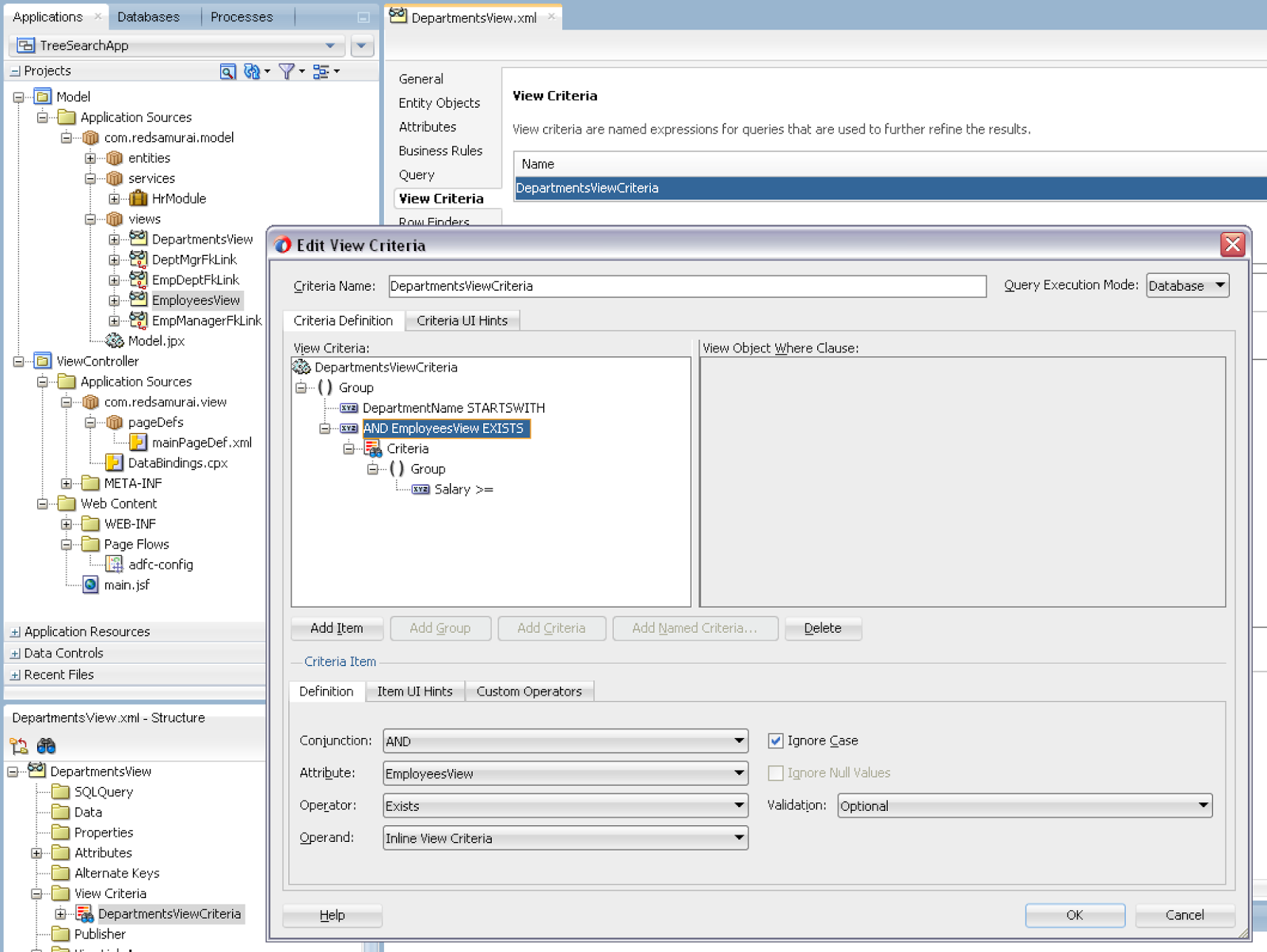
ADF BC View Criteria allows to implement Inline View Criteria to execute hierarchal search. This is especially useful, when you have Master-Detail relationship and want to filter Master records, based on attribute value from Detail. Keep in mind, Inline View Criteria for hierarchical search would not work, if VO is based on custom SQL query. It works only with declarative VO's.

This is how View Criteria with detail search option looks like. If there is View Link available, you can select depend VO from the list of attributes. JDeveloper automatically sets Inline View Criteria option and you can select any attribute from detail VO. All criteria attributes will be rendered in the single search block on UI:


Inline View Criteria is created based on View Link:


Make sure not to use custom SQL based VO, Inline View Criteria would work only with declarative or not custom SQL based VO:


Search filters Master results (departments), based on Detail filtering (employees). I'm searching for employees with salary greater or equal to 12000. This query returns only those departments, where employees with such salary are available:


If I search with lower salary, more departments are present in the result:


Download sample application - TreeSearchApp.zip.