Showing posts with label Bad Practices. Show all posts

Sunday, May 13, 2012

View Link Accessor Usage Performance Side Effect

View Link Accessor is available when there is View Link defined and typically is used in ADF to retrieve detail collection from master row in VO row implementation class. Officially this is recommended approach to retrieve detail collections programmatically. However, not everything what is recommended is always good from performance point of view. Its always good to question recommended best practices and compare with other possible solutions to achieve better performance. However, when focusing on performance - don't forget to keep your solution still maintainable and don't over complicate things.

In this post I will show you there is one additional SQL select executed, when using View Link accessor - looks like data is not retrieved from the cache by default, even if detail rowset is loaded already. Alternative solution with better performance will be presented as well - directly using detail VO instance from AM data model. Download sample application - ViewLinkAccessorApp.zip.

This sample implements test case for both approaches - detail collection retrieval from View Link Accessor and from VO instance declared in AM. As you see in the screenshot, there is Master record loaded and related detail rows are available. This means no additional SQL should be executed, when accessing detail rowset:


First I test to get detail collection from VO instance declared in AM - there is no SQL executed as expected:


Now I use standard View Link Accessor approach - it executes new SQL statement to get detail rowset which already exists in the cache. It executes this additional SQL once, on the second View Link Accessor call it keeps data in the cache - but why it executes new SQL statement, it could retrieve same detail collection from VO cache in first place:


Here we have source code for both methods. First one is using View Link Accessor and executes SQL statement, regardless if there is detail collection already loaded. Second is using detail VO instance from AM data model and always gets data from existing cache:


Optimized method instead of using View Link Accessor, is calling detail VO instance from AM data model directly - means it gets same data collection as displayed on the UI:


Thursday, May 3, 2012

Bad Practice for Session Scope Access in ADF BC

Few months back I had a blog post which started discussion in ADF community - if its good or bad practice to access Session Scope in ADF BC - How to Access Session Scope in ADF BC. In this blog post I was describing ADF public API method which gives access to the Session Scope object in ADF BC. Is it good or bad practice? Well - there always must be common sense, when thinking about architecture. I believe its Ok to access Session Scope object in ADF BC in exceptional cases, but this should not become a rule. If to be more precise - you can access Session Scope in ADF BC, if this will not violate MVC pattern (if you still will be able to run ADF BC separately, without ADF UI present). For example, you need to access current Web client IP info, etc.

In this post I would like to show one of many scenarios, when you should avoid accessing Session Scope in ADF BC - SecurityFormLogin_v4.zip.

Application Module Implementation class contains two methods:


First method gets parameter from Session Scope. Second method gets parameter from function argument. Both methods execute View Criteria and initialize Bind Variable value from input value.

Second method is not accessing Session Scope, but rather gets input value from function argument:


Both methods are exposed through Application Module interface:


In Login bean, Session Scope variable - "depName" is initialized with value "A". This value will be accessed from first AM method:


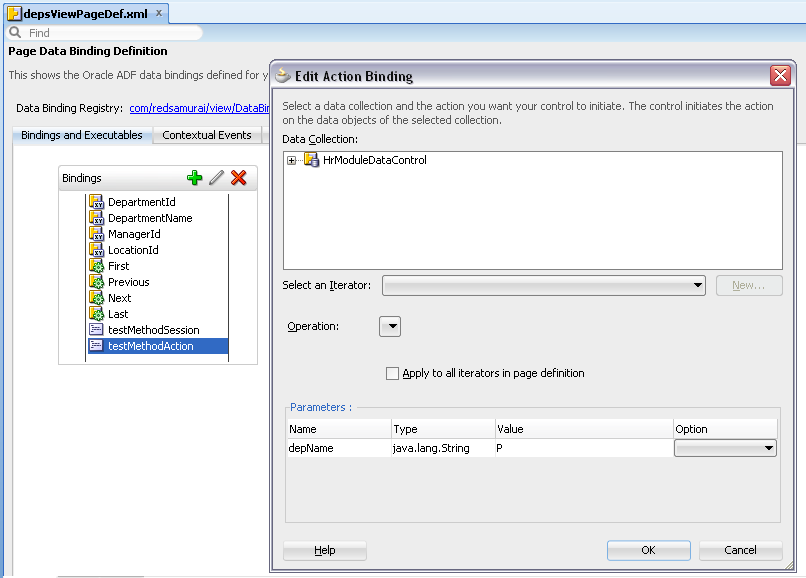
Second method gets parameter declaratively, through ADF bindings - because it accepts function argument:


From ADF UI both methods work great - results returned are correct:


Both methods initialize Bind Variable, search is executed:


If you try to test first method from ADF BC tester - you can't. MVC pattern is violated, you can't set input argument value - Bind Variable will not be initialized:


Be very careful, when you are accessing Session Scope directly in ADF BC. While it works, it always will be quick and dirty type solution - you may pay expensive price for it in the future.

Sunday, April 8, 2012

Comparing Number of SQL Executions to get LOV Description Without Entity Association Available

When speaking about performance, ADF developers should not rely only on the framework and do blind development. Its a must to check form performance proactively using different methods - AM pool disabled, JMeter stress test and finally monitor number of SQL executions. As for the basis for today post I will take bad practice for LOV implementation description - Bad Practice Use Case for LOV Performance Implementation in ADF BC, and will describe how to improve it.

Bad practice use case (AM custom method execution from Groovy VO attribute), you can download from link above. Improved solutions are available for download here - LOVByNameViewAccessor.zip and LOVByNameSQLEO.zip. So, there will be three solutions compared: AM custom method execution from Groovy VO attribute, direct LOV VO View Accessor Find By Key access and finally inline SQL approach to retrieve LOV description value. Keep in mind, all these implementations are not using EO Associations, this is because not always we can use EO Associations and I would like to make you think with this post about performance - so, you will not wonder why ADF system is slow. In my next posts, I will compare number of SQL executions for default LOV with EO Association available.

All three applications are tested in the following way - initial page load with LOV component, navigation to the next record, LOV opening, LOV value selection:

A. Initial page load with LOV component


B. Navigation to the next record, with different description (Next button)


C. LOV list opening


D. Value selection from LOV list


Here we have SQL execution results for all three methods (JOBS table access): Groovy script invocation from VO attribute for the custom AM method fails big time (Groovy value for VO attribute is initialized many times, this is causing to execute many times referenced method to retrieve LOV description):


Number in the graph presents total number of SQL executions (A-D tests).

A. Initial page load with LOV component

Groovy script invocation from VO attribute to call custom AM method - 3 SQL executions:


View Accessor and Find By Key - 1 SQL execution:


Inline SQL approach - no additional SQL for Jobs:


B. Navigation to the next record, with different description (Next button)

Groovy script invocation from VO attribute to call custom AM method - 5 SQL executions (total 8):


View Accessor and Find By Key - 1 SQL executions (total 2):


Inline SQL approach - no additional SQL for Jobs:


C. LOV list opening

Groovy script invocation from VO attribute to call custom AM method - 4 SQL executions (total 12):


View Accessor and Find By Key - 1 SQL executions (total 3):


Inline SQL approach - 1 SQL execution (total 1):


D. Value selection from LOV list

Groovy script invocation from VO attribute to call custom AM method - 9 SQL executions (total 21):


View Accessor and Find By Key - 0 SQL executions (total 3):


Inline SQL approach - 0 SQL execution (total 1):


Finished with statistics.

How to implement View Accessor and inline SQL statement approaches?

In both cases, you must have transient attribute - JobTitle. Just in the case of inline SQL - I prefer to have transient attribute on EO level - is easier to manage custom SQL statements and make them reusable. From maintenance point of view, I would recommend to use View Accessor approach. LOV declared for transient attribute should return both - key and description values:


In case of View Accessor approach, you should go to the getter method for JobTitle and include findByKey method there (search directly through LOV View Accessor RowSet to retrieve LOV description):


In case of inline SQL statement, just include SQL logic for attribute value on EO level and inherit it inside VO, where LOV will be defined:


Wednesday, April 4, 2012

Bad Practice Use Case for LOV Performance Implementation in ADF BC

If you want to learn something well, there is nothing better as to learn bad practices first. Really, by knowing bad practices - you will start to follow best practices just automatically, because there will be simply no bad practices left. If serious, I would like to post one use case that was discovered recently during my work - terribly slow LOV performance in ADF BC. After debugging session, it was discovered - when selecting LOV value, LOV SQL statement was executed around 20 - 25 times. With such SQL statement duplication, of course we can not expect great performance for LOV's, especially with complex SQL cases. Because of specific requirements, there were no EO Associations created to get LOV description, LOV was created based on transient attribute directly. However, this is not a problem, problem is elsewhere.

To reproduce this bad practice use case, I have created basic sample application - EO, VO, AM and LOV VO (there is no second EO and Association for LOV description):


Main VO - EmployeesView, contains transient attribute - JobTitle (always updateable). This attribute retrieves its value from Groovy method, this method in turn calls SQL statement to get LOV description value on page load. This is big NO NO NO, to use Groovy script for attribute value expression, when method invoked from Groovy expression in turn calls SQL logic. This is because, EO/VO attribute in ADF can be initialized multiple times during same request - it will call then SQL multiple times as well. Without knowing this, you can degrade system performance significantly:


Transient attribute is defined with LOV (this part is OK):


Custom method from AM (invoked through Groovy script as attribute expression), calls LOV VO and executes View Criteria to retrive LOV description value to display:


On runtime, when user select value from LOV:


It calls same custom AM method through attribute value around 20-25 times, imagine how it may slow down your system:


This use case was implemented, because there are no EO Associations in the system. In my next post, I will describe how to implement this use case with inline SQL for optimal performance.

Download bad practice sample application - LOVByNameGroovy.zip.