Showing posts with label JDeveloper 12c. Show all posts

Wednesday, July 3, 2019

Oracle ADF A Status Update

Oracle posted information update for Oracle ADF - "With the continuous investment and usage of Oracle ADF inside Oracle we expect external customers will also continue to enjoy the benefits of Oracle ADF for many more years."

Read the complete post here: https://blogs.oracle.com/jdeveloperpm/oracle-adf-a-status-update

Happy to read the update, sounds positive. Thanks to Oracle for taking time and publishing this information. #adf #middleware #javascript #oracle #cloud #oraclefusion

Wednesday, June 26, 2019

Oracle Developer Tools - Do They Still Exist?

People are frustrated about @OracleADF @JDeveloper on social media - "ADF boat has no captain", etc. I agree @Oracle is to blame big time for such lame handling of its own Developer Tools stack. @Oracle please wake up and spend some budget on @OracleADF. Read more:

Oracle VBCS - right now this tool gets the most of Oracle focus. Supposed to offer declarative #JavaScript development experience in the Cloud. Not well received by the community. Are there any VBCS customers, please respond if yes?

Oracle APEX - comes with a very strong community (mostly backed by DB folks). But is not strategic for Oracle. More likely will be used by PL/SQL guys then by Java or Web developers. 

Oracle JET - highly promoted by Oracle. Set of opensource #JavaScript libs, glued by Oracle layer. Nice, but can't be used as a direct replacement for @OracleADF, JET is UI layer only. Oracle folks often confuse community by saying - Oracle JET is a great option to replace ADF

Oracle Forms - still alive, but obviously can't be strategic Oracle platform. A few years ago, Oracle was promoting Forms modernization to @OracleADF

Summary - Oracle Developer tools offering is weak. Lack of Oracle investment into development tools - makes Oracle developers community shrink.

Wednesday, February 20, 2019

Intercepting ADF Table Column Show/Hide Event with Custom Change Manager Class

Ever wondered how to intercept ADF table column show/hide event from ADF Panel Collection component? Yes, you could use ADF MDS functionality to store user preference for table visible columns. But what if you would want to implement it yourself without using MDS? Actually, this is possible through custom persistence manager class. I will show you how.

If you don't know what I'm talking about. Check below screenshot, this popup comes out of the box with ADF Panel Collection and it helps to manage table visible columns. Pretty much useful, especially for large tables:


Obviously, we would like to store user preference and next time the user comes back to the form, he should see previously stored setup for the table columns. One way to achieve this is to use out of the box ADF MDS functionality. But what if you don't want to use it? Still possible - we can catch all changes done through Manage Columns popup in custom Change Manager class. Extend from SessionChangeManager and override only a single method - addComponentChange. This is the place where we intercept changes and could log them to DB for example (later on form load, we could read table setup and apply it before fragment is rendered):


Register custom Change Manager class in web.xml:


Manage Columns popup is out of the box functionality offered by ADF Panel Collection component:


Method addComponentChange will be automatically invoked and you should see similar output when changing table columns visibility:


Download sample application code from my GitHub repository.

Friday, February 15, 2019

ADF Performance Improvement with Nginx Compression

We are using Nginx web server for Oracle ADF WorkBetter hosted demo hosted on DigitalOcean cloud server. Nginx helps to serve web application content fast and offer improved performance. One of the important tuning options - content compression, Nginx does this job well and is simple to setup.

Content compression doesn't provide direct runtime performance, a browser would run the same code, doesn't matter it was compressed or not. But it brings improved perceived performance (which is very important), network time is way faster, because of reduced content size. Oracle ADF is a server-side framework, each request would bring content from the server - faster this content comes, means better application performance.

1. Content Compression = OFF

Let see stats, when no content compression applied (using our Oracle ADF WorkBetter hosted demo).

Page load size is 2.69 MB transferred. Finish time 1.55 s:


Navigation to the employee section generates 165.76 KB and finish time 924 ms:


Navigation to employee compensation generates 46.19 KB and finish time 494 ms:


2. Nginx compression

Compression is simple to setup in Nginx. Gzip settings are set in nginx.conf, make sure to list all content types which must be supported for compression. Restart nginx process after new settings are saved in nginx.conf:


3. Content Compression = ON

Page load size is 733.84 KB transferred. Finish time 1.48 s:


Navigation to the employee section generates 72.75 KB and finish time 917 ms:


Navigation to employee compensation generates 7.59 KB and finish time 498 ms:

Tuesday, February 5, 2019

JDeveloper 12c IDE Performance Boost

There is a way to optimize JDeveloper 12c IDE performance by disabling some of the features you are not using.

I was positively surprised with improved JDeveloper responsiveness after turning off some of the features. ADF BC, Task Flow, and ADF Faces wizards started to respond in a noticeably faster way. Simple change and big performance gain, awesome.

One of the strongest JDeveloper performance improvements come from disabling TopLink feature. Ironically - TopLink is an abandoned product (12.1.3 was the last release). I remember back in 2006 TopLink was very promising and it was almost becoming the default platform for ADF Model. One of the old blog posts written by me related to TopLink - External Transaction Service in Oracle TopLink. But luckily it was overshadowed by ADF BC.

These are the features I disabled in my JDeveloper to get performance gain:

Monday, January 21, 2019

Announcing Hosting for Oracle ADF Rich Client and Oracle ADF WorkBetter Demos

If you are curious about how Oracle ADF works or want to explore a rich set of ADF Faces components - welcome to access Oracle ADF demo apps hosted on our cloud server.

We launched a dedicated website Oracle ADF Components. Hosted demos:

1. ADF Faces Rich Client
2. ADF Work Better


These demo apps can be downloaded from Oracle, you could run them on your own environment too. But sometimes it is useful to have apps online for quick access.

Sunday, December 23, 2018

Understanding Attributes Enum in ADF BC Row Class

Did you ever wonder why Attributes Enum is generated by JDeveloper in Entity or View Row class? Attributes Enum holds a collection of attribute names and there is a set of static variables with attribute indexes. These indexes are used to locate attribute in getter/setter. Attributes Enum is a structure which is required for JDeveloper on design time to generate Java code. On runtime Attributes Enum is needed only as long as you are using a static variable index in the getter/setter.

Attributes Enum and list of static indexes in View Row class:


Static index is used in the getter/setter to access attribute:


Attributes Enum is mimicking attributes order in the VO/EO. You can think about it as about attributes metadata. It is not mandatory to use index from Attributes Enum. In some use cases, you could get attribute index directly from VO/EO Def and use it to access attribute:


First name is fetched correctly using overridden getter:


Download sample code from GitHub

Thursday, August 16, 2018

ADF BC REST Query and SQL Nesting Control Solution

I will talk about expert mode View Object (with hand written SQL), this View Object is created based on SQL join. So, thats my use case for today example. I will describe issue related to generated SQL statement and give a hint how to solve it. This is in particular useful, if you want to expose complex VO (SQL with joins and calculating totals) over ADF BC REST service and then run queries against this REST resource.

Code is available on my GitHub repository.

Here is SQL join and expert mode VO (the one where you can modify SQL by hand):


This VO is exposed through ADF BC REST, I will not go through those details, you can find more info about it online. Once application is running, REST resource is accessible through GET. ADF BC REST syntax allows to pass query string along with REST request, here I'm filtering based on StreetAddress='ABC':


On backend this works OK by default and generates nested query (this is expected behaviour for expert mode VOs, all additional criteria clauses will be added through SQL wrapping). While such query executes just fine, this is not what we want in some use cases. If we calculate totals or average aggregated values in SQL, we don't want it to be wrapped:


To prevent SQL wrapping we can call ADF BC API method in VO constructor:


While probably this works with regular ADF BC, it doesn't work with criteria coming from ADF BC REST. SQL query is generated with two WHERE clauses, after query nesting was disabled:


Possible solution proposed by me - override executeQueryForCollection method, do some parsing and change second WHERE to be AND, apply changed query string and then execute super:


This trick helps and query is generated as we would expect, criteria added from ADF BC REST query call is appended at the end of WHERE clause:

Tuesday, May 29, 2018

Effective Way to Get Changed Rows in ADF BC API

Did you ever wondered how to get all changed rows in the transaction, without iterating through entire row set? It turns out to be pretty simple with ADF BC API method - getAllEntityInstancesIterator, which is invoked for Entity Definition attached to current VO.

Method works well - it returns changed rows from different row set pages, not only from the current. In my experiment, I changed couple of rows in the first page:


And couple of rows in 5th page. Also I removed row and created one:


Method returns information about all changed rows, as well as deleted and new:


Example of getAllEntityInstancesIterator method usage in VO Impl class. This method helps to get all changed rows in current transaction, very handy:


Sample application source code is available on GitHub.

Thursday, March 22, 2018

ADF Declarative Component Example

ADF Declarative Component support is popular ADF framework feature, but in this post I would like to explain it from slightly different angle. I will show how to pass ADF binding and Java bean objects into component through properties, in these cases when component must show data from ADF bindings, such approach could offer robustness and simplify component development.

This is component implemented in the sample app - choice list renders data from ADF LOV and button calls Java bean method to print selected LOV item value (retrieved from ADF bindings):


JDeveloper provides wizard to create initial structure for declarative component:


This is ADF declarative component, it is rendered from our own tag. There are two properties. List binding is assigned with LOV binding object instance and bean property with Java bean instance defined in backing bean scope. In this way, we pass objects directly into the component:


LOV binding is defined in target page definition file, where component is consumed:


Bean is defined in the same project, where page which consumes ADF declarative component is created. We need to define component property type to match bean type, for that reason, we must create class interface in the component library and in target project implement it:


Component and main projects can be in the same JDEV application, we can use JDEV working sets to navigate between projects (when running main project, we dont want to run component project, component project is deployed and reused through ADF JAR library):


Bean interface is defined inside component:


Property for list binding is defined with JUCtrlListBinding type, this allows to pass binding instance directly to the component. Same for bean instance, using interface to define bean instance type, which will be assigned from the page, where component is used:


Declarative component is based on combination of ADF Faces components:


Download sample application from GitHub repository.

Sunday, March 11, 2018

Find In Cache By Key ADF BC API Method Usage

What if you need to verify - if row with given key exists in fetched rowset? This could be useful while implementing validation logic. ADF BC API method findByKey - will trigger SQL call and fetch row from DB, if row with given key doesn't exist in fetched rowset. Luckily there is ADF BC API method called findInCacheByKey, this method only checks for row in fetched rowset, without going to DB - very convenient in certain situations, when you actually don't want to bring record from DB, if it wasn't fetched.

Imagine table with pagination feature. First ten rows are fetched and exist in the cache:


Now if we call custom method, where findInCacheByKey is invoked twice - you will see different results. First call is using key from fetched rowset - this call will find a row. Second call is using key, which doesn't belong to the fetched rowset - row is not in cache and call will return zero rows:


Download sample app from my GitHub repository.

Saturday, February 24, 2018

Microservices with Oracle ADF Remote Regions

ADF remote regions - functionality available in the latest ADF 12c versions. ADF remote region runs on different server and content is delivered to consuming module through ADF remote region servlet. This allows to decouple large enterprise system into separate modules, each running independently on separate servers. Gained advantage - system becomes more scalable and reliable, even if several modules will be down, system will continue to be functional.

Concept of ADF remote regions, reminds me closely microservices architecture. Microservices - also known as the microservice architecture - is an architectural style that structures an application as a collection of loosely coupled services, which implement business capabilities. The microservice architecture enables the continuous delivery/deployment of large, complex applications. It also enables an organization to evolve its technology stack (as describe here).

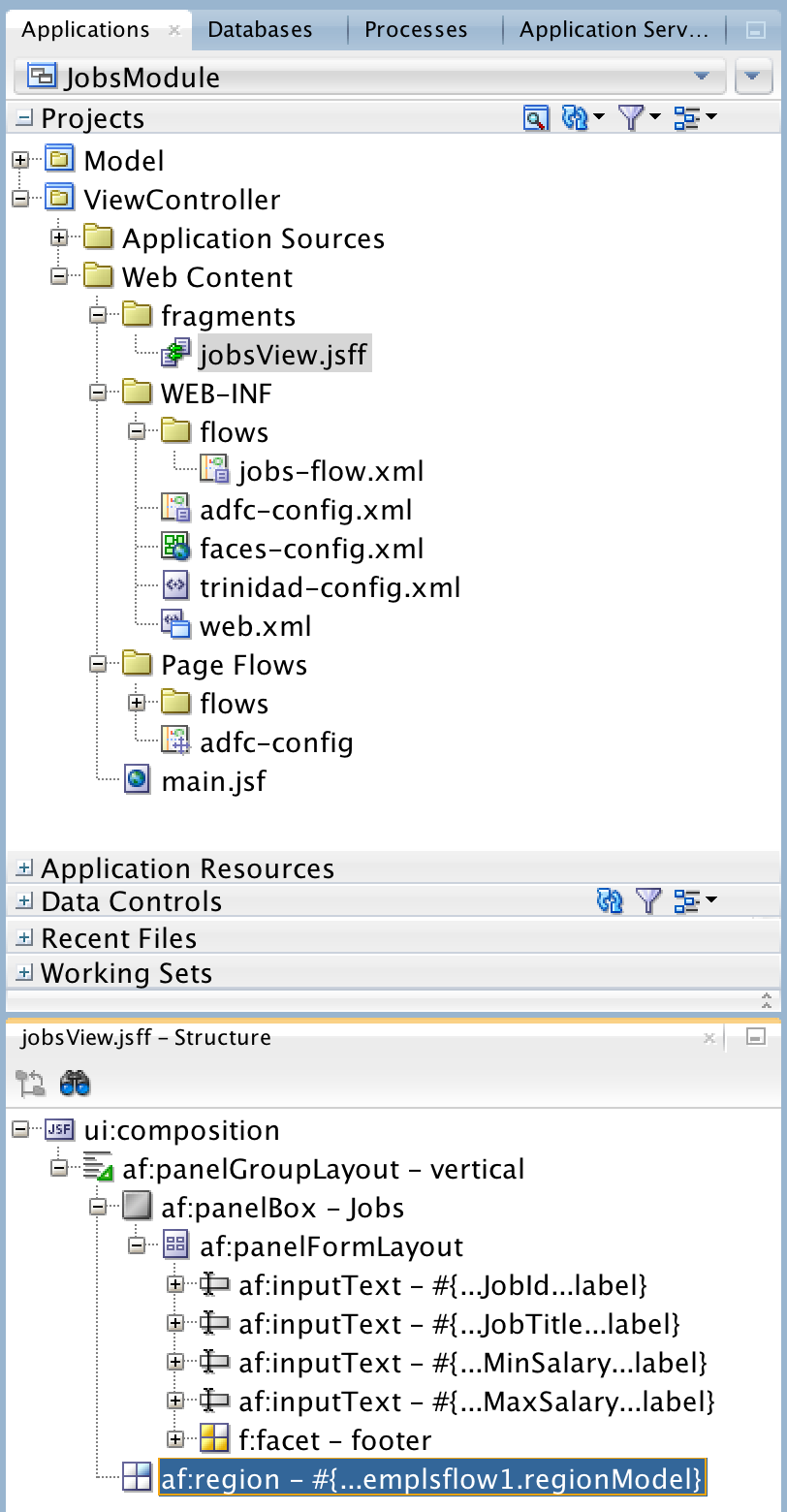
Let's see how ADF remote regions are configured and consumed. Sample application (available for download from GitHub repository) is based on Employees and Jobs modules. Each module is deployed on different servers, Employees module is consumed in Jobs. Microservice here - Employees table. This table comes from loosely coupled service and is consumed within Jobs module:


Employees module runs on ADF server in Docker container (read more: Essential WebLogic Tuning to Run on Docker and Avoid OOM):


I will stop this module:


Jobs module still works, even Employees module is not available anymore - it is stopped. Otherwise if both modules would be deployed as single application - if application is down, system will be completely unavailable. But now users can access part of the functionality:


Will dive into technical part. ADF remote region is not different from the way how regular ADF region is consumed. You still must use ADF region tag, to define region:


Key difference is in region bindings - there is one extra property called Remote Connection. This connection defines source, from where remote region content is transferred. All other properties are the same, we can pass parameters too:


Consuming module must define ADF remote region connection. If connection details are correct, you should see ADF task flows with remote access listed:


Remote region connection wizard. You should use module context root and point to ADF remote region servlets rtfquery and rr:


This wizard can be opened by right clicking on Connections folder and going to New Connections section:


Consumer module should be enabled with remote region consumer support:


Producer module should be enabled with remote region producer support:


Producer module is configured with required servlets automatically, as soon as you enable remote region producer support:


Read more about ADF remote regions in ADF developer guide - 26.13 Creating Remote Regions in a Fusion Web Application.