Showing posts with label BPM 12c. Show all posts

Tuesday, September 27, 2016

BPM Worklist API 12.2.1.1 and Custom ADF 12.2.1.1 Application

I have updated my sample app with BPM API usage in ADF application to 12.2.1.1. Originally this was developed with ADF/BPM 11.1.1.7 - Dynamic ADF Buttons Solution for Oracle BPM Outcomes. There are several changes in BPM libraries usage. I will describe it all step by step.

Download sample application - adfbpm12211.zip. This archive contains both BPM and ADF app. BPM process implements two roles - request holiday and approve holiday:


Main goal of such use case - we don't want to use out of the box Oracle Worklist app, but prefer to develop our own business logic and manage BPM process from custom ADF app through BPM API. It is important to initialize Workflow context one time during login, this can be heavy operation and we should not call it each time when BPM API is invoked:


I'm using authenticateOnBehalfOf method. This allows to use admin user as a proxy for business user connection. Once Workflow context is established, we can get BPM context to use it for BPM API calls, all this is done during login into ADF app:


Assigned tasks are fetched through Workflow context:


We can initiate new task through BPM API in our custom ADF app:


There is a way to generate buttons to control task actions dynamically. Buttons can be generated on top of task outcomes list obtained from BPM API:


Task action can be executed with payload info, this allows to pass correct info to the next step in the process:


Let's see how it works. User can start new BPM task from ADF:


When task is submitted to approval, manager is assigned task to approve or reject holiday request. Buttons are generated dynamically based on task outcomes:


To double check executed flow from BPM API in ADF we can review it in EM control:


ADF application must import BPM API JARs to be able to compile Java code. In ADF 12.2.1.1 it is enough to import BPM Services JARs:


There is no need to package these JARs into application archive, these should be referenced for compile time only:

Tuesday, July 21, 2015

Oracle Process Cloud Application Player

With Oracle Process Cloud you can forget these days when you was waiting long to deploy BPM process and test Human Task UI. No need to wait anymore, in Oracle Process Cloud you could use Application Player feature, this allows to run the process and test Human Task UI almost instantly.

To demonstrate Application Player functionality, I have implemented basic process of Data Entry for the Claim Handling:


This process is using Web Form in the Start activity to capture data, human activity Claim Expense Review allows to review entered data, before submitting it:


This is how Web Form UI design looks like:


When you build Web Form and arrange UI components, business type is constructed automatically, no need to define anything separately. Business type can be used in the process, without changing it:


Data object variable is assigned to the process activity element through Association dialog in Process Cloud, this is where you can map input/output with business type:


Once process is ready to be tested, all you need to do is to invoke Application Player. Click on Test Application button in the top right corner:


In the Test Application window you should select Play option:


To show how it works, I have recorded a video - see yourself how helpful is Application Player:

Tuesday, July 7, 2015

Oracle Process Cloud Service - SOAP Web Service Integration

Oracle Process Cloud (https://cloud.oracle.com/process) allows to invoke SOAP services, along with REST services. You can define a library of SOAP services in Oracle Process Cloud application and use them within the process. This helps to integrate with business logic running on premise.

I have implemented regular SOAP service in ADF BC, just to test how it works to invoke it from Process Cloud:


SOAP service method accepts employee ID and checks the status. ADF BC application is deployed on standalone WLS. Make sure to select correct deployment profile, when deploying ADF BC with SOAP on standalone server, otherwise SOAP service reference will be missing in deployed application. You should use ADF BC service deployment profile:


Once SOAP service is deployed, you can access WSDL file through Enterprise Manager. Oracle Process Cloud currently doesn't support direct SOAP references, instead you must provide WSDL file copy for Web Service registration:


Download WSDL file from URL (here is the sample WSDL, I was using for my test - HrModuleService.wsdl). This is how it looks like, it contains SOAP service description:


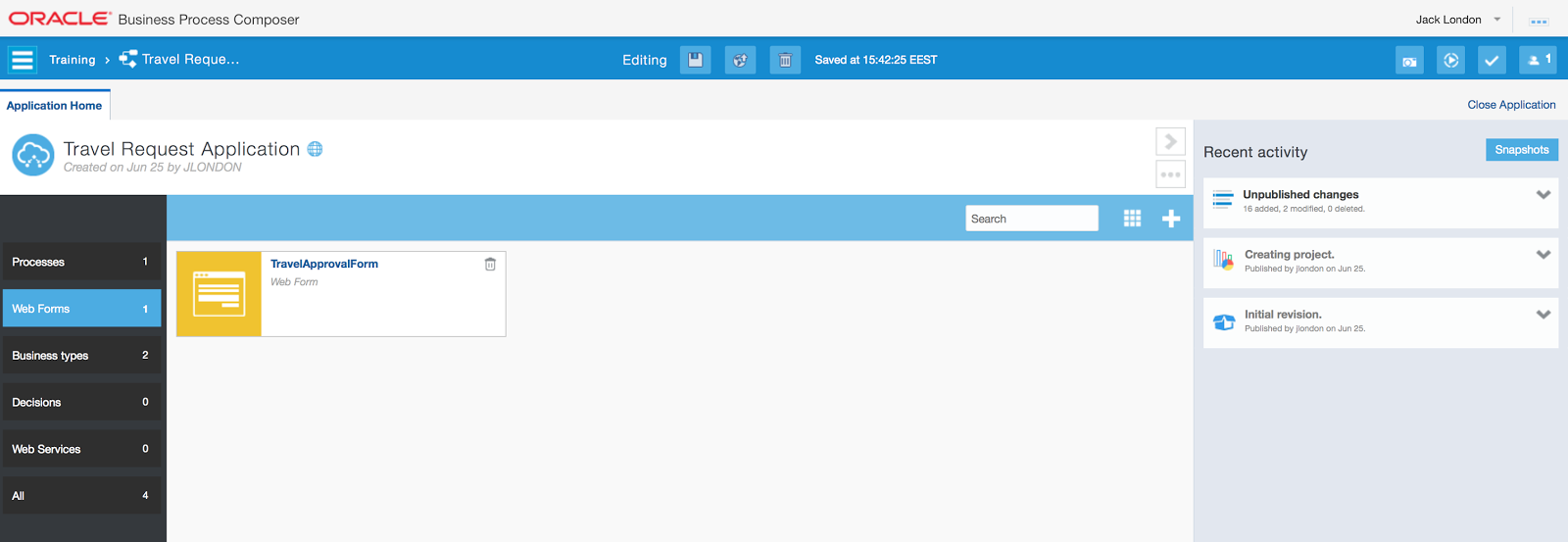
Here you can see Oracle Process Cloud interface. It looks quite user friendly and functional, this is what I like about it. On the left side, there is menu with different objects - Processes, Web Forms, Web Services, etc.:


To add new SOAP service reference is fairly easy, provide a name and upload WSDL file:


Once service is registered, we can go to the process diagram and select Service component from the palette:


Drag and drop it on the diagram, Implementation section will be opened, where you should specify SOAP service reference to be invoked:


Select Service Call from the list, this allows to invoke SOAP Web Service:


Once option for Service Call will be selected, you will be able to select Web Service reference. I have defined only one service, it is listed in the popup - select it:


Operation field is listing all available methods from the service, select one of the operations to be invoked:


Data associations are available to define correct mapping for the input/output values for the SOAP Web Service call, this can be done through Process Cloud composer window:


If you are interested in Human Task UI implementation in Oracle Process Cloud, read my previous post about REST service integration: Oracle Process Cloud Service - Consuming ADF BC REST Service in Web Form.

Saturday, July 4, 2015

Oracle Process Cloud Service - Consuming ADF BC REST Service in Web Form

With the introduction of Oracle Process Cloud Service (https://cloud.oracle.com/process) there is an option to run your business process in the cloud. You can implement very similar things as it is possible with BPM 12c in JDeveloper, but only in the cloud. There is no option to implement human task UI with ADF, it must be done with Web Forms (light UI forms implementation framework). This is disadvantage, as it will require to externalise complex business logic and access data collections through REST calls, instead of processing it locally in ADF extension. However, this is how it is implemented currently in the BPM cloud version.

This is how it looks - Web Form editor in Process Cloud Service:


You have an option to select specific types from component palette. There are such types as money, email, phone, text. Components are provided with built in validation, checks for valid email address, etc. User who implements a form, needs to drag and drop components one by one (generally it works OK, but sometimes may get stuck and page refresh will be required). Properties section is available to enter details for the selected component.

Cool part about it - we can define business logic rules. For example, to show/hide customer field based on trip type, etc. One of the rules below, shows how REST service can be called inline and REST response is applied for drop-down field. This is pretty simple to fetch data from external REST service and use it for the Web Form component. Just invoke REST service and assign collection to the component supporting array of data:


If REST call requires to pass parameters through URL, this is also possible, see example below - list of cities, based on the selected country in the Web Form:


Web Form works pretty well in Preview mode, it even calls REST services and shows real data. Validation messages for built-in checks are displayed pretty nicely. Here I'm selecting a country from the list populated by REST service:


Based on the selection in the Country drop-down, filtered list for Cities becomes available (another REST call):


Good news - most of the Oracle Process Cloud interface itself is implemented with ADF. Here you can see a section listing all Web Forms available for the current process:


I have implemented REST service for Countries and Cities lists in ADF BC. There are two custom methods in AM implementation, to fetch the data and transform it to the list format:


REST resources are defined through annotations and are configured to produce JSON data, this will allow Oracle Process Cloud to parse such data automatically:


If you are going to check how REST service is implemented in ADF BC, you can run a query in Postman to retrieve a list of all countries from HR schema:


Another query to retrieve a list of cities, by country:


Download sample application, with ADF BC REST service - RestADFBCApp.zip.

Saturday, July 26, 2014

Oracle BPM 12c Installation Improvements and Issues with Mac

Oracle BPM 12c is improved with a great installation process - simplified and stable. You only need to download single installation package, run a wizard and after several clicks it gets installed. All required products are installed for you out of the box, no extra configuration is needed - JDeveloper, BPM/SOA extensions, BPM/SOA schemas in Java DB. Developer can focus on his development tasks, no need to spend days to install and configure development environment. You should read official guide - Quick Start for Oracle Business Process Management Suite.

Installer works on Mac OS platform, you can install entire Oracle BPM 12c infrastructure and run domain. However, it fails to open Human Task wizard, while running JDEV on Mac OS. I have developed extremely basic Oracle BPM 12c sample application, to test Human Task wizard with JDeveloper installed on Oracle Enterprise Linux and on Mac OS - BpmApplication.zip.

It works fine to load Human Task wizard with JDeveloper 12c installed on Linux:


The same Human Task fails to open with JDeveloper 12c installed on Mac OS. There is Null Pointer exception generated, thrown from JDeveloper IDE class:


Messages in JDeveloper log for this exception:


Probably you should not use Oracle BPM 12c for development on Mac OS, rather use Linux or Windows platforms. This is a bit pity, but on other hand JDeveloper extensions (except ADF Mobile) always had issues running on Mac OS. It should be no difference, but it seems like development on Linux or Windows with JDeveloper is more stable.