Showing posts with label VBCS. Show all posts
Showing posts with label VBCS. Show all posts
Friday, December 11, 2020
Oracle JET or Oracle VBCS For Your Next Web App
I talk about my experience of working with Oracle JET and VBCS. I share a few hints - how to choose between Oracle JET and Oracle VBCS for your next Web app development.

Tuesday, July 16, 2019
Fix for Oracle VBCS "Error 404--Not Found"
We are using Pay As You Go Oracle VBCS instance and had an issue with accessing VBCS home page after starting the service. The service was started successfully, without errors. But when accessing VBCS home page URL - "Error 404--Not Found" was returned.
I raised a support ticket and must say - received the response and help promptly. If you would encounter similar issue yourself, hopefully, this post will share some light.
Apparently "Error 404--Not Found" was returned, because VBCS instance wasn't initialized during instance start. It wasn't initialized, because of expired password for VBCS DB schemas. Yes, you read it right - internal system passwords expire in Cloud too.
Based on the instructions given by Oracle Support, I was able to extract logs from VBCS WebLogic instance (by connecting through SSH to VBCS cloud machine) and provide it to support team (yes, VBCS runs on WebLogic). They found password expire errors in the log, similar to this:
weblogic.application.ModuleException: java.sql.SQLException: ORA-28001: the password has expired
Based on provided instructions, I extracted VBCS DB schema name and connected through SQL developer. Then I executed SQL statement given by support team to reset all VBCS DB passwords in bulk. Next password expiry is set for 2019/January. Should it expire at all?
Summary: If you would encounter "Error 404--Not Found" after starting VBCS instance and trying to access VBCS home page, then most likely (but not always) it will be related to VBCS DB schema password expiry issue.
I raised a support ticket and must say - received the response and help promptly. If you would encounter similar issue yourself, hopefully, this post will share some light.
Apparently "Error 404--Not Found" was returned, because VBCS instance wasn't initialized during instance start. It wasn't initialized, because of expired password for VBCS DB schemas. Yes, you read it right - internal system passwords expire in Cloud too.
Based on the instructions given by Oracle Support, I was able to extract logs from VBCS WebLogic instance (by connecting through SSH to VBCS cloud machine) and provide it to support team (yes, VBCS runs on WebLogic). They found password expire errors in the log, similar to this:
weblogic.application.ModuleException: java.sql.SQLException: ORA-28001: the password has expired
Based on provided instructions, I extracted VBCS DB schema name and connected through SQL developer. Then I executed SQL statement given by support team to reset all VBCS DB passwords in bulk. Next password expiry is set for 2019/January. Should it expire at all?
Summary: If you would encounter "Error 404--Not Found" after starting VBCS instance and trying to access VBCS home page, then most likely (but not always) it will be related to VBCS DB schema password expiry issue.
Tuesday, April 30, 2019
Run Oracle VBCS Application on Your Own Server
Latest VBCS release brings an option to export VBCS application and run on your own server (or different cloud provider). This is a truly strong step forward for VCBS. Read more about it in Shay Shmeltzer blog post. If you decide to keep running VBCS app within VBCS itself, then you get additional functionality of VBCS Business Services, Oracle Cloud security, etc. out of the box. If you export VBCS application and run on your own environment, these features are not included, but then you don't need to pay for VBCS Cloud runtime when hosting the app. It is great to have alternatives and depending on the customer either one or another of the use cases would work.
One of the use cases - customer even don't need to have its own VBCS instance. We could develop Oracle JET app in our VBCS instance, export and deploy it in the customer environment. Later we could provide support for version upgrade.
I have exported sample VBCS app with the external REST service call (REST service). Deployed app on our own server. You can try it yourself - http://138.68.79.219:7001/vbcsapp/webApps/countries/:

I must say it is simple to export VBCS app, no hassle at all. Make sure VBCS app you are exporting is set with anonymous access (this will disable Oracle Cloud security model). You will need to implement security and backend secure calls yourself:

Next go to REST service control and specify Bypass Proxy option (this will enable direct REST service call from VBCS app, bypassing Oracle Cloud proxy service). Important: to work with Bypass Proxy option, REST service must be invoked through HTTPS:

Nothing else on VBCS side. Next need to push application code to Oracle Developer Cloud Service Git repository and build artifact which can be exported. I suggest reading Shay Shmeltzer blog post about how to proceed with VBCS and Oracle Developer Cloud Service setup.
In VBCS do push to Git for the selected app:

If it is the first time with Oracle Developer Cloud Service, you will need to set up (refer to Shay post mentioned above) a build job. Create build job configuration, point to Git repo:

Provide a set of parameters for the build job:

Add Unix Shell script to the build job. This script will execute Node.js NPM command to run vb-build job to construct artifact which can be exported and deployed in your own environment. It is important to make sure that property values used in the script match property values defined in the build job earlier. To execute npm command, make sure to use Oracle Developer Cloud Service machine with Node.js support:

Run the job, once it completes and if there are no errors, go to job artifacts and download optimized.zip - this is the archive with VBCS application you can deploy:

Important: when exported VCBS application is accessed, it loads a bunch of scripts and executes HTTPS requests. There is one request which slows down VBCS application initial loading - call to _currentuser. It is trying to execute the _currentuser request on VBCS instance, but if the instance is down - it will wait until a timeout and only then will proceed with application loading. To fix that, search for _currentuser URL in the exported code and change URL to some dummy value, so that this request will fail immediately and will not keep VBCS application from continue loading:

One of the use cases - customer even don't need to have its own VBCS instance. We could develop Oracle JET app in our VBCS instance, export and deploy it in the customer environment. Later we could provide support for version upgrade.
I have exported sample VBCS app with the external REST service call (REST service). Deployed app on our own server. You can try it yourself - http://138.68.79.219:7001/vbcsapp/webApps/countries/:

I must say it is simple to export VBCS app, no hassle at all. Make sure VBCS app you are exporting is set with anonymous access (this will disable Oracle Cloud security model). You will need to implement security and backend secure calls yourself:

Next go to REST service control and specify Bypass Proxy option (this will enable direct REST service call from VBCS app, bypassing Oracle Cloud proxy service). Important: to work with Bypass Proxy option, REST service must be invoked through HTTPS:

Nothing else on VBCS side. Next need to push application code to Oracle Developer Cloud Service Git repository and build artifact which can be exported. I suggest reading Shay Shmeltzer blog post about how to proceed with VBCS and Oracle Developer Cloud Service setup.
In VBCS do push to Git for the selected app:

If it is the first time with Oracle Developer Cloud Service, you will need to set up (refer to Shay post mentioned above) a build job. Create build job configuration, point to Git repo:

Provide a set of parameters for the build job:

Add Unix Shell script to the build job. This script will execute Node.js NPM command to run vb-build job to construct artifact which can be exported and deployed in your own environment. It is important to make sure that property values used in the script match property values defined in the build job earlier. To execute npm command, make sure to use Oracle Developer Cloud Service machine with Node.js support:

Run the job, once it completes and if there are no errors, go to job artifacts and download optimized.zip - this is the archive with VBCS application you can deploy:

Important: when exported VCBS application is accessed, it loads a bunch of scripts and executes HTTPS requests. There is one request which slows down VBCS application initial loading - call to _currentuser. It is trying to execute the _currentuser request on VBCS instance, but if the instance is down - it will wait until a timeout and only then will proceed with application loading. To fix that, search for _currentuser URL in the exported code and change URL to some dummy value, so that this request will fail immediately and will not keep VBCS application from continue loading:

Saturday, January 26, 2019
Search Form in Oracle Visual Builder based on ADF BC REST
Oracle Visual Builder supports ADF BC REST out of the box. Build service connection using "Define by Specification" wizard:

Wizards support ADF as API type. Add describe at the end of the REST URL, this will bring metadata for exposed ADF BC REST service (information about attribute types, etc.):

List of endpoints will be populated automatically. You could select all endpoints to be supported for your connection or select only few:

The most typical thing you would do with endpoint - map it with the table to display collection data. You would drag and drop Oracle JET table into VBCS page and choose Add Data option to map it with the service connection:

In the wizard you would select previously defined service connection:

There is a way to switch wizard to detailed view and choose from multiple endpoints available for the connection:

In the next step, you would select service attributes to be displayed in table columns. All declarative, sweet:

In Visual Builder at any point you can quickly test application, it will load in separate browser tab (or you could switch app to Live mode and test page functionality directly in VBCS window):

Every action in Visual Builder is handled through events. For example, this event is mapped with Reset button (you can see it in structure tab on the left):

At any point, you can switch to source view and check (or edit) HTML/JET code which is generated for you by Visual Builder. So cool, imagine typing and copy-pasting all this text by hand, tough and time-consuming (you could do better things in your life than copy-pasting HTML code):

Let's explain how search form logic is done in this sample. I have defined page scope variable type, this type would hold search attribute name, type and operation:

Create as many variables based on this type, as many search criteria items you will expect to have. Make sure to provide attribute and operation names (leave value property empty, this will be assigned by user):

Map search form fields with variables:

Create an event for Search button, which calls search action chain:

In action chain we can define search logic. Before executing search criteria, we need to prepare search criteria array (normally this step could be skipped, but there is issue in current Visual Builder, it fails to execute criteria search, when at least one of the criteria items empty). Calling custom JavaScript function where search criteria array will be prepared:

Custom JavaScript function, it helps to prepare array to be based to criteria (if search item is not set, we are assigning empty value):

Result of the function is mapped with service connection criteria, search will be executed automatically:
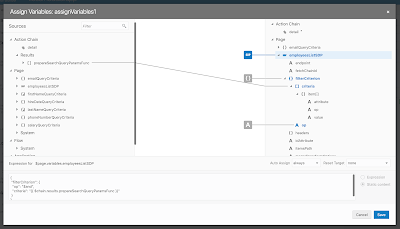
Table pagination is handled automatically too. Make sure to specify scroll policy = loadMoreOnScroll and define fetch size:

Resources:
1. Sample source code on my GitHub
2. Blog from Shay - Filtering Data Providers with Compound Conditions in Visual Builder
3. Blog from Shay - Oracle JET UI on Top of Oracle ADF With Visual Builder
4. My previous post about query logic in Visual Builder - Query Logic Implementation in VBCS for ADF BC REST

Wizards support ADF as API type. Add describe at the end of the REST URL, this will bring metadata for exposed ADF BC REST service (information about attribute types, etc.):

List of endpoints will be populated automatically. You could select all endpoints to be supported for your connection or select only few:

The most typical thing you would do with endpoint - map it with the table to display collection data. You would drag and drop Oracle JET table into VBCS page and choose Add Data option to map it with the service connection:

In the wizard you would select previously defined service connection:

There is a way to switch wizard to detailed view and choose from multiple endpoints available for the connection:

In the next step, you would select service attributes to be displayed in table columns. All declarative, sweet:

In Visual Builder at any point you can quickly test application, it will load in separate browser tab (or you could switch app to Live mode and test page functionality directly in VBCS window):

Every action in Visual Builder is handled through events. For example, this event is mapped with Reset button (you can see it in structure tab on the left):

At any point, you can switch to source view and check (or edit) HTML/JET code which is generated for you by Visual Builder. So cool, imagine typing and copy-pasting all this text by hand, tough and time-consuming (you could do better things in your life than copy-pasting HTML code):

Let's explain how search form logic is done in this sample. I have defined page scope variable type, this type would hold search attribute name, type and operation:

Create as many variables based on this type, as many search criteria items you will expect to have. Make sure to provide attribute and operation names (leave value property empty, this will be assigned by user):

Map search form fields with variables:

Create an event for Search button, which calls search action chain:

In action chain we can define search logic. Before executing search criteria, we need to prepare search criteria array (normally this step could be skipped, but there is issue in current Visual Builder, it fails to execute criteria search, when at least one of the criteria items empty). Calling custom JavaScript function where search criteria array will be prepared:

Custom JavaScript function, it helps to prepare array to be based to criteria (if search item is not set, we are assigning empty value):

Result of the function is mapped with service connection criteria, search will be executed automatically:

Table pagination is handled automatically too. Make sure to specify scroll policy = loadMoreOnScroll and define fetch size:

Resources:
1. Sample source code on my GitHub
2. Blog from Shay - Filtering Data Providers with Compound Conditions in Visual Builder
3. Blog from Shay - Oracle JET UI on Top of Oracle ADF With Visual Builder
4. My previous post about query logic in Visual Builder - Query Logic Implementation in VBCS for ADF BC REST
Tuesday, January 8, 2019
Oracle Visual Builder 18.4.5 and JET 6 Support
Oracle Visual Builder 18.4.5 comes with very neat and polished UI. Also it brings Oracle JET 6 support (latest JET version to date). Read more about it - New Features in Oracle Visual Builder December Release.
I have upgraded our VBCS instance to 18.4.5:

I was curious how automatic upgrade would work for VBCS app implemented in the previous version (download source code for the upgraded app from my GitHub repo). Especially that now VBCS is using newer JET too. I must say I was pleased with the results - application was upgraded to JET 6 automatically without manual interference:

I did a quick check in the source on runtime - indeed our upgraded VBCS app is using JET 6:

Awesome work by VBCS team.
I have upgraded our VBCS instance to 18.4.5:

I was curious how automatic upgrade would work for VBCS app implemented in the previous version (download source code for the upgraded app from my GitHub repo). Especially that now VBCS is using newer JET too. I must say I was pleased with the results - application was upgraded to JET 6 automatically without manual interference:

I did a quick check in the source on runtime - indeed our upgraded VBCS app is using JET 6:

Awesome work by VBCS team.
Saturday, December 15, 2018
Off Canvas Menu in Oracle VBCS/JET Cloud
These days I'm actively working with VBCS/JET Cloud product from Oracle. The more I work with VBCS the more I like it. VBCS follows similar declarative development concepts as Oracle ADF, this makes it easy to get up to speed with VBCS development. VBCS with declarative JavaScript development approach brings unique solution for JavaScript systems implementation for enterprise.
I will share sample with off canvas menu implementation for VBCS app. Sample is based on step by step guide shared by Shay Shmeltzer. I don't describe steps how to build off canvas in VBCS from scratch, you should watch Shay's video for the instructions.
Off canvas menu rendered in VBCS app:

You should check how to build multiple flows in VBCS app in my previous post - Flow Navigation Menu Control in Oracle VBCS. I have defined three flows in my sample, this means there will be three menu items:

To render menu in off canvas block, I'm using JET navigation list component:

Sample app code which can be imported into your VBCS instance is available on GitHub.
I will share sample with off canvas menu implementation for VBCS app. Sample is based on step by step guide shared by Shay Shmeltzer. I don't describe steps how to build off canvas in VBCS from scratch, you should watch Shay's video for the instructions.
Off canvas menu rendered in VBCS app:

You should check how to build multiple flows in VBCS app in my previous post - Flow Navigation Menu Control in Oracle VBCS. I have defined three flows in my sample, this means there will be three menu items:

To render menu in off canvas block, I'm using JET navigation list component:

Sample app code which can be imported into your VBCS instance is available on GitHub.
Wednesday, September 19, 2018
Query Logic Implementation in VBCS for ADF BC REST
Oracle Visual Builder Cloud Service allows to define external REST service connections. In this post I will explain how to implement query logic against such service. Connection is defined for ADF BC REST service.
Wizard provides option to add query parameters, both static and dynamic. I have set one static parameter onlyData=true, to return data only from the service. Also I have created multiple dynamic parameters, the one used in this use case - q parameter. This parameter accepts query expression to filter data. Later in VBCS action chain, I will assign value to this parameter and service will be re-executed to bring filtered data:

Search form elements will be assigned with page scope variables, to hold user query input. On search button click, VBCS action chain will be invoked to read these values and update query parameter. Page scope variables:

Variables firstNameQueryVar and lastNameQueryVar are assigned to search form fields, here is example:

Search button invokes action chain:

Action chain does two things - calls JS function to construct query parameter and then assigns returned value to rest service query parameter to execute search:

JS function is mapped to accept input parameters from search form input fields:

JS function code - parameters are joined into ADF BC REST query string:

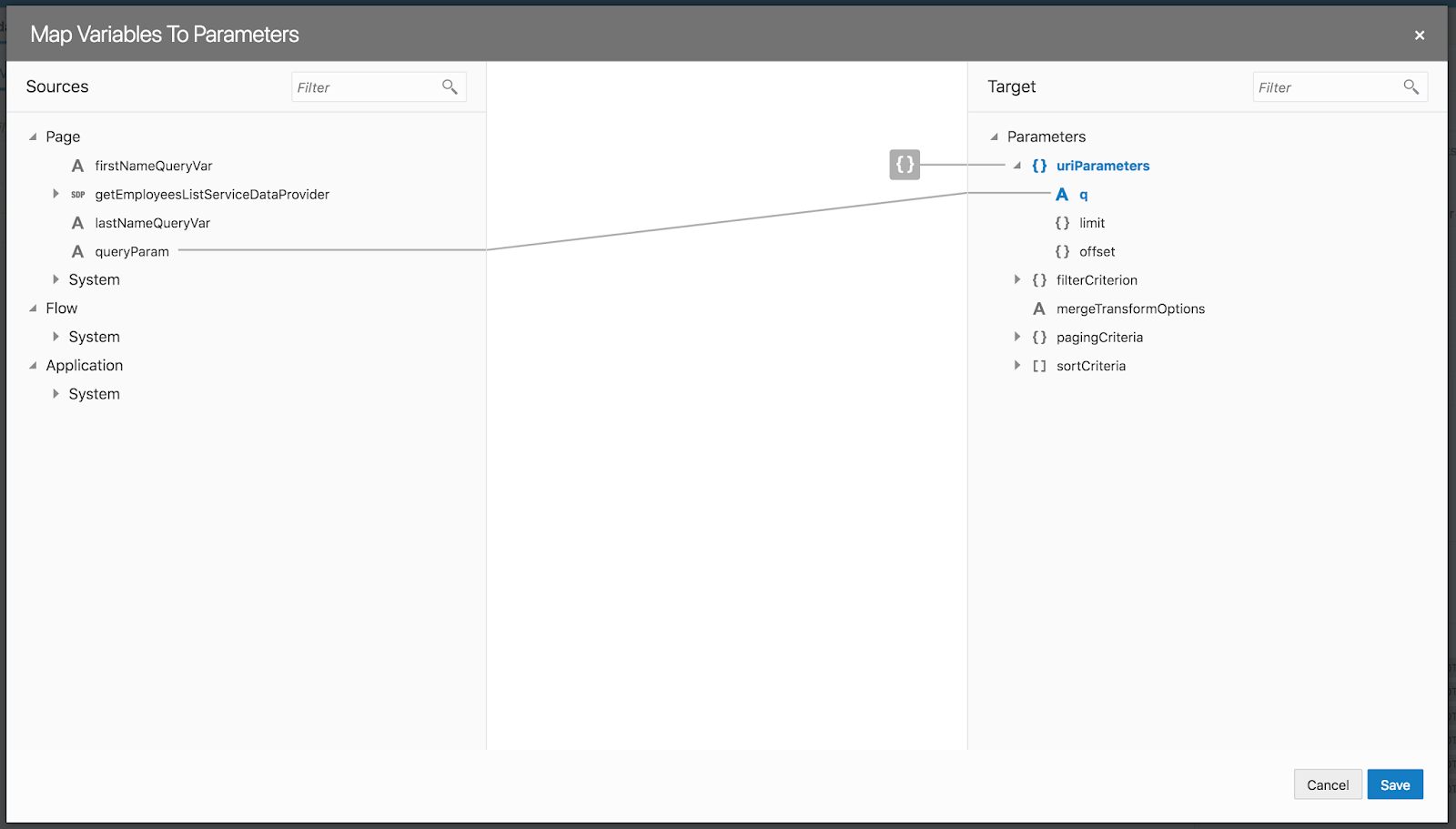
JS function result is mapped with page scope variable - result is assigned to this variable:

REST service query parameter q variable is assigned with this value. Once value changes, query is automatically re-executed:

In my next post I will explain how to implement filtering and pagination with transformation function, on top of service connection:

VBCS sample application code is available on GitHub (if you download ZIP from GitHub, make sure to extract it and create new archive including extracted content directly, without top folder).
Wizard provides option to add query parameters, both static and dynamic. I have set one static parameter onlyData=true, to return data only from the service. Also I have created multiple dynamic parameters, the one used in this use case - q parameter. This parameter accepts query expression to filter data. Later in VBCS action chain, I will assign value to this parameter and service will be re-executed to bring filtered data:

Search form elements will be assigned with page scope variables, to hold user query input. On search button click, VBCS action chain will be invoked to read these values and update query parameter. Page scope variables:

Variables firstNameQueryVar and lastNameQueryVar are assigned to search form fields, here is example:

Search button invokes action chain:

Action chain does two things - calls JS function to construct query parameter and then assigns returned value to rest service query parameter to execute search:

JS function is mapped to accept input parameters from search form input fields:

JS function code - parameters are joined into ADF BC REST query string:

JS function result is mapped with page scope variable - result is assigned to this variable:

REST service query parameter q variable is assigned with this value. Once value changes, query is automatically re-executed:
In my next post I will explain how to implement filtering and pagination with transformation function, on top of service connection:

VBCS sample application code is available on GitHub (if you download ZIP from GitHub, make sure to extract it and create new archive including extracted content directly, without top folder).
Sunday, August 12, 2018
Flow Navigation Menu Control in Oracle VBCS
Oracle VBCS allows us to build multiple flows within the application. This is great - this helps to split application logic into different smaller modules. Although VBCS doesn't offer (in the current version) declarative support to build menu structure to navigate between the flows. Luckily this requirement can be achieved in few simple steps, please read John Ceccarelli post - Adding a Navigation Bar to a VBCS Application. I thought to go through instructions listed by John and test it out, today post is based on this. In my next posts I will take a look how to replace navigation bar menu structure with something more advanced, for example - menu slider on the left.
I think VBCS have great potential as JavaScript declarative development IDE. I see many concepts are similar to other Oracle declarative development tools, e.g. Forms, Oracle ADF. VBCS runs Oracle JET, all you build in VBCS is Oracle JET. Oracle takes care upgrading Oracle JET version in VBCS, I have applied recent patch (by click of the button) and latest JET version is available within our VBCS environment:

Coming back to flows in VBCS. We can create as many flows we want. Each flow could be based on one or multiple fragments (HTML/JS modules). Here I have created three flows, each with single fragment:

We can select flow and this will bring us flow diagram, where we could have navigation implementation between flow elements/fragments:

Fragment - this is where UI part is done:

So thats about flows and fragments. For someone with ADF background, this sounds very similar to task flows and fragments. Next we should see how to implement flow navigation, to be able to select flow from the top menu. VBCS application comes with so called shell page. This page is top UI wrapper, which contains application name, logged user info, etc. Here we can implement top level menu, which would navigate through application flows:

There must be default flow, which is displayed once application is loaded. Default flow is set in settings of the shell page. Go to settings and choose default flow, dashboard-flow in my case:

Next we need to add JET component - navigation list to the shell page, to render menu UI. You can do it by drag and drop, but easier is to switch shell page to source view and add navigation list HTML portion manually (you can copy paste it from source code uploaded to GitHub, see link at the end of this post) - highlighted HTML will render menu bar to navigate between flows:

Initially you will notice error related to JET navigation list not recognised, we need to import it. Another error - selection listener is not found, we will implement it.
To import JET navigation list component, go to source implementation of the shell page and add oj-navigation-list in component imports section - this will solve issue with unknown navigation list entry:

To execute action in VBCS, we must create Action Chain. Crete Action Chain within shell page - navigateToPage:

We need input parameter - flow name, which want navigate to. Create variable in Action Chain - currentFlow:

Add action of type Navigate to Action Chain, this will trigger navigation logic:

Go to Action Chain source and add "page": "{{$variables.currentFlow}}" under actions. This will force navigation to the flow, which will be passed through parameter:

Finally we create navigation list selection event (within shell page), this event will trigger action chain created above and pass current flow ID. We must create custom event and its name should match event name defined in JET navigation list in HTML (see above):

Choose to create custom event (it didn't work for me in Chrome, only in Safari browser. VBCS bug?) and provide same name as in navigation list component listener:

Choose our navigation Action Chain to be triggered from this event:

Just a reminder, event is called from navigation list selection:

Event is passing flow ID from currently selected tab item:

On runtime, dashboard flow is loaded by default:

We can switch to Jobs, etc.:

Download exported (runnable only in VBCS) VBCS app from GitHub repo.
I think VBCS have great potential as JavaScript declarative development IDE. I see many concepts are similar to other Oracle declarative development tools, e.g. Forms, Oracle ADF. VBCS runs Oracle JET, all you build in VBCS is Oracle JET. Oracle takes care upgrading Oracle JET version in VBCS, I have applied recent patch (by click of the button) and latest JET version is available within our VBCS environment:

Coming back to flows in VBCS. We can create as many flows we want. Each flow could be based on one or multiple fragments (HTML/JS modules). Here I have created three flows, each with single fragment:

We can select flow and this will bring us flow diagram, where we could have navigation implementation between flow elements/fragments:

Fragment - this is where UI part is done:

So thats about flows and fragments. For someone with ADF background, this sounds very similar to task flows and fragments. Next we should see how to implement flow navigation, to be able to select flow from the top menu. VBCS application comes with so called shell page. This page is top UI wrapper, which contains application name, logged user info, etc. Here we can implement top level menu, which would navigate through application flows:

There must be default flow, which is displayed once application is loaded. Default flow is set in settings of the shell page. Go to settings and choose default flow, dashboard-flow in my case:

Next we need to add JET component - navigation list to the shell page, to render menu UI. You can do it by drag and drop, but easier is to switch shell page to source view and add navigation list HTML portion manually (you can copy paste it from source code uploaded to GitHub, see link at the end of this post) - highlighted HTML will render menu bar to navigate between flows:

Initially you will notice error related to JET navigation list not recognised, we need to import it. Another error - selection listener is not found, we will implement it.
To import JET navigation list component, go to source implementation of the shell page and add oj-navigation-list in component imports section - this will solve issue with unknown navigation list entry:

To execute action in VBCS, we must create Action Chain. Crete Action Chain within shell page - navigateToPage:

We need input parameter - flow name, which want navigate to. Create variable in Action Chain - currentFlow:

Add action of type Navigate to Action Chain, this will trigger navigation logic:

Go to Action Chain source and add "page": "{{$variables.currentFlow}}" under actions. This will force navigation to the flow, which will be passed through parameter:

Finally we create navigation list selection event (within shell page), this event will trigger action chain created above and pass current flow ID. We must create custom event and its name should match event name defined in JET navigation list in HTML (see above):

Choose to create custom event (it didn't work for me in Chrome, only in Safari browser. VBCS bug?) and provide same name as in navigation list component listener:

Choose our navigation Action Chain to be triggered from this event:

Just a reminder, event is called from navigation list selection:

Event is passing flow ID from currently selected tab item:

On runtime, dashboard flow is loaded by default:

We can switch to Jobs, etc.:

Download exported (runnable only in VBCS) VBCS app from GitHub repo.
Subscribe to:
Posts (Atom)