ADF dynamic ADF BC and dynamic ADF UI implementation is useful functionality and is required almost in every larger project. Primary area where this functionality is applied - report parameters screens, instead of building hundreds of static report parameter screens for every report, we can build one dynamic and regenerate required ADF BC objects structure, together with dynamic ADF UI. Here you can read my previous post for the same topic - ADF Generator for Dynamic ADF BC and ADF UI - Recreate. Today post provides improved sample application with added support for ADF dynamic functionality working in passivation/activation event scenario.
Download updated sample application - ADFDynamicReportUI_v4.zip. Previous sample application contained one dummy VO - DynamicView:

This VO was replaced on runtime with real dynamic VO, created programmatically in HrModule class. This didn't worked in stress test environment, simulated by disabling AM pooling:

Null pointer exception for ADF dynamic form - activation event was failing:

It was failing, because on activation, ADF runtime was trying to activate original dummy VO - not the one we have substituted programmatically:

In theory it should work to remove dummy VO and change it with programmatic one, but really it fails on activation event:

Solution is pretty simple for this - we can get rid of dummy VO completely and rely directly on VO instance created programmatically on runtime. There is no need to define dummy VO in AM Data Model:

There is no need to have dummy VO either:

As there is no dummy VO anymore, no need to remove it's instance. We can simply create new programmatic VO instance with given name:

In page definition we should reference VO instance by the same name, obviously it will be highlighted as design time error - as there is no such VO instance defined statically, but this will work on runtime:

There are few additional improvements to survive passivation/activation events better - I will list them all below:
1. Non editable primary key - you should add primary key attribute and hide it to be non editable

2. If there is no default value for the attribute, it can be marked as not selected in query and there will be no need to include it into SQL statement

3. Not specifically related to passivation/activation - but for dependent LOV's, we need to set AutoSubmit=true for the parent attribute:

Dependent attribute should be set with backward dependency, this will reset attribute value automatically, when parent attribute value is changed:

4. SQL statement includes only selected attributes, where default value is set:

5. Dynamic VO doesn't passivate and activate correctly by default. We need to passivate and activate such VO manually. Standard method for passivation should be overridden, we can read current row attribute values and passivate them:

Standard method for activation should be overridden, to activate and set values to the current row attributes back:

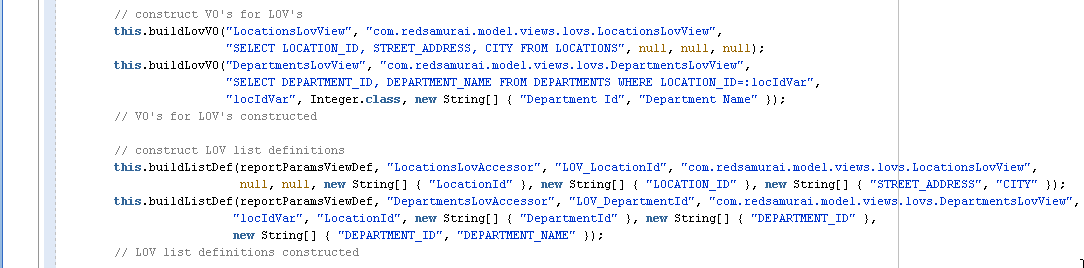
6. If there are LOV's created dynamically, all such LOV's must be assigned with primary key:

Here you can see how it works on UI. Let's select Location Id, based on selected value LOV for Department Id is filtered and returns 50:

If you change Location Id, Department Id will be cleared automatically and user could select new Department Id value corresponding to the currently selected Location Id:

Download updated sample application - ADFDynamicReportUI_v4.zip. Previous sample application contained one dummy VO - DynamicView:

This VO was replaced on runtime with real dynamic VO, created programmatically in HrModule class. This didn't worked in stress test environment, simulated by disabling AM pooling:

Null pointer exception for ADF dynamic form - activation event was failing:

It was failing, because on activation, ADF runtime was trying to activate original dummy VO - not the one we have substituted programmatically:

In theory it should work to remove dummy VO and change it with programmatic one, but really it fails on activation event:

Solution is pretty simple for this - we can get rid of dummy VO completely and rely directly on VO instance created programmatically on runtime. There is no need to define dummy VO in AM Data Model:

There is no need to have dummy VO either:

As there is no dummy VO anymore, no need to remove it's instance. We can simply create new programmatic VO instance with given name:

In page definition we should reference VO instance by the same name, obviously it will be highlighted as design time error - as there is no such VO instance defined statically, but this will work on runtime:

There are few additional improvements to survive passivation/activation events better - I will list them all below:
1. Non editable primary key - you should add primary key attribute and hide it to be non editable

2. If there is no default value for the attribute, it can be marked as not selected in query and there will be no need to include it into SQL statement

3. Not specifically related to passivation/activation - but for dependent LOV's, we need to set AutoSubmit=true for the parent attribute:

Dependent attribute should be set with backward dependency, this will reset attribute value automatically, when parent attribute value is changed:

4. SQL statement includes only selected attributes, where default value is set:

5. Dynamic VO doesn't passivate and activate correctly by default. We need to passivate and activate such VO manually. Standard method for passivation should be overridden, we can read current row attribute values and passivate them:

Standard method for activation should be overridden, to activate and set values to the current row attributes back:

6. If there are LOV's created dynamically, all such LOV's must be assigned with primary key:

Here you can see how it works on UI. Let's select Location Id, based on selected value LOV for Department Id is filtered and returns 50:

If you change Location Id, Department Id will be cleared automatically and user could select new Department Id value corresponding to the currently selected Location Id: