Showing posts with label Locking. Show all posts

Wednesday, March 30, 2016

Change ADF BC Data Update Locking with FOR UPDATE WAIT

Each time when data is changed and updated through ADF BC, before posting changes to DB, SQL query with FOR UPDATE NOWAIT is generated and executed. In case if other process locks row to be updated, or another user in the same moment is updating it, error will be generated and update will be stopped. There might be use cases, when you would like to wait for certain period of time, until row will be unlocked and then commit row changes. This is especially true, if 3rd party (PL/SQL) process is updating rows and you have defined change indicator attribute in ADF BC (see my previous post - ADF BC Version Number and Change Indicator to Track Changed Rows).

We can change default behavior, instead of requesting for immediate lock - we can wait a period of time. If lock becomes available during this period, session acquires lock. If row remains locked, error is returned. Instead of default FOR UDPATE NOWAIT, we can generate FOR UDPATE WAIT (time period in seconds).

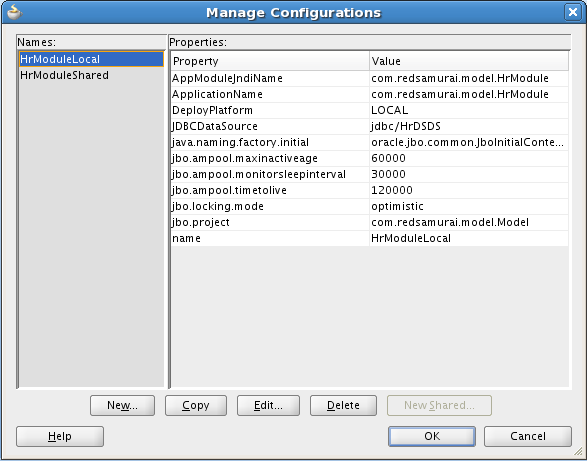
To override default behavior, we need to specify custom SQLBuilder class. This can be registered in Application Module configuration jbo.SQLBuilder property:


Class must extend from OracleSQLBuilderImpl and override getSqlVariantLockTrailer() method. My sample application is implemented to return FOR UPDATE WAIT 30:


We can do a test. We can simulate PL/SQL lock by executing SQL query with FOR UPDATE from SQL Developer:


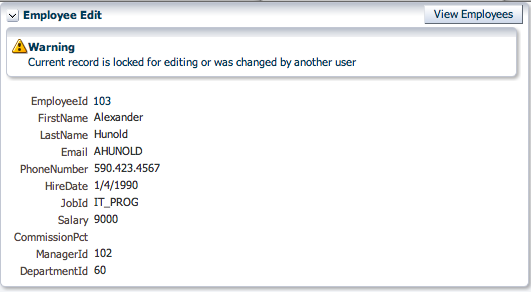
Try to update same row from ADF BC with default behavior, error will be returned - "Failed to lock the record, another user holds the lock". This is expected, because row remains locked:


With overriden SQL Builder, FOR UPDATE WAIT 30 is generated. It waits 30 seconds, as soon as lock is removed - lock from current session is set and row data is updated:


Download sample application - LockUpdateApp.zip.

Friday, March 25, 2016

ADF BC Version Number and Change Indicator to Track Changed Rows

One of the common use cases in enteprise applications is to track concurrent user changes. There are two types of changes possible - when two real users are changing data in the same row, or when single user is changing data and same row is updated by PL/SQL procedure/function (all happen in the same user session). In the first case, we would like to inform a user - row data was changed (two different users changing data). In the second case, there is no need to inform user (data wasn't changed by another real user, it was changed by PL/SQL function/procedure invoked in the same session).

ADF BC by default tracks all attributes and checks if they values were changed. This would mean, if any attribute value is changed directly in DB, EO cache will be out of synch and changed row error will be reported. We can minimize number of attributes to be checked to single attribute - Version Number. There must be additional number type column created in DB table, we are going to use it for Version Number in the EO. EO attribute should be marked as Change Indicator and set to be "version number" in Track Change History property. This means, row will be considered as changed by another user, only if Version Number attribute value will be changed. All changes happening directly from PL/SQL will not increment Version Number (it will be incremented only for the changes submitted from ADF BC):


There should be new column created in the DB for Version Number attribute:


Let's see how it works. I will use two different browser sessions, to simulate two users. Change value for First Name, take a look into Version Number. Value is equal to 4, before Save:


Data is saved successfully to DB. New value 5 is assigned automatically for Version Number:


Switch to different session now. Version Number is equal to previous value 4 (this session was opened before recent commit from first session). Both sessions are working with the same row. Change value for Salary:


Try to save this change. You will get standard error message, informing user about changes in the same row. This happens, because Version Number value doesn't match with recent Version Number for the same record:


At the same time, Version Number is synchronized automatically (updated to 5) and user can try to commit his changes again. This time data is saved and Version Number is increased to 6:


We should check now, how it works data is changed in the DB directly, without increasing Version Number (the case of update happening from PL/SQL). I'm changing Employee_Id = 100 record directly in DB (changing Salary value). Version Number is not changed:


Go back to Web session and change First Name value, press Save:


Despite data was changed in DB, save was successful - Version Number was recent. First Name was successfully changed and Version Number was increased to 7:


Download sample application (make sure to create manually VERSION_NO(10, 0) column in the EMPLOYEES DB table) - ADFChangedRowApp.zip.

Sunday, January 16, 2011

OptUpdate Locking Mode in ADF 11g PS3 and Centralized ADF BC Config

Hey, exciting news - JDeveloper 11g PS3, SOA 11g PS3 and WebLogic 11g PS3 are available. But there are no WebCenter 11g PS3 yet, Ok  - we can wait (we expect really good quality release). Download new JDeveloper 11g PS3 - download page. I didn't see anywhere separate download of ADF 11g PS3 runtime for standalone WebLogic deployment, but you can use the same JDeveloper 11g PS3 install wizard for this purpose. In order to get up to speed with new features of ADF 11g PS3, I recommend to read What's New sections from available developer guides - ADF Developer Guide and ADF Web Developer Guide. There are many new interesting features, one of them - additional locking mode (Optupdate). This locking mode works without executing database lock on data change. Previous ADF 11g releases were working with two locking modes - Pessimistic and Optimistic.

Download sample application - OptUpdateADF.zip.

Some of the ADF Business Components configuration settings can be set now from one central place - adf-config.xml file. Before researching new Optupdate locking, let's look into behavior without any locking mode at all. Locking mode - None:


One user is editing FirstName field - saving change:


Update and Commit are done without any locking:


There is another user, who is editing the same record at the same time - changing and saving LastName field:


Even the same record was modified by another user - we still can commit without any warning:


We can change and update even the same field, previously modified by another user - FirstName:


There will be no errors, data will be updated and saved successfully:


Now we change Locking Mode to Optupdate, new Locking Mode available in PS3:


Let's change FirstName field and save:


Data was saved without executing lock, similar as with no locking mode:


Second user work with the same record, updates and saves LastName field:


RowNoFound exception is generated:


ADF reports error about not found row:


In case of Pessimistic or Optimistic lockings, user would be informed about data changed by another user. In this case, user will be forced to refresh VO data, for example by clicking Undo button. It seems like Optupdate locking mode is useful, when there is no concurrency and mostly only single user is doing updates. However, we still want to prevent possible concurrency cases from simultaneous updates (as it happens in no locking mode).

Press Undo button to refresh VO with latest data:


Now this user can change and save data as well:


Let's test how it works when validation error happens. One user is changing foreign key value and gets validation error:


The same as with Optimistic locking, while validation error is not fixed, still other user will be able to change and save data (because lock is not set by the first user):

Wednesday, December 1, 2010

Oracle ADF BC 11g Tuning for Immediate Row Level Locking

You can read my previous post to learn how to implement immediate row locking in ADF BC - Immediate Row Level Lock Management for ADF 11g Transactional Applications. One of the main things we have learned from that post - obtained lock will be removed automatically, after web session times out. Thats very good, however there are couple of tips and tricks we should keep in mind. These tips and tricks are related to ADF BC tuning parameters for AM pool size and AM instance time to live.

I was performing experiments based on sample application from my last post - RowLockingApp.zip. You can download it as well, and try to play by adjusting AM settings and checking generated results.

There are at least two AM tuning settings we should keep in mind, when AM implements immediate row level locking:
  • AM pool size
  • AM time to live
By default, maximum pool size and referenced pool size are set to 4096 and 10 respectively:


We can simulate stress test environment, by setting both values to 1. This means, there will be enough space only for one single AM instance at one time. If there will be two sessions active, one of them always will be passivated. Stress environment simulation AM pool size settings:


We open two web sessions, one is session A:


Second is session B:


Session A obtains row level lock:


AM pool size allows to maintain only one AM instance (as defined for stress test simulation). When session B performs submit and wants to lock the record, because there is no free space in the pool, AM instance from session A will be passivated. AM instance from session B will steal session A spot from AM pool - session A passivation/session B activation will happen:


During session A passivation, session A obtained lock will be removed and session B will get this lock:


This means - for these AM's, where immediate row locking is implemented, you need to make sure AM pool size is sufficient to serve all concurrent users. Otherwise, if AM instance of that session which owns the lock will be passivated, this session will loose that lock even before commit/rollback or logout actions - as it happened based on example above.

Another important property - AM time to live (more about this setting - Optimizing Oracle ADF Application Pool). Make sure this value is always greater than web session timeout. For test purposes lets set web session timeout to 15 minutes:


AM time to live will be set to 2 minutes, which is less than 15 minutes for web session timeout:


Let's see what happens - session A opens and locks the record:


Session B starts, user prepares to lock for editing the same record as session A currently locks:


If this happens during the first 2 minutes of session A inactivity, when AM instance of session A is still not destroyed - session A will keep its lock and session B will not be able to edit (as expected):


However, after AM time to live period is expired - AM instance for session A will be destroyed and session data will be passivated, this means lock will be removed:


Even A web session is still active, lock will be lost - session B will be able to obtain it and prevent session A commit/rollback or logout actions:


In order to prevent lock removal, make sure you keep AM time to live longer than web session timeout.

Sunday, November 28, 2010

Immediate Row Level Lock Management for ADF 11g Transactional Applications

Oracle ADF 11g framework is primarily designed for enterprise applications. Majority of enterprise applications are processing user transactions, it is important to preserve proper transaction state for every user. Oracle ADF 11g out of the box provides pessimistic and optimistic locking support - Optimistic and Pessimistic Locking in Oracle ADF BC. Generally, optimistic locking is recommended for Web applications, pessimistic locking mechanism will lock current record once user will edit it. However, for specific applications (especially bank and insurance sector), we have quite natural business requirement to lock record directly after this record was opened for editing. Such type of locking is stronger than pessimistic locking - it locks record even before user starts editing it. Its very important to understand how to tune and control ADF 11g runtime parameters, when implementing immediate locking solutions. Today I will describe how immediate locking use case can be implemented with ADF BC and ADF Task Flows. My next posts will provide information about ADF BC parameters tuning for reliable immediate row locking mechanism.

Download sample application - RowLockingApp.zip. This sample contains one ADF task flow based on JSF fragments. Default activity represents read-only table with Employees data. When user hits employee editing button, navigation is passed to Method Call activity - it invokes method from Application Module Implementation class to lock current record from Employees VO. If current record is not locked by another user - lock is set and editing screen opens successfully. Otherwise, if current record is already locked by another user - we render information message and display data in read-only mode:


Immediate row locking mechanism is implemented by overriding AM and EO implementation classes:


Custom row locking method from AM implementation class is exposed through client interface:


This method retrieved current row from VO and invoked VO lock method. If current row is already locked by another user or lock fails, we catch exception and return negative parameter value into Controller layer:


If current row is already locked, we want to render it in read-only mode. This can be achieved by overriding isAttributeUpdateable(int i) method from EO implementation class. If attempt to lock current record failed, this means user can't edit any attributes - read-only mode:


Controller layer receives result of locking method from AM implementation class and stores into Page Flow Scope:


This value is used to render or not information message about failed locking attempt:


Rendered property is referencing value from Page Flow Scope:


If current row was not locked by another user and current user performs successful lock - lock will remain until user will commit or rollback his changes for current row. Its almost true, but not completely. What will happen if user will close browser without performing commit/rollback or even without doing proper logout action? Good news - obtained lock will be removed automatically, after web session times out. After web session time out, database connection still will remain open and can be reused by another AM instances. However current web session AM instance will be destroyed, this means database lock obtained by that session also will be removed. This means if user will forget to commit/rollback or logout, longest time when current row will remain locked is equal to web session time out time. You should keep this in mind, when configuring and tuning your ADF 11g application. Default web session time out - 30 minutes is sufficient in most of the cases.

In order to test locking behavior, I have set web session timeout to 5 minutes:


Let's experiment a bit and see how it works. User A logs in into application and opens Employees list screen:


User A select record and opens it for editing, lock is applied automatically:


We can see from the log, lock is successful for user A:


Another user B selects the same record:


And opens it for editing, however same record is already locked by user A - lock for user B fails and data is rendered in read-only mode with information message:


Lock for user B fails:


Lock from user A will remain until commit/rollback or logout. Let's say user A will not do any of mentioned actions and just will leave from his work place by closing browser or keeping it open. Two sessions, one for user A and another for user B are active:


Because of inactivity, user A session will timeout after 5 minutes (as it is set in web.xml) and AM instance will be released:


When user A will return to check his work, he will receive session timeout message and will be forced to login again - of course lock will be lost:


Next release of ADF 11g - PS3 provides user-friendly popup message for session timeout.

After waiting 5 minutes (session timeout for user A), user B will be able to lock released record and perform required changes: